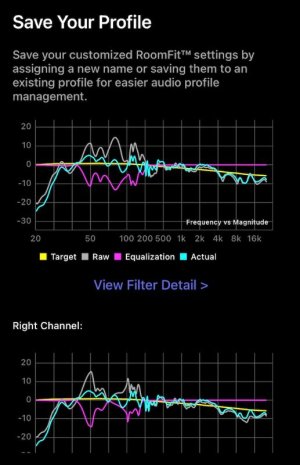
Analyzing RoomFit correction results (KEF LSX II + Ultra)

huyvoxyz

Member
Joined
Nov 1, 2025
Messages
8
Hello everyone,

I've been experimenting with RoomFit to correct the low-frequency issues in my room using my KEF LSX II speakers (with their internal EQ disabled) connected to a WiiM Ultra via optical cable. I don't use sub.

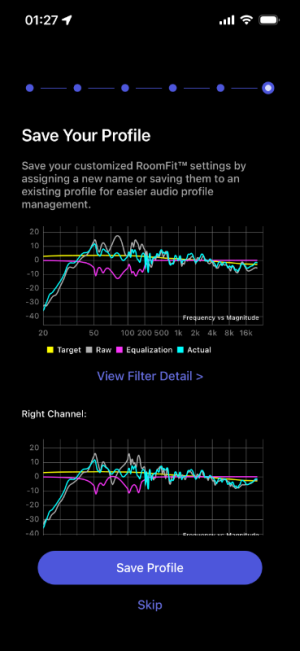
I ran three Individual Channel RoomFit sessions and would appreciate the community's analysis and comparison, as I'm not entirely confident in my RoomFit settings and in reading the results graphs and selecting the best profile.

RoomFit configuration:
- Type: Individual Channel RoomFit (my speakers are not placed in center of the room, the left is near the corner and wall layout behind them is also different)
- B&K target curve
- Min-max gain: -12 dB and +6 dB, https://faq.wiimhome.com/en/support/solutions/articles/72000647399 recommends max gain +3 dB but someone on this forum suggested +6 dB when used with non-boost mode, so I followed that
- Max Q: 10
- Non-boost mode: enabled
- Built-in mic compensation: enabled
- Smoothing: 1/12 octave
- Multiple measurements: enabled

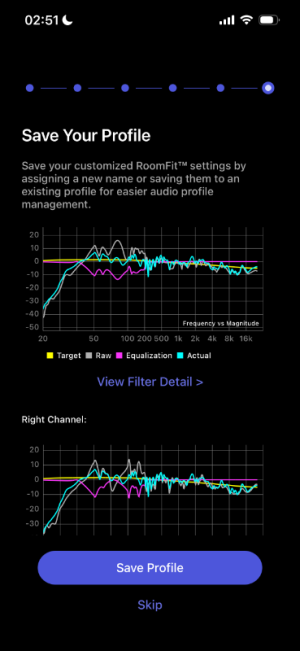
First session (individual400Hz): target frequency is 50-400Hz
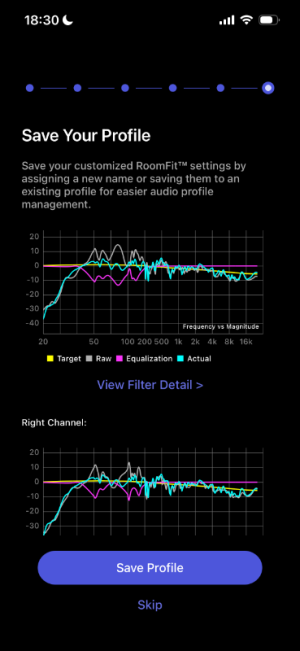
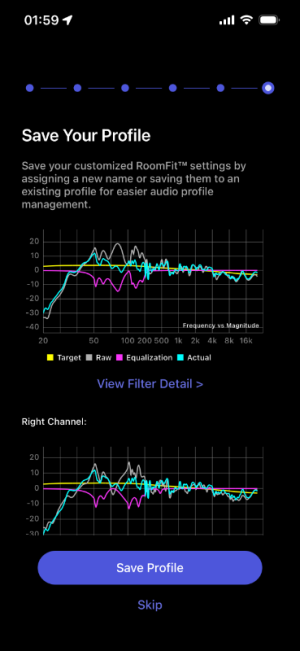
Second session (individual400Hz-2): same freq with first session
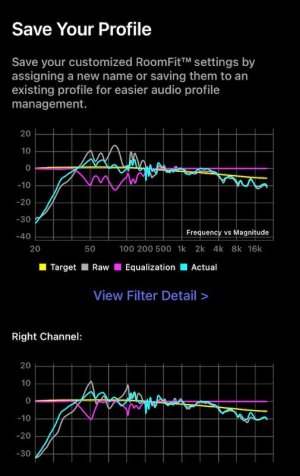
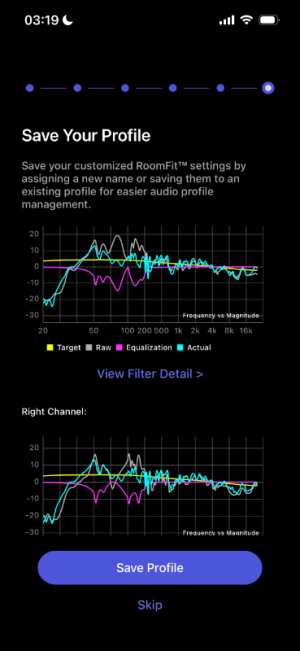
Third session (individual500Hz): target frequency is 50-500Hz

I am very new to this subject, and any advice is welcomed!
  1. 400Hz vs 500Hz range: I am confused about the ideal correction limit. Some advice points to 400Hz as the maximum range for reliable room correction, while others suggest 500Hz is safe for low-frequency room mode correction. Which cutoff is technically more appropriate for this purpose?
  2. How successful was Roomfit in correcting the Hz across all profiles? (I can't say which cyan curve is better than which)
  3. Will an external microphone improve further the correction? I've been using the iphone 13 mic at 3 am for absolute silence lol
Thank you in advance!
 

Attachments

  • individual400Hz.PNG
    individual400Hz.PNG
    80 KB · Views: 86
  • individual400Hz-2.PNG
    individual400Hz-2.PNG
    82.8 KB · Views: 69
  • individual500hz.PNG
    individual500hz.PNG
    79.6 KB · Views: 67
Hello everyone,

I've been experimenting with RoomFit to correct the low-frequency issues in my room using my KEF LSX II speakers (with their internal EQ disabled) connected to a WiiM Ultra via optical cable. I don't use sub.

I ran three Individual Channel RoomFit sessions and would appreciate the community's analysis and comparison, as I'm not entirely confident in my RoomFit settings and in reading the results graphs and selecting the best profile.

RoomFit configuration:
- Type: Individual Channel RoomFit (my speakers are not placed in center of the room, the left is near the corner and wall layout behind them is also different)
- B&K target curve
- Min-max gain: -12 dB and +6 dB, https://faq.wiimhome.com/en/support/solutions/articles/72000647399 recommends max gain +3 dB but someone on this forum suggested +6 dB when used with non-boost mode, so I followed that
- Max Q: 10
- Non-boost mode: enabled
- Built-in mic compensation: enabled
- Smoothing: 1/12 octave
- Multiple measurements: enabled

First session (individual400Hz): target frequency is 50-400Hz
Second session (individual400Hz-2): same freq with first session
Third session (individual500Hz): target frequency is 50-500Hz

I am very new to this subject, and any advice is welcomed!
  1. 400Hz vs 500Hz range: I am confused about the ideal correction limit. Some advice points to 400Hz as the maximum range for reliable room correction, while others suggest 500Hz is safe for low-frequency room mode correction. Which cutoff is technically more appropriate for this purpose?
  2. How successful was Roomfit in correcting the Hz across all profiles? (I can't say which cyan curve is better than which)
  3. Will an external microphone improve further the correction? I've been using the iphone 13 mic at 3 am for absolute silence lol
Thank you in advance!
Hello!
Based on your measurements I'd advise to change the correction range to 40Hz-300Hz.
The rest looks good to me!

An individually calibrated measurement microphone would give you more confidence that your results are accurate. However the results themselves may not differ much - that depends on how well the generic iPhone mic calibration applies to your particular device. Still, IMHO a measurement mic is a worthwhile investment for an audio enthusiast.
 
Hello everyone,

I've been experimenting with RoomFit to correct the low-frequency issues in my room using my KEF LSX II speakers (with their internal EQ disabled) connected to a WiiM Ultra via optical cable. I don't use sub.

I ran three Individual Channel RoomFit sessions and would appreciate the community's analysis and comparison, as I'm not entirely confident in my RoomFit settings and in reading the results graphs and selecting the best profile.

RoomFit configuration:
- Type: Individual Channel RoomFit (my speakers are not placed in center of the room, the left is near the corner and wall layout behind them is also different)
- B&K target curve
- Min-max gain: -12 dB and +6 dB, https://faq.wiimhome.com/en/support/solutions/articles/72000647399 recommends max gain +3 dB but someone on this forum suggested +6 dB when used with non-boost mode, so I followed that
- Max Q: 10
- Non-boost mode: enabled
- Built-in mic compensation: enabled
- Smoothing: 1/12 octave
- Multiple measurements: enabled

First session (individual400Hz): target frequency is 50-400Hz
Second session (individual400Hz-2): same freq with first session
Third session (individual500Hz): target frequency is 50-500Hz

I am very new to this subject, and any advice is welcomed!
  1. 400Hz vs 500Hz range: I am confused about the ideal correction limit. Some advice points to 400Hz as the maximum range for reliable room correction, while others suggest 500Hz is safe for low-frequency room mode correction. Which cutoff is technically more appropriate for this purpose?
  2. How successful was Roomfit in correcting the Hz across all profiles? (I can't say which cyan curve is better than which)
  3. Will an external microphone improve further the correction? I've been using the iphone 13 mic at 3 am for absolute silence lol
Thank you in advance!

Hi,
Out of curiosity, what results would be obtained when evaluating Profiles 1 and 3 ?

Personally, I think Multiple measurements can be turn off.
 
@huyvoxyz, these results already look pretty excellent to me. Note that the difference between your runs "individual400Hz" and "individual400Hz-2" is much smaller than it seems at a first glance: It's mainly (even though not entirely) down to the fact that the scaling of the y-axis is different (~60 dB range vs. ~50 dB range).

I agree with @dominikz in that there's hardly anything to correct above 300 Hz in your room, so it makes sense to rather spread the available PEQ bands over a lower frequency range.

Setting the lower limit to 40 Hz instead of 50 Hz is a good idea, too. As you can see in the graphs, RoomFit doesn't tame the 50 Hz peak as much as it could due to the lower limit being set to 50 Hz. You should however listen carefully, if the results are really better. The linearity of the iPhone 13 mic could be worse below 50 or 60 Hz (or it could be just fine), potentially leading to "wrong" corrections. So, until you manage to get a better microphone simply trust your ears. I would definitely try the 40 Hz lower limit!

There's no hard rule which upper limit for correction works best as this (mainly the Schrödinger frequency) is room dependent on its own.

PS:
Evaluation runs are a good idea, too, but limited to stereo, not individual left and right measurements.
 
Last edited:
Hi,
Out of curiosity, what results would be obtained when evaluating Profiles 1 and 3 ?

Personally, I think Multiple measurements can be turn off.
Based on my listening (I’m not an audiophile), the 400 Hz profiles improve the soundstage the most. The 500 Hz reduces the boomy bass but also make it feel weaker, and the midrange sounds less exciting. Between the two 400 Hz profiles, the second one seems better for long listening since I guess it tones down the bass more, though the first profile definitely has the best bass overall.
 
Last edited:
@huyvoxyz, these results already look pretty excellent to me. Note that the difference between your runs "individual400Hz" and "individual400Hz-2" is much smaller than it seems at a first glance: It's mainly (even though not entirely) down to the fact that the scaling of the y-axis is different (~60 dB range Vs. ~50 dB range).

I agree with @dominikz in that there's hardly anything to correct above 300 Hz in your room, so it makes sense to rather spread the available PEQ bands over a lower frequency range.

Setting the lower limit to 40 Hz instead of 50 Hz is a good idea, too. As you can see in the graphs, RoomFit doesn't tame the 50 Hz peak as much as it could due to the lower limit being set to 50 Hz. You should however listen carefully, if the results are really better. The linearity of the iPhone 13 mic could be worse below 50 or 60 Hz (or it could be just fine), potentially leading to "wrong" corrections. So, until you manage to get a better microphone simply trust your ears. I would definitely try the 40 Hz lower limit!

There's no hard rule which upper limit for correction works best as this (mainly the Schrödinger frequency) is room dependent on its own.

PS:
Evaluation runs are a good idea, too, but limited to stereo, not individual left and right measurements.
I tried the 40-250 from @dominikz and the results are amazing - it sounds better than ever! I'm going to run just one measurement later, but I'm curious why using only one measurement is preferred for individual L/R, as I thought more would be better?
 
I tried the 40-250 from @dominikz and the results are amazing - it sounds better than ever! I'm going to run just one measurement later, but I'm curious why using only one measurement is preferred for individual L/R, as I thought more would be better?
Personally, I don't prefer the single measurement.

Multiple measurements tended to not work reliably for quite some time but right now I don't see any remaining problems.
 
Personally, I don't prefer the single measurement.

Multiple measurements tended to not work reliably for quite some time but right now I don't see any remaining problems.
Do multiple measurements improve the results though? The poster in this thread did two multiple measurements with different results. When I run multiple sweeps in REW there is very little difference if the mic has not been moved.
 
I tried the 40-250 from @dominikz and the results are amazing - it sounds better than ever! I'm going to run just one measurement later, but I'm curious why using only one measurement is preferred for individual L/R, as I thought more would be better?
Glad to hear you like the result!

At low frequencies the difference between a response measured with a single sweep and multiple sweeps (or even MMM) is usually not very significant - so either should work fine in your case.

At higher frequencies multiple sweeps (with slight microphone position adjustments between each sweep) will result in some spatial averaging which can indeed give more consistent results between runs. But using RoomFit to correct the response at higher frequencies is anyway not a good idea so in practice this is not a crucial factor.
 
Personally, I don't prefer the single measurement.

Multiple measurements tended to not work reliably for quite some time but right now I don't see any remaining problems.

Under the current specification, a single-sweep file is played back three times in repeat mode. (I guess this remains unchanged.)

This makes problems more likely to occur. It would be preferable to record three sweeps within a single file.
 
Do multiple measurements improve the results though? The poster in this thread did two multiple measurements with different results. When I run multiple sweeps in REW there is very little difference if the mic has not been moved.
I do move the mic intentionally between measurements like +/- 30 cm.

At low frequencies the difference between a response measured with a single sweep and multiple sweeps (or even MMM) is usually not very significant - so either should work fine in your case.
Yes, it probably doesn't make much of a difference, but I think it cannot hurt.

Under the current specification, a single-sweep file is played back three times in repeat mode. (I guess this remains unchanged.)

This makes problems more likely to occur. It would be preferable to record three sweeps within a single file.
Not sure if I understand you correctly here. I do want RoomFit to average multiple measurements because I do move the mic between the sweeps. If we want the sweeps to be more resilient against ambient noise, a bigger sample size (and slower sweeps) would be more efficient that averaging over multiple measurements in the same mic position.
 
Not sure if I understand you correctly here. I do want RoomFit to average multiple measurements because I do move the mic between the sweeps. If we want the sweeps to be more resilient against ambient noise, a bigger sample size (and slower sweeps) would be more efficient that averaging over multiple measurements in the same mic position.

I'm referring to the method of playing the test audio, not the measurement method itself. As you are likely aware, both single measurements and multiple measurements utilise the same audio track (Room Correction Audio).

In multiple measurements, this audio track is played three times. Consequently, issues are more likely to occur between tracks (such as the audio only playing twice or cutting out).

Multiple measurements may have improved compared to before, but I think discontinuing the repeat playback and instead playing a single audio track containing three sweep tones once would be less prone to problems.

However, as I have digressed from the main topic, I shall conclude here ,sorry 🙂
 
Recently I've been playing with roomfit settings and trying to see the differences with different values for max gain/Q:

Profile 1:
- B&K target
- 40-300 Hz range
- max gain: 6, min gain: -12
- max Q: 10
- non-boost mode: enabled
- 1/12 smoothing
- iphone mic

Profile 2:
- B&K target
- 40-300 Hz range
- max gain: 0.5, min gain: -12
- max Q: 5
- non-boost mode: enabled
- 1/12 smoothing
- iphone mic


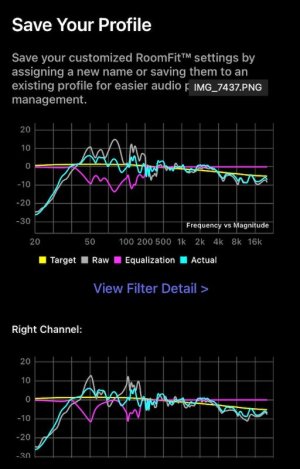
I’m noticing that the curves from the results are virtually identical. Not sure if I already reached the limit or would using an external mic or a different roomfit configurations yield a more effective correction?
 

Attachments

  • profile 1.PNG
    profile 1.PNG
    79.6 KB · Views: 16
  • profile 2.PNG
    profile 2.PNG
    78.5 KB · Views: 16
Recently I've been playing with roomfit settings and trying to see the differences with different values for max gain/Q:

Profile 1:
- B&K target
- 40-300 Hz range
- max gain: 6, min gain: -12
- max Q: 10
- non-boost mode: enabled
- 1/12 smoothing
- iphone mic

Profile 2:
- B&K target
- 40-300 Hz range
- max gain: 0.5, min gain: -12
- max Q: 5
- non-boost mode: enabled
- 1/12 smoothing
- iphone mic


I’m noticing that the curves from the results are virtually identical.
The small differences in the curves correspond to the changes to the attributes you made. If you look at the pink "Equalization" curve you can see that in the first screenshot there is a little bit more detail/sharpness compared to the second curve. This is because you allowed higher Q values and higher max gain range in the first one.
I’m noticing that the curves from the results are virtually identical. Not sure if I already reached the limit or would using an external mic or a different roomfit configurations yield a more effective correction?
If you get a calibrated external measurement microphone you'd just get more confidence in the accuracy of your results, but they wouldn't necessarily end up being very different to what you already have.
Phone microphones have some tolerance, so you can't be 100% confident that the generic iPhone calibration matches the response of your phone microphone exactly - though the deviation shouldn't be very large.

Your RoomFit settings appear sensible to me - though I'd personally use this variant:
- max gain: +12, min gain: -12
- max Q: 10
Since you have non-boost mode enabled, using max gain at +12dB will only allow higher precision for the correction filters, while still keeping net-negative filters - so there's no danger of introducing any ringing. It won't make a big difference, however.

That being said, you may wish to consider optimizing loudspeaker placement to see if you can avoid some of the cancellations (e.g. around 70Hz in the right channel).

This article by Genelec is a great starting point to learn about optimal loudspeaker placement (with or without subs) - especially chapters "Wall Reflections and Cancellations" and "Placement of the Monitors and the Subwoofer".
This video from GIK Acoustics might also help explain how speaker distance from walls affects their response (i.e. SBIR).
Lastly, have a look at this post for some advice on placement, subwoofer integration and RoomFit configuration.

Good luck!
 
Last edited:
Back
Top