

You are using an out of date browser. It may not display this or other websites correctly.
You should upgrade or use an alternative browser.
You should upgrade or use an alternative browser.
Completed Beta Test: Audio Spectrum Display for WiiM Ultra
- Thread starter WiiM Team
- Start date
Beta testing concluded and stable version released to the public builds.

hgo58
Major Contributor
The screen can be manually turned off.
In addition to that we are awaiting WiiM to allow individual screen options for each input. Maybe as part of the coming Sound Profile options?
In addition to that we are awaiting WiiM to allow individual screen options for each input. Maybe as part of the coming Sound Profile options?
I did a request for this around a year ago. Around the same time I asked for a offline mode. Do you really think this will ever happen?In addition to that we are awaiting WiiM to allow individual screen options for each input.
hgo58
Major Contributor
I have no idea.I did a request for this around a year ago. Around the same time I asked for a offline mode. Do you really think this will ever happen?
There have been many requests in this forum for association of Ultra playback screen with the selected input. It has not been something @WiiM Team has prioritized.
You can try to raise it again via the feedback option in the WiiM Home App.

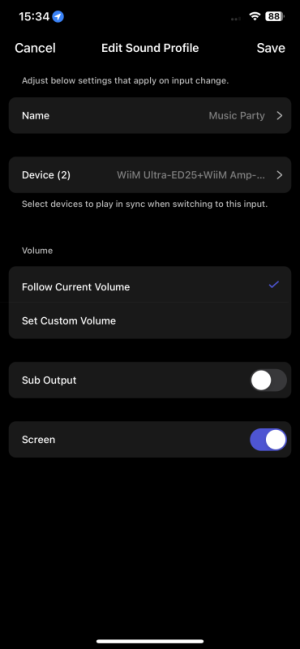
The Ultra's Input Sound Profile beta already includes the ability to turn off the screen via HDMI input.It works pretty good but now you guys really have to make an option for screen off when using HDMI. This is really distracting when watching a movie in a dark room.
Where can I find this setting?The Ultra's Input Sound Profile beta already includes the ability to turn off the screen via HDMI input.
Where can I find this setting?
See step 6 of "Configure a Sound Profile".
hgo58
Major Contributor
It's still in beta test.The option "Sound profile" is not available for me.

- Joined
- Mar 2, 2024
- Messages
- 4,243
If you have an Ultra, you can install the beta firmware required for Sound Profile.The option "Sound profile" is not available for me.
Ok, thx.It's still in beta test.
But then you loose the spectrum analyzer. At least I did so I had to revert back.If you have an Ultra, you can install the beta firmware required for Sound Profile.

Such are betas - they’re not kept in step with public versions.But then you loose the spectrum analyzer. At least I did so I had to revert back.
- Joined
- Mar 2, 2024
- Messages
- 4,243
It’s no loss in its current state of development.But then you loose the spectrum analyzer. At least I did so I had to revert back.

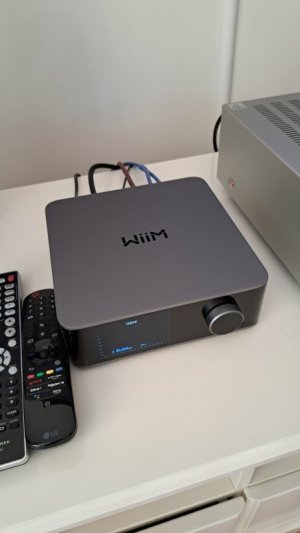
Yeah, I've asked if they willView attachment 32689
I was hoping the jumping blue bars would go at least to halfway the screen. This isnt showing a lot.
Allow it to display signal level as the vu has an option for.
If you are using your ultra as a pre amp. It won't go further without being on at ridiculous volume.
Hopefully they'll actually address it at some point
In a firmware update
Yeah, seems like a simple fix.Yeah, I've asked if they will
Allow it to display signal level as the vu has an option for.
If you are using your ultra as a pre amp. It won't go further without being on at ridiculous volume.
Hopefully they'll actually address it at some point
In a firmware update
Im using the wiim as a streamer/transport to my integrated now by the way.
If it's like that using fixed volume out, they definitely need to work on it.Yeah, seems like a simple fix.
Im using the wiim as a streamer/transport to my integrated now by the way.
hgo58
Major Contributor
The spectrum analyser is currently only showing the output volume level. Not as the VU meter that can also show the input. @WiiM Support have said that they are working on that.View attachment 32689
I was hoping the jumping blue bars would go at least to halfway the screen. This isnt showing a lot.
I wouldn't expect a spread spectrum like that to be able to reach FS. Imagine you have a 1k tone as FS driving a 10W amp at full volume. Now add another tone at 500Hz also at FS. You will now be trying to drive your 10W amp to 20W or to +6dB FS. If the scale is a representation of voltage, not power the max you can get with the two tones is -6dB FS on each bar. The bars are already well overinflated, Wiim themselves have said they have made the spectrum more pleasing to the eye by raising the bars for lower volumes as the bars were too low and not using the screen real estate availableIt looks like the display cuts off at -10 dBFS? Or whatever the scale is? It doesn't look logarithmic.
View attachment 28466
It's not easy to see the actual value but if it's like the VU meters, it's not correct anyway.
A peak indicator, as in the announcement picture, would be appreciated.
Similar threads


- Replies
- 13
- Views
- 608


- Replies
- 8
- Views
- 1K