Hello,
I recently bought a Wiim Ultra and a Wiim Sound Lite. I'm super happy with both and they work a treat until I try to add them to the Alexa ecosystem.
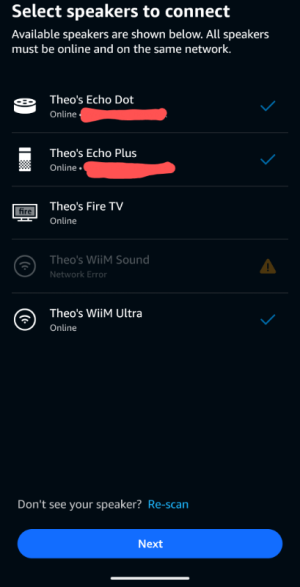
All of my Alexa devices and wiim device are connected to the same network, I have triple checked this and reconnected the Wiim Sound Lite to the correct network. However, the Alexa app seems to think the Sound Lite is connected to a different network and won't let me add it to a speaker group with all my other devices. It lets me add the Ultra, but not the Sound Lite.
I have my internet separated into 2.4 and 5ghz networks so I know I'm not connected to the wrong frequency. I have the settings of the Sound Lite and Ultra set the same in the Wiim Home app so there shouldn't be any differences.
Please help, thank you in advance.
Update : I disabled ipv6 on both the Ultra and the Sound Lite, now in the speaker group creation in the Alexa app it has changed to 'update available' and is greyed out. I have checked on the wiim home app and I am fully up to date on the Sound Lite, I also connected the wiim remote as it says to try 'alexa, check for software updates' and it says there are no updates...
I recently bought a Wiim Ultra and a Wiim Sound Lite. I'm super happy with both and they work a treat until I try to add them to the Alexa ecosystem.
All of my Alexa devices and wiim device are connected to the same network, I have triple checked this and reconnected the Wiim Sound Lite to the correct network. However, the Alexa app seems to think the Sound Lite is connected to a different network and won't let me add it to a speaker group with all my other devices. It lets me add the Ultra, but not the Sound Lite.
I have my internet separated into 2.4 and 5ghz networks so I know I'm not connected to the wrong frequency. I have the settings of the Sound Lite and Ultra set the same in the Wiim Home app so there shouldn't be any differences.
Please help, thank you in advance.
Update : I disabled ipv6 on both the Ultra and the Sound Lite, now in the speaker group creation in the Alexa app it has changed to 'update available' and is greyed out. I have checked on the wiim home app and I am fully up to date on the Sound Lite, I also connected the wiim remote as it says to try 'alexa, check for software updates' and it says there are no updates...
Last edited: