The dip can be caused by room modes, speaker boundary interference, listening position boundary interference or even other stuff resonating in your room. It will probably change its location and depth whenever you move the microphone (or your head) just a couple of inches.
Room correction probably cannot and definitely should not attempt to remove this very narrow dip. A dip that is caused by destructive interference of sound waves will hardly change at all if room correction applies more power at this frequency. All components that make up this interference will be amplified by the same amount. The positive and negative sound pressure will still cancel each other out.
You can change RoomFit settings so the dip doesn't show in the graphs, but that doesn't mean it's gone. Measurements cannot tell you anything about if this dip is even audible by you with any type of music. If it is, then rearranging your speakers and/or listening position and/or furniture is much more likely to result in an improvement. And as has been pointed out many times, if you don't have the room to freely position your speakers and MLP in the room (most people don't) then placing the speakers as close as possible to the front wall (and adding a subwoofer) is the second best thing you can do.
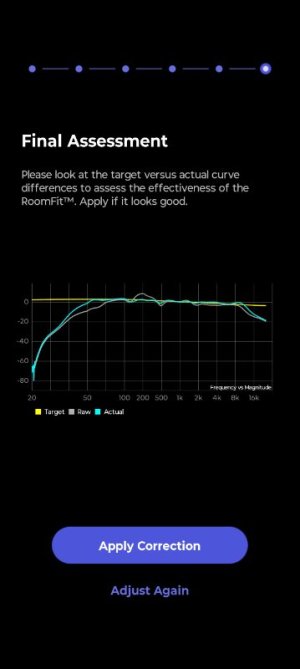
Due to the massive roll-off to low frequencies, the vertical scale is very imprecise (covering a range of more than 80 dB). That makes the measurements look very nice and flat, but its hard to judge the details. As of now there's nothing we can do to change this representation of the data. Not knowing the actual filters created by RoomFit makes it close to impossible to see if the correction is the best you can have.



![QC8VWrd[1].jpg](https://forum.wiimhome.com/data/attachments/34/34751-d18a35afe443054e2f9fd8376ee4594f.jpg?hash=gAd7zh3vRm "QC8VWrd[1].jpg")