Custom room fit target curve

gasolin75

Valued Contributor
Joined
Apr 27, 2024
Messages
150
Is it possible to make a custom room fit target curve or download additional filters
Can i have 2 or 3 profiles like having flat,harman and B&K roomcorretion profiles i can switch between


How big is the difference between B&K and Harman
 
Last edited:
I settled on psychoacoustics bk 35hz
View attachment 35316

1/3 octave bk 35hz
View attachment 35317

20hz lim it didn't seem to do much would a 50hz limit do something noticeable ?
Psychoacoustic and 1/3 octave don't show the real response at low frequency. Variable is recommended for room correction. Using Psychoacoustic just covers up the frequency response irregularities.
 
I will try some setting later to hear what i wanna use so fare it's 1/3 octave

Don't know if it has ben answered but custom target curves other than flat, harman and bk, is that possible ?
 
Last edited:
Don't know if it has ben answered but custom target curves other than flat, harman and bk, is that possible ?
No, not possible. At least not so far.

What to use i recommended

Smoothing and lower hz limit ?
Go with variable smoothing unless you have a specific reason not to. There's very little bass output from your speakers below 50 Hz. Setting the lower correction limit much lower than that (e.g. 35 Hz) will either do nothing (with no-boost mode enabled) or add lots of positive gain, potentially overloading your speakers and the amp when listening at elevated levels (with no-boost mode disabled).

So, don't go much lower than 50 Hz.
 
Last edited:
Might not hear it but even after measurement theres a dip at 125hz ish using variable

Smoothing ?


On one hand it's nice to try different settings but having sooo much options can also be a pain in the..... because no setting is right or wrong until you try them and hear for your self

Even at modest specs it still performs really good providing a punchy bass, no room correction very midbass, lower midrange heavy and no to little bass
 
Last edited:
It's very unlikely that anybody can safely detect such a narrow band dip. Move the mic by a foot any direction and the dip might be different.
 
Last edited:
so fare i dont use variable, atm 1/6 octave 50hz bk target curve

The bass is really good just because i turn it up doesn't mean it at some point get's weak

Around 2 o'clock on my amp it get's punchy, as you might not think it would, since it's small speaker, it's just where something in the bass happens
 
No deep bass, unless the microphone is bad like most smartphone mics.

Use whatever settings you like, but why are you asking for advice?
 
I don't know why it has have this dip.

Even when the bass is punchy it's not boomy

Frequency responce can also look like this - 20db is around 5hz lower

RSxCPSA.jpeg
 
The dip can be caused by room modes, speaker boundary interference, listening position boundary interference or even other stuff resonating in your room. It will probably change its location and depth whenever you move the microphone (or your head) just a couple of inches.

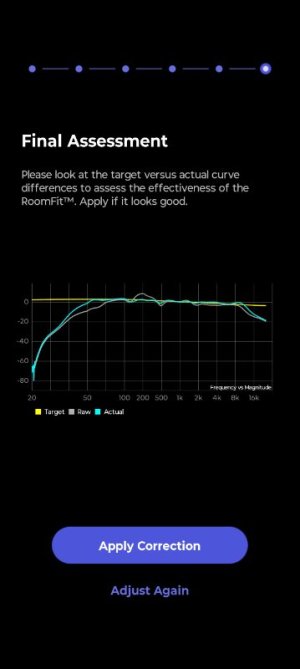
Room correction probably cannot and definitely should not attempt to remove this very narrow dip. A dip that is caused by destructive interference of sound waves will hardly change at all if room correction applies more power at this frequency. All components that make up this interference will be amplified by the same amount. The positive and negative sound pressure will still cancel each other out.

You can change RoomFit settings so the dip doesn't show in the graphs, but that doesn't mean it's gone. Measurements cannot tell you anything about if this dip is even audible by you with any type of music. If it is, then rearranging your speakers and/or listening position and/or furniture is much more likely to result in an improvement. And as has been pointed out many times, if you don't have the room to freely position your speakers and MLP in the room (most people don't) then placing the speakers as close as possible to the front wall (and adding a subwoofer) is the second best thing you can do.

Due to the massive roll-off to low frequencies, the vertical scale is very imprecise (covering a range of more than 80 dB). That makes the measurements look very nice and flat, but its hard to judge the details. As of now there's nothing we can do to change this representation of the data. Not knowing the actual filters created by RoomFit makes it close to impossible to see if the correction is the best you can have.

 
Last edited:
doesn't do it when i do other smoothing
Just because you don't see the dip doesn't mean it isn't there. Room correction is normally only performed at low frequencies and Variable smoothing has more appropriate smoothing at low frequencies that allows a better view of the actual response of the system at these frequencies. Other types of smoothing act like concealer that hide the true response. You can try the Moving Microphone Method which averages out dips that only occur in a particular microphone position.
 
Update

I tried many times to do room correction and even with a good mic the dayton usb c mic, the result wasn't consistant in the highs

Sometimes peaks or dips, other times with the same settings many peaks and dip wheren't the same
 
Update

I tried many times to do room correction and even with a good mic the dayton usb c mic, the result wasn't consistant in the highs

Sometimes peaks or dips, other times with the same settings many peaks and dip wheren't the same
Is that with the mic in exactly the same position?
 
Yes tried several times with the same volume

Mabye the mic isn't good for repeated measurement or the software isn't good when doing measuremenst many times in a short periode or both

Also roomfit doesn't remove peaks and dips that are fairly large or a small area with a large dip og peak

MMM can be better

I also wonder why it doesn't try to enhance bass more when doing down to 20 hz compared to 50hz
 
Last edited:
Yes tried several times with the same volume

Mabye the mic isn't good for repeated measurement or the software isn't good when doing measuremenst many times in a short periode or both

Also roomfit doesn't remove peaks and dips that are fairly large or a small area with a large dip og peak

MMM can be better

I also wonder why it doesn't try to enhance bass more when doing down to 20 hz compared to 50hz
Try Variable smoothing. That uses more smoothing at higher frequencies.
 
Back
Top