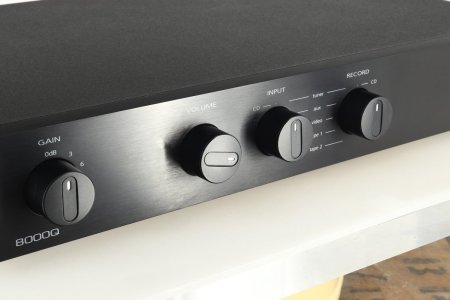
More inputs please! And maybe a tape loop?

ralphs99

Member
Joined
Dec 1, 2025
Messages
7
Another 1x digital and 1x analog inputs would be great!

While I'm at it, maybe a tape loop as well? ie a fixed volume output derived from the source input to go to a recording device, and a return that can be sent to the main outputs for monitoring in place of the source input. Does that make sense?

In other words, when monitoring from a recording device that's recording from the selected source input, the signal path would be: Source --> Fixed out; Recorder return --> Main output

Probably a niche application, but would be awesome!

Cheers, Ralph
 
Upvote 1
A convoluted mess.

I can do what you're doing with two rotary switches and I don't need to into apps to mess around and I only need one pre amp.
This thead is about how to add more input to the WiiM devices and have a tape loop. They don't have a rotary switch!

You can of course get other equipment where your get this all in one.

I don't see my setup as a joke. It's working perfectly well for me but of cause there may be people that cannot handle "complexity".
 
This thead is about how to add more input to the WiiM devices and have a tape loop. They don't have a rotary switch!

You can of course get other equipment where your get this all in one.

I don't see my setup as a joke. It's working perfectly well for me but of cause there may be people that cannot handle "complexity".

Then you buy something which does.

Yes it's a mess, sorry. I guess if you have them and a workaround, and saves buying/selling to replace I can understand..but if starting from scratch and you want to do something specific buy the right product first. sure I've done that with convulated mess to get it working

PC digital out to Lexicon processor
Lexicon processor to another power amp for surrounds
Lexicon processor to arcam ingrated amplifier L/R
PC to HDMI switch then off into TV


Except from where it uses analog i/o for analog equipment, where is it using additional conversation?

The wiims digitise analogue inputs.
 
Helpful as always. 😂


Yes, so what? ;)

Try and minimise conversions. For a tape loop you want it analogue from output, to the device, to the input.

Only conversions I've got is sub out to minidsp then off to subs (which probably digitise again) that's out of my control.
 
Then you buy something which does.

Yes it's a mess, sorry. I guess if you have them and a workaround, and saves buying/selling to replace I can understand..but if starting from scratch and you want to do something specific buy the right product first. sure I've done that with convulated mess to get it working
Again, this is about WiiM, not some other products. I am just utilizing what I have and it works exactly as I want it to. Connection any input with any output. The tape loop could also be made by connecting the Tape to both WiiMs (one input and one output) but I don't do that.

You could even control everything across the devices via e.g. Home Assistant.

PC digital out to Lexicon processor
Lexicon processor to another power amp for surrounds
Lexicon processor to arcam ingrated amplifier L/R
PC to HDMI switch then off into TV
And that is not complex :unsure:

The wiims digitise analogue inputs.
Of course. That is the whole point with a digital streamer. And for the attached device types (turntable, tuner and tape) it makes no real difference.
 
Again, this is about WiiM, not some other products. I am just utilizing what I have and it works exactly as I want it to. Connection any input with any output. The tape loop could also be made by connecting the Tape to both WiiMs (one input and one output) but I don't do that.

This could even control everything across the devices via e.g. Home Assistant.


And that is not complex :unsure:


Of course. That is the whole point with a digital streamer. And for the attached device types (turntable, tuner and tape) it makes no real difference.

yes it was and a complete PITA, I soon replaced it with a AVR which does all that (one box versions four)
 
Hey, @hgo58 and @rccarguy

calm down. Both of you have something going for your respective points of view.

If hgo58 was bothering us with ‚this doesn‘t work‘ and ‚how do I do that?‘ I‘d also tell him to first get a life and then a proper preamp. But as it is he‘s the master of his own fate. Why not?!
 
Hey, @hgo58 and @rccarguy

calm down. Both of you have something going for your respective points of view.

If hgo58 was bothering us with ‚this doesn‘t work‘ and ‚how do I do that?‘ I‘d also tell him to first get a life and then a proper preamp. But as it is he‘s the master of his own fate. Why not?!
Thanks. I do actually have an AVR but it was removed from my setup when I got the Ultra. I prefer this setup for the way I use my old attached devices.

There is however one issue with this setup and that is that the per input EQ and pre-gain don't work across linking. So I need to have specific EQ profiles on the Ultra for each equipment type and apply those to the network input (WiFi/Ethernet) for whatever device I play on the Pro Plus. Not a big deal, as I usually play from the same device for a longer time but it would be nice if this did work.
 
Last edited:
Good but not a WiiM (yet) as OP is requesting.

You can request it.

Doubt it'll happen, tape loops are dead. Graphic EQ are dead, and any EQ is done in the source/pre amp so they're not needed. Dedicated decoders aren't needed anymore. They've removed them from AVR's as well, my old Yamaha 570 had this, the new one does not

If tape loops are essential pickup some legacy gear, where they have a "tape monitor" button as well.. Plenty of options
 
Back
Top