

You are using an out of date browser. It may not display this or other websites correctly.
You should upgrade or use an alternative browser.
You should upgrade or use an alternative browser.
OPUS support
- Thread starter hyperion
- Start date


Going back to Gerbera configuration and transcoding, I can see this in my config:
So I'm not sure if my Gerbera is transcoding. I have not seen any confirmation in this forum thread from Wiim support that Opus is in fact not supported. Not sure if capturing network traffic between the DLNA server and the Wiim would help to determine that.
<transcoding enabled="no">
So I'm not sure if my Gerbera is transcoding. I have not seen any confirmation in this forum thread from Wiim support that Opus is in fact not supported. Not sure if capturing network traffic between the DLNA server and the Wiim would help to determine that.
If you're on Android, install BubbleUPnP and browse to a track, then select the vertical ellipsis on the right hand side and choose Show Metadata. This will show you the streams that Gerbera is offering.So I'm not sure if my Gerbera is transcoding.
I think it said "ogg" last time I checked. Maybe I can raise a ticket to Gerbera, just for my understanding.If you're on Android, install BubbleUPnP and browse to a track, then select the vertical ellipsis on the right hand side and choose Show Metadata. This will show you the streams that Gerbera is offering.
That's interesting as I would have expected to see the transcoded streams in addition to the original, it's then up to the control point to choose which one given the renderers capabilities.I think it said "ogg" last time I checked.
To see a list of the supported formats, in BubbleUPnP select the vertical ellipsis next to the WiiM renderer and choose Info.
Makes senseMaybe I can raise a ticket to Gerbera, just for my understanding.
OK, I see OPUS for local renderer, but not for Wiim. Thanks.To see a list of the supported formats, in BubbleUPnP select the vertical ellipsis next to the WiiM renderer and choose Info.
WiiM actually supports opus, but not with the .opus file extension.
Since opus is just a ogg-file with opus codec, it's enough to rename your opus file to ogg.
This way my WiiM Amp plays these files without any issue.
But still accepting this extension as well would be great, even though everything works already.
Since opus is just a ogg-file with opus codec, it's enough to rename your opus file to ogg.
This way my WiiM Amp plays these files without any issue.
But still accepting this extension as well would be great, even though everything works already.

Can you please send feedback to WiiM directly from the WiiM Home app? Tab "More" => "Feedback".WiiM actually supports opus, but not with the .opus file extension.
Since opus is just a ogg-file with opus codec, it's enough to rename your opus file to ogg.
This way my WiiM Amp plays these files without any issue.
But still accepting this extension as well would be great, even though everything works already.
This seems like a super easy addition!
Just did this. Will keep you updated on the response. Thanks a lot for the hint!Can you please send feedback to WiiM directly from the WiiM Home app? Tab "More" => "Feedback".
This seems like a super easy addition!
They responded:Just did this. Will keep you updated on the response. Thanks a lot for the hint!
So let's see if they implement this.Thank you for your feedback.
We will add your suggestion to our feature request list. Should the opportunity arise to implement this feature in the future, we will certainly consider it.
Thank you for your patience and understanding.
Best Regards,
WiiM Support
TIll then: just rename your .opus files to .ogg.
Are you using the WiiM Amp as a server? I renamed an Opus file to .ogg and scanned it with MiniDLNA 1.3.3 but it's not indexed - though I have no idea if the WiiM server is based on the official release.So let's see if they implement this.
TIll then: just rename your .opus files to .ogg.
I also tried MinimServer (which doesn't support Opus) but it fails during indexing:
Code:
Error: incorrect segment length 19 at offset 27Whilst it may play, WiiM may choose not to support it unless it's also available through their server component.
I only use the WiiM Amp as a player.Are you using the WiiM Amp as a server? I renamed an Opus file to .ogg and scanned it with MiniDLNA 1.3.3 but it's not indexed - though I have no idea if the WiiM server is based on the official release.
I also tried MinimServer (which doesn't support Opus) but it fails during indexing:
Code:Error: incorrect segment length 19 at offset 27
Whilst it may play, WiiM may choose not to support it unless it's also available through their server component.
I just accessed the .ogg files via the WiiM App from my local NAS. Either via DLNA of the NAS or via direct network-path (in the Home Music Share section).
Both ways worked fine with the .ogg files (formerly .opus).
Tried it with the latest firmware on Wiim Mini, doesn't work.TIll then: just rename your .opus files to .ogg.
Most music servers have the ability to transcode to supported formats.Tried it with the latest firmware on Wiim Mini, doesn't work.
Where are your files hosted and how are they served?
EDIT: I've just tested the Android WHA and it successfully played Opus in an Ogg container regardless of file extension (.ogg or .opus) from the local library.
Last edited:
I have done tests with both Ogg-VORBIS and-Ogg-OPUS : Wiim can't play OPUS.
I spotted Opus files in my collection a bit ago. They play fine. Isn't LMS great?
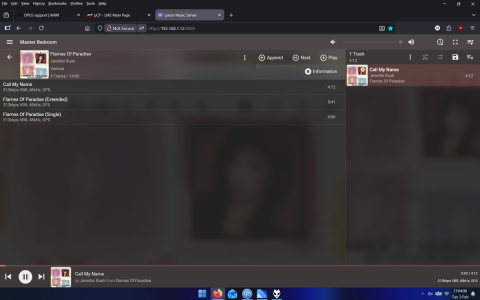

They're on a Navidrome server and served via upmpd. Transcoding works although it is not perfect because it makes switching tracks slow.Most music servers have the ability to transcode to supported formats.
Where are your files hosted and how are they served?
The Wiim Home App shows "16Bit 48kHz" (and nothing else) while playing a local Opus File so I assume there is some transcoding to PCM going on in the background.
Last edited:
Lightweight Music Server (LMS) doesn't transcode so it might be how Navidrome/upmpd serves the file. If we call the GetMediaInfo action during playback of a .opus track we'll be able to see how upmpd advertises the track and how Navidrome serves it:They're on a Navidrome server and served via upmpd. Transcoding works although it is not perfect because it makes switching tracks slow.
The Wiim Home App shows "16Bit 48kHz" (and nothing else) while playing a local Opus File so I assume there is some transcoding to PCM going on in the background.
Bash:
curl -s \
     -X POST http://<<ip-address-of-wimm>>:49152/upnp/control/rendertransport1 \
     -H 'Content-Type: text/xml; charset="utf-8"' \
     -H 'SOAPAction: "urn:schemas-upnp-org:service:AVTransport:1#GetMediaInfo"' \
     -d '<?xml version="1.0" encoding="utf-8"?>
<s:Envelope s:encodingStyle="http://schemas.xmlsoap.org/soap/encoding/" xmlns:s="http://schemas.xmlsoap.org/soap/envelope/">
  <s:Body>
    <u:GetMediaInfo xmlns:u="urn:schemas-upnp-org:service:AVTransport:1">
      <InstanceID>0</InstanceID>
    </u:GetMediaInfo>
  </s:Body>
</s:Envelope>' | xmlstarlet sel -t -v "//CurrentURIMetaData"Retrieving the current URL:
Bash:
curl -s \
     -X POST http://<<ip-address-of-wimm>>:49152/upnp/control/rendertransport1 \
     -H 'Content-Type: text/xml; charset="utf-8"' \
     -H 'SOAPAction: "urn:schemas-upnp-org:service:AVTransport:1#GetMediaInfo"' \
     -d '<?xml version="1.0" encoding="utf-8"?>
<s:Envelope s:encodingStyle="http://schemas.xmlsoap.org/soap/encoding/" xmlns:s="http://schemas.xmlsoap.org/soap/envelope/">
  <s:Body>
    <u:GetMediaInfo xmlns:u="urn:schemas-upnp-org:service:AVTransport:1">
      <InstanceID>0</InstanceID>
    </u:GetMediaInfo>
  </s:Body>
</s:Envelope>' | xmlstarlet sel -t -v "//CurrentURI"
Using curl to look at the headers (removing url encoding e.g. "&" to "&"):
Bash:
curl -v 'http://192.168.*.*:5082/rest/stream.view?id=tr-70366&apiKey=xxxxxxxx-xxxx-xxxx-xxxx-xxxxxxxxxxxx&v=1.13.0&c=Symfonium&f=json' --output /dev/null
  % Total    % Received % Xferd  Average Speed   Time    Time     Time  Current
...
> User-Agent: curl/8.5.0
> Accept: */*
>
< HTTP/1.1 200 OK
< Date: Thu, 05 Feb 2026 08:35:26 GMT
< Content-Type: audio/ogg; codecs="opus"
< Accept-Ranges: bytes
< Content-Length: 13731291
...
LMS identifies the track as an Ogg container containing Opus audio (< Content-Type: audio/ogg; codecs="opus").
I thought LMS can convert from one format to another on the fly (as long as encoder is installed) and can downsample ie if you have 192khz file but the streamer/DAC is only 44.1khz it'll downsample that for that specific player (and for other 192khz players leave them unaltered) as can set per player optionsLightweight Music Server (LMS) doesn't transcode so it might be how Navidrome/upmpd serves the file. If we call the GetMediaInfo action during playback of a .opus track we'll be able to see how upmpd advertises the track and how Navidrome serves it:
protocolInfo="" shows us that Symfonium advertises the track as "http-get:*:audio/ogg".Bash:curl -s \ -X POST http://<<ip-address-of-wimm>>:49152/upnp/control/rendertransport1 \ -H 'Content-Type: text/xml; charset="utf-8"' \ -H 'SOAPAction: "urn:schemas-upnp-org:service:AVTransport:1#GetMediaInfo"' \ -d '<?xml version="1.0" encoding="utf-8"?> <s:Envelope s:encodingStyle="http://schemas.xmlsoap.org/soap/encoding/" xmlns:s="http://schemas.xmlsoap.org/soap/envelope/"> <s:Body> <u:GetMediaInfo xmlns:u="urn:schemas-upnp-org:service:AVTransport:1"> <InstanceID>0</InstanceID> </u:GetMediaInfo> </s:Body> </s:Envelope>' | xmlstarlet sel -t -v "//CurrentURIMetaData"
Retrieving the current URL:
Bash:curl -s \ -X POST http://<<ip-address-of-wimm>>:49152/upnp/control/rendertransport1 \ -H 'Content-Type: text/xml; charset="utf-8"' \ -H 'SOAPAction: "urn:schemas-upnp-org:service:AVTransport:1#GetMediaInfo"' \ -d '<?xml version="1.0" encoding="utf-8"?> <s:Envelope s:encodingStyle="http://schemas.xmlsoap.org/soap/encoding/" xmlns:s="http://schemas.xmlsoap.org/soap/envelope/"> <s:Body> <u:GetMediaInfo xmlns:u="urn:schemas-upnp-org:service:AVTransport:1"> <InstanceID>0</InstanceID> </u:GetMediaInfo> </s:Body> </s:Envelope>' | xmlstarlet sel -t -v "//CurrentURI"
Using curl to look at the headers (removing url encoding e.g. "&" to "&"):
Bash:curl -v 'http://192.168.*.*:5082/rest/stream.view?id=tr-70366&apiKey=xxxxxxxx-xxxx-xxxx-xxxx-xxxxxxxxxxxx&v=1.13.0&c=Symfonium&f=json' --output /dev/null % Total % Received % Xferd Average Speed Time Time Time Current ... > User-Agent: curl/8.5.0 > Accept: */* > < HTTP/1.1 200 OK < Date: Thu, 05 Feb 2026 08:35:26 GMT < Content-Type: audio/ogg; codecs="opus" < Accept-Ranges: bytes < Content-Length: 13731291 ...
LMS identifies the track as an Ogg container containing Opus audio (< Content-Type: audio/ogg; codecs="opus").
Both Lyrion and Lightweight Music Server can transcode based on the capabilities of the renderer.I thought LMS can convert from one format to another on the fly (as long as encoder is installed) and can downsample ie if you have 192khz file but the streamer/DAC is only 44.1khz it'll downsample that for that specific player (and for other 192khz players leave them unaltered) as can set per player options
I was stating in this instance (playing an Opus track with a .opus extension) that my WiiM Pro didn't require transcoding when served by Lightweight Music Server.
Similar threads

- Suggestion
- Replies
- 6
- Views
- 1K

- Suggestion
- Replies
- 0
- Views
- 402
- Suggestion
- Replies
- 2
- Views
- 468
- Replies
- 3
- Views
- 478
- Replies
- 11
- Views
- 533