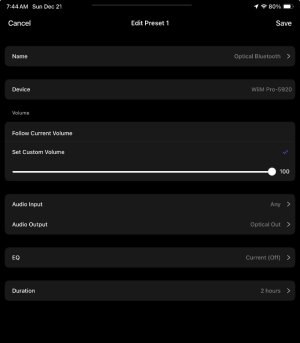
Preset duration….?

Good point.
Indeed, switching to TuneIn after pressing the Duration Preset button didn't stop it. It seems switching to a specific source resets the Duration..

The same thing happens with Hotmix, so switching to a radio station might be the reset trigger.🤔
I don't mind it's working this way, if it was documented.

As it is now it's inconsistent and undocumented.

@WiiM Team Please clarify this.

If this is relevant for the OP is another matter. Probably not?
 
It may or may not be.😂
No such indication was found in his post.
Let us wait for him to wake up.🙂

I had originally set the preset’s duration to 4hrs because I only wanted the preset effective for a short time, and then to switch back to the WiiM’s original state… i.e., SPDIF output to coax. I considered that the duration might be “to quit playing”, but “original state” made more sense (to me). The preset attached reflects the duration setting I used for the test. If indeed the duration implies “quit playing” I will create another preset to switch the output to coax, but “original state” still makes more sense (to me)…

Edit… if the source makes any difference, the WiiM’s primary use is streaming from my Jriver server…
 

Attachments

  • IMG_1330.jpeg
    IMG_1330.jpeg
    50.1 KB · Views: 2
@hgo58
You win! 😂

I had originally set the preset’s duration to 4hrs because I only wanted the preset effective for a short time, and then to switch back to the WiiM’s original state… i.e., SPDIF output to coax. I considered that the duration might be “to quit playing”, but “original state” made more sense (to me). The preset attached reflects the duration setting I used for the test. If indeed the duration implies “quit playing” I will create another preset to switch the output to coax, but “original state” still makes more sense (to me)…

Edit… if the source makes any difference, the WiiM’s primary use is streaming from my Jriver server…
Yes, as @hgo58 already mentioned, that is not possible.
Do you want to continue listening to music via coaxial four hours later?

If not, as mentioned earlier, I think you can use the alarm to switch to coaxial at any desired time.
 
I had originally set the preset’s duration to 4hrs because I only wanted the preset effective for a short time, and then to switch back to the WiiM’s original state… i.e., SPDIF output to coax. I considered that the duration might be “to quit playing”, but “original state” made more sense (to me). The preset attached reflects the duration setting I used for the test. If indeed the duration implies “quit playing” I will create another preset to switch the output to coax, but “original state” still makes more sense (to me)…

Edit… if the source makes any difference, the WiiM’s primary use is streaming from my Jriver server…
The return to the previous state would be nice but think about what would happen if you activate another (or the same) Preset after the first. In that case the WiiM would need to preserve a history of settings and do rollback. That would be confusing.
 
@hgo58
You win! 😂


Yes, as @hgo58 already mentioned, that is not possible.
Do you want to continue listening to music via coaxial four hours later?

If not, as mentioned earlier, I think you can use the alarm to switch to coaxial at any desired time.

Would there be any general interest for the duration option to offer running another preset when the duration lapses?

I’ll investigate the alarm because I only want the Bluetooth option enabled only for the typical listening session. More often than not I listen to wired cans, but have to say it’s nice to lose the wires when you have a Bluetooth headset option like the Sennheiser HDB 630 Bt headphones and the aptX Adaptive codec (!)

Edit… I see no alarm option to change output settings. I do see where an alarm can run a preset, but if I wanted the alarm to use an existing preset, “switch output to coax”, the list available to the alarm shows that they’re all empty…(?)
 
Last edited:
Good point.
Indeed, switching to TuneIn after pressing the Duration Preset button didn't stop it. It seems switching to a specific source resets the Duration..

The same thing happens with Hotmix, so switching to a radio station might be the reset trigger.🤔
Hi @Wiimer ,

We will check this issue promptly.
 
Would there be any general interest for the duration option to offer running another preset when the duration lapses?
The preset's operation may become complex, potentially causing issues. I'm not sure but interested.
Edit… I see no alarm option to change output settings. I do see where an alarm can run a preset, but if I wanted the alarm to use an existing preset, “switch output to coax”, the list available to the alarm shows that they’re all empty…(?)
You can't set an empty preset as an alarm. If you use a streaming service, please search for and play a silent track. Searching for "Muon" on Spotify or Amazon Music should yield such tracks.
1652.jpg

Play this track and register it as a preset in the WiiM app. (or, you can create a silent track yourself or download one from a website for use.)

Edit the preset and set the output to coaxial. Next, create an alarm and select this preset under 'Music'. Set the Duration to 1 minute and the alarm start time to 1 minute later, then verify it functions correctly.
 
The preset's operation may become complex, potentially causing issues. I'm not sure but interested.

You can't set an empty preset as an alarm. If you use a streaming service, please search for and play a silent track. Searching for "Muon" on Spotify or Amazon Music should yield such tracks.
View attachment 31326

Play this track and register it as a preset in the WiiM app. (or, you can create a silent track yourself or download one from a website for use.)

Edit the preset and set the output to coaxial. Next, create an alarm and select this preset under 'Music'. Set the Duration to 1 minute and the alarm start time to 1 minute later, then verify it functions correctly.

I’m confused as to what an empty preset is, or the difference between the list of presets accessed normally and the list of presets available when setting an alarm. That is, I’ve already created a preset that would switch the SPDIF output to coax—why doesn’t it show up in the list of presets available to use as an alarm?

If a preset is “empty” simply because it doesn’t play a sound, then I am confused as to how to register a track as a preset(?) I wasn’t able to find any procedure like this in your knowledgebase or forums. I will play with this later today, but if there is a documented procedure available please reference it…

Thanks, again… and Cheers from the Avalon (y):)
 
I’m confused as to what an empty preset is, or the difference between the list of presets accessed normally and the list of presets available when setting an alarm. That is, I’ve already created a preset that would switch the SPDIF output to coax—why doesn’t it show up in the list of presets available to use as an alarm?

If a preset is “empty” simply because it doesn’t play a sound, then I am confused as to how to register a track as a preset(?) I wasn’t able to find any procedure like this in your knowledgebase or forums. I will play with this later today, but if there is a documented procedure available please reference it…

Thanks, again… and Cheers from the Avalon (y):)
You can save radio stations as presets so I suppose you can do the same with tracks.

Edit. Now I've tried I can't find a way to add tracks from Home Music Share to presets or to use them as an alarm sound.
 
Last edited:
I’m confused as to what an empty preset is, or the difference between the list of presets accessed normally and the list of presets available when setting an alarm. That is, I’ve already created a preset that would switch the SPDIF output to coax—why doesn’t it show up in the list of presets available to use as an alarm?

If a preset is “empty” simply because it doesn’t play a sound, then I am confused as to how to register a track as a preset(?) I wasn’t able to find any procedure like this in your knowledgebase or forums. I will play with this later today, but if there is a documented procedure available please reference it…

Thanks, again… and Cheers from the Avalon (y):)
All my presets are available for alarms. Also the ones without music.

Are you sure you are on the same device?
 
I’m confused as to what an empty preset is, or the difference between the list of presets accessed normally and the list of presets available when setting an alarm. That is, I’ve already created a preset that would switch the SPDIF output to coax—why doesn’t it show up in the list of presets available to use as an alarm?

If a preset is “empty” simply because it doesn’t play a sound, then I am confused as to how to register a track as a preset(?) I wasn’t able to find any procedure like this in your knowledgebase or forums. I will play with this later today, but if there is a documented procedure available please reference it…

Thanks, again… and Cheers from the Avalon (y):)

I think it's easier to press the preset button to switch to coax, but this is the alarm setup procedure.

View attachment 682.mp4
 
All my presets are available for alarms. Also the ones without music.

Are you sure you are on the same device?
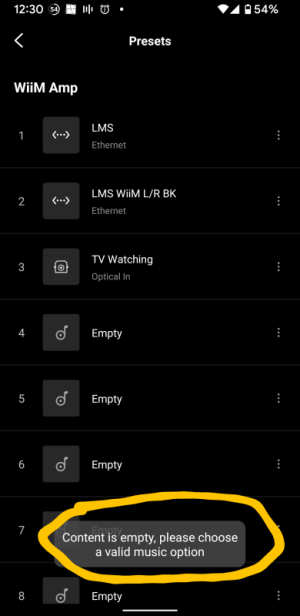
I couldn't set an alarm on my Amp using a preset without music.
This was choosing Preset 1 or 3
Screenshot_20251222-123050.png
 
Last edited:
I couldn't set an alarm on my Amp using a preset without music.
Yes. Are right. I can see all but I am not allowed to use the ones without music.

Too bad. Not even my Preset that changes to CD (optical input) and EQ can be used as an alarm.

Never tried it before. :unsure:
 
Last edited:
Yes. Are right. I can see all but I am not allowed to use the ones without music.

Too bad. Not even my Preset that changes to CD (optical input) and EQ can be used as an alarm.

Never tried it before. :unsure:
Yes, unfortunately, that is not possible. I previously made a request to enable it, but it has not been implemented yet.
 
I think it's easier to press the preset button to switch to coax, but this is the alarm setup procedure.

I’m beginning to believe the preset button is easier as well…

However, I was successful creating a preset to switch the output to coax and play Radio Paradise for a duration for one minute. The preset was available for an alarm and I set it up. The alarm does play RP for 1min, and the output is coax as I can hear the wired headphone playing, but it never switches the WiiM output to coax. I can enable the preset which does play RP and switch the output to coax, but if the preset is engaged via the alarm optical remains as the output (…except, apparently, for the 1min duration).

What is weird is I can monitor the WiiM’ settings while testing the preset and the alarm, and while I can watch the output setting change to coax after engaging the preset, the output setting never changes during the alarm in spite of hearing RP out of the DAC/Amp connected to WiiM’s coax.
 
Back
Top