

You are using an out of date browser. It may not display this or other websites correctly.
You should upgrade or use an alternative browser.
You should upgrade or use an alternative browser.
Qobuz Qobuz update
- Thread starter jetson
- Start date
You're right that Qobuz doesn't stop playing when I close Qobuz Connect (which is good). However, since the app update, Qobuz doesn't seem to work properly in the Wiim app. Playback is frequently interrupted. This seems to occur on both my Wiim Pros. The obvious work around is to use Qobuz Connect exclusively but surely both routes ought to work properly?

- Joined
- Mar 2, 2024
- Messages
- 4,182
I have never had a problem with Qobuz not working properly in the WiiM Home App, and with various WiiM devices.You're right that Qobuz doesn't stop playing when I close Qobuz Connect (which is good). However, since the app update, Qobuz doesn't seem to work properly in the Wiim app. Playback is frequently interrupted. This seems to occur on both my Wiim Pros. The obvious work around is to use Qobuz Connect exclusively but surely both routes ought to work properly?
I think I have resolved the problem.
In the Settings menu in WHA, I went to the Network Status tab. I activated 'Preferred DNS server (8.8.8.8)
Currently, no stuttering and no failed tracks.
I remain unsure as to why everything worked fine before the latest WHA update, but as long as it works now I'm delighted.
Posts on What Hifi forum regarding Qobuz problems suggested resetting the default DNS settings in the router where this was possible. It appears Wiim were one step ahead
In the Settings menu in WHA, I went to the Network Status tab. I activated 'Preferred DNS server (8.8.8.8)
Currently, no stuttering and no failed tracks.
I remain unsure as to why everything worked fine before the latest WHA update, but as long as it works now I'm delighted.
Posts on What Hifi forum regarding Qobuz problems suggested resetting the default DNS settings in the router where this was possible. It appears Wiim were one step ahead

HansD-NL
Valued Contributor
DNS problems can be difficult to diagnose without some network diagnostic tools.I think I have resolved the problem.
In the Settings menu in WHA, I went to the Network Status tab. I activated 'Preferred DNS server (8.8.8.8)
Currently, no stuttering and no failed tracks.
I remain unsure as to why everything worked fine before the latest WHA update, but as long as it works now I'm delighted.
Posts on What Hifi forum regarding Qobuz problems suggested resetting the default DNS settings in the router where this was possible. It appears Wiim were one step ahead
It sounds like the DNS service your particular ISP is providing is unstable at the moment and switching the WiiM to Googles primary 8.8.8.8 was the solution. But other devices on your (home) network still suffer from slow lookups. You can solve that by changing the DNS servers that your router assigns to it's clients in the router DNS/DHCP settings and choose 2 stable DNS servers (a primary and secondary) that are publicly available like Google or (what I do) Akamai's robust nameservers 1.1.1.1 (primary) and 1.0.0.1 (secondary)
In networking it is best practice to always configure a primary and secondary DNS but for high availability DNS servers assigning only one (like WiiM chose to do) works fine 99% of the time.
Update: It can also be that your router itself is too busy doing DNS lookups and routing functions and needs it's tables cleared by a restart.
Last edited:
Thank you for your response, which is most helpful. The initial difficulty in adopting your advice is that my ISP is Virgin Media and I'm using their Hub 5 router. A number of sources express frustration that the DNS config can't be changed on the Hub 5 and that the solution lies in setting the Hub in 'modem' mode and then using a third-party router which can be readily reconfigured. This is probably a job for another day. However, thank you again for your insight.DNS problems can be difficult to diagnose without some network diagnostic tools.
It sounds like the DNS service your particular ISP is providing is unstable at the moment and switching the WiiM to Googles primary 8.8.8.8 was the solution. But other devices on your (home) network still suffer from slow lookups. You can solve that by changing the DNS servers that your router assigns to it's clients in the router DNS/DHCP settings and choose 2 stable DNS servers (a primary and secondary) that are publicly available like Google or (what I do) Akamai's robust nameservers 1.1.1.1 (primary) and 1.0.0.1 (secondary)
In networking it is best practice to always configure a primary and secondary DNS but for high availability DNS servers assigning only one (like WiiM chose to do) works fine 99% of the time.
Update: I can also be that your router itself is too busy doing DNS lookups and routing fuctions and needs it's tables cleared by a restart.

Golana
New Member
- Joined
- Mar 5, 2026
- Messages
- 44
I have the situation that Qobuz Connect is working fine, as long I use the Qobuz App.
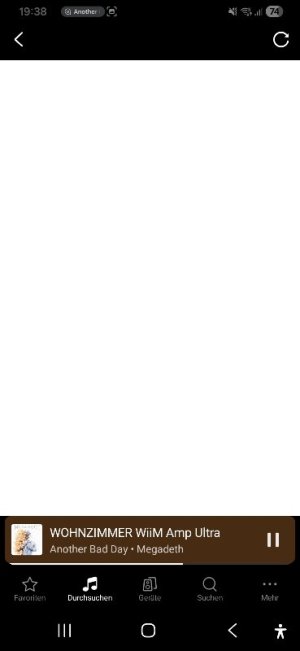
It is not possible to use Qobuz inside the WiiM home app.
I use Android and was trying on 3 different phones.
In the picture you can see the WiiM app screen after selecting the qobuz streaming.
Any idea ?
It is not possible to use Qobuz inside the WiiM home app.
I use Android and was trying on 3 different phones.
In the picture you can see the WiiM app screen after selecting the qobuz streaming.
Any idea ?
Attachments

I'd delete and re-install the WiiM app, although you will lose any open network stream entries unless you export them first to a file. Also, what happens if you select the refresh icon in the top corner?

Are you sure you had Firefox set as the standard browser and not just been using it "manually"?The support resolve the problem . With the chrome browser as standard it is working .
Before I used Firefox...
The typical reason for the behaviour you've been observing is Samsung's own web browser being the standard browser by default. Both, Chrome and Firefox should not be causing these issues when set as the standard browser.
The issue is not limited to Qobuz, but affects other music services, too, that require you to log in from the WiiM Home App.
Golana
New Member
- Joined
- Mar 5, 2026
- Messages
- 44
Yes....I'm sure sure.... never used the Samsung browserAre you sure you had Firefox set as the standard browser and not just been using it "manually"?
The typical reason for the behaviour you've been observing is Samsung's own web browser being the standard browser by default. Both, Chrome and Firefox should not be causing these issues when set as the standard browser.
The issue is not limited to Qobuz, but affects other music services, too, that require you to log in from the WiiM Home App.

It's not about using the Samsung browser, but it being the system default (which doesn't mean it's displayed on your home screen). Android (and thus the WiiM Home App) don't care about which app you use to browse the Internet. The WHA integrates a WebView component (at least I think it doesYes....I'm sure sure.... never used the Samsung browser
 ) to pass on the login screen of Qobuz, Tidal, whatever, and it does so based on the system's standard browser.
Anyway, problem solved. No need to make things more complicated than they already are.
Similar threads
- Replies
- 77
- Views
- 3K
- Replies
- 8
- Views
- 768

- Replies
- 0
- Views
- 359
- Replies
- 30
- Views
- 2K