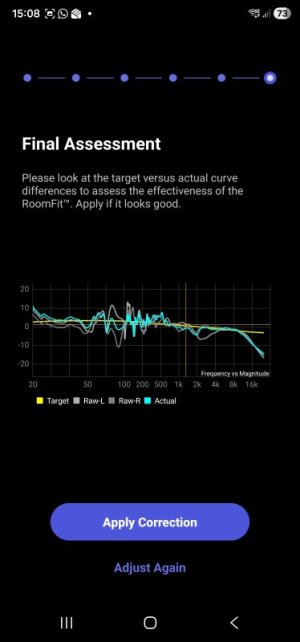
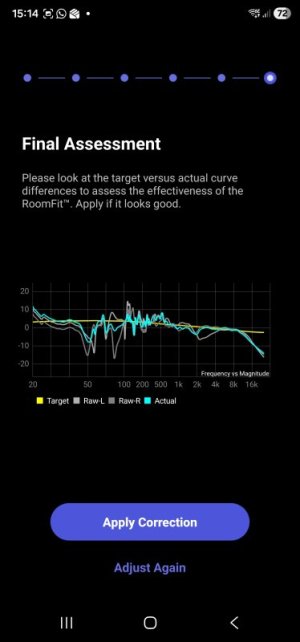
To get me going more quickly (and prevent a divorce) I could do with some guidance please.
I’ve had my Wiim Pro Plus for a while but shortly after buying it, a fault arose with my active speakers. Over a year later I finally have them back from repair. The transformers had failed. If you ever need spares, I can’t recommend Tiger Toroids highly enough. Great quality and cost me about a fifth of the price the original manufacturer would have charged to make a pair.
I have just tried playing around with RoomFit for the first time. I used Blue Snowball in omnidirectional mode, but I have decided to bite the bullet and order a Umik-1 which is currently on its way to me.
The system comprises the Wiim Pro Plus into a Benchmark DAC2 feeding a pair of old Meridian M33 active speakers using the balanced outputs and a BK XLS200 MKII front firing 10” sub connected to the RCA outputs. The speakers are wall mounted flush with the sides of a chimney breast, and the sub is at the bottom of the left side of the chimney breast (on some acoustic foam).
The room this system is in isn’t great and I have no scope to reposition the speakers or sub. There are no soft furnishings. I know the results will be limited because of this but from the few hours I spend experimenting, I believe there is scope for significant improvement. It's about 15' by 13' but the wall the speakers are on is angled (the room isn't rectangular).
The speakers were originally rated 55Hz-20kHz at +/-3dB.
My thoughts regarding the sub settings were to set the gain to about two thirds and the cutoff frequency to about 60Hz. Does this seem sensible?
Regarding the RoomFit settings, I have set smoothing to 1/12 Octave (should I use variable now that it is available or something else?) and switched on Multiple Measurements. I have always used individual channels.
I switched off Non-Boost Mode.
I haven’t tried Moving Mic Measurement. Should I?
Once I have the Umik, my plan is to try and save three profiles, one for each of flat, B&K and Harman.
I would appreciate comments regarding the above settings and help with the frequency range, max gain, min gain and max q settings. I will continue reading up on this but some suggestions to get me going quickly would be really appreciated.
I am wondering whether to set the frequency range to the maximum or limit it to the lower frequencies (or something else).
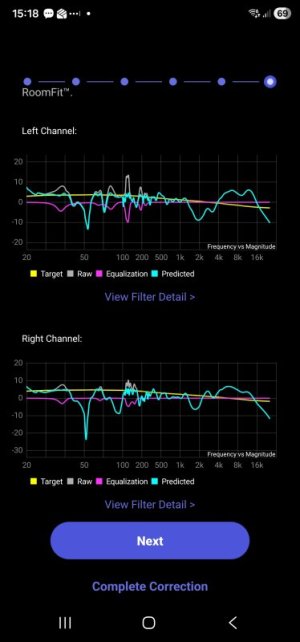
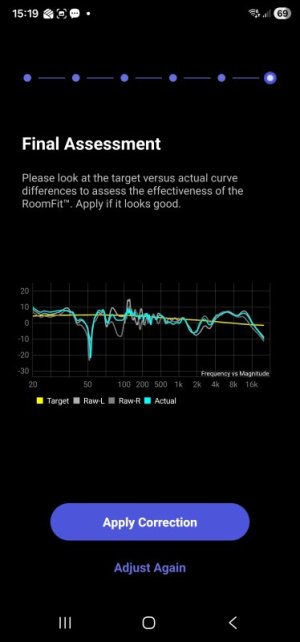
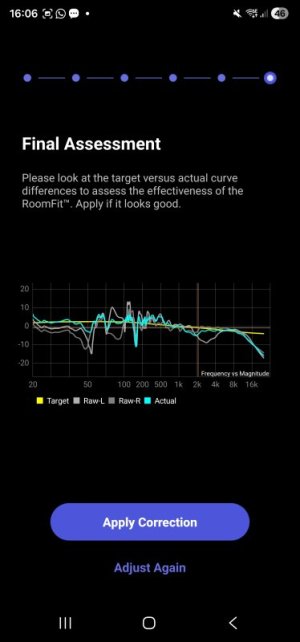
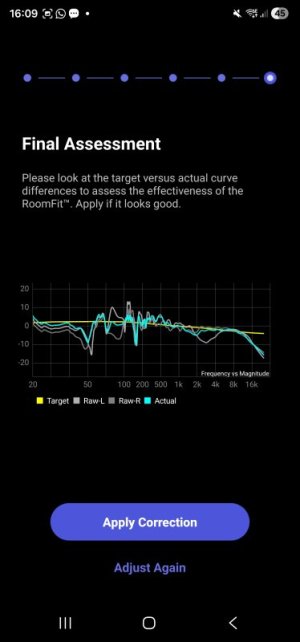
On every reading so far, there has been a significant dip around 50Hz. Any suggestions with this? One thought on this was that if the sub gain is set quite high, the equaliser could reduce the lower frequencies (and increase around 50Hz) to improve things but I don’t yet really know what I’m doing.
Trying a 20Hz to 400Hz range did sound quite good. More mid-range clarity. Setting it to 20Hz to 20kHz produced quite a drastic change but I’m not sure whether it was for the better or not. I haven’t taken too much from this as presumably the results using the Blue Snowball will be unreliable and potentially not very good, but it has demonstrated the potential for marked improvements such that I decided to buy the Umik.
I am also wondering whether it would be best to buy an Ultra at some stage so that I could use the USB output to my Benchmark DAC and the sub out from the Ultra. Would this result in better scope for the subwoofer tuning?
It’s a shame the Pro Plus doesn’t have USB out as I could use it in my other system which has no sub but I’m reluctant to forego the asynchronous USB connection with the other Benchmark DAC 2 I have in that system.
I will no doubt look into REW in due course but am wary of falling further down the rabbit hole at the moment due to other things I have going on in my life that need to take priority right now.
I’ve had my Wiim Pro Plus for a while but shortly after buying it, a fault arose with my active speakers. Over a year later I finally have them back from repair. The transformers had failed. If you ever need spares, I can’t recommend Tiger Toroids highly enough. Great quality and cost me about a fifth of the price the original manufacturer would have charged to make a pair.
I have just tried playing around with RoomFit for the first time. I used Blue Snowball in omnidirectional mode, but I have decided to bite the bullet and order a Umik-1 which is currently on its way to me.
The system comprises the Wiim Pro Plus into a Benchmark DAC2 feeding a pair of old Meridian M33 active speakers using the balanced outputs and a BK XLS200 MKII front firing 10” sub connected to the RCA outputs. The speakers are wall mounted flush with the sides of a chimney breast, and the sub is at the bottom of the left side of the chimney breast (on some acoustic foam).
The room this system is in isn’t great and I have no scope to reposition the speakers or sub. There are no soft furnishings. I know the results will be limited because of this but from the few hours I spend experimenting, I believe there is scope for significant improvement. It's about 15' by 13' but the wall the speakers are on is angled (the room isn't rectangular).
The speakers were originally rated 55Hz-20kHz at +/-3dB.
My thoughts regarding the sub settings were to set the gain to about two thirds and the cutoff frequency to about 60Hz. Does this seem sensible?
Regarding the RoomFit settings, I have set smoothing to 1/12 Octave (should I use variable now that it is available or something else?) and switched on Multiple Measurements. I have always used individual channels.
I switched off Non-Boost Mode.
I haven’t tried Moving Mic Measurement. Should I?
Once I have the Umik, my plan is to try and save three profiles, one for each of flat, B&K and Harman.
I would appreciate comments regarding the above settings and help with the frequency range, max gain, min gain and max q settings. I will continue reading up on this but some suggestions to get me going quickly would be really appreciated.
I am wondering whether to set the frequency range to the maximum or limit it to the lower frequencies (or something else).
On every reading so far, there has been a significant dip around 50Hz. Any suggestions with this? One thought on this was that if the sub gain is set quite high, the equaliser could reduce the lower frequencies (and increase around 50Hz) to improve things but I don’t yet really know what I’m doing.
Trying a 20Hz to 400Hz range did sound quite good. More mid-range clarity. Setting it to 20Hz to 20kHz produced quite a drastic change but I’m not sure whether it was for the better or not. I haven’t taken too much from this as presumably the results using the Blue Snowball will be unreliable and potentially not very good, but it has demonstrated the potential for marked improvements such that I decided to buy the Umik.
I am also wondering whether it would be best to buy an Ultra at some stage so that I could use the USB output to my Benchmark DAC and the sub out from the Ultra. Would this result in better scope for the subwoofer tuning?
It’s a shame the Pro Plus doesn’t have USB out as I could use it in my other system which has no sub but I’m reluctant to forego the asynchronous USB connection with the other Benchmark DAC 2 I have in that system.
I will no doubt look into REW in due course but am wary of falling further down the rabbit hole at the moment due to other things I have going on in my life that need to take priority right now.