Strange behavior of RoomFit and settings

aeroshin

New Member
Joined
Jan 21, 2026
Messages
11
Hi everyone!
I think my RoomFit is behaving strangely and I could use some help.

My setup
  • WiiM Amp Pro
  • ELAC Debut B6.2 speakers
  • Calibration mic: Dayton iMM-6C (with calibration file)

RoomFit settings
  • Freq: 30.0 to 300 Hz
  • Max Gain: 4.0 dB
  • Min Gain: -12.0 dB
  • Max Q: 10.0
  • Non-Boost Mode: off (I believe this is correct since I don’t listen louder than about 40%)

What happened
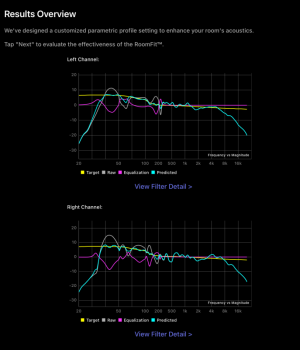
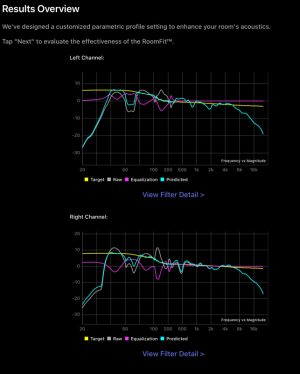
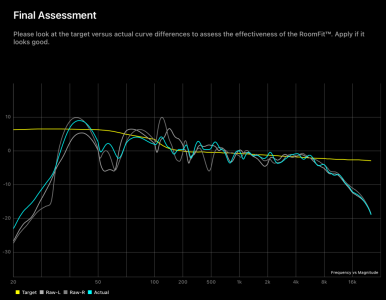
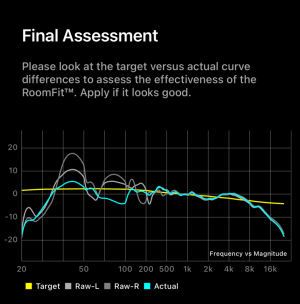
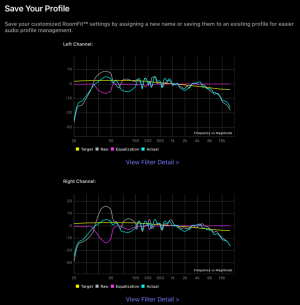
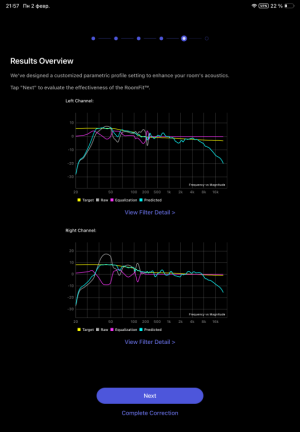
  1. After the measurement, the Predicted curve looked very good.
    1770063397221.png
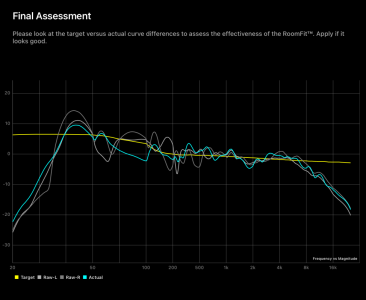
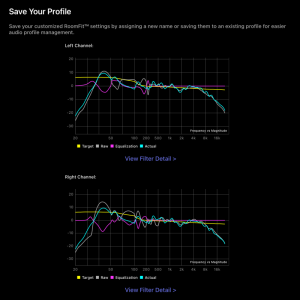
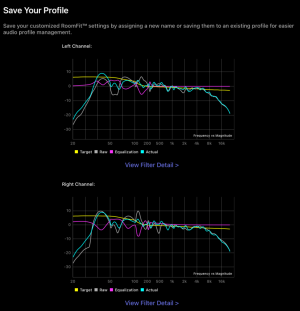
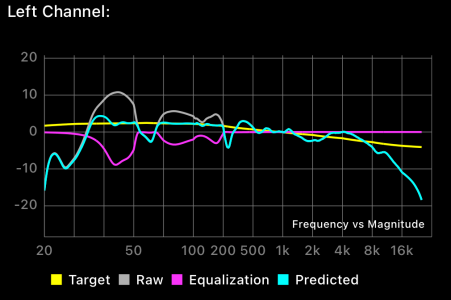
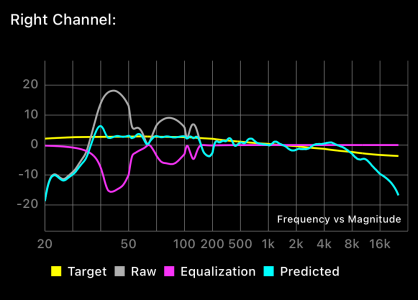
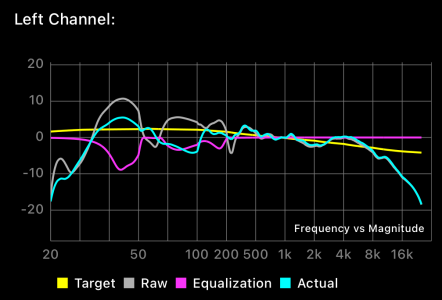
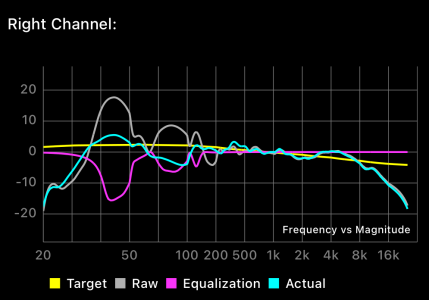
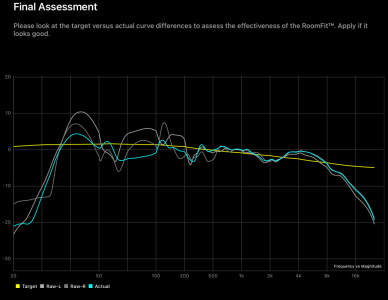
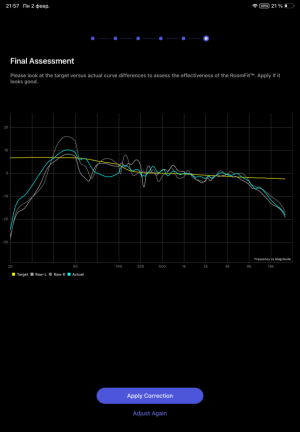
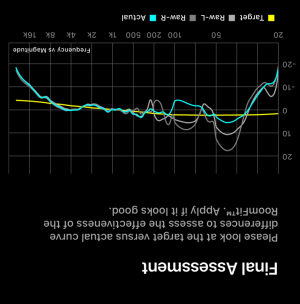
  2. I applied the results and did a re-measurement. Now the Actual response is uneven — in some places the Raw measurement even looks better than Actual.
    1770063438830.png
    1770063458970.png

Questions
  1. How can I fix this? Could I have set RoomFit incorrectly? Which settings should I change (Freq range, Max/Min gain, Q, Non-Boost mode, etc.) to get a smoother Actual response?
  2. On my measured curve there are deep dips (nulls) that I suspect are due to room modes / standing waves. Boosting at the null frequency won’t help. I was thinking you might be able to compensate by reducing the level of surrounding frequencies (so the curve looks flatter overall). Is there a way to do that in RoomFit, or another recommended approach to handle room nulls with these tools?
Any advice on diagnostics, settings to try, or workflow would be appreciated. If you need more data I can attach it.
Thanks in advance!
 
Hi everyone!
I think my RoomFit is behaving strangely and I could use some help.

My setup
  • WiiM Amp Pro
  • ELAC Debut B6.2 speakers
  • Calibration mic: Dayton iMM-6C (with calibration file)

RoomFit settings
  • Freq: 30.0 to 300 Hz
  • Max Gain: 4.0 dB
  • Min Gain: -12.0 dB
  • Max Q: 10.0
  • Non-Boost Mode: off (I believe this is correct since I don’t listen louder than about 40%)

What happened
  1. After the measurement, the Predicted curve looked very good.
    View attachment 33306
  2. I applied the results and did a re-measurement. Now the Actual response is uneven — in some places the Raw measurement even looks better than Actual.
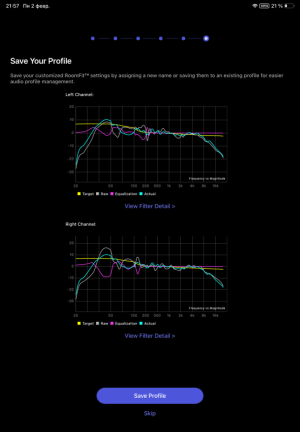
    View attachment 33307
    View attachment 33308

Questions
  1. How can I fix this? Could I have set RoomFit incorrectly? Which settings should I change (Freq range, Max/Min gain, Q, Non-Boost mode, etc.) to get a smoother Actual response?
  2. On my measured curve there are deep dips (nulls) that I suspect are due to room modes / standing waves. Boosting at the null frequency won’t help. I was thinking you might be able to compensate by reducing the level of surrounding frequencies (so the curve looks flatter overall). Is there a way to do that in RoomFit, or another recommended approach to handle room nulls with these tools?
Any advice on diagnostics, settings to try, or workflow would be appreciated. If you need more data I can attach it.
Thanks in advance!
Hi, welcome.

I'm not an expert, so I can't pinpoint the cause of your problem. However, I experienced a similar issue with the WiiM Sound stereo pair I have in my bedroom.

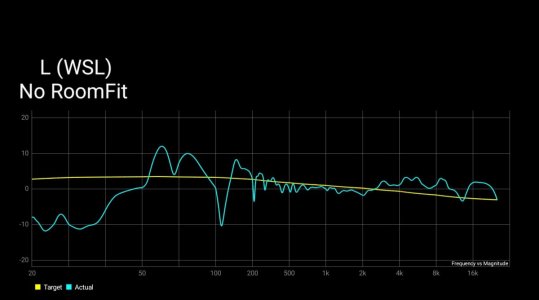
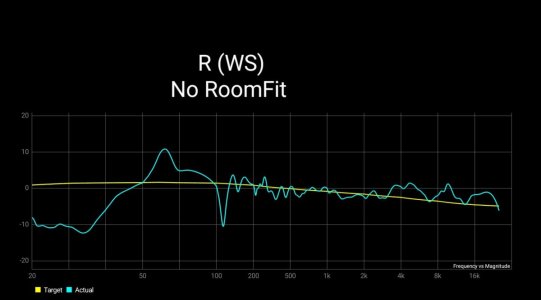
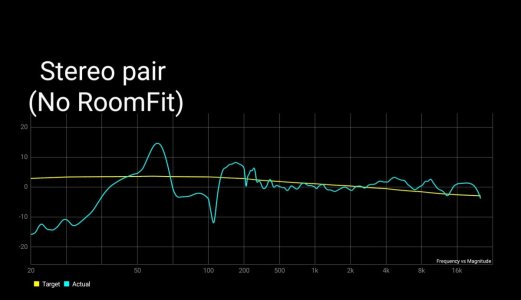
These are the results from measuring the left and right speakers individually, and the results from measuring the stereo pair.

L ch
2191.jpg

R ch
2190.jpg

Stereo pair
2192.jpg

In the stereo pair, cancellation occurs at 80Hz to 100Hz, resulting in a significant dip.

Moving the speakers to another room for testing did not reproduce this issue. After repeating several tests, I concluded that the 80-inch projector screen in the bedroom was likely the cause.

Subsequently, moving the speakers slightly forward improved the situation somewhat. (I still haven't identified all the causes.)

I'm not sure if the same thing is happening in your room, but it might be worth checking if moving your speakers or listening position slightly could improve things.


Do I need to invert the microphone calibration file? It has negative values at the edges of the range and positive values in the middle of the range.
I don't think so.
 
Moving the speakers to another room for testing did not reproduce this issue. After repeating several tests, I concluded that the 80-inch projector screen in the bedroom was likely the cause.
I made a simple formula for calculating 1/4 of the wavelength in Excel, then substituted RT60 from REW (which usually coincides with the frequency response peaks) and got the depth values of my shelves of cabinets in the room :)
But I do not know how to nulls frequency response failures and do not understand why the result of RoomFit does not match the target value so much.
upd: Now I noticed that I performed individual calibration for the right and left channels (since my speakers are not positioned symmetrically, one is closer to the wall and creates more low frequencies, but I do not have the opportunity to position the speakers symmetrically in the room), and the final measurement is performed in stereo mode. Because of this, the final result is very different and looks worse than planned. When calibrating in stereo mode, the calibration result and the target curve match. Is it possible to solve this problem? I definitely need an individual calibration for my speaker arrangement.
 
Last edited:
On my measured curve there are deep dips (nulls) that I suspect are due to room modes / standing waves. Boosting at the null frequency won’t help. I was thinking you might be able to compensate by reducing the level of surrounding frequencies (so the curve looks flatter overall). Is there a way to do that in RoomFit, or another recommended approach to handle room nulls with these tools?
The dips are not likely caused by room modes / standing waves, a much more likely cause is Speaker Boundary Interference Response (SBIR) or Listener Boundary Interference Response (LBIR). You can use this online calculator to estimate at which frequency SBIR will happen in your room and with your placement.

SBIR/LBIR dips and peaks happen at specific frequencies when a speaker or listener are a corresponding distance from a solid boundary (like a wall, ceiling or floor).
Careful placement of speakers, subwoofer (if any) and listening position can help a lot with (or even completely solve) such dips.
RoomFit and similar room correction tools are really good at knocking down resonances/peaks, but not as good at fixing dips, so dips should be fixed by optimizing placement. I wrote on what RoomFit does and doesn't do well in this post.

Regarding placement, I usually recommend to read this really nice illustrated loudspeaker/subwoofer placement guide by Genelec.

If you don't have a sub, I'd recommend to have your speakers as close as possible to the wall behind them (which will push the front wall SBIR null to ~300Hz and should make the dip shallower), and if possible put the speakers more than 2m from any sidewall (which will push the sidewall SBIR null to <40Hz where the speakers have no output anyway).

Lastly, note that the cyan curve when doing response evaluation (after RoomFit calculated the correction filters) is an L+R summed response, which means it also contains interreference between the two channels (unlike the individual channel measurements you have for the raw speaker response). As @Wiimer suggested, sometime this inter-channel interference can be improved a bit by further tweaking speaker placement.

Hope this helps and good luck!
 
Thank you so much for such a detailed answer and useful materials, dear @dominikz
I have studied your materials, and also, I will study them in more detail later.
I realize that physics cannot be fooled and miracles do not happen.
But unfortunately, my current apartment does not allow me to choose the location of the speakers.
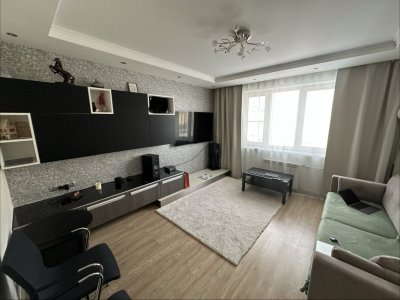
You can appreciate it in the photo below:
1770113794927.jpeg

The listening point is located on the couch, and the speakers are positioned so that I can also use them when watching movies.
When I turn on the sine wave sound at 70 Hz, I hear it softly on the couch and very loudly in the center of the carpet or if I move my head to the wall.

I would be very grateful if you could give me some recommendations based on your experience and the information I have provided.
 
Thank you so much for such a detailed answer and useful materials, dear @dominikz
I have studied your materials, and also, I will study them in more detail later.
I realize that physics cannot be fooled and miracles do not happen.
But unfortunately, my current apartment does not allow me to choose the location of the speakers.
You can appreciate it in the photo below:

The listening point is located on the couch, and the speakers are positioned so that I can also use them when watching movies.
When I turn on the sine wave sound at 70 Hz, I hear it softly on the couch and very loudly in the center of the carpet or if I move my head to the wall.

I would be very grateful if you could give me some recommendations based on your experience and the information I have provided.
Thanks for sharing the picture, that gives some helpful context. Most of us don't have the luxury to build our environment around ideal speaker positions, so we have to find ways to either work around the limitations or accept them. Luckily, in most environment we can get pretty good results with some effort. :)

First, for the responses in post #1: where did you keep the microphone when running RoomFit? Was it at the couch were your head would normally be when listening?
If so, how does the response change if you run RoomFit (individual channel variant) for a position e.g. 50cm in front of where you usually sit?
the reason for asking is: both of your speakers seems to have a dip at ~70Hz, which makes me believe it might be related to your listening position rather than the speaker position.
 
First, for the responses in post #1: where did you keep the microphone when running RoomFit? Was it at the couch were your head would normally be when listening?
Yes, in the first measurements, the microphone was located above the center of the couch, about where my ears are while listening.
I took repeated measurements and here is the result:
1770130278530.png
1770130310892.png
1770130328897.png

Here are the measurement results if I move the microphone 50 cm forward to the speakers:
1770130565240.png
1770130580372.png
1770130595688.png
 
Yes, in the first measurements, the microphone was located above the center of the couch, about where my ears are while listening.
I took repeated measurements and here is the result:
View attachment 33332
View attachment 33333
View attachment 33334

Here are the measurement results if I move the microphone 50 cm forward to the speakers:
View attachment 33335
View attachment 33336
View attachment 33337
OK, looks like we're onto something - the null definitely changes when you move the listening location. Since you probably can't move the listening position much, I guess this is just something you'll need to accept.
We can however try to mitigate a bit. My suggestion would be to configure RoomFit like this (changes bolded) and then re-run Individual Channel RoomFit:
  • Target: B&K
  • Freq: 40 to 300 Hz
  • Max Gain: 12.0 dB
  • Min Gain: -12.0 dB
  • Max Q: 10.0
  • Non-Boost Mode: enabled
  • Moving Mic Method (beta): enabled
Note that the Moving Mic Method (beta) option will require you to slowly and randomly move the microphone in about 50cm area around your listening position while periodic pink noise is playing from your speakers. This will create a spatial average of the response, rather than optimize for a single point in space, so hopefully may provide a more realistic take on the LBIR notch between 50-80Hz.
Take care not to block the direct path from the speaker to the microphone with your body while measuring - a good approach is to sit one seat to the side of the main listening position and measure with your arm extended into the main listening position. Also note that Moving Mic Method is sensitive to ambient noise, so your environment should be reasonably silent while you run RoomFit.

I also suggested to use B&K curve because I suspect you will be able to get a smoother bass response that way with RoomFit. Then later you can easily adjust bass level to taste with EQ (just follow this guide).

Good luck!
 
My suggestion would be to configure RoomFit like this (changes bolded) and then re-run Individual Channel RoomFit
I took measurements with these settings. During the measurements, I was on the side and used an outstretched arm and a selfie stick :)
1770180171924.png
1770180219518.png
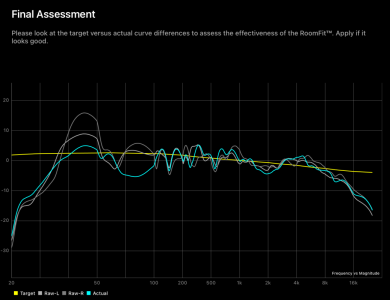
Here's what happened after the correction:
1770180305726.png
1770180337334.png
1770180366756.png


I would like to solve the problem that in the place where there is a peak on the RAW curve, after equalization I get a null.
 

Attachments

  • 1770180286880.png
    1770180286880.png
    124.5 KB · Views: 3
I was on the side and used an outstretched arm and a selfie stick :)

Reminded me of this thread 😀

 
I took measurements with these settings. During the measurements, I was on the side and used an outstretched arm and a selfie stick :)
View attachment 33354
View attachment 33355
Here's what happened after the correction:
View attachment 33357
View attachment 33358
View attachment 33359


I would like to solve the problem that in the place where there is a peak on the RAW curve, after equalization I get a null.
In the left/right individual adjustments, RoomFit appears to be cutting too much around the 90Hz range. This might be resolved by manually adjusting the filter.
(It won't solve the problem at its root, but)

However, it would be better to wait for @dominikz to wake up. 😂
 
Last edited:
I took measurements with these settings. During the measurements, I was on the side and used an outstretched arm and a selfie stick :)
View attachment 33354
View attachment 33355
Here's what happened after the correction:
View attachment 33357
View attachment 33358
View attachment 33359


I would like to solve the problem that in the place where there is a peak on the RAW curve, after equalization I get a null.
OK, so the null appears to be some kind of higher-order interference between the two channels.
This means that the L and R channels probably won't have the null if you would measure them individually, but the summed L+R response contains the null. You could verify this by measuring with REW, just in case you're curious.

An implication of this is that the hard-panned instruments shouldn't be affected by this null, but center-panned instruments would be affected. Given that the null is about 5dB deep and spread across most of the mid-bass (where e.g. most of the bass guitar fundamental sits, and bass guitar is often center-panned in many mixes) it would indeed be better to try and find a solution.

The dip appears to be some kind of inter-channel cancellation, so one easy thing to try is to move the speakers towards the front of the shelf they are sitting on. This goes against my previous advice to keep speakers close to the wall, but it is worth a try in this case.

In the left/right individual adjustments, RoomFit appears to be cutting too much around the 90Hz range. This might be resolved by manually adjusting the filter.
(It won't solve the problem at its root, but)

However, it would be better to wait for @dominikz to wake up. 😂
This is another thing worth trying, in case adjusting speaker position doesn't help.
Though I should note that this will be a compromise - unless we find a way to fix the cause of the cancellation, if we match the L+R response to our target to optimize for center-panned instruments then hard panned instruments will end up having too much mid-bass energy.
 
OK, so the null appears to be some kind of higher-order interference between the two channels.
This means that the L and R channels probably won't have the null if you would measure them individually, but the summed L+R response contains the null. You could verify this by measuring with REW, just in case you're curious.

An implication of this is that the hard-panned instruments shouldn't be affected by this null, but center-panned instruments would be affected. Given that the null is about 5dB deep and spread across most of the mid-bass (where e.g. most of the bass guitar fundamental sits, and bass guitar is often center-panned in many mixes) it would indeed be better to try and find a solution.

The dip appears to be some kind of inter-channel cancellation, so one easy thing to try is to move the speakers towards the front of the shelf they are sitting on. This goes against my previous advice to keep speakers close to the wall, but it is worth a try in this case.


This is another thing worth trying, in case adjusting speaker position doesn't help.
Though I should note that this will be a compromise - unless we find a way to fix the cause of the cancellation, if we match the L+R response to our target to optimize for center-panned instruments then hard panned instruments will end up having too much mid-bass energy.

Off topic

I was wondering if the processors in our Wiim could, as they currently stand, handle expert FIR approaches on a frequency band deliberately fixed at 20-30/300-500Hz...
Perhaps it could be estimated? ;-)
 
OK, so the null appears to be some kind of higher-order interference between the two channels.
This means that the L and R channels probably won't have the null if you would measure them individually, but the summed L+R response contains the null. You could verify this by measuring with REW, just in case you're curious.
Yes, that's right, I've been checking it out.

The dip appears to be some kind of inter-channel cancellation, so one easy thing to try is to move the speakers towards the front of the shelf they are sitting on. This goes against my previous advice to keep speakers close to the wall, but it is worth a try in this case.
I will try to do this today and take measurements.

This is another thing worth trying, in case adjusting speaker position doesn't help.
Though I should note that this will be a compromise - unless we find a way to fix the cause of the cancellation, if we match the L+R response to our target to optimize for center-panned instruments then hard panned instruments will end up having too much mid-bass energy.
I agree, I'd like to fix the cause, not the symptoms.

Thanks for the advice!
 
I moved the speakers away from the wall and got almost identical results. Each column individually has a peak, but together they have a null:
1770221041950.png
1770221069341.png

Dear @dominikz , is there anything else you can suggest based on your experience?

p.s.: what an amazing repeatability of measurements :)

upd: I closed the bass reflex of the right speaker (against the wall) and this is what I got:
1770224693924.png
The prediction of each channel was not as smooth as I would have liked, but the resulting curve became somewhat better.
 
Last edited:
Dear @dominikz , is there anything else you can suggest based on your experience?
To be completely honest, I'm not yet entirely sure what is causing this cancellation in your system.
My suspicion, based on the tests so far, is that one of the early sidewall reflections from one speaker is cancelling out with the direct sound coming from the other speaker. We could try to figure out how to test if this is indeed the case, but I believe it might not make sense to spend the time, given that you don't have much flexibility with speaker placement anyway.

upd: I closed the bass reflex of the right speaker (against the wall) and this is what I got:
1770224693924.png

The prediction of each channel was not as smooth as I would have liked, but the resulting curve became somewhat better.
That was a good idea to try, good job! Sadly it doesn't completely solve the issue.

IMHO without changing speaker placement significantly your options are a bit limited.

So my advice would be to just use "stereo" RoomFit and accept minor individual channel response imbalance at low frequencies. Many recordings have mono bass anyway so perhaps you will find it an acceptable compromise in practice. It should take care of the bass boom, and therefore still sound better than no correction at all.

That being said, in principle you could also use a hybrid approach: use "stereo" RoomFit filters for the response below 100Hz (to avoid the L+R cancellation), and combine it with "individual channel" RoomFit above 100Hz (up to a max of 500Hz or so). This would require some manual work and trial-and-error to configure, however, with probably only limited benefits.
 
Back
Top