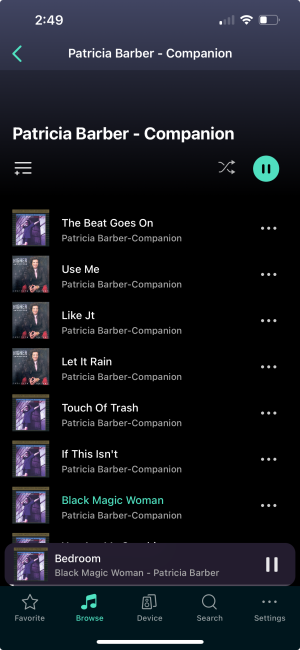
That view is whether it was a search per album, artist or from the folder. No difference. I used Mp3tag to do all my tagging. It’s a very odd issue. Especially when the song Yellow Car III shows the correct art work when it’s playing on my iPhone and on the Ultra’s display.
I think I might be able to help. Try this.
Attach your drive to your PC. Go to an affected folder. How many tracks? Let’s say there are 20. Come out of the folder, right click on it, click on properties. How many files? If it’s 21 (or more) you have hidden artwork in there. Let’s say there’s 21.
Create a new folder on your desktop. Cut and paste all 20 music files from the music folder into the new folder. To be safe, bulk select tracks 2-19 first. Then move tracks 1 and 20 individually.
Go back and right click on the folder. Despite looking empty, it should say there’s still 1 file in there.
Rename the folder on your desktop as the same as the one on your HDD. Delete the one on your HDD. Run the desktop folder through mp3tag to remove any remaining hidden artwork.
Put the folder on your desktop back on to your HDD where the old folder was.
Delete the cache on your HDD. Delete the WiiM Home app from your phone/tablet. Then reinstall the app.
Re-attach the HDD to the WiiM. Re-scan.
I’d do it with just one folder to start with to see if it works. If it does, remove the HDD from the WiiM, re-attach to your PC, and repeat for all affected folders.
While you’re there, make sure all jpegs are called ‘folder’ and that all are JPEG’s, not PNGs, etc.
It’s a little time consuming, but once it’s done, it’s done.
I presume you keep a master/back up copy on your PC. Make sure that’s corrected.
Good luck.