WiiM Home App v1.12 Update for Apple, Android, and Fire TV – Dec 1, 2025

Please review the Android & Fire TV app update release notes below. If you encounter any issues, feel free to reach out to us.

The Fire TV version is currently under review.

What's New:

1. Added a toggle for Lyrics Display and new Player Style options.
2. Added support for EQ, input, and output selection.
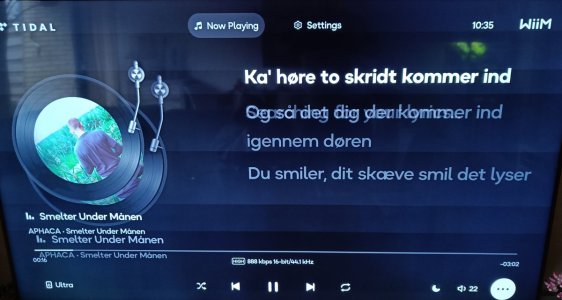
3. Introduced a new Vinyl-Style Cover view (selectable in Settings).
 
I really like the rotating record.😵‍💫😄

So why is adding preset buttons being put off? It's a shame, because being able to choose 12 presets would make up for the remote's weakness..

Even so, this is a excellent update.😄
 
Tested today on my Android TV. Great.

I like very much this new options.
The vinyl skin and the option to keep main screen always active are great!
 
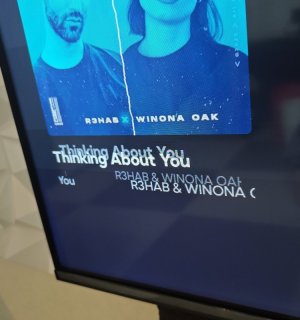
This version has some strange "echo" pictures if you switch between displays.

The "Searching for lyrics" text also remains on, even if the lyrics are displayed.

1000005425.jpg

This is on a Sony Bravia TV.
 
I’m trying the new Fire TV version, and it’s definitely an improvement on the previous version.

The record playing view is quite nice, although it would be better if the 9” tone arm was replaced with a 12” version, as the current one is rather too short.🤔

I don’t use the karaoke mode, so it would be better if the track, artist, and album details could be moved to the right hand side of the image, and also make the whole text display at least twice as long, or even use the full width available to the right hand side of the image.

This would much reduce the need for the text display to scroll, unless the titles are extremely long.🙂
 
The tonearm lifts away too.
And we still have the annoying jumping bars, even though we can now see if anything is playing by looking at the turntable.

I have also noted that the scrolling text is wobbling. Especially when paused. I am not sure if this was also the case before?
 
I have found my first issue, I have been playing music from a “group”, but have cancelled the group, and want to select my Ultra from the devices list, but it doesn’t have the option, it still has the Ultra linked in the group, so I’m unable to select it.

I had to exit the app, then go into settings and clear the app cache, and then restart the app, and I can now select my Ultra.
 
This version has some strange "echo" pictures if you switch between displays.

The "Searching for lyrics" text also remains on, even if the lyrics are displayed.

View attachment 30450

This is on a Sony Bravia TV.
I had this a week or two back (actually, 19 days ago according to the ticket) on an earlier version (1.10 android), but couldn't reproduce it.
Glad you have proof, 'cos I couldn't provide it for my ticket!

For me, it did this (searching for lyrics always shown) whenever I enabled Night Mode (and would disappear again when Night Mode was disabled), and the dual track title etc. when the screen changed between showing the track progress etc. and not (when the image changes size).

@WiiM Support, my ticket was #547163
Proof I wasn't hallucinating!
 
Last edited:
I had this a week or two back (actually, 19 days ago according to the ticket) on an earlier version (1.10 android), but couldn't reproduce it.
Glad you have proof, 'cos I couldn't provide it for my ticket!

For me, it did this whenever I enabled Night Mode.

@WiiM Support, my ticket was #547163
Proof I wasn't hallucinating!
I don't have a way to replicate the issue either but it has happened twice today when just playing around with the new options.

Only a restart of the App fixes the display.
 
I’m trying the new Fire TV version, and it’s definitely an improvement on the previous version.

The record playing view is quite nice, although it would be better if the 9” tone arm was replaced with a 12” version, as the current one is rather too short.🤔

I don’t use the karaoke mode, so it would be better if the track, artist, and album details could be moved to the right hand side of the image, and also make the whole text display at least twice as long, or even use the full width available to the right hand side of the image.

This would much reduce the need for the text display to scroll, unless the titles are extremely long.🙂
After further use, I no longer like the record playing view, as I don’t like the round cropped cover art, as in most cases it looks awful, so now it’s back to the Minimal Square view.

Thinking about my comments above, in the Non Karaoke mode, I would like to see a larger version of the square image, with the track, artist, and album details to the right hand side, in a similar style to the iPad landscape version below.

IMG_0019.jpeg
 
The bug I reported here six months ago still hasn't been fixed..
 
Another issue is that in the Minimal Square view, the track title doesn’t scroll, but it does in the rotating record view.

That’s enough testing for now, and I will wait to see if there are any further improvements in the next app version.🤔
 
On v1.12 I find the "cursor" (can't think of a better word) disappears.
i.e. I can move left/right and up/down but the currently selected item doesn't get highlighted.
The active icon definitely changes with my button pushes. e.g. I just pushed the 'centre' button and night mode activated.
If I press left 3 times then the centre the music pauses. Press left 3 more then centre and the device list pops up.
So it works, but it's a bit of a lucky dip if you don't keep track of what was last pressed.
 
On v1.12 I find the "cursor" (can't think of a better word) disappears.
i.e. I can move left/right and up/down but the currently selected item doesn't get highlighted.
The active icon definitely changes with my button pushes. e.g. I just pushed the 'centre' button and night mode activated.
If I press left 3 times then the centre the music pauses. Press left 3 more then centre and the device list pops up.
So it works, but it's a bit of a lucky dip if you don't keep track of what was last pressed.
All of these are working as you would expect on the Fire TV version.
 
Back
Top