WiiM Home App v3.5.2 Update – Mar 13, 2026

Please review the app update release notes below. If you encounter any issues, feel free to reach out to us.

App Version:
3.5.2

Beta Features

1. Simultaneous Output (Beta): Supports Optical/Coaxial with Line Out for simultaneous playback. Enable it on the Audio Output page.
2. Stereo Pair (Beta): Simplifies stereo pair setup. Note: The current beta firmware has a known issue where the volume may not stay synchronized when devices are grouped as a stereo pair.

Device Settings

1. Device Screen: Adds per-input screen on/off settings (requires the upcoming firmware update).
2. Automatic Updates: Adds an option to delay automatic firmware updates (requires the upcoming firmware update).

NAS & Streaming

1. NAS Browsing: Optimizes NAS browsing cache to reduce outdated data.
2. Open Network Stream (iOS): Improves handling of spaces in imported Custom Radio file names.

Setup

1. OOBE: Improves OOBE guidance to help troubleshoot setup issues.
2. Permissions: Improves permission explanation pages.
 
Last edited:
@WiiM Team
Not sure where I can post Wiim Home App suggestions but there is one thing I think would be a a nice to have.
It`s a UI feature for EQ - whenever I adjust graphic EQ I need to tap the the slider for given frequency and adjust, problem is that when tapping and holding I cannot see exact location of slider as it is covered by my finger (I can move my finger away while still pressed but that`s not very convenient). Additionally it is hard to do small adjustments by moving slider, it`s not very accurate.
So some kind of +/- buttons for each freq would be great.
 
@WiiM Team
Not sure where I can post Wiim Home App suggestions but there is one thing I think would be a a nice to have.
It`s a UI feature for EQ - whenever I adjust graphic EQ I need to tap the the slider for given frequency and adjust, problem is that when tapping and holding I cannot see exact location of slider as it is covered by my finger (I can move my finger away while still pressed but that`s not very convenient). Additionally it is hard to do small adjustments by moving slider, it`s not very accurate.
So some kind of +/- buttons for each freq would be great.
I’m not opposed to your suggestion.

However, there’s something I’d like you to try. After tapping the EQ band’s pointer, drag it slightly to the right (or left). You’ll then see the pointer. From there, drag it up or down.


View attachment 3296.mp4
 
I’m not opposed to your suggestion.

However, there’s something I’d like you to try. After tapping the EQ band’s pointer, drag it slightly to the right (or left). You’ll then see the pointer. From there, drag it up or down.


View attachment 36765
Yes, I know about that and I referred to this in my post, but still, in my opinion, this is not the best UX and additional buttons would improve usability.
 
V3.5.5 released on ipad

View attachment 35745

Got it also in Android.
General Improvement section removed, the Device Features and Streaming the Services the same.

By the way, we are discussing 3.5.5 on a a 3.5.2 releasw update thread..and there's no other newer than this ...
View attachment 35747
@RyanWithWiiM @JasonWithWiiM Will a new Thread be generated for WHA v3.5.5 (or maybe v3.5.6)??
We have to manually scan back Two Pages in the v3.5.2 thread to find even the Update Announcements as screenshots.
(Forum Search is having a hard time finding even these references because of how the version references are buried in the posts.)
 
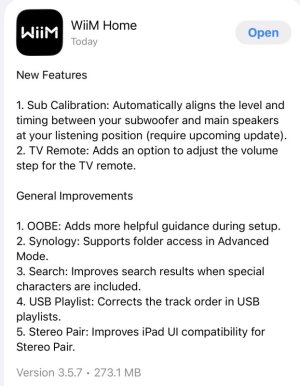
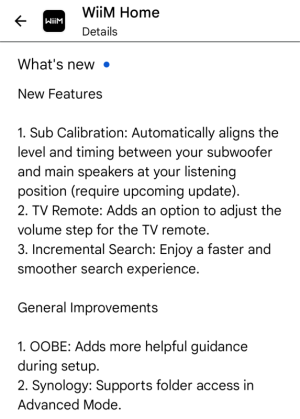
Level alignment. First time I've heard that. Not sure if I want it either unless it agrees with my manual setting 🙂
As long as you can manually change the level (as you can change the latency) it shouldn't be a problem. RoomFit is going to manipulate the actual level anyway (if subwoofer calibration is enabled and the lower corner frequency includes the subwoofer's frequency range). :)

This ...
2. TV Remote: Adds an option to adjust the volume step for the TV remote.
... is going to make some folks really happy.

@lemsto @timwimmy @artishard116 @kornface13 @hampisch @aeroshin @ister
 
As long as you can manually change the level (as you can change the latency) it shouldn't be a problem. RoomFit is going to manipulate the actual level anyway (if subwoofer calibration is enabled and the lower corner frequency includes the subwoofer's frequency range
When it eventually reaches the WiiM Amp I suppose I'll find out.
 
I just recognized coincidential stops (pause) when playing from LMS since the latest update. Anyone else seeing that?
Also, low signal levels on line input stops playing with message „No audio“. Is there any Auto-sensing that I can disable for Line in? (Pre-Gain is set to +10 dB). Is Low-level signal input only possible via Phono input? If so, is there a possibility to turn off RIAA equalization (linear input)?
And, thanks for improving RTA dynamics! Next, please improve dual display (stereo) and dual meters (stereo) with more than 20 dB range, perhaps horizontal bar (see RME for example)
 
Last edited:
Back
Top