WiiM Home App v3.3.9 Update – Oct 24, 2025

Please review the app update release notes below. If you encounter any issues, feel free to reach out to us.

What's New:

1. WiiM Sound:

- RoomFit™ room correction available during first-time setup (OOBE).
- In-app user manual.
- Dynamic Bass control.
2. Playback & Display: Audio Spectrum option on WiiM Ultra Now Playing screen (requires upcoming beta firmware).
3. Alarms: Custom labels and support for up to 32 alarms (requires upcoming firmware).
4. RoomFit: Automatically adjusts measurement range based on recording quality.
5. HDMI ARC: On-screen prompt when an unsupported audio format is detected via ARC.
 
Last edited:
Essentially these programmable reconstruction filters are nothing that WiiM has done. They are part of the architecture of the ESS SABRE DAC that WiiM is using. See docs on their product line-up:
The question here is if WiiM makes the filter selection available in the firmware or the app.
Sure I know, but thanks😊
 
Since last update (3.3.11) I've got a lot of messages like that (Wiim Pro Plus). Streaming from AM using Alexa Cast. It seems like pausing streaming and starting it after some time, creates sometimes new session instead of continuing in the existing one.
 

Attachments

  • 6376.jpg
    6376.jpg
    21.2 KB · Views: 14
Since last update (3.3.11)
Could you try going to your app settings and delete data, then cache , then the app. Then reinstall the app
Also remove the power from your wiim device for a couple of minutes and try again
 
Since last update (3.3.11) I've got a lot of messages like that (Wiim Pro Plus). Streaming from AM using Alexa Cast. It seems like pausing streaming and starting it after some time, creates sometimes new session instead of continuing in the existing one.
That screen is from the Amazon Music app, isn't it? It appears to be an Alexa Cast error unrelated to the WiiM app. I occasionally see that screen too. As you mentioned, it indicates playback is currently active on another device (including smartphone). As @Ronnie suggested, after attempting to reboot your WiiM device, please also try the following:

- Enable auto-connect in the Amazon Music app settings screen.
- Clear the Amazon Music app cache.
- Reboot your phone.

I may be wrong, but personally I guess this error is an issue with Alexa.
 
Could you try going to your app settings and delete data, then cache , then the app. Then reinstall the app
Also remove the power from your wiim device for a couple of minutes and try again
I did it several times, but the problem still persist randomly. Sometimes everything works fine, sometimes not. My problem is not specific to the 3.3.11 version, it was like that before but not so frequently.
 
I did it several times, but the problem still persist randomly. Sometimes everything works fine, sometimes not. My problem is not specific to the 3.3.11 version, it was like that before but not so frequently.
Hi MSdt,

Please send us a ticket via the WiiM Home App ( "More (...)" Tab > "Feedback" ). Our team will troubleshoot this issue ASAP. Thank you for your continued support and patience!
 
Hi MSdt,

Please send us a ticket via the WiiM Home App ( "More (...)" Tab > "Feedback" ). Our team will troubleshoot this issue ASAP. Thank you for your continued support and patience!
I will do this when I replicate the problem. For now I disconnect WiiM device everytime I pause/stop listen to mucis in AM.
 
I'm still hoping Wiim will add a "recently added" tab in the music list that does not sort by the date like this:

2025/09/03
2025/09/28
2025/10/09
2025/11/03
2025/11/08
...

but rather like this:

album A
album B
album C
...
where album A is the most recently added album.


The way it is now, I have no idea what I'm going to see when I select a date. I have a list of 30 dates and I have no idea when I added which album. I don't have to see the date when something was added, I want to see what I added most recently.
(Maybe have a look at how BS does it)
 
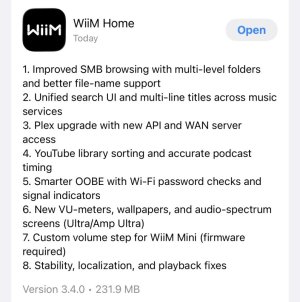
Version 3.4.0, right?
Audio spectrum for amp ultra...? Maybe it needs a new fw too?
 
That smb browsing still sucks. Big time.

Select recently added, you get a bunch of dates when music was added.
Select a date, you get 5000 tracks that were added at that day. Sorting only gives you the same 5000 tracks but mixed in a different order.
Select a track, and it starts playing that one track. Unless you push the big play button, then it adds ALL the tracks to the queue. No option to go to the album, you can't select multiple tracks, can't go to the artist.

Just have the system look at the most recently added files and folders and sort them into albums. Or into artists.
I don't care about the actual date. I just want the most recently added album on top of the list and the oldest at the end of the list. Not 5000 tracks in one long list and no option to go to the artist or album.

If I get home from work and want to listen to the new album I added the night before, I don't want to spend 20 minutes adding single tracks to the queue, if I can find them in the list of tracks.

Do the app developers even have a NAS filled with music they bought, or do they just use YouTube and Spotify?

Again, Wiim developers, buy a Bluesound streamer, see how fast, responsive and intuitively that works.

It begins to feel like I'm a beta tester for wiim too. And it starts to look a lot like Eversolo (my other streamer, for which I also appear to be a beta tester):
Add new vu meters and disregard the other issues.
 
imo, Smb browsing really is a last resort.
And iirc, bluesound basically scans the smb and creates a local library / database, so it's sort of turned the smb into a pseudo media server.
 
WiiM Home App version 3.4.0 now has its own thread, so any further discussions should continue there.

 
Back
Top