It seems a little strange that the settings are there if the Sub Pro isn't paired, but is connected by cable.
So, it looks like the opportunity for the Sub Pro owner to make his own decision about these settings has been removed.
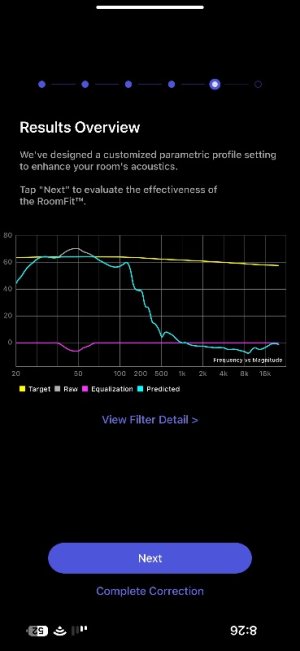
This is what my wiim sub pro frequency response looks like using my iPhone 15 mic. There’s a rolloff between say 50-100hz. My bookshelfs also start rolling off after 100hz. Hence the combined effect looks like a crossover drop.
I will try repositioning the sub and maybe rotating it to see if the perceived response changes.
This is what my wiim sub pro frequency response looks like using my iPhone 15 mic. There’s a rolloff between say 50-100hz. My bookshelfs also start rolling off after 100hz. Hence the combined effect looks like a crossover drop.
I will try repositioning the sub and maybe rotating it to see if the perceived response changes.
If you increase the Sub Pro volume and then use Ultra's RoomFit to correct frequencies between 30Hz and 300Hz, will it approach a flatter response? (with non-boost mode enabled)
The sub itself doesn’t have a volume knob but there is a level slider in the app with -15/+15 db range.
I will try your suggestion. Thanks!
Although relatively flat to 150hz is more than enough. Looks like a limiter kicks in at ~120-150hz from the steep rolloff.
The sub itself doesn’t have a volume knob but there is a level slider in the app with -15/+15 db range.
I will try your suggestion. Thanks!
Although relatively flat to 150hz is more than enough. Looks like a limiter kicks in at ~120-150hz from the steep rolloff.
In addition to the sub's response, if you could post screenshots of the speaker-only correction results and the sub+speaker correction results, you might receive some good advice from the knowledgeable members here.
Hi sorry for the late reply.
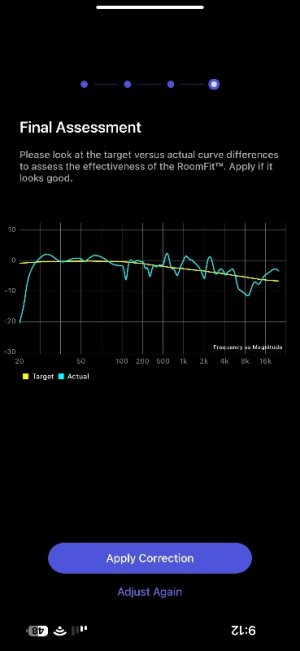
This is one capture I saved. Iirc this was with roomfit range set to 100-6000hz for the mains.
Always seems to be a big difference between the forecast and actual. Perhaps a small change in mic position makes a big difference at higher frequencies.
In addition to the sub's response, if you could post screenshots of the speaker-only correction results and the sub+speaker correction results, you might receive some good advice from the knowledgeable members here.
Forgot to mention I tried changing the sub gain and then running the Roomfit. However it appears that the gain is ignored and testing is done at 0db ie midpoint. Hopefully gain and roomfit correction is applied in a manner to avoid clipping.
This site uses cookies to help personalise content, tailor your experience and to keep you logged in if you register.
By continuing to use this site, you are consenting to our use of cookies.