WiiM Ultra Firmware v5.2.804553 Update - Jan 14, 2026

Please review the WiiM Ultra update release notes below. If you encounter any issues, feel free to reach out to us. This firmware update is being rolled out in stages, with devices updating sequentially over the next few days.

5.2.804553 (In Progress)

Release date:

Jan 14, 2026

What’s New:
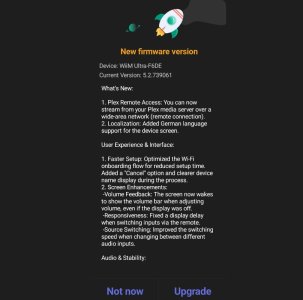
  1. Plex Remote Access: You can now stream from your Plex media server over a wide-area network (remote connection).
  2. Localization: Added German language support for the device screen.

User Experience & Interface:
  1. Faster Setup: Optimized the Wi-Fi onboarding flow for reduced setup time. Added a "Cancel" option and clearer device name display during the process.
  2. Screen Enhancements:
    • Volume Feedback: The screen now wakes to show the volume bar when adjusting volume, even if the display was off.
    • Responsiveness: Fixed a display delay when switching inputs via the remote.
    • Source Switching: Improved the switching speed when changing between different audio inputs.

Audio & Stability:
  1. Streaming Stability:
    • TIDAL Connect: Fixed an issue causing random playback stops.
    • Amazon Music: Resolved an issue where playback occasionally failed to start.
    • TuneIn: Fixed playback issues specific to NPR podcasts.
  2. System Performance:
    • USB Library: Fixed a potential memory issue (OOM) during large library scanning for better stability.
    • DAC Settings: Refined the logic for default DAC filter selection.
    • Alarms: Fixed a bug where alarm presets would not stop playing after the set duration ended.
 
My Ultra received 5.2.804553 yesterday. All settings were fine, except RAAT set on.
 
This update will be installed automatically, right?
Or is there any option in the settings such as "keep me informed about new FW updates but don´t install yet"?
 
This update will be installed automatically, right?
Or is there any option in the settings such as "keep me informed about new FW updates but don´t install yet"?
If you want to avoid an automatic update, you could try unplugging your device between 2am and 5am local time as I think that is when it goes through the automatic updates process. Then when you apply power again you will be given the option to not update in the WHA
 
Or is there any option in the settings such as "keep me informed about new FW updates but don´t install yet"?
You can also join a beta test which will delay any updates until you leave the beta test or the beta test ends.
You can also ask WiiM to 'whitelist' your device, but that would mean contacting them again to have the 'whitelist' request removed.
 
Mine popped up as a notification of available update and I manually accepted it with the option to reject it. ¯\_(ツ)_/¯

-Ed
If you had rejected it, there is a very good likelihood that it would install itself at a later time, probably overnight.
 
Hmm...in my case there was no notification ..just the message that "your device is up to date" (and showing the latest FW version) after I checked for updates.
 
probably overnight.
Unless you remove the power overnight.😇
I am actually testing this at the moment with the last update that gave some issues. I am waiting to see if the new update would appear before updating to the older version. I will let you know.
AISelect_20260123_143744_WiiM Home.jpg
Or is this the new version?
 
Unless you remove the power overnight.😇
I am actually testing this at the moment with the last update that gave some issues. I am waiting to see if the new update would appear before updating to the older version. I will let you know.
View attachment 32902
Or is this the new version?
I have no need to do that, and as soon as I know there is an update release, I keep checking multiple times per day as in this song by @Wiimer. :unsure: :)
 
Except it does not, still does it when using the Tidal app. It will take about 3 hours now, but it will do it.
If you haven’t already done so, raise a ticket via the more/feedback section when it next happens so WiiM can inspect your device logs. Are you on Android or iOS?
 
If you haven’t already done so, raise a ticket via the more/feedback section when it next happens so WiiM can inspect your device logs. Are you on Android or iOS?
On Android, up to date version 16.

Will raise a ticket next time it happens.
 
Still no shuffle mode worthy of the name in sight for the usb library.
Resume playback from where it was stopped and a real random mode, it"s not complicated.
 
That seems to be a very old FW version...
Thanks for the info.
The version listed is from the build date of 20251218.
I wanted to see if removing the power from the WiiM Ultra overnight could stop the automatic update, but also allow bypassing a particular update that caused issues until a patch was released.
It would appear that you can, as a patch was issued on the newer FW. I still haven't updated yet. I will probably wait until the next FW update is released ( just to make sure).
 
Back
Top