
I am trying to setup my music streaming service into my new wiim ultra. I am using RCA outputs into my denon 4300 receiver. I am trying to decide which input on the wiim is the best setup. Can you tell me which of these inputs have the best audio quality for music streaming (ethernet, bluetooth, hdmi arc or optical (fed from music app on firestick plugged into TV HDMI)? Thanks

You are using an out of date browser. It may not display this or other websites correctly.
You should upgrade or use an alternative browser.
You should upgrade or use an alternative browser.
Wiim Ultra input with best audio quality
- Thread starter wad
- Start date
-
- Tags
- wiim ultra

hgo58
Major Contributor
The quality depends on the source, not so much on what input is used.I am trying to setup my music streaming service into my new wiim ultra. I am using RCA outputs into my denon 4300 receiver. I am trying to decide which input on the wiim is the best setup. Can you tell me which of these inputs have the best audio quality for music streaming (ethernet, bluetooth, hdmi arc or optical (fed from music app on firestick plugged into TV HDMI)? Thanks
What is your source for the music?
All inputs except Bluetooth support the highest quality you source can provide.
Last edited:
We can more easily identify those with poorer Sound Quality - Bluetooth, Lossy Compressed Media (MP3 AAC etc), Lossy / Lower-grade Audio Streamed from "Free accounts".
As for the results produced via High-Res Streaming (24bit/44.1khz minimum) via WiFi or Ethernet or HDMI-ARC or Optical-In and output via RCA (using the Internal DAC) or Digital Outputs (using external downstream DAC - Denon 4300 in your case) - it is basically equal and ONLY YOU will be able to decide which is "Best" for your specific setup and room and Music Preferences.
As for the results produced via High-Res Streaming (24bit/44.1khz minimum) via WiFi or Ethernet or HDMI-ARC or Optical-In and output via RCA (using the Internal DAC) or Digital Outputs (using external downstream DAC - Denon 4300 in your case) - it is basically equal and ONLY YOU will be able to decide which is "Best" for your specific setup and room and Music Preferences.

Regardless of whether you can hear the difference, Bluetooth offers the lowest sound quality. When listening to Amazon Music on Fire TV, the sound quality changes due to upsampling. I don't know about other music services.I am trying to setup my music streaming service into my new wiim ultra. I am using RCA outputs into my denon 4300 receiver. I am trying to decide which input on the wiim is the best setup. Can you tell me which of these inputs have the best audio quality for music streaming (ethernet, bluetooth, hdmi arc or optical (fed from music app on firestick plugged into TV HDMI)? Thanks
But Ethernet (or Wi-Fi) offers the highest sound quality.
WiiM Ultra and the WiiM Home App provide a myriad of configuration settings (some not applicable to your equipment setup) that can be used to tweak and tune your Ultra to produce the Best Sound Quality - you will have to explore and try them.
Major amongst these is: RoomFit - it shapes the sound to compensate for some of your room's audio weaknesses.
Major amongst these is: RoomFit - it shapes the sound to compensate for some of your room's audio weaknesses.
I was hoping to use my firestick with the Amazon app installed plugged into my TV hdmi port then out to the ultra via hdmi arc or optical. Will that sound any different than using ethernet with the Amazon connect inside the wiim app? The Amazon app inside wiim isn't great compared to the firestick Amazon app. Also using the firestick Amazon app will allow the pictures to be seen on the TV. Before I purchased the wiim ultra I had my firestick plugged directly into my Denon AVR & I am not sure I heard much difference between this & using the wiim. The wiim does have some useful features that I am interested in but not sure better sound quality is a huge benefit.The quality depends on the source, not so much on what input is used.
What is your source for the music?
All inputs except Bluetooth support the highest quality you source can provide.
hgo58
Major Contributor
It's hard to say if the use of the HDMI path is ok. This depends on the TV and its implementation of HDMI. Many TVs resamples the HDMI input to a common lowest resolution.I was hoping to use my firestick with the Amazon app installed plugged into my TV hdmi port then out to the ultra via hdmi arc or optical. Will that sound any different than using ethernet with the Amazon connect inside the wiim app? The Amazon app inside wiim isn't great compared to the firestick Amazon app. Also using the firestick Amazon app will allow the pictures to be seen on the TV. Before I purchased the wiim ultra I had my firestick plugged directly into my Denon AVR & I am not sure I heard much difference between this & using the wiim. The wiim does have some useful features that I am interested in but not sure better sound quality is a huge benefit.
I would myself never use HDMI for anything else than sound from movies, etc.
Depending on what TV you have, you can use the WiiM TV App to show album art, etc.
Last edited:
As mentioned earlier, to the best of my knowledge, all UHD tracks on Amazon Music Unlimited via Fire Stick are upsampled to 192 kHz.I was hoping to use my firestick with the Amazon app installed plugged into my TV hdmi port then out to the ultra via hdmi arc or optical. Will that sound any different than using ethernet with the Amazon connect inside the wiim app? The Amazon app inside wiim isn't great compared to the firestick Amazon app. Also using the firestick Amazon app will allow the pictures to be seen on the TV. Before I purchased the wiim ultra I had my firestick plugged directly into my Denon AVR & I am not sure I heard much difference between this & using the wiim. The wiim does have some useful features that I am interested in but not sure better sound quality is a huge benefit.
However, if you can’t hear any difference compared to playing them on WiiM, I think you just choose whichever you prefer.
As @hgo58 mentioned, you can also use the WiiM Home TV app on the Fire Stick. In this case, you can control playback using the Amazon Music app on your smartphone and display the currently playing track information on your TV screen. I guess this is probably easier than using the TV remote.
hipoagumol
Valued Contributor
- Joined
- Sep 6, 2025
- Messages
- 186
I do use that setup sometimes. But since wiim released the nice Wiim Home App for Fire TV visualization is no longer a reason to go for Amazon Music at Fire TV.
I rather use the app Amazon Music with my phone and enable Alexa Cast through my Ultra.
You'll enjoy the Amazon Music official app while it is Wiim Ultra streaming the audio.
The other option is to use the Wiim Home app's Amazon Music interface (i agree not so nice, many threads here about what lacks and fails).
Anyway let me advise you the settings for best audio in your Fire tv and TV. I was experimenting and investigating it with some IA support too.
- Fire TV audio settings
- Display & Sounds - Audio- Surround Audio
--- If using ultra hdmi for movies use 'Best Available' setting. Fire tv will send the dolby audio signal to your tv and that to your Wiim.
-- If using hdmi just for stereo you may also chosen PCM (best available is also fine)
Either way and regardless what the song resolution is and also regardless of what the amazon music interface says on screen the Ultra will receive most likely 16 bits/48khz audio resolution (AC3 16b/48khz if Best Available setting OR LPCM 16bit/48Khz ). Maybe if your TV is more modern than mine and implements eARC it may go with higher sample rate (even if song is not streamed at thar rate).
You can check what digital stream your Ultra is receiving via HDMI in the now playing screen of Wiim Home App.
TV audio settings. The most important one actually if you don't want poor dac/dsp to mess around with your signal:
- It depends on your model where to find the setting but typically you should look for the audio settings , optical / hdmi output and select 'Passthrough' as prefered option . If that does not exist then PCM.
But my advise is to use native Amazon music app on phone and give a try to wiim app on Fire tv. Ultra will stream the song at its original available resolution.
You will no longer needed amazon music app on Fire tv just for the enjoy of lyrics and big album art.
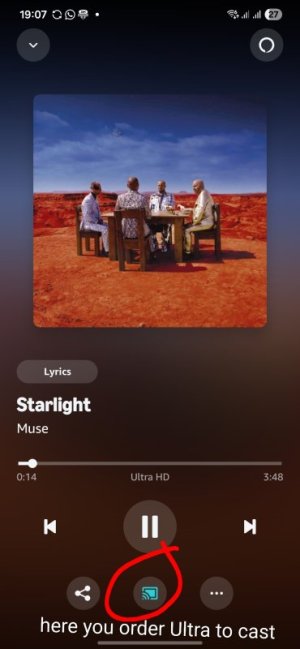
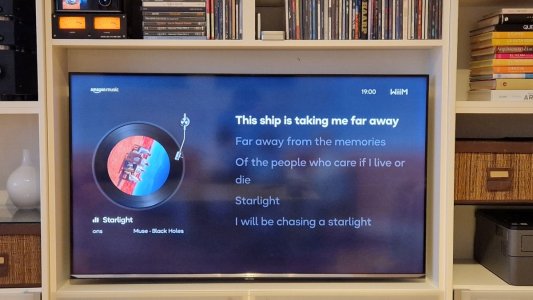
I rather use the app Amazon Music with my phone and enable Alexa Cast through my Ultra.
You'll enjoy the Amazon Music official app while it is Wiim Ultra streaming the audio.
The other option is to use the Wiim Home app's Amazon Music interface (i agree not so nice, many threads here about what lacks and fails).
Anyway let me advise you the settings for best audio in your Fire tv and TV. I was experimenting and investigating it with some IA support too.
- Fire TV audio settings
- Display & Sounds - Audio- Surround Audio
--- If using ultra hdmi for movies use 'Best Available' setting. Fire tv will send the dolby audio signal to your tv and that to your Wiim.
-- If using hdmi just for stereo you may also chosen PCM (best available is also fine)
Either way and regardless what the song resolution is and also regardless of what the amazon music interface says on screen the Ultra will receive most likely 16 bits/48khz audio resolution (AC3 16b/48khz if Best Available setting OR LPCM 16bit/48Khz ). Maybe if your TV is more modern than mine and implements eARC it may go with higher sample rate (even if song is not streamed at thar rate).
You can check what digital stream your Ultra is receiving via HDMI in the now playing screen of Wiim Home App.
TV audio settings. The most important one actually if you don't want poor dac/dsp to mess around with your signal:
- It depends on your model where to find the setting but typically you should look for the audio settings , optical / hdmi output and select 'Passthrough' as prefered option . If that does not exist then PCM.
But my advise is to use native Amazon music app on phone and give a try to wiim app on Fire tv. Ultra will stream the song at its original available resolution.
You will no longer needed amazon music app on Fire tv just for the enjoy of lyrics and big album art.
Last edited:
Thanks. It's not actually a fire tv. It's an Amazon firestick plugged into the hdmi port on a hisense u65 tv. The audio output if actually information says same as when using ethernet streamingI do use that setup sometimes. But since wiim releases the nice Wiim App for Fire TV visualization is no longer a reason to go for Amazon Music at Fire TV.
I rather use the app Amazon Music with my phone and enable Alexa Cast through my Ultra. You'd enjoy the Amazon Music official app while it is Wimm Ultra streaming the audio. The other option is to use the wiim home app's amazon music interface (i agree not so nice, many threads here about what lacks and fails).
Anyway Let me advise settings for best audio in your Fire tv and TV settings
- Fire TV audio settings
- Display & Sounds - Audio- Surround Audio
--- If using ultra hdmi for movies use 'Best Available' setting
-- If using hdm just for stereo you may also chosen PCM ( best available is also fine)
Either way and regardless what the song resolution is and regardless of what the amazon music interface says on screen the Ultra will receive most likely 16 bits/48khz audio resolution (AC3 OR PCM). Maybe if toir TV is verinmodern and eARC it may go with higher sample rate. You can check that in the now playing screen off Wiim Home App.
TV audio settings (the most important if you don't want poor dac/dsp to mess around with your signal.
It depends on your model wherw to finde the setting but typically you should look for the audio settings , optical / hdmi output and select 'Passthrough' as prefered option . If that does not exist then PCM
But my advise is to use native amazon music app on phone and give a try to wiim app on Fire tv.
You will no longer needed amazon music app on Fire tv just for the enjoy of lyrics and big album art.
View attachment 36627
View attachment 36628
hipoagumol
Valued Contributor
- Joined
- Sep 6, 2025
- Messages
- 186
Haha,about same TV here, hisense u7qf50.Thanks. It's not actually a fire tv. It's an Amazon firestick plugged into the hdmi port on a hisense u65 tv. The audio output if actually information says same as when using ethernet streaming
Isn't amazon firestick same? Mine is technically Amazon Fire Stick TV 4K Max
You'll see the same settings i mentioned
Just rechecked mine is a hisense 65U78 & exactly same firestick. Too funny. Great I will try your setup. ThanksHaha,about same TV here, hisense u7qf50.
Isn't amazon firestick same? Mine is technically Amazon Fire Stick TV 4K Max
You'll see the same settings i mentioned
I do have the wiim tv app on my hisense tv so I can use ethernet streaming & have the tv app show me album art, etc. The only issue that I have with this is that I need to keep going into tv setting & turning off cec control because I do have my bluray player, cable tv & firestick plugged into my denon receiver with earc from tv into receiver earc. I also have a qnap NAS but I am not concerned with it as its barely used. Is there a different setup that I should be using?It's hard to say if the use of the HDMI path is ok. This depends on the TV and its implementation of HDMI. Many TVs resamples the HDMI input to a common lowest resolution.
I would myself never use HDMI for anything else than sound from movies, etc.
Depending on what TV you have, you can use the WiiM TV App to show album art, etc.
hipoagumol
Valued Contributor
- Joined
- Sep 6, 2025
- Messages
- 186
What is exactly problem with your tv settings and CEC? Why do you need it off?I have it enabled and these settings (I guess menu will be same or very similar in your Hisense)
It works as i want it to. Try out...
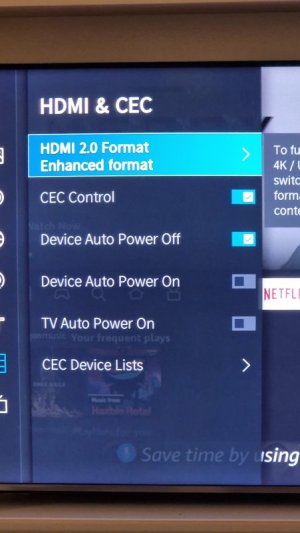
It works as i want it to. Try out...
My problem is that I have my firestick, bluray & cable plugged into denon receiver's HDMI therefore my earc from tv is connected to my denon receiver. So my wiim rca output goes into CD input on denon. So to switch to wiim app on TV it switches denon receiver input & cuts off wiim sound. Do you have multiple inputs connected on your receiver?What is exactly problem with your tv settings and CEC? Why do you need it off?I have it enabled and these settings (I guess menu will be same or very similar in your Hisense)
It works as i want it to. Try out...
View attachment 36637
hipoagumol
Valued Contributor
- Joined
- Sep 6, 2025
- Messages
- 186
I think that you should be able to modify that behavior from TV CEC settings (similar to what i sent before) or receiver settings.
My setup has Fire Tv, bluray player and PC connected to TV on normal hdmi and TV connected to wiim ultra through hdmi arc. Then the ultra connected via rca to stereo amplifier.
That way what i see on tv (digital tv, Fire tv, bluray, streaming, pc...) goes to wiim which is my media hub plus enjoys all sound benefits of centralized sound level, roomfit correction etc.
You may try something similar if your tv has multiple inputs and let ultra receive hdmi arc and your receiver only the ultra's output.
My setup has Fire Tv, bluray player and PC connected to TV on normal hdmi and TV connected to wiim ultra through hdmi arc. Then the ultra connected via rca to stereo amplifier.
That way what i see on tv (digital tv, Fire tv, bluray, streaming, pc...) goes to wiim which is my media hub plus enjoys all sound benefits of centralized sound level, roomfit correction etc.
You may try something similar if your tv has multiple inputs and let ultra receive hdmi arc and your receiver only the ultra's output.
Ok thanks. I will try that. I have multiple hdmi connections on tv. So you have everything connected to tv & then out to wiim via hdmi arc? So then you change your tv inputs to play different devices?I think that you should be able to modify that behavior from TV CEC settings (similar to what i sent before) or receiver settings.
My setup has Fire Tv, bluray player and PC connected to TV on normal hdmi and TV connected to wiim ultra through hdmi arc. Then the ultra connected via rca to stereo amplifier.
That way what i see on tv (digital tv, Fire tv, bluray, streaming, pc...) goes to wiim which is my media hub plus enjoys all sound benefits of centralized sound level, roomfit correction etc.
You may try something similar if your tv has multiple inputs and let ultra receive hdmi arc and your receiver only the ultra's output.
hipoagumol
Valued Contributor
- Joined
- Sep 6, 2025
- Messages
- 186
Yes. All connected to TV and the TV via hdmi ARC to wiim ultra. My Tv switches inputs. When i push Home button of Firestick remote it switches to hdmi1 and i see firestick. When I switch on bluray player with bluray's remote, the tv switches to hdmi2...that is because of CEC configurartion but of course you can probably also configure to switch tv inputs with the tv remote.Ok thanks. I will try that. I have multiple hdmi connections on tv. So you have everything connected to tv & then out to wiim via hdmi arc? So then you change your tv inputs to play different devices?
Streaming Amazon Music from the Firestick via the TV will likley limit the sample rate to 48kHz. For maxiumum resolution / sampling rate use the Amazon Music function in WiiM Home or stream from an Amazon Music app direct to the WiiM device. You could use the the WiiM aop on the Firestick which will stream Amazon Music to the WiiM device at full resolution depending on what shows on the home page of the Firestick WiiM app.I was hoping to use my firestick with the Amazon app installed plugged into my TV hdmi port then out to the ultra via hdmi arc or optical. Will that sound any different than using ethernet with the Amazon connect inside the wiim app? The Amazon app inside wiim isn't great compared to the firestick Amazon app. Also using the firestick Amazon app will allow the pictures to be seen on the TV. Before I purchased the wiim ultra I had my firestick plugged directly into my Denon AVR & I am not sure I heard much difference between this & using the wiim. The wiim does have some useful features that I am interested in but not sure better sound quality is a huge benefit.
Similar threads
- Replies
- 27
- Views
- 569

- Replies
- 6
- Views
- 508
- Replies
- 4
- Views
- 455
- Replies
- 26
- Views
- 757
- Replies
- 3
- Views
- 596
