So, you don't want that the Firestick remote turn on/off TV ans even control volume? (even wiim ultra volume when wiim set to hdmi input)
For me that is very convenient since i can grab any remote to swtich on/off or adjust volume.
I dont push the power button of Firestick unless i want to swtich off tv ..and my music system as if ultra is on and using hdm input the turnn off of tv/firestick will turn off also the ultra.
If i want the TV to show firestick I push the Home button of the Firestick remote and if i want to swtich to other inputs on tv use the tv remote or the other devices' remote (for example if i power on bluray tv switches to that hdmi input automatically).
The firestick is somehow meant to be always on while tv is on.
But also you can achieve yout desired behavior if you remove your TV from the Firestick list of controled devices .
This is the setting under Equipment Control:
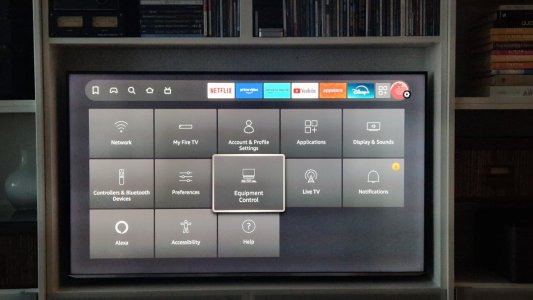
Browse go Manage Equipment
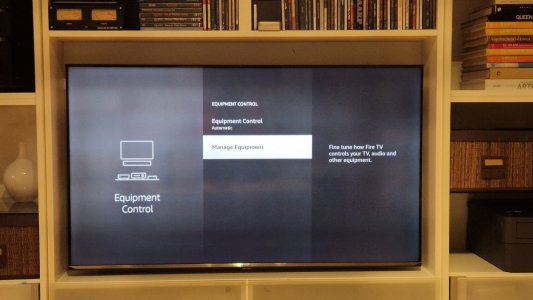
Then to TV
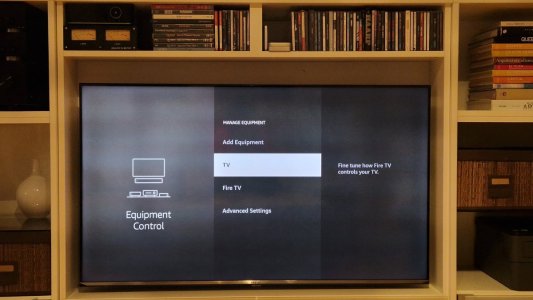
Then all way down to Change tv
and you press the 3 bars button on the firestick remote. Your TV will be removed from the controled devices. So your firestick remote won't switch on or off tv or control volume.
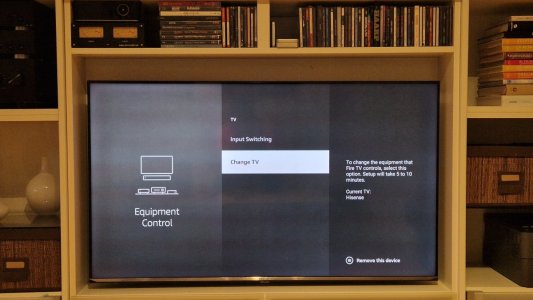
If you regret you can come back tonthis menu and add back the tv as a device that can be controles by your firestick remote. It is an easy guided process . I just tried removing ans addingmñ.
Hope it helps!



