Analyzing RoomFit correction results (KEF LSX II + Ultra)

huyvoxyz

Member
Joined
Nov 1, 2025
Messages
12
Hello everyone,

I've been experimenting with RoomFit to correct the low-frequency issues in my room using my KEF LSX II speakers (with their internal EQ disabled) connected to a WiiM Ultra via optical cable. I don't use sub.

I ran three Individual Channel RoomFit sessions and would appreciate the community's analysis and comparison, as I'm not entirely confident in my RoomFit settings and in reading the results graphs and selecting the best profile.

RoomFit configuration:
- Type: Individual Channel RoomFit (my speakers are not placed in center of the room, the left is near the corner and wall layout behind them is also different)
- B&K target curve
- Min-max gain: -12 dB and +6 dB, https://faq.wiimhome.com/en/support/solutions/articles/72000647399 recommends max gain +3 dB but someone on this forum suggested +6 dB when used with non-boost mode, so I followed that
- Max Q: 10
- Non-boost mode: enabled
- Built-in mic compensation: enabled
- Smoothing: 1/12 octave
- Multiple measurements: enabled

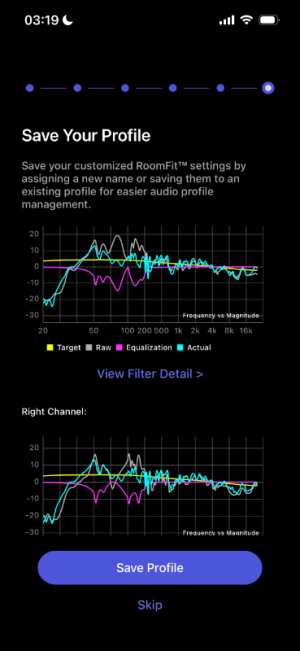
First session (individual400Hz): target frequency is 50-400Hz
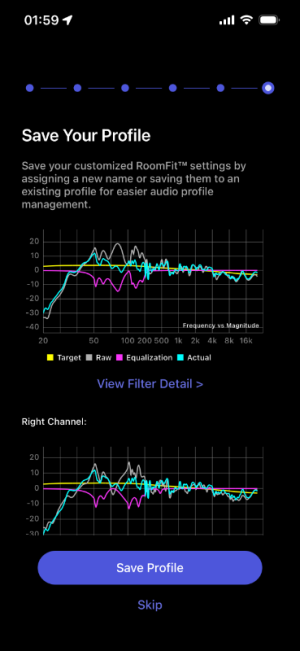
Second session (individual400Hz-2): same freq with first session
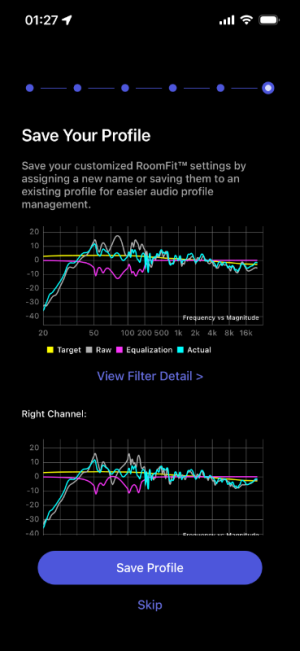
Third session (individual500Hz): target frequency is 50-500Hz

I am very new to this subject, and any advice is welcomed!
  1. 400Hz vs 500Hz range: I am confused about the ideal correction limit. Some advice points to 400Hz as the maximum range for reliable room correction, while others suggest 500Hz is safe for low-frequency room mode correction. Which cutoff is technically more appropriate for this purpose?
  2. How successful was Roomfit in correcting the Hz across all profiles? (I can't say which cyan curve is better than which)
  3. Will an external microphone improve further the correction? I've been using the iphone 13 mic at 3 am for absolute silence lol
Thank you in advance!
 

Attachments

  • individual400Hz.PNG
    individual400Hz.PNG
    80 KB · Views: 112
  • individual400Hz-2.PNG
    individual400Hz-2.PNG
    82.8 KB · Views: 94
  • individual500hz.PNG
    individual500hz.PNG
    79.6 KB · Views: 92
I ran a few multi-mic measurements at different times of the day and got mixed results. Profile 2 seems to be the worst, but I’m stuck between 1 and 3.

Profile 1
View attachment 32476

Profile 2
View attachment 32477

Profile 3
View attachment 32478

Honestly, I’m a bit lost on how to read these graphs. Should I be focusing on the cyan curve or the pink one? Does the cyan line shift every time I measure? Basically, should I just be looking at the pink curve to judge how well the bass is actually being handled?
Cyan curve tells you how the corrected loudspeaker response looks, so best to focus on that one.

Anyway, all 3 profiles look pretty similar to me, so I'd say any one of them should be fine.
Did you change anything between them, or are these just 3 attempts made with the same configuration and under the same conditions?
 
Cyan curve tells you how the corrected loudspeaker response looks, so best to focus on that one.

Anyway, all 3 profiles look pretty similar to me, so I'd say any one of them should be fine.
Did you change anything between them, or are these just 3 attempts made with the same configuration and under the same conditions?
The only difference was using line out for the first run, then switching to optical out for the second and third, but I don't think it should change anything? And with MMM, the way I move the phone is different each time, so that probably explains it.
 
The only difference was using line out for the first run, then switching to optical out for the second and third, but I don't think it should change anything? And with MMM, the way I move the phone is different each time, so that probably explains it.
You didn't say you were using MMM. You said you were using multiple measurements which is different.
 
The only difference was using line out for the first run, then switching to optical out for the second and third, but I don't think it should change anything? And with MMM, the way I move the phone is different each time, so that probably explains it.
Note that MMM is sensitive to environment noise (e.g. like fridge hum, or a truck passing by on the street outside your house).
This means that the response shape you measure with MMM can change as the noise changes, assuming noise level is sufficiently high to pollute the measurement.

Sweep measurements are much more resistant to environment noise.

Both sweep and MMM should give similar results at low frequencies (e.g. below 300Hz), but they will be different at higher frequencies.
Since we only apply RoomFit correction at low frequencies, either method (MMM or sweep) works well enough.
 
One trick that’s really great in the Ultra , is that you can do room correction the ordinary way from listening position between 30-300 Hz , and do another correction preset using a good measurement microphone about one meter from only one speaker active, and correct the on axis sound from the speaker between 300-20000 Hz using the roomfit mode ”flat ” and 1/6 oct smoothing.

So, now you have two presets in roomfit . One done from listening position ( 30-300 Hz ) and the other 1 meter (300-20000 Hz ) from only one speaker , correcting the speaker.

Now , you print over all the correction numbers you did between 300-20000 Hz and put it in the Eq mode.

Now , both eq mode and roomfit shall be turned on.

You can combine both eq ( 300-20000 Hz that you did with only one speaker active) and roomfit ( 30-300 Hz with mic at listening position ) and the sounding result can be stunning - try it (y)

( Ofcourse If your speakers are already flat between 300 - 20000 Hz the sound will not be any better )
 
Last edited:
One trick that’s really great in the Ultra , is that you can do room correction the ordinary way from listening position between 30-300 Hz , and do another correction preset using a good measurement microphone about one meter from only one speaker active, and correct the on axis sound from the speaker between 300-20000 Hz using the roomfit mode ”flat ” and 1/6 oct smoothing.

So, now you have two presets in roomfit . One done from listening position ( 30-300 Hz ) and the other 1 meter (300-20000 Hz ) from only one speaker , correcting the speaker.

Now , you print over all the correction numbers you did between 300-20000 Hz and put it in the Eq mode.

Now , both eq mode and roomfit shall be turned on.

You can combine both eq ( 300-20000 Hz that you did with only one speaker active) and roomfit ( 30-300 Hz with mic at listening position ) and the sounding result can be stunning - try it (y)

( Ofcourse If your speakers are already flat between 300 - 20000 Hz the sound will not be any better )

Thank you. I will try that! (y)
 
One trick that’s really great in the Ultra , is that you can do room correction the ordinary way from listening position between 30-300 Hz , and do another correction preset using a good measurement microphone about one meter from only one speaker active, and correct the on axis sound from the speaker between 300-20000 Hz using the roomfit mode ”flat ” and 1/6 oct smoothing.

So, now you have two presets in roomfit . One done from listening position ( 30-300 Hz ) and the other 1 meter (300-20000 Hz ) from only one speaker , correcting the speaker.

Now , you print over all the correction numbers you did between 300-20000 Hz and put it in the Eq mode.

Now , both eq mode and roomfit shall be turned on.

You can combine both eq ( 300-20000 Hz that you did with only one speaker active) and roomfit ( 30-300 Hz with mic at listening position ) and the sounding result can be stunning - try it (y)

( Ofcourse If your speakers are already flat between 300 - 20000 Hz the sound will not be any better )
I must thank you for this tip.
Worked great for me.👍
 
and do another correction preset using a good measurement microphone about one meter from only one speaker active, and correct the on axis sound from the speaker between 300-20000 Hz using the roomfit mode ”flat ” and 1/6 oct smoothing.
On what hight should the mic be positioned? I have a 2-way standmounter. Inbetween tweeter and mid/low woofer?
 
On what hight should the mic be positioned? I have a 2-way standmounter. Inbetween tweeter and mid/low woofer?
If the speaker manufacturer has defined a reference axis, this should be used. Unfortunately this is not so common any more.

In any other case it makes sense to place the mic at the same height your ears would be.
 
On what hight should the mic be positioned? I have a 2-way standmounter. Inbetween tweeter and mid/low woofer?
When correcting the loudspeaker 300-20000 Hz , you can have the microphone about 1 meter from the single speaker at the same height as the tweeter and for best result use a microphone stand. You can sit at listening position 3-4 meters away and see the line from this position , the microphone on its stand, and the tweeter. The best result may because of this be putting the microphone 10-15 degrees off axis, or the angle you have to the speaker from listening position.

When correcting the loudspeaker, remember to use the roomfit option ”flat”, and use 1/6 Oct smoothing. Also remember to turn off the other speaker completely when measuring,
 
When correcting the loudspeaker 300-20000 Hz , you can have the microphone about 1 meter from the single speaker at the same height as the tweeter and for best result use a microphone stand. You can sit at listening position 3-4 meters away and see the line from this position , the microphone on its stand, and the tweeter. The best result may because of this be putting the microphone 10-15 degrees off axis, or the angle you have to the speaker from listening position.

When correcting the loudspeaker, remember to use the roomfit option ”flat”, and use 1/6 Oct smoothing. Also remember to turn off the other speaker completely when measuring,
Do you need to move the speaker well away from the wall behind it?
 
When correcting the loudspeaker 300-20000 Hz , you can have the microphone about 1 meter from the single speaker at the same height as the tweeter and for best result use a microphone stand. You can sit at listening position 3-4 meters away and see the line from this position , the microphone on its stand, and the tweeter. The best result may because of this be putting the microphone 10-15 degrees off axis, or the angle you have to the speaker from listening position.

When correcting the loudspeaker, remember to use the roomfit option ”flat”, and use 1/6 Oct smoothing. Also remember to turn off the other speaker completely when measuring,
Tried it, however, results are quite different if measure several times dependent on position e.g. a bit higher/lower, left/right, left/right channel…
I see some consistency in some measurements around 250, 350 and 3kHz, the rest differs! (Measured from 200-20k - above 10k (in my case) is no correction necessary.
 
Tried it, however, results are quite different if measure several times dependent on position e.g. a bit higher/lower, left/right, left/right channel…
I see some consistency in some measurements around 250, 350 and 3kHz, the rest differs! (Measured from 200-20k - above 10k (in my case) is no correction necessary.
The problem is that, even at only 1m distance, room effects will unfortunately be overwhelming - especially if just a single point sweep without temporal gating is used to measure.

You can try the MMM variant of RoomFit instead, which at 1m distance from the speaker would probably produce something resembling either LW or PIR curves (or something in between), at least above 1kHz. This should be more repeatable, and slightly more representative of loudspeaker's anechoic performance.

However if you really want to try and measure just the loudspeaker direct/anechoic response then a bit more effort is needed, I'm afraid. The procedure is very nicely explained in this guide on ASR, in case you want to give it a try.
It is IMHO quite interesting!
 
The problem is that, even at only 1m distance, room effects will unfortunately be overwhelming - especially if just a single point sweep without temporal gating is used to measure.

You can try the MMM variant of RoomFit instead, which at 1m distance from the speaker would probably produce something resembling either LW or PIR curves (or something in between), at least above 1kHz. This should be more repeatable, and slightly more representative of loudspeaker's anechoic performance.

However if you really want to try and measure just the loudspeaker direct/anechoic response then a bit more effort is needed, I'm afraid. The procedure is very nicely explained in this guide on ASR, in case you want to give it a try.
It is IMHO quite interesting!
This is what I thought. I will check my measurements and see how I like the possible corrections that are repeatable. I will keep your suggestion for later… 👍🏻☺️ Thank you!
 
Best is ofcourse to measure the frequency range of 300-20000 Hz outside , with the speaker on a high stand. But….

My measurement 70 cm on axis from Genelec 8340 with line audio om1 using sine sweep in the middle of the room ( thick rug on floor ) with 1/6 smoothing shows it’s flat within +-1.5 dB 500-20000 Hz , - in reality this monitor is even flatter. I think you can trust the measurements.

A bad microphone is much less accurate.

Please use my advice only if the sound gets any better.
 
Back
Top