Beta Test: Stereo Pair

WiiM Team

WiiM Team
Staff member
Admin
Moderator
Joined
Oct 19, 2022
Messages
1,093
Hi WiiM Community,

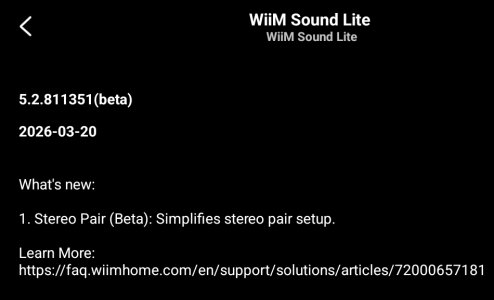
We’re looking for beta testers to try the new Stereo Pair experience. You can easily pair two WiiM Sound or WiiM Sound Lite devices into a stereo setup, and their volume will stay in sync. In the next version, they will also stay consistent in EQ, Pre-Gain, Dynamic Bass, and more.

How to join the beta​

  • Update the WiiM Home app to the latest version
  • Go to WiiM Sound / Sound Lite → Device Settings → Device Info → Join Beta Testing
  • Select Version 5.2.811351

Thanks!
WiiM Team
 
Seemingly you can't pair a WiiM Sound with a WiiM Sound Lite - surely they're sonically identical so what's the issue? Ticket raised.
I was able to pair mine. Though I upgraded both to the new beta SW first.

In my case the issues I noticed is that the pair isn't always visible as a Spotify Connect endpoint, and also that I'm unable to change the name of the group (i.e. can't click Next once I update the name).
Edit: I can update the name after all, it was just user error. The "Next" button works if the new name is different than current one, but not if you try to commit the same name again.
 
Last edited:
Yeah, I updated to the same beta firmware first too. I've even power cycled them but still no joy. Hopefully support can have a look at my logs and advise.
 
When Per-Source Volume Control is enabled, can the volume of the two speakers remain synchronized even if you switch between inputs with different volume levels several times?
 
I'll try it later with a Sound and a Sound Lite.
I thought "You can easily pair two WiiM Sound or WiiM Sound Lite devices into a stereo setup" was ambiguous.
I note the doco shows a screenshot that says "identical" Sounds, but also that @dominikz got a non-identical pair to pair.

In the meantime, a suggestion for Wiim - make the Learn More links clickable or selectable (copy / paste)
1000001114.jpg
 
Yeah, I updated to the same beta firmware first too. I've even power cycled them but still no joy. Hopefully support can have a look at my logs and advise.
Creating (and renaming) the pair worked for my WiiM Sound plus WiiM Sound Lite setup immediately.

WiiM Home App 3.5.5 on Android. So far I only played a bit of Radio Paradise, nothing special or complicated.

RoomFit setup appears to be separated for both devices, which leads to the question what the best RoomFit settings might be for a stereo pair. At a first glance I'd suspect that individual channel RF per speaker would not make much sense.

Apart from that I tried to match as many settings as possible prior to setting up the stereo pair. What would be the use of one stereo pair member going into standby after 2 minutes, but the other after 30 seconds? Same thoughts.for dynamic bass.
 
Last edited:
WHAT? I thought this was standard. This is how they are advertised.
No need to panic 🙄

Prompted by @Mr Ee's post, I tried on my Android phone and they paired immediately. So looks like there's a bug with my app on iPad, but following the advice I parrot out incessantly (or so I'm told by much missed ex-members - hi achim ;) ), I submitted a ticket via the more/feedback section in the app so I'm optimistic WiiM will fix the iOS app asap...
 
No need to panic 🙄

Prompted by @Mr Ee's post, I tried on my Android phone and they paired immediately. So looks like there's a bug with my app on iPad, but following the advice I parrot out incessantly (or so I'm told by much missed ex-members - hi achim ;) ), I submitted a ticket via the more/feedback section in the app so I'm optimistic WiiM will fix the iOS app asap...
I only have one Sound and iDevices for the WHA. Had I gotten an additional Sound Lite and the pairing hadn‘t worked, THEN I‘d have paniced😅.
Seriously, if this is really so this is a very major bug and I‘m surprised we haven‘t read more on that.
 
The beta is hardly out and the bug in the iOS app has been reported, while it works in the Android app - and the results can be seen and used in the iOS app. That's what betas are for, to identify bugs before a public release. This is very close to "nothing to see here, please move on". Sheesh as I believe the colonials say ...
 
I called my pair 'Wiim Sounds Pair'. The Lite is the leader.

Tidal Connect: just like when wiims are in a wiim group, only the lead device is shown with its normal, individual name.
i.e. I see 'Wiim Sound Lite', but I don't see 'Wiim Sound'

Spotify Connect:
It's all gone horribly wrong when I messed around with what I was casting to...
I'll 'clean up' and try again...
(The 'Sounds' group is a wiim persistent group. That still works.)
 

Attachments

  • 1000001116.jpg
    1000001116.jpg
    15.6 KB · Views: 0
I called my pair 'Wiim Sounds Pair'. The Lite is the leader.
That's a really boring name.😜

Spotify Connect:
It's all gone horribly wrong when I messed around with what I was casting to...
I'll 'clean up' and try again...
(The 'Sounds' group is a wiim persistent group. That still works.)
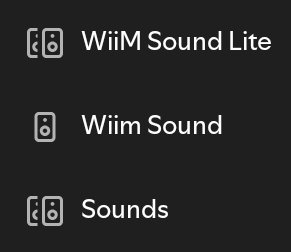
Looking at that screenshot, the WSL icon appear in pairs—does that mean if you connect to WSL, the audio will play in stereo pair?

If so, then we won’t need a persistent group. 🙂

Or does connecting to a persistent group unlock the speaker pair, and then return it to the persistent group? 🤔
 
Looking at that screenshot, the WSL icon appear in pairs—does that mean if you connect to WSL, the audio will play in stereo pair?
When I chose the WSL with two speakers (top option) both speakers played.
I'm assuming they played the appropriate L / R channel, but I didn't get that far...

...because I then chose the 2nd option, Wiim Sound, which was the follower in the stereo pair, and as expected just the Sound played.
From that point on it seemed the stereo pair 'dissolved' as no matter what I did I couldn't get the stereo pair to play again.
Each of the Sounds' Settings screen showed they were paired (in the Stereo Pair option), but the Devices screen showed them as individual devices rather than combined in a single card.

As I said, the persistent group still worked.

I had to go into the Stereo Pair screen and choose 'Remove Stereo Pair' so I could set them up again.
This time I chose another boring name, Stereo Sounds.
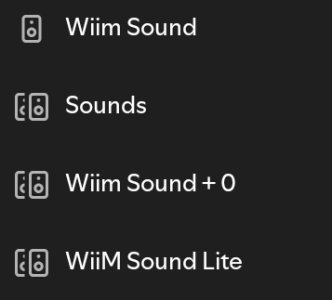
This (screenshot below) is what Spotify shows now, about 2 hours after I recreated the Stereo Pair in the wiim app and rebooted my tablet.
It's confused.

But at least the persistent group ("Sounds") looks / works as expected.
Well, almost. They lose their L or R setting and revert to LR, which is what I guess Stereo Pair was supposed to fix.

1000001117.jpg


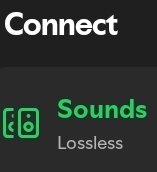
And, somewhat perversely, Spotify knows it's casting to the persistent group name
1000001118.jpg

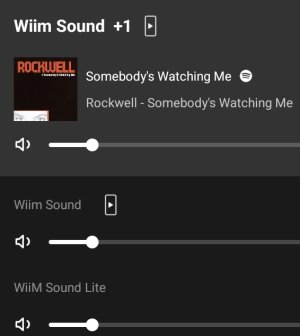
yet the wiim app doesn't! It's just Wiim Sound + 1
1000001119.jpg
 
Last edited:
When I chose the WSL with two speakers (top option) both speakers played.
I'm assuming they played the appropriate L / R channel, but I didn't get that far...

...because I then chose the 2nd option, Wiim Sound, which was the follower in the stereo pair, and as expected just the Sound played.
From that point on it seemed the stereo pair 'dissolved' as no matter what I did I couldn't get the stereo pair to play again.
Each of the Sounds' Settings screen showed they were paired (in the Stereo Pair option), but the Devices screen showed them as individual devices rather than combined in a single card.

As I said, the persistent group still worked.

I had to go into the Stereo Pair screen and choose 'Remove Stereo Pair' so I could set them up again.
This time I chose another boring name, Stereo Sounds.
This is what Spotify shows now, about 2 hours after I recreated the Stereo Pair in the wiim app and rebooted my tablet.
It's confused.

But at least the persistent group ("Sounds") looks / works as expected.
Well, almost. They lose their L or R setting and revert to LR, which is what I guess Stereo Pair was supposed to fix.

View attachment 35805


And, somewhat perversely, Spotify knows it's casting to the persistent group name
View attachment 35806

yet the wiim app doesn't! It's just Wiim Sound + 1
View attachment 35807
Thanks🙂

To be honest, I think it would have been better to design the system so that persistent groups could be locked.

This feature could potentially be used for more than just stereo pairs. (E.g., when connecting a subwoofer to two WiiM units.)

It’s a shame that, as things stand, I can’t pair devices other than WiiM Sound, and I can’t play in all-stereo mode either..
 
Isn’t it enough to form a group with both speakers, assigning L to one and R to the other?
 
Isn’t it enough to form a group with both speakers, assigning L to one and R to the other?
The L and R aren't part of the group setup, unfortunately.
tbh, I don't know why they went for this additional Stereo Pair config rather than allowing the group setup to have a 'sticky' L, R, LR option per device in the group, defaulting back to the device's Audio Settings, Audio Channel option when not used in a group.
As @Wiimer says, why limit this to a stereo pair?

The only other difference to groups I've noticed so far is that you can't adjust volume independently per device.
But you'd think that could be an option in group config.

There could well be things I don't know / have not considered that affect implementation, but we've already made all these suggestions to improve persistent groups so I can't fathom why, once again, we seem to have a completely independent approach to providing functionality rather than consolidating / improving what's already there.
 
Last edited:
Back
Top