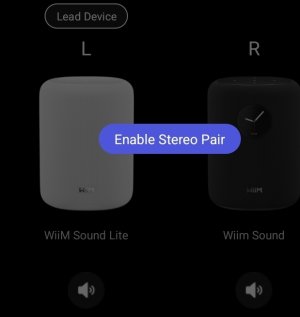
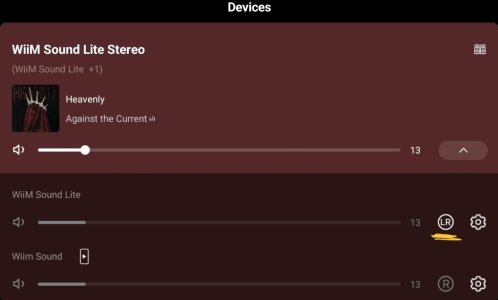
Beta Test: Stereo Pair

Isn’t it enough to form a group with both speakers, assigning L to one and R to the other?
Even in standard groups that aren’t stereo pairs, there may be times when I want to keep the volume levels synchronized at all times.

The current issues with WiiM groups are that they can't maintain a stereo pair and can't maintain volume synchronization.

For example, please try creating a group with any two WiiM devices and setting the group volume to 30%. Then, set an alarm on the leader device with a volume of 40%.

When the alarm goes off, the volume on the leader device will go up to 40%, but the volume on the follower device will remain at 30%.

If per-source volume control is enabled, the same issue occurs when switching inputs.

I had hoped that this feature would resolve all of these issues.
 
The L and R aren't part of the group setup, unfortunately.
tbh, I don't know why they went for this additional Stereo Pair config rather than allowing the group setup to have a 'sticky' L, R, LR option per device in the group, defaulting back to the device's Audio Settings, Audio Channel option when not used in a group.
As @Wiimer says, why limit this to a stereo pair?

The only other difference to groups I've noticed so far is that you can't adjust volume independently per device.
But you'd think that could be an option in group config.

There could well be things I don't know / have not considered that affect implementation, but we've already made all these suggestions to improve persistent groups so I can't fathom why, once again, we seem to have a completely independent approach to providing functionality rather than consolidating / improving what's already there.

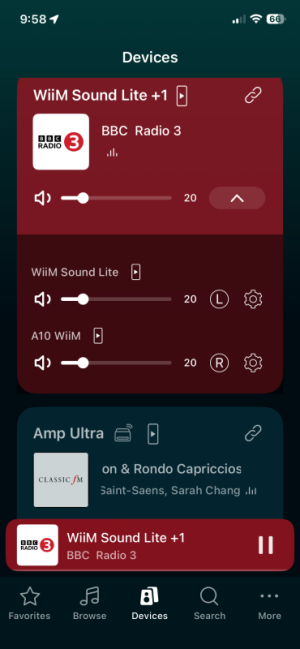
I can set a Lite A10 pair L and R. Not enough to form a stereo pair?

IMG_1266.png
 
As Wiimer said not perfect, but with 2 identical speakers vanilla stereo might be possible.

I will try the new stereo beta once I receive the Sound replacement in a week or so.
 
I can set a Lite A10 pair L and R. Not enough to form a stereo pair?

View attachment 35808
Nope, the L and R don't always stick.

I do remember trying to set each device's Audio Channel to L or R too, but can't recall if this worked.
My main issue was that sometimes I wanted a stereo pair, sometimes I wanted to use each Sound independently, and thus be LR..
 
Back to the Stereo Pair feature. ;)

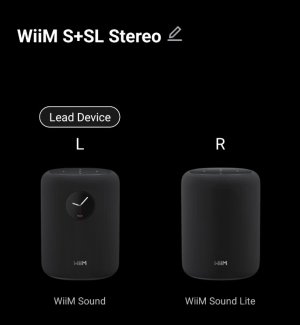
My boring name for the pair: WiiM S+SL Stereo.
IMG_20260328_091549.jpg

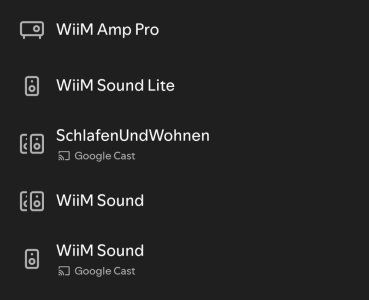
And this is what Spotify makes of it:
IMG_20260328_085750.jpg

I can only tell by the icon that "WiiM Sound" referrs to a "group", which in reality is handled as one stereo device.

Switching between the different devices or - more precisely - selecting one of the individual WiiM Sounds breaks the stereo pair. I have to re-enable it in the WiiM Home App.

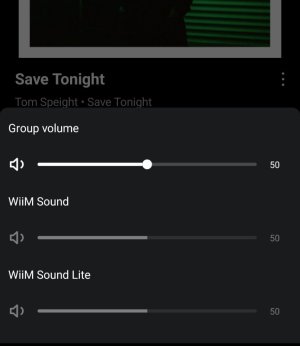
At this point I don't want to join the discussion if the final UI should rather be merged with the existing persistent group feature, but I don't like the way the group volume is handled right now.
IMG_20260328_102252.jpg

Touching the slider brings up the group volume dialog, but at its core this feature is all about keeping the volume settings in sync. Consequently, there's no use for the group volume screen, it just takes one more tap to open it and another one to close it again.
 
Back to the Stereo Pair feature. ;)

My boring name for the pair: WiiM S+SL Stereo.
View attachment 35810

And this is what Spotify makes of it:
View attachment 35812

I can only tell by the icon that "WiiM Sound" referrs to a "group", which in reality is handled as one stereo device.

Switching between the different devices or - more precisely - selecting one of the individual WiiM Sounds breaks the stereo pair. I have to re-enable it in the WiiM Home App.

At this point I don't want to join the discussion if the final UI should rather be merged with the existing persistent group feature, but I don't like the way the group volume is handled right now.
View attachment 35813

Touching the slider brings up the group volume dialog, but at its core this feature is all about keeping the volume settings in sync. Consequently, there's no use for the group volume screen, it just takes one more tap to open it and another one to close it again.

I was just wondering—is it possible to include that stereo pair in a group?

For example, could you group the Amp Ultra and the stereo pair together and play music through 3 WiiMs while keeping the stereo pair intact?
 
is it possible to include that stereo pair in a group?
No.

With a Sound Lite as the leader of a Stereo Pair I created a group of the Sound Lite and a Pro.
Cast tidal Connect to the Sound Lite and both Sounds play, as expected.

Nicely, even though the Sound is the follower its remote can control the group volume, pause, skip etc.

However, press a preset button on the Sound (follower) device and the stereo pair 'dissolves' again, and the wiim app shows the Sound is now the leader of a normal group containing the Sound and the Sound Lite, and both are playing LR.
As the Lite is now a follower in a group it doesn't show as a Tidal Connect target.

The Wiim app Stereo Pair entry shows they are still in a pair, and the pair can be re-enabled.
1000001120.jpg(

The Sound Lite now shows in Tidal again, and we're back in business.
Almost.


Despite looking clickable, it's not.
Playing a stereo test track confirms the Sound Lite is indeed playing LR.
The only way I found to fix this was to delete and recreate the stereo pair. Yet again.
1000001122.jpg
 
Last edited:
I'm really sorry to butt into this thread when I don't have 2 sounds but I asked this question a while back and this is probably the best place for the answer.

If we had two wiim sounds in the bedroom paired as stereo, is it possible for each one to have it's own alarm that only plays on itself but at all other times operate as a stereo pair?

For couples who listen to the same music\radio\audiobooks at bedtime and on Sunday morning but get up at different times during the week.
 
I'm really sorry to butt into this thread when I don't have 2 sounds but I asked this question a while back and this is probably the best place for the answer.

If we had two wiim sounds in the bedroom paired as stereo, is it possible for each one to have it's own alarm that only plays on itself but at all other times operate as a stereo pair?

For couples who listen to the same music\radio\audiobooks at bedtime and on Sunday morning but get up at different times during the week.
Seems like you'd be better not setting them up as a stereo pair so they are completely independent from each other.
And when you do want the same music on both I'd suggest the easiest is a persistent group, with the few extra taps to set them up as L or R rather than LR if wanted.
But you'd have to remember to unlink them before going to sleep!

So, no ideal solution for you atm.
 
I'm really sorry to butt into this thread when I don't have 2 sounds but I asked this question a while back and this is probably the best place for the answer.

If we had two wiim sounds in the bedroom paired as stereo, is it possible for each one to have it's own alarm that only plays on itself but at all other times operate as a stereo pair?

For couples who listen to the same music\radio\audiobooks at bedtime and on Sunday morning but get up at different times during the week.

No, you can’t. However, you can do this using Alexa Routines.


- Enable Alexa in 2 WiiM Sounds.
- Install the Alexa app on your phone.
- Create 2 routines in the Alexa app.

Routine 1: Create a routine that sets the volume of the follower speaker to 0% every day at 5:00 AM. (Please specify the device to be used for this routine.

Routine 2: Create a routine that restores the volume of the follower speaker to its original level every day at 7:00 AM. (Please specify the device to be used for this routine. )

- In the WiiM app, set an alarm on the leader speaker. It will play music for 10 minutes every day at 6:00 AM.


This will set the volume of the follower speaker to 0% every day at 5:00 AM.

Then, at 6:00 AM, music will play through the stereo pair triggered by the leader speaker’s alarm.

However, since the follower speaker’s volume is set to 0%, no sound will be produced.

Finally, at 7:00 AM, the volume of the follower speaker will return to its original level. 🙂

** However, you cannot use the Speaker Pair feature currently being tested here, as their volume levels will be synchronized. Please create a persistent group and keep it active always.
 
No, you can’t. However, you can do this using Alexa Routines.


- Enable Alexa in 2 WiiM Sounds.
- Install the Alexa app on your phone.
- Create 2 routines in the Alexa app.

Routine 1: Create a routine that sets the volume of the follower speaker to 0% every day at 5:00 AM. (Please specify the device to be used for this routine.

Routine 2: Create a routine that restores the volume of the follower speaker to its original level every day at 7:00 AM. (Please specify the device to be used for this routine. )

- In the WiiM app, set an alarm on the leader speaker. It will play music for 10 minutes every day at 6:00 AM.


This will set the volume of the follower speaker to 0% every day at 5:00 AM.

Then, at 6:00 AM, music will play through the stereo pair triggered by the leader speaker’s alarm.

However, since the follower speaker’s volume is set to 0%, no sound will be produced.

Finally, at 7:00 AM, the volume of the follower speaker will return to its original level. 🙂

** However, you cannot use the Speaker Pair feature currently being tested here, as their volume levels will be synchronized. Please create a persistent group and keep it active always.
Thank you. The possibilities for that to go (me to set it up) wrong are too great I think.

I suppose at this point we're better sticking with a pro plus plus active speakers for listening and dedicated radio alarm clocks for waking up.

I think it would be a neat feature though. We can't be the only ones this would be useful and practical for.
 
The possibilities for that to go (me to set it up) wrong are too great I think.
Once you've created the routine, you can test it right away. As long as you set the time correctly, there's almost no risk of it malfunctioning. You only need to set it once. (You can probably set an alarm with Alexa even without using the WiiM alarm.)
 
Once you've created the routine, you can test it right away. As long as you set the time correctly, there's almost no risk of it malfunctioning. You only need to set it once. (You can probably set an alarm with Alexa even without using the WiiM alarm.)
You have to weigh this up with the fact that the leader of the opposition will object to this £700 purchase regardless.

It has to work better and with less faff than the current set up.

And if she ends up late to work........., well that's not a situation I want to entertain
 
You have to weigh this up with the fact that the leader of the opposition will object to this £700 purchase regardless.

It has to work better and with less faff than the current set up.

And if she ends up late to work........., well that's not a situation I want to entertain
You must have an enormous bed if an alarm on one side doesn't wake the sleeper on the other side.
 
You have to weigh this up with the fact that the leader of the opposition will object to this £700 purchase regardless.

It has to work better and with less faff than the current set up.

And if she ends up late to work........., well that's not a situation I want to entertain
I’ll test it out later, but I think it’ll probably be easier to just use the WiiM alarm. Please try to convince your partner. 😂
 
So I have now a Sound and a Sound Lite set as a stereo pair under the current FW beta.

As stated, volume is set for the group, individual L/R volume controls seem to be pegged.

I have identical Remote controls one attached to Sound the other to Lite. Each remote is able to change the pair's volume,
I can change Presets, say going from Preset 1 to Preset 3 on either remote and retain the Stereo Pair as long as those Presets are the same on both units. If one Preset is different in both units, switching to that will break the Stereo Pair and remain in group mode.

Now a question re RoomFit… what does the braintrust think is the recommended way to set RoomFit for a stereo pair like this?
My first thought is to do it separately for each speaker setting it in Mono mode and positioning the mic on the stereo pair center line. Makes sense?
 
Now a question re RoomFit… what does the braintrust think is the recommended way to set RoomFit for a stereo pair like this?
My first thought is to do it separately for each speaker setting it in Mono mode and positioning the mic on the stereo pair center line. Makes sense?
Running RoomFit on each Sound (Lite) individually would be my recommendation, yes.
Once they are paired that will effectively work like the standard Individual Channel RoomFit in other WiiM devices.

Hopefully in the future stereo-paired devices get a simplified UI for RoomFit (and other applicable settings) too!
 
Back
Top