How to set up roomfit correctly? help

Also you can set presets, so just name them ie

"no boost, upto 300hz, harmon curve"
"full range, no boost, flat curve"

etc

I use two presets for my speakers (two different models)

"towers"
"bookshelf"

Also I measured each speaker pair in the cinema , then entered in those correction values into my av processor. So the Wiim has worked as a measurement/correction device. I've saved

"center"
"mains"
"top height"
"rear height"
"sides"
"rears"
"front wide"

so if I ever reset my processor I can then enter into it again
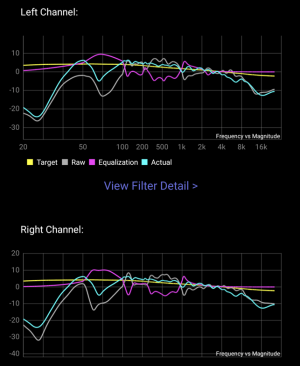
 
I managed to screenshot this when doing the no-sub run just now

Big hole at crossover point. you may want to play around with subwoofer position, use REW room sim to get an idea how sub response changes in the room
 

Attachments

  • Capture2.JPG
    Capture2.JPG
    77.3 KB · Views: 21
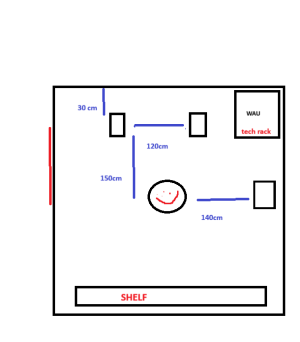
Am I understanding this right that both your speakers are practically in your room corners?
Are the speakers 30cm from the side walls, or from the wall behind them?
How wide is the room?
The subwoofer is in the corner, right?


This is my man cave, the wideness of room is not to dimension. I guess it is around 3.5x5m
 

Attachments

  • audiophile.png
    audiophile.png
    23.1 KB · Views: 19
Big hole at crossover point. you may want to play around with subwoofer position, use REW room sim to get an idea how sub response changes in the room

hm what does hole at the crossover point caused by? I thought i have set according to wiim recommended settings

can i do something else to solve it, instead of moving the sub around? I dont have the cable and dont wish to lift it around
 
hm what does hole at the crossover point caused by? I thought i have set according to wiim recommended settings

can i do something else to solve it, instead of moving the sub around? I dont have the cable and dont wish to lift it around

Sub placement, your position, and room shape and height effects that,

It's pretty complex to get it right (especially moreso if you have dual subs)

Try and get the speakers response (disable sub in wiim app) and see how it compares with the sub enabled. If speakers looks like they go lower with just the speakers, then the sub is cancelling <frequencies , so look into placement/delay
 
hm what does hole at the crossover point caused by? I thought i have set according to wiim recommended settings

can i do something else to solve it, instead of moving the sub around? I dont have the cable and dont wish to lift it around
First, increase the Sub volume more before running RoomFit. After that, as @dominikz mentioned, try adjusting the crossover values, switching the phase, and adjusting the delay while checking the RoomFit results.
 
Sub placement, your position, and room shape and height effects that,

It's pretty complex to get it right (especially moreso if you have dual subs)

Try and get the speakers response (disable sub in wiim app) and see how it compares with the sub enabled. If speakers looks like they go lower with just the speakers, then the sub is cancelling <frequencies , so look into placement/delay
More likely speaker placement since there was no sub involved in that measurement.
 
More likely speaker placement since there was no sub involved in that measurement.

ah yeah that will effect bass response, if speakers are too close or too far from back wall, corners etc. Or if room is open up to another, difference between closed door/window and open etc.

I have a triple sub setup so complex getting that right (minidsp HD)
 
I managed to screenshot this when doing the no-sub run just now
So this is measured with the sub output disabled?

This is my man cave, the wideness of room is not to dimension. I guess it is around 4x5m
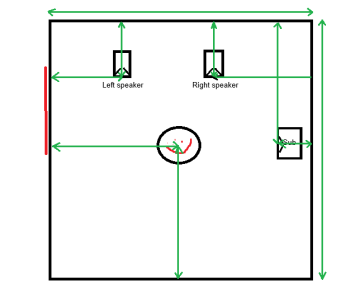
Unfortunately this diagram is missing a lot of the dimensions I need to be able to help.
These are the dimensions which would be helpful:
1765900744405.png
 
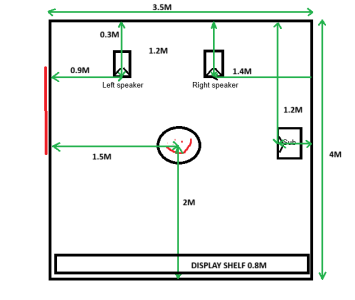
Thanks for the drawing, i have added some measurements i roughly took just now
 

Attachments

  • 1765900744405.png
    1765900744405.png
    22.3 KB · Views: 11
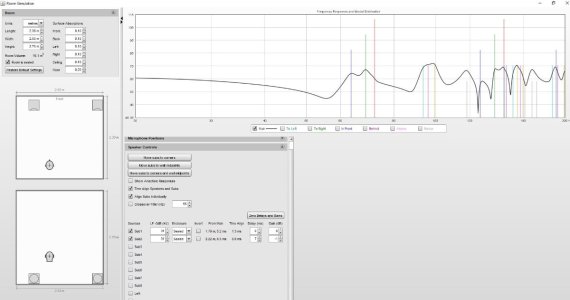
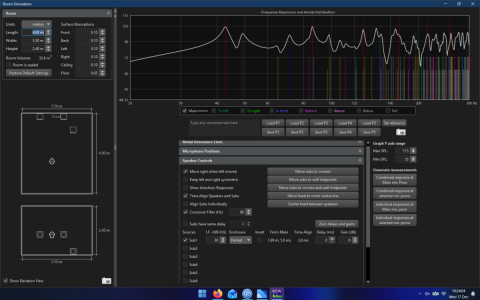
Here is predicted response with your room size and placement, probably need height of room, height of speakers as well.

Does it match up to yours?
 

Attachments

  • 1765967057115.png
    1765967057115.png
    236.9 KB · Views: 12
Back
Top