How to set up roomfit correctly? help

To be honest i have no idea what i am looking at

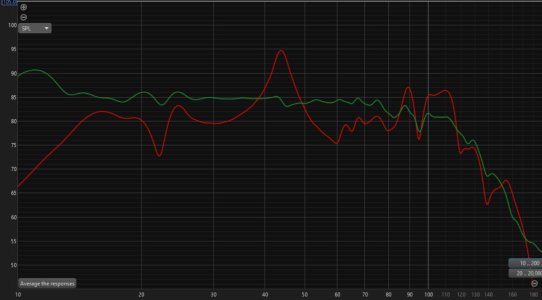
The graph on the top right, does it look similar your response? That REW room sim uses your room dimensions and speaker/sub placement to approximate response.

If it's accurate, then you can move the sub around in the virtual room and see how it interacts with the response, then you can move the sub to that place - so save some time in moving the sub around, then see if response is better.
 

try it out, it's free.

It is complex if you need it to be, but just go to "room sim" tab, enter in your room dimensions, place speakers/sub where yours is, then move sub around room and notice how the response <120hz changes, try and get the best response onscreen then move the sub to that actual position. You'd need to do the wiim sub alignment again

What sub do you have? that changes response also, sealed/ported, and how low it goes
 
The graph on the top right, does it look similar your response? That REW room sim uses your room dimensions and speaker/sub placement to approximate response.

If it's accurate, then you can move the sub around in the virtual room and see how it interacts with the response, then you can move the sub to that place - so save some time in moving the sub around, then see if response is better.

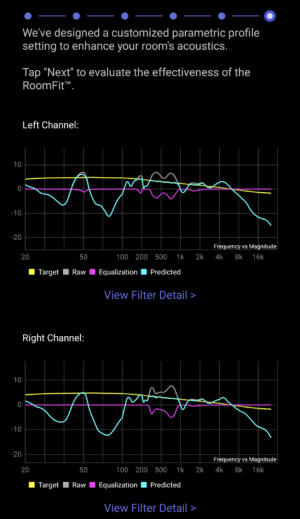
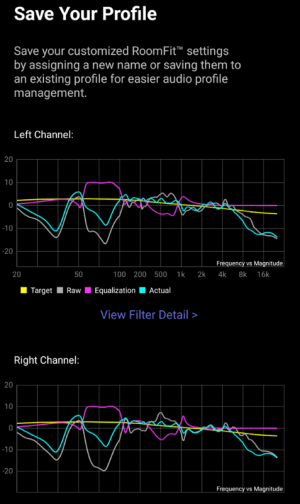
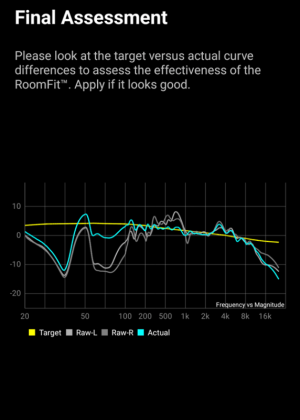
I guess there is resemblance, this was my roomfit reading without sub https://forum.wiimhome.com/threads/how-to-set-up-roomfit-correctly-help.8811/post-162214

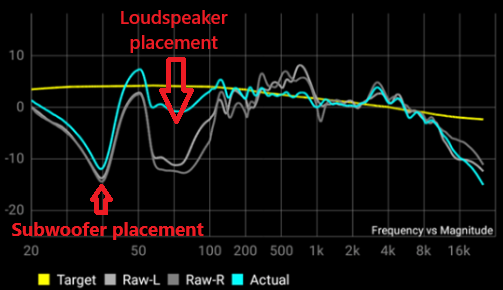
It is the big dips at the 60-70hz range that is questioned. I wonder if that is my phone mic issue?

I am still waiting for the dayton usb-c this week. Hopefully it is more accurate?
 

try it out, it's free.

It is complex if you need it to be, but just go to "room sim" tab, enter in your room dimensions, place speakers/sub where yours is, then move sub around room and notice how the response <120hz changes, try and get the best response onscreen then move the sub to that actual position. You'd need to do the wiim sub alignment again

What sub do you have? that changes response also, sealed/ported, and how low it goes
The issue is still the KEF LS50
 
Simulations can be used as a sanity check for the final result and for planning ahead any repositioning. That only makes sense if the process of simulation and the results are understood and if there are options to move the speakers and subwoofer around.

@dankandi, are you willing and able to go this way? You could use the time until the iMM-6C arrives, of course. But this is not even a matter of mic accuracy in the first place. It's a question of if you can bring your sub and speakers into different positions at all and how much you want to learn about room acoustics and REW.

As soon as you start using RoomFit again we need a screenshot of your RoomFit settings. If you don't know where to find them, this is where we should start.
 
I guess there is resemblance, this was my roomfit reading without sub https://forum.wiimhome.com/threads/how-to-set-up-roomfit-correctly-help.8811/post-162214

It is the big dips at the 60-70hz range that is questioned. I wonder if that is my phone mic issue?

I am still waiting for the dayton usb-c this week. Hopefully it is more accurate?

Some cheap mics do have inaccuracies I remember seeing iphone app response and it was spiking at certain frequency.

Good idea to look at ASR for your speakers, they do drop off below 100hz


Just be aware a dip or boost can be due to incorrectly set phase aka delay/distance setting on the sub (or in wiim app for sub delay). I wouldn't trust the Wiim calibration, adjust it a little either way of way wiim finds, test a few either way of the calculated delay. oh here's my response before and after of just the subs with minidsp, with time alignment and EQ filters (three subswoofers) slightly different concept but principle is the same, to get the subs time alignment then EQ'd
 

Attachments

  • subs.jpg
    subs.jpg
    98.9 KB · Views: 10
Last edited:
Simulations can be used as a sanity check for the final result and for planning ahead any repositioning. That only makes sense if the process of simulation and the results are understood and if there are options to move the speakers and subwoofer around.

@dankandi, are you willing and able to go this way? You could use the time until the iMM-6C arrives, of course. But this is not even a matter of mic accuracy in the first place. It's a question of if you can bring your sub and speakers into different positions at all and how much you want to learn about room acoustics and REW.

As soon as you start using RoomFit again we need a screenshot of your RoomFit settings. If you don't know where to find them, this is where we should start.

unfortunately i do not wish to move my furniture and speakers around. Heavy and the need for cabling length freaks me away.

i mean, the sound now is pretty good already, more mid-bass, more lfe, more alive, than my old as701.

but im just geeking out with all these new modern feature set that WAU opened up
 
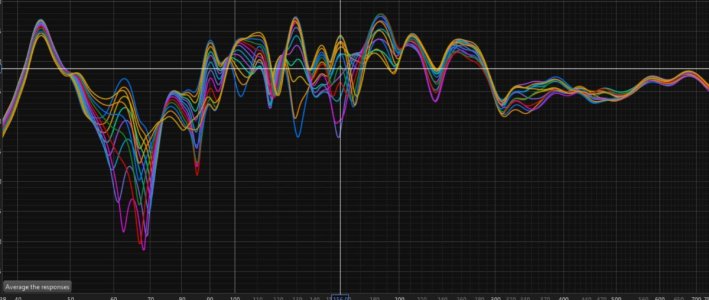
And here is what the different phase settings (what wiim shows as delay) for the sub, see how phase on the sub effects overall response. you can see some settings boost or cut certain frequencies along the range.

So with these responses I can compare each phase degree, enable/disable three, then see what is best, what is the flattest.

This is response with sub + left speaker
 

Attachments

  • phase.jpg
    phase.jpg
    112.8 KB · Views: 10
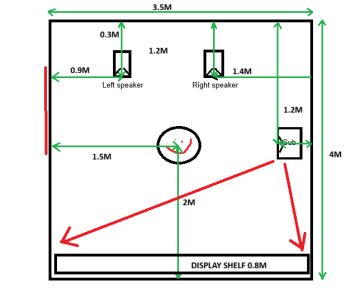
Thanks for the drawing, i have added some measurements i roughly took just now
Thanks, these are helpful.

Regarding the speaker distance to the wall behind them - I assume 30cm is the distance from the back side of the speaker to the wall - so if the LS50 speaker is 28cm deep, that gives a total of about 58cm from the front of the speaker to the wall behind the speaker.

In the calculation I assume the height of both speakers is about 1,2m (i.e. from floor to middle of speaker), that your head is at the same height when sitting at your listening position, and that your room is 2,5m high - let me know if any of this is incorrect.

If we plug these dimensions into this online SBIR calculator, we can see that with the current placement of speakers:
  • For the left speaker SBIR cancellations from the side wall is at roughly 85Hz, the ceiling SBIR notch should be about 65Hz, and floor SBIR notch about 70Hz.
  • For the right speaker SBIR cancellations from the side wall is at roughly 57Hz, the ceiling SBIR notch should be about 65Hz, and floor SBIR notch about 70Hz.
  • For the subwoofer SBIR cancellations from the front and back wall will overlap at around 45Hz.
  • At your listening position LBIR cancellations from 3 of the 4 walls will overlap at about 45Hz, the 4th wall LBIR notch will be at about 55Hz, while ceiling and floor LBIR notches would overlap with those from the speakers.
When I compare these numbers with the measurements you pasted here:
I managed to screenshot this when doing the no-sub run just now

They seem to match pretty well to the prediction for the speakers, so my assumption is that the cause of the wide dip/null around 70Hz in your measurements is caused by a combination of SBIR and LBIR at your current positions.

My proposal to improve the response would be to try this:
  1. Move the sub to a room corner (any corner will do)
    • That should completely move the SBIR cancellations >80Hz (out of the subwoofer operating range), and give you more bass headroom for RoomFit correction
  2. Move both speakers 15-20cm to the right
    • That should keep the side wall SBIR notch below 80Hz for both
  3. Set the subwoofer crossover frequency to 80Hz in WiiM Home App
  4. Move both speakers 20cm closer to the wall behind them
    • That will push the front wall SBIR notch >200Hz and allow you to sit away from room center
  5. Move your listening position anywhere outside of the exact middle of the room
Note that steps 1, 2 and 3 work together to avoid SBIR dips in the summed (loudspeaker + sub) response.
So if you don't follow all of the steps the results may be less effective.
 
yeah dead center of room is pretty bad place, good recommendation to move the chair, if I move my chair a foot or so that changes overall response. now 3/4
 
Last edited:
Back
Top