RoomFit help - Bass nulls just on left channel

hipoagumol

Active Member
Joined
Sep 6, 2025
Messages
110
Hello,
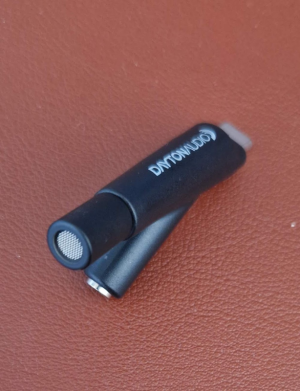
Just purchased Dayton Audio iMM-6c usb-c calibrated mic to perform room correction.
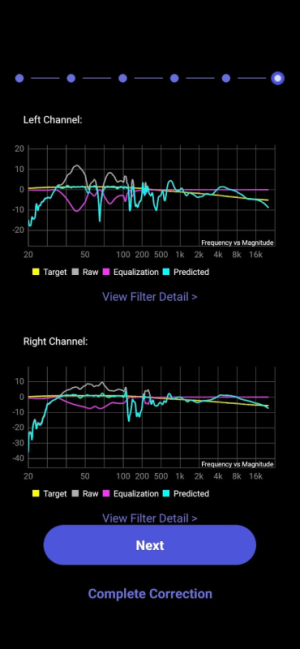
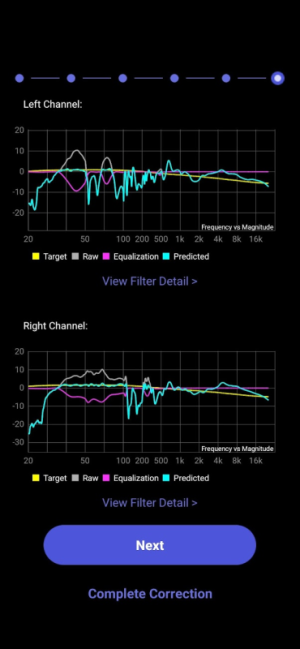
I run with these settings and found deep nulls in the bass region response of my left channel (50 and 80 hz approx?)
- B&K
- 30-400hz
- -12/12 Gain, Q max 10
- No boost
- variable smoothing
- No multiple/moving mic measurements
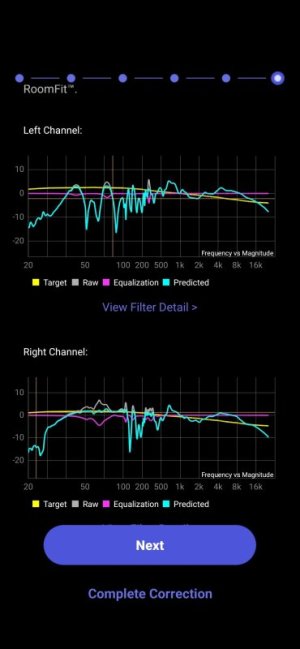
1000133419.jpg
My setup is wiim ultra-yamaha a-s501- Q Acoustics 3050i.
I tried without and with foam plugs in the bass reflex ports, reduxed bass energy but same nulls issue in the measured left channel response.
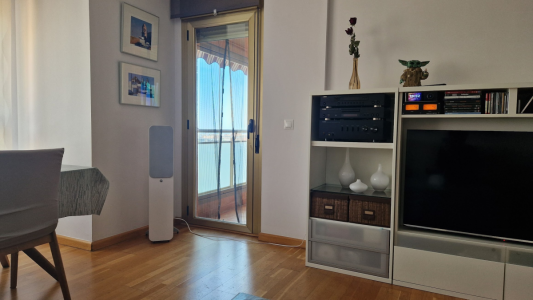
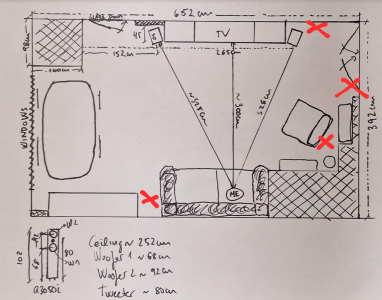
My room is quite symmetrical, parquet floor and plasterboard walls, so not a reflective room i would say except for cristal in doors you see in the picture..The windows you can't see on left side are shaded by Japanese panels. Picture is taken with wide angle, distance between speakers and to listen position is approx 2.5m
Any idea on what may be the reason? Is it truly so much different the left/right response or may have some flaw in my setup/hardware? Any advise?
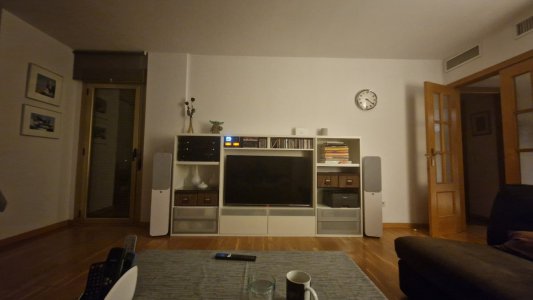
1000133420.jpg
 
Last edited:
I bow to you @dominikz . Simply outstanding responses. Full of content yet concise and understandable.
I can't thank you enough for taking so much time, even built a model of my room! And being so pedagogical and kind. Truly appreciate 🙏.
I am quite new in this forum and only couple of years into audio as "enthusiast". I am engineer and obviously prefer the fact, measurement-based explanations over the fluffy audiophile jargon and snake oil sellers. So, you fit me well, although I acknowledge there are other approaches in this forum. I enjoy reading you guys. Thanks!

Ps: I will continue experimenting with my speakers and room as soon as i can get rid of the 7 teenagers that stormed into it this morning to play MTG, D&D and eat pizza while playing music in my imperfect system, sitting at a totally suboptimal location.
 
I bow to you @dominikz . Simply outstanding responses. Full of content yet concise and understandable.
I can't thank you enough for taking so much time, even built a model of my room! And being so pedagogical and kind. Truly appreciate 🙏.
Thanks a lot for the kind words - made my day! :)
IMHO we all benefit from sharing knowledge with each other. It is both a resposibility and a privilege to be in a position to do so.

Ps: I will continue experimenting with my speakers and room as soon as i can get rid of the 7 teenagers that stormed into it this morning to play MTG, D&D and eat pizza while playing music in my imperfect system, sitting at a totally suboptimal location.
I somehow suspect that they managed to have fun despite the nulls in the bass response of the left speaker :D
 
Good morning all...Teenegers left!

I measured response moving the left speaker close to left side wall.
1774270189289.png

I measured this new location and once again the Original Location, not using moving mic but sweep tone, as original post in this thread:

New Location Original Location
1774270179197.png1774270212417.png

So the left channel 56Hz null is gone in new location :D... but the one around 70 got much deeper now :confused:...

I have couple of questions regarding usage of mic:

1) Shall I point towards one speaker at a time speaker when doing L+ R measurements or just to center?
i.e: point mic towards left speaker when testing left, point towards right speaker when testing rigt.
2) Also, should I point the tip of the mic upwards (ceiling) or towards the speaker horizontally?
1774270714858.png
I know iMM6-C is supposedly omnidirectional and shouldn't matter but since it is pen shaped and its tip a bit embeded in plastic i am not certain it actually has same response at all arriving angles..

These measurements above where done with phone horizontal , tip of the mic pointing towards TV (more or less the axial center of listening position) more or less at my ear level but in front of my face, ie 25-30cm ahead of ears.

If you suggest other way of measuring I will share room freq responses when measuring 'the better way'.
The calibration file provided by Dayton support page is loaded. I attach it here for reference.

Speaker distance to side walls is not a variable i can play with much, but seating position..I may move listening position a bit closer by moving sofa a bit ahead and filling the gap with some shelve or forniture.

Then subwoofer option is a bit scary to me. When I chose to go with tower speakers my idea was not having to use a sub, otherwise i would have gone for bookshelves. If i integrated a sub and pass it freqs below 120hz or something to fix all my bass reponse problems i think i would feel bad for having tower speakers i could cut in a half :D.
But seriously, there are not many places I may lay a sub (see the red X below..)...and what if isn't best location for it?
Anyway that would be a longer term decision...cost, impact on decoration/usability of the room etc....then decide which one :D.
1774272544082.png
Thanks and Regards
 

Attachments

I measured this new location and once again the Original Location, not using moving mic but sweep tone, as original post in this thread:

New Location Original Location
1774270179197.png
1774270212417.png


So the left channel 56Hz null is gone in new location :D... but the one around 70 got much deeper now :confused:...
OK, so this confirms without a doubt that the dip around 50Hz was side wall SBIR notch. Nice job!

The one around 70Hz seems to have moved up in frequency slightly - I suspect at this alternative location it might actually be a second-order SBIR null from the opposite side wall. Not sure if you want to spend time figuring that one out, however, since you can't really move the speakers anyway.

1) Shall I point towards one speaker at a time speaker when doing L+ R measurements or just to center?
i.e: point mic towards left speaker when testing left, point towards right speaker when testing rigt.
2) Also, should I point the tip of the mic upwards (ceiling) or towards the speaker horizontally?
1774270714858.png

I know iMM6-C is supposedly omnidirectional and shouldn't matter but since it is pen shaped and its tip a bit embeded in plastic i am not certain it actually has same response at all arriving angles..
Short answer is - just point the mic to the center point between the speakers.

But in case you're after a more nuanced answer, the difference between mic orientations will only show at high frequencies (>5kHz), which we're anyway not concerned with when doing room correction. So in reality it doesn't matter that much how you orient the mic, as long as there is nothing blocking the path between the speakers and the mic.
If you're curious, more information on all this can be found in this post (and included links).

These measurements above where done with phone horizontal , tip of the mic pointing towards TV (more or less the axial center of listening position) more or less at my ear level but in front of my face, ie 25-30cm ahead of ears.

If you suggest other way of measuring I will share room freq responses when measuring 'the better way'.
The calibration file provided by Dayton support page is loaded. I attach it here for reference.
That sounds OK to me.

I'd perhaps only recommend to measure a bit further away from your own body. E.g. I like to sit in the seat on the side *next to the main listening position* and hold the mic with an extended arm to where my head would normally be when listening.

Also, note that a sweep measurement will show more irregularities compared to MMM, because MMM basically does a spatial average of the response.
An MMM response is IMHO closer to what we hear, because our head is never perfectly still, and our brain constantly integrates the sounds we hear.
But sweep is much faster and much less sensitive to environment noise.

Everything is a compromise. :)

Speaker distance to side walls is not a variable i can play with much, but seating position..I may move listening position a bit closer by moving sofa a bit ahead and filling the gap with some shelve or forniture.
Acoustic interference related to speaker distance vs room boundaries is called SBIR (Speaker Boundary Interference Response). The only practical way to fix it is to move the speaker and/or to cross it over to a sub.

There is also a concept of LBIR (Listener Boundary Interference Response), and it is related to listener distance to room boundaries.

However, I'm afraid that the ~50Hz dip is strictly related to the left speaker position (i.e. SBIR), so moving your listening position sadly won't help.
The ~70Hz is also likely *not* LBIR because it isn't visible in both channels; which is what we'd expect if it was related to the listening position rather than the speaker position.

Then subwoofer option is a bit scary to me. When I chose to go with tower speakers my idea was not having to use a sub, otherwise i would have gone for bookshelves. If i integrated a sub and pass it freqs below 120hz or something to fix all my bass reponse problems i think i would feel bad for having tower speakers i could cut in a half :D.
I can understand your situation.

Though it is worth mentioning that tower speakers are rarely a replacement for subs (as even budget subs often play lower than formidable tower speakers); the main reason to go for towers should actually be their higher sensitivity (can play louder with less power) and higher max SPL capability compared to bookshelves. But even towers benefit from well integrated subs.

The benefit of subs is that they can play lower frequencies more cleanly, and that you can place them independently of your speakers to avoid these kinds of null-causing interference in the combined system response.

But seriously, there are not many places I may lay a sub (see the red X below..)...and what if isn't best location for it?
Anyway that would be a longer term decision...cost, impact on decoration/usability of the room etc....then decide which one :D.
1774272544082.png
In your case the position where your right speaker sits is IMO a known 'good' bass position. You see from your right channel measurements there are no significant dips at that position. So if you put a sub next to your right speaker that would most probably work pretty well.

But perhaps some day there might be another alternative - in case WiiM ever decide to implement the feature I proposed here, that would probably solve your issue as well. After all, having the bass of two speakers summed to mono below a specific frequency is not too different from crossing over to a mono subwoofer.
 
Thanks for the answer... i will need some time to digest it and read more carefully, but 2 quick ones
- So regarding mic it does not matter below 5hkz fine due to not very directive, but if willing to be accurate above that range too even if not for correction, pointing mic in horizontal towards center of speakers should go with 90° or 0° cal file?...and..which one did i get from Dayton? 
- Regarding your WIIM feature request. Thank you, cool that cases like mine triggered your creativity and proposal to Wiim.
So if I got your point is:
IF problematic frequencies suffering of SIBR in just one channel also exist in some instants in the music source in that very same channel, and only in that channel, then, instead of losing that information due SIBR, by combining them and sending to both speakers, at least that frequency would emitted also by the speaker which does not suffer SIBR at that frequency.
So it is like creating 2 virtual subwoofers: My 2 tower speakers will be working stereo at freqs>Crossover frequency and working as 2 mono subwoofers at <=Crossover frequency.
Makes lots of sense... actually, isn't that doable by extracting the sub out signal of my wiim ultra and combining it somehow externally with the stereo rca line output (hpf'd accordingly by wiim) and then injecting the combined to my amp?
Exist such device that can sum 2 mono signals? Sub+R into R' and sub+L into L'?
Interesting...while wiim decides if worth and eventually implements, there might be some DIY approach?
Still room correction afterwards is needed...in stereo mode I guess.
 
- So regarding mic it does not matter below 5hkz fine due to not very directive, but if willing to be accurate above that range too even if not for correction, pointing mic in horizontal towards center of speakers should go with 90° or 0° cal file?...and..which one did i get from Dayton?
Dayton Audio only provide a 0° cal file, so that would be a reason to point the tip of the mic straight between your speakers. As said before, it doesn't really matter for low frequencies.
 
- So regarding mic it does not matter below 5hkz fine due to not very directive, but if willing to be accurate above that range too even if not for correction, pointing mic in horizontal towards center of speakers should go with 90° or 0° cal file?...and..which one did i get from Dayton?
As @harkpabst already answered, you got the 0° cal file only, which is why we recommend horizontal mic orientation to the mid-point between the speakers. But ultimately mic orientation won't affect much in the frequency range of interest for RoomFit.

So if I got your point is:
IF problematic frequencies suffering of SIBR in just one channel also exist in some instants in the music source in that very same channel, and only in that channel, then, instead of losing that information due SIBR, by combining them and sending to both speakers, at least that frequency would emitted also by the speaker which does not suffer SIBR at that frequency.
Exactly.

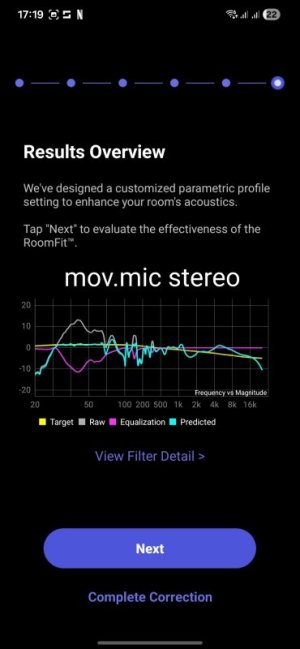
As you can see from your "Stereo RoomFit" measurement attempt, when both speakers play the same content (i.e. summed to mono) the nulls are not visible anymore. It is similar to how with multiple mono subwoofers you can get a smoother response vs a single subwoofer (much more on that in this presentation by Todd Welti).

So it is like creating 2 virtual subwoofers: My 2 tower speakers will be working stereo at freqs>Crossover frequency and working as 2 mono subwoofers at <=Crossover frequency.
Yes.

Makes lots of sense... actually, isn't that doable by extracting the sub out signal of my wiim ultra and combining it somehow externally with the stereo rca line output (hpf'd accordingly by wiim) and then injecting the combined to my amp?
Exist such device that can sum 2 mono signals? Sub+R into R' and sub+L into L'?
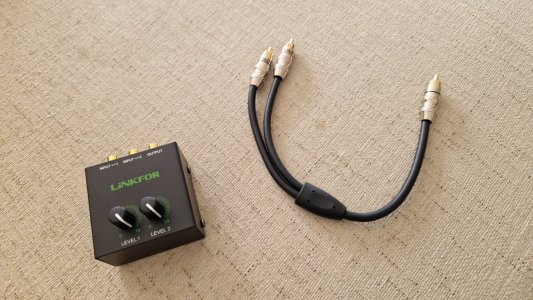
It should be possible to do with a line-level mixer.

E.g. perhaps something like this (though I have no idea if that specific one is designed well or not).

In that case you'd connect the stereo RCA line out of your Ultra to mixer input 1, and the Sub Out with an RCA Y-splitter cable to mixer input 2 (both RCAs should be connected). The mixer output would be connected to your power amp.
Lastly, you'd need to adjust the levels on the mixer until you get a perfect blend of the sub out and the line outs. You could do this visually by evaluating RoomFit responses of both channels.

Still room correction afterwards is needed...in stereo mode I guess.
Since with this setup bass will be mono anyway, either Individual Channel or Stereo RoomFit modes would be OK to use - but they will behave differently.

Both of them will measure and correct the same response for both channels below the crossover frequency, but they will create different corrections above the crossover. Stereo RoomFit would apply the same correction to both channel, while Individual Channel RoomFit would apply different corrections per channel above the crossover frequency.

So my own preference would be for Individual Channel RoomFit in this case.
 
Thanks again!
I read the posts and threads you linked about subwoofer integration. They are great , gives some confidence and security so as noobs can one day accomplish the task and succeed. You incepted the subwoofer solution in my brain...

But back to present, we concluded that there's a quite easy way to implement your suggested feature outside wiim, just with Y cable for sub and a line level RCA mixer...tempting for those of us who like experimenting anf playing with hardware ;)
But perhaps some day there might be another alternative - in case WiiM ever decide to implement the feature I proposed here, that would probably solve your issue as well
But, regardless if this feature is implemented or if I applied the external mix of stereo bass to mono and then re-inyected to L+R , I still don't fully understand why this would "solve my issue"...
I mean, the sibr nulls would still be there and it will only make the problematic frequencies to be played in both speakers always but from the left channel I will still get the nulls.
You also said that is very rare the music in which low frequencies exist only on left or right at a time, they are normally equal in both channels...
So this feature you suggest in reality will make no acoustical difference 99% of playback time in my room? ...Being the remaining 1% the music passages where bass including my problematic freqs. is panned to Left... Is this it?
Don't get me wrong, I am engineer, I am happy to put effort and time to mitigate something that only might happen 1% of the time, that's actually my job :). And I hope wiim team take note implements that feature which should be kind of easy in the DSP domain...But just to have some context...

Regards
 
Thanks again!
I read the posts and threads you linked about subwoofer integration. They are great , gives some confidence and security so as noobs can one day accomplish the task and succeed. You incepted the subwoofer solution in my brain...

But back to present, we concluded that there's a quite easy way to implement your suggested feature outside wiim, just with Y cable for sub and a line level RCA mixer...tempting for those of us who like experimenting anf playing with hardware ;)
Glad to hear you found the posts interesting!

But, regardless if this feature is implemented or if I applied the external mix of stereo bass to mono and then re-inyected to L+R , I still don't fully understand why this would "solve my issue"...
I mean, the sibr nulls would still be there and it will only make the problematic frequencies to be played in both speakers always but from the left channel I will still get the nulls.
Yes, the left channel output will still be affected by the same SBIR nulls; it is just that when its response is summed with the right channel (playing the same mono signal) at the listening position these dips won't be audible.

I.e. the left and right channels would 'work together' to give a smoother bass response at the listening position.

However, that only really works if the same low-frequency signal is always sent to both left and right channels... i.e. mono bass.

You also said that is very rare the music in which low frequencies exist only on left or right at a time, they are normally equal in both channels...
So this feature you suggest in reality will make no acoustical difference 99% of playback time in my room? ...Being the remaining 1% the music passages where bass including my problematic freqs. is panned to Left... Is this it?
In principle yes; but I can't say whether the percentage of music with mono bass is really that high.
And in any case your own music preferences might or might not deviate in this aspect vs the average.

So it is hard to say how likely this is to negatively affect your own listening experience. Personally I'd say that if you don't hear obvious issues with frequency balance when listening to music (e.g. some bass line notes not being audible or as loud as others) you're probably fine.

Don't get me wrong, I am engineer, I am happy to put effort and time to mitigate something that only might happen 1% of the time, that's actually my job :).
I'm with you on this. :) I find it gratifying just to understand how things work and how they could be improved.
So like you, I'd probaly spend time to see what I could do about the left channel response - even if it didn't cause me issues in practice.
The journey itself can be fun! :)
 
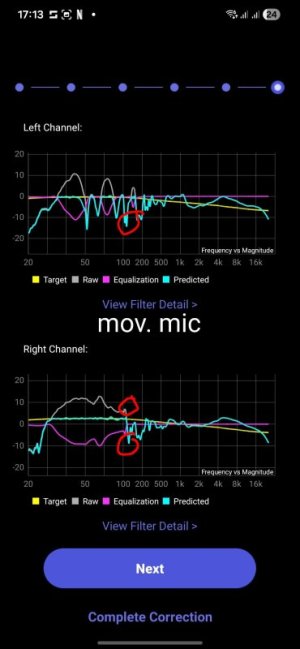
Hello again... Got a mixer and an Y cable..but before starting to play with this...
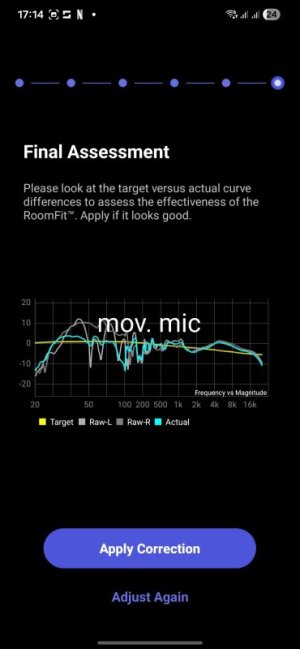
One last batch of measurements, with moving mic.
1) moving mic L+R
1000134472.jpg1000134471.jpg
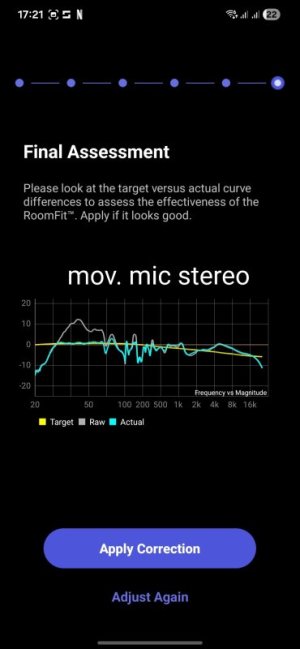
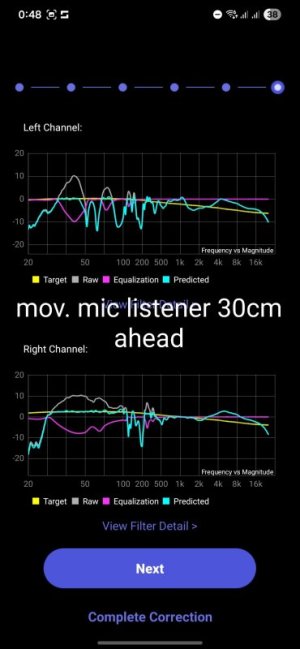
2) moving mic stereo

1000134475.jpg
1000134476.jpg
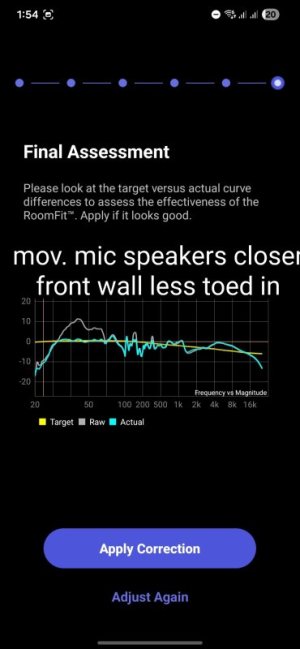
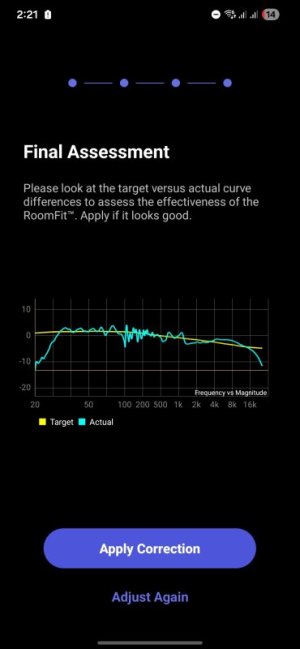
The 50hz and 60-70hz dips seem to be well corrected when measured after correction because right channel is actually boosted and smooth in those freqs and compensates the null when listening combined.
Good because i cannot really move my left speaker much more to the left.

My concerns after seeing the Roomfit outcome have now shifted to the 100-125hz area.
It seems I have consecutive peaks and dips in this region, and the dip is seen similarly in both channels.

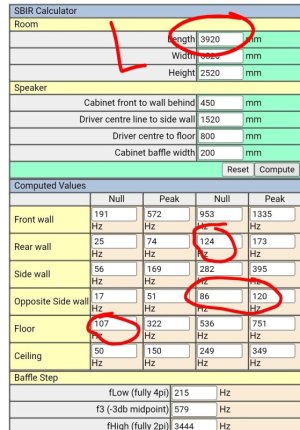
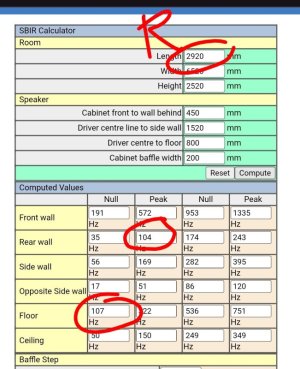
The sibr simulator you sent estimated for my room a peak around 104hz caused by rear wall sibr (shortest distance from right speaker to front, and it is seen in R response) a null at 124hz caused also by rear wall sibr (if using the largest distance in that dimension front-rear wall) plus also a null due to floor sibr at 126/107/93Hz depending on what distance to floor taken (bottom woofer/tweeter/top woofer). So perfect storm in this range.

Is there anything I may do with this nasty 100-125hz region?
Dip in both channels at the same time doesn't seem easy to fix..
Can rear wall and floor sibr at this freq be somehow corrected? Only speaker movement? Listening position changes may help moving out of the nodes caused by floor reflection?

Then I want also to experiment with the mixing of sub out and L/R.
Mixer is passive . There was an active version just a bit more expensive but I thought that introducing signal amplfiication by a non hi-fi device might be not a good idea to preserve the ultra's outputs integrity in distorsion and SNR .
The passive mixer I bought will drop signal levels. It has in built potentiometers to control mix balance, but won't introduce gain. I must set them exactly to same value not to change L/R balance.

Any other advice when mixing ultra's sub out and Rca out to get L (hpf)+sub(lpf)=L'(full range) and R(hpf)+sub(lpf)=R'?
Crossover freq: since it is not a real sub but I just want to select the portion of my bass that I want to ensure is converted to mono and feeding both channels I guess I can go as high as 150-200hz?
Subwoofer level, how to match with the hpf portion of the signal?
Roomfit with Sub Out will be a whole new world too... Any advice is welcome.
1000134442.jpg
Thanks in advance
Regards
 
Hello again... Got a mixer and an Y cable..but before starting to play with this...
One last batch of measurements, with moving mic.
1) moving mic L+R
1000134472.jpg
1000134471.jpg

2) moving mic stereo

1000134475.jpg

1000134476.jpg

The 50hz and 60-70hz dips seem to be well corrected when measured after correction because right channel is actually boosted and smooth in those freqs and compensates the null when listening combined.
Good because i cannot really move my left speaker much more to the left.

My concerns after seeing the Roomfit outcome have now shifted to the 100-125hz area.
It seems I have consecutive peaks and dips in this region, and the dip is seen similarly in both channels.

The sibr simulator you sent estimated for my room a peak around 104hz caused by rear wall sibr (shortest distance from right speaker to front, and it is seen in R response) a null at 124hz caused also by rear wall sibr (if using the largest distance in that dimension front-rear wall) plus also a null due to floor sibr at 126/107/93Hz depending on what distance to floor taken (bottom woofer/tweeter/top woofer). So perfect storm in this range.

Is there anything I may do with this nasty 100-125hz region?
Dip in both channels at the same time doesn't seem easy to fix..
Can rear wall and floor sibr at this freq be somehow corrected? Only speaker movement? Listening position changes may help moving out of the nodes caused by floor reflection?
You could try a couple of things:

1) Try measuring from a few different positions (i.e. different listening positions), without moving the speakers, and see if that changes the Stereo RoomFit response. That will tell us if the cause of any of the dips is LBIR.

2) Try moving the speakers closer to the wall behind them first (leave just a 5cm gap so the port isn't blocked), and then pull them out significantly further into the room (e.g. >70cm from the wall behind them). Remeasure with Stereo RoomFit at each position (while keeping the listening position fixed). That will tell us which of the dips the front-wall SBIR is responsible for.

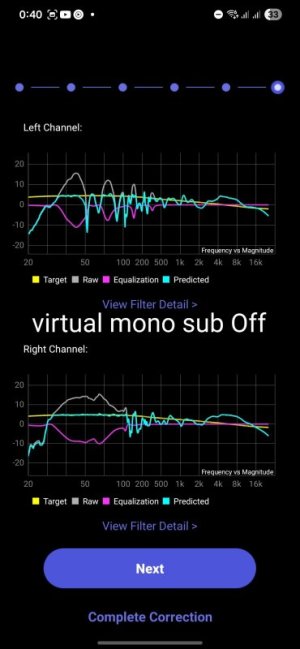
In addition, looking at your individual channel "Final Assessment" screen, we see that your two speakers end up out of phase just below and up to 100Hz - so you get a cancellation in the summed response; while individual channel dips just above 100Hz are largely compensated for in the summed/mono response.
It will be interesting to see if any of that changes as you move the listening position and the speakers.

Then I want also to experiment with the mixing of sub out and L/R.
Mixer is passive . There was an active version just a bit more expensive but I thought that introducing signal amplfiication by a non hi-fi device might be not a good idea to preserve the ultra's outputs integrity in distorsion and SNR .
The passive mixer I bought will drop signal levels. It has in built potentiometers to control mix balance, but won't introduce gain. I must set them exactly to same value not to change L/R balance.
I'm not sure if the nominal output level of sub out is the same as for line outs, however. In case not, you may need to set potentiometers to different values to compensate for the mismatch. You should see if the balance is right from RoomFit measurements.

Very interested to see how that DIY 'hack' works out in practice! :)

Any other advice when mixing ultra's sub out and Rca out to get L (hpf)+sub(lpf)=L'(full range) and R(hpf)+sub(lpf)=R'?
Crossover freq: since it is not a real sub but I just want to select the portion of my bass that I want to ensure is converted to mono and feeding both channels I guess I can go as high as 150-200hz?
Subwoofer level, how to match with the hpf portion of the signal?
I'd keep the Sub Out level at 0dB and only use the pots on your mixer to adjust relative levels. I'd start with both pots wide open (max level) and then gradually reduce the one that is too hot, until you reach a good balance.
Note that it is much better to have too much bass rather than too little before correction - RoomFit will compensate for the excess bass anyway.

In your case I'd probably start with the crossover at 100Hz.

Roomfit with Sub Out will be a whole new world too... Any advice is welcome.
IMHO the same setting should still work, except that you will need to also enable "Subwoofer Calibration".
My usual starting RoomFit settings are: Individual Channel RoomFit, B&K target, correction only below 300Hz, Non-Boost Mode enabled, Variable smoothing, MMM enabled. Keep min/max gain at 12, and max Q at 10.
 
Last edited:
null due to floor sibr at 126/107/93Hz depending on what distance to floor taken (bottom woofer/tweeter/top woofer).
Note that the tweeter doesn't play that low, so isn't a factor in low-frequency SBIR. We just need to consider the woofers and the port (in their respective passbands).
 
Hi again,
An other question: if you listen to music, that you like and know, do you hear any difference in the various set ups?
Yes, not sure if you read whole thread but room correction is very needed in my room.
1) Try measuring from a few different positions (i.e. different listening positions), without moving the speakers, and see if that changes the Stereo RoomFit response. That will tell us if the cause of any of the dips is LBIR
I did move listening position 30-40cm ahead. 100hz null was still there specially for right channel..plus I got a deeper null at 200hz in both channels.
If it was better response I may have considered pushing the sofa 30-40 inside the room instead of against rear wall and fill the gap with some shelf or storage, but don't think it got any better.
1000134537.jpg
The distance to front wall of speakers cannot be modified much and it is already very short, it is not responsible for the 90 to 120 peaks and dips. Using your sibr it seems the dip is because of floor mainly and then around that 90 to 120 hz there's a bunch of other sibr constructive and destructive even different as my rear wall (behind listener) has 2 different distances, the shortest in front of right speaker.

1000134627.jpg
1000134626.jpg
I however play a bit pushing a bit behind the speakers(I can't more because the tv forniture would become an obstacle) and redolucing the toe in.
Got an stereo measured response that fortunately clears the 50 70 dips but have a kid of hole in between 90 and 100. But not too bad no?
1000134558.jpg
Allowing some boost I managed to lift up on top of target curve the 200-500 range and applying manual HS on the higher freqs I got this stereo measured and corrected curve:
1000134564.jpg
I had to remove some of the filters that I found irrelevant and use them for the HS to lower down the treble.
By the way why does room fit always use all the 10 filters?..some are weirdly stacked. That leaves no room to add additional corrections on the rest of the response.
This last one isn't bad ...except for the know 90-110hz range... however I lost this profile while playing with the filters 😅. But I'll try again since I know how I got there.
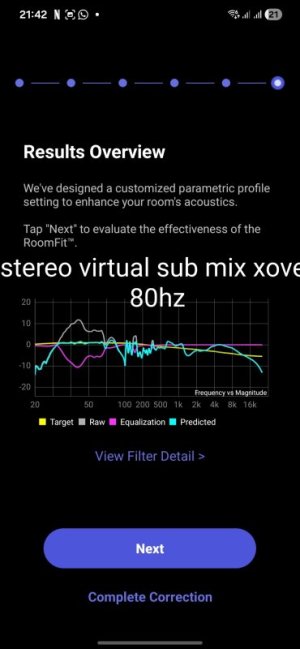
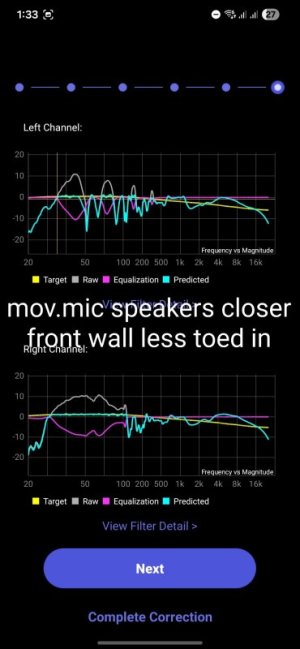
The hole between 90 and 110 I am afraid can't be filled in... except by a well integrated subwoofer, right?

Now, despite the stereo response improved I still wanted to do your mono bass experiment since I got the hardware.

I just connected stuff differently than @dominikz was probably thinking:
Input 1:
- Red Rca In: Red Rca out from ultra
- White Rca In: Sub out from ultra
Input 2:
- Red Rca In: Sub out from ultra
- White Rca in: White Rca out of wiim

Result:
1) The the mixer's output R' mixes R+sub and the mixer' output L' mixes L+sub.
2) The mixer input level knobs are in this configuration just controling the R' and L' channels volume. It is a kind of balance control, not a sub and mains mix levels control. I just left then both to max.
3) If sub out is OFF in wiim home app I just get the normal full range being mixed with nothing (mono bass reinject Feature OFF)
If sub out is ON in wiim home I get your suggested mono bass reinject On.
So Sub switch at WHA is the feature ON/OFF control.

Then with Sub ON I ran the main speakers and sub sync (1ms !?) and left the rest the of settings default (phase 0 and crossover 80).

4) The mix It sounds lower but good.
The response is very similar , so I think the sub and hpf rca out signals are matching levels.
Response in stereo
1000134673.jpg

To really test it fine I would need an stereo signal with for example a 56hz paned to left.
Then play it and measure it with spectroid or similar..
a) 'feature' OFF- measured in stereo should get little energy at 56hz. My left channel null at that freq kills the sound
-b) Feature' ON- measured in stereo I should get measured energy at 56 Hz. The feature would copy the signal to R channel and hence it would be measured.

Source signal for this test..any volunteers? ;)

Thanks @dominikz I enjoyed this experiment. Is there anything else you wanted to test to document/alidate your feature request? Happy to support.

Regards
 

Attachments

  • 1000134553.jpg
    1000134553.jpg
    47.1 KB · Views: 3
By the way why does room fit always use all the 10 filters?..some are weirdly stacked.
It is not a very efficient implementation, I agree. But it works well enough. :)
That leaves no room to add additional corrections on the rest of the response.
Note that you can do additional correction with the separate EQ feature.
I just connected stuff differently than @dominikz was probably thinking:
Input 1:
- Red Rca In: Red Rca out from ultra
- White Rca In: Sub out from ultra
Input 2:
- Red Rca In: Sub out from ultra
- White Rca in: White Rca out of wiim
The way you chose to connect is different in a sense that the mixer's level controls perform a different purpose (i.e. L/R balance instead of low/high frequency balance). Which I see you already know. :)

Then with Sub ON I ran the main speakers and sub sync (1ms !?)
No need for speaker and sub sync in this case, I suggest to keep delays of both at 0ms. Low and high frequencies are coming from the same speakers, after all.

You could however play with delays to see if any values help with the dips (since adding delay changes phase) - but if you overdo it can start to sound strange.

To really test it fine I would need an stereo signal with for example a 56hz paned to left.
Then play it and measure it with spectroid or similar..
a) 'feature' OFF- measured in stereo should get little energy at 56hz. My left channel null at that freq kills the sound
-b) Feature' ON- measured in stereo I should get measured energy at 56 Hz. The feature would copy the signal to R channel and hence it would be measured.

Source signal for this test..any volunteers? ;)
My advice is to just run Individual Channel RoomFit. You should see in the responses that with 'mono bass feature' ON both channels measure identically below the crossover, and differently above it.
With 'feature 'OFF they will measure differently accross full range.

This would be evidence it works as intended.

Thanks @dominikz I enjoyed this experiment. Is there anything else you wanted to test to document/alidate your feature request? Happy to support.

Regards
Glad to hear you enjoyed it! I'm finding it interesting too - thanks for sharing your progress! :)
 
Last edited:
Hey!
My advice is to just run Individual Channel RoomFit with sweeps. You should see in the responses that with 'mono bass feature' ON both channels measure identically below the crossover, and differently above it.
With 'feature 'OFF they will measure differently accross full range.
Yes, much easier!
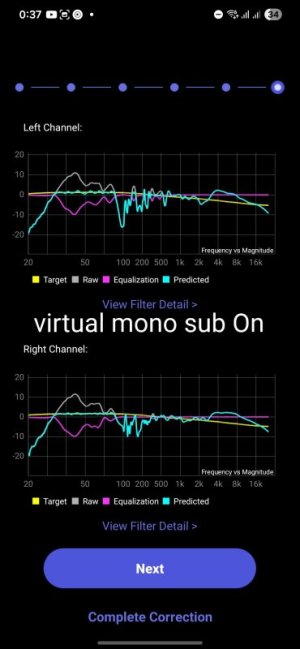
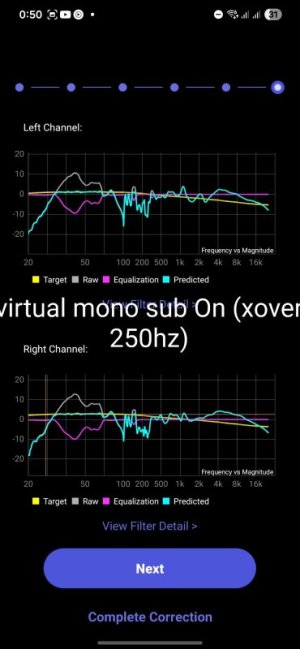
Here it is, my very well know nasty assymetrical left channel response plenty of nulls measured 'alone' and then with the virtual mono sub ON, with sweep test firing full range sweep on left speaker and only bass on right and then viceversa (used 150khz crossover).
1000134709.jpg1000134710.jpg

They look alike, up to my problematic region when they start differing I guess because the 150hz frequency sets the -3db bandwidth of the lfp hence there's some loss of signal already around 100hz.
I changed crossover freq to 250hz and both channels looked alike along a wider range as expected. Still seems left side has a bit deeper 90-110 nulled region.

1000134712.jpg

Searching second hand subs already to give it a try if it smooths even up to 100hz, null. if not happy will sell third hand ;).

Regards
 
Hey!

Yes, much easier!
Here it is, my very well know nasty assymetrical left channel response plenty of nulls measured 'alone' and then with the virtual mono sub ON, with sweep test firing full range sweep on left speaker and only bass on right and then viceversa (used 150khz crossover).
View attachment 35850View attachment 35851

They look alike, up to my problematic region when they start differing I guess because the 150hz frequency sets the -3db bandwidth of the lfp hence there's some loss of signal already around 100hz.
I changed crossover freq to 250hz and both channels looked alike along a wider range as expected. Still seems left side has a bit deeper 90-110 nulled region.

View attachment 35852
First I'd just like to say nice work so far! Thanks for taking the time to do these tests, they are very interesting - I haven't seen anybody else in this forum attempt this before. :)

So the concept seems to be working as expected, which is good news! Unfortunately it didn't solve all of the issues right away, but how does it generally sound to you? Is the tonality difference between channels with pink noise reduced compared to before?
They look alike, up to my problematic region when they start differing I guess because the 150hz frequency sets the -3db bandwidth of the lfp hence there's some loss of signal already around 100hz.
Yes, the crossover is not a brick-wall, so there's still significant overlap at 100Hz. I suspect at this frequency the "virtual mono sub" is playing roughly out of phase with the left channel, so you get a pretty deep null.

Two tests you could try:
  • Just to validate the theory: With the 150Hz crossover frequency flip the phase switch on the Sub Out to 180° position. I suspect that will give you a deep null at 150Hz in the right channel, but I suspect the 100Hz null in the left channel might improve.
  • Try to set the crossover frequency to 70Hz (phase switch back to 0°) and see if that looks better. I'm hoping that might make the 100Hz null less wide and deep.
Searching second hand subs already to give it a try if it smooths even up to 100hz, null. if not happy will sell third hand ;).
A sub could definitely help up to roughly 100Hz, but not really much above that. Any issues in the region above 100Hz unfortunately must be tackled by other means, like:
  • Speaker placement optimization (unfortunately not a feasible option in this case),
  • Physical acoustic treatment (I.e. try to absorb the problematic reflection points)
    • This is difficult to do if the 120Hz null is really caused by floor SBIR. I suspect the null at ~200Hz is caused by the front wall reflection, which then you perhaps might be able to suppress a bit by adding thick rockwool absorbers behind the speakers. Though that might be visually intrusive, so not sure if really worth it.
  • More advanced room correction like e.g. Dirac Live ART (which uses additional channels of a multichannel system as support to cancel out room reflections).
If considering a sub, I'd suggest to look at this amazing list before making a choice: Subwoofer Comparison spreadsheet.

The spreadsheet allows you to filter and sort subwoofer models based on a large number of parameters, so should help with the choice. I'd personally only consider models for which CEA-2010-A or CEA-2010-B data is available (also listed there).
The simplest way to choose would be to filter only models with "Bassaholic" rating "Medium" (or higher), as those should be a good fit for a room your size. More information about this classification can be found here.

Then simply choose between them based on price, local availability and looks. :)
 
Back
Top