WiiM Home App v3.4.12 Update – Jan 26, 2026

Please review the app update release notes below. If you encounter any issues, feel free to reach out to us.

App Version:
3.4.12

Beta Features

1. Sync Main Speakers & Sub: Align main speakers and subwoofer for the listening position using the phone’s microphone (requires an upcoming beta firmware update).
2. Standby Source Mode: Automatically switch to a selected input source when the device enters Standby (requires an upcoming beta firmware update).

Improvements

1. Qobuz Radio: Added support for Artist, Album, and Track Radio (requires an upcoming firmware update).
2. Room Correction: Added Variable, Psychoacoustic, and ERB smoothing options.
3. OOBE: Improved Wi-Fi setup stability.
4. Screen: Added per-input playback screen customization (requires an upcoming firmware update).

Bug Fixes

1. Plex: Fixed a bitrate downsampling issue.
2. NAS: Fixed local playlist playback failures and resolved Synology indexing issues on certain models.
3. [Android] Fixed a crash caused by oversized images.
 
In mmm, do such smoothing techniques still make sense? ;-)
Variable smoothing is not as beneficial with MMM as it is with sweeps, that’s correct.
But it still makes sense even with MMM, IMHO, because it will smooth-out any remaining response irregularities.
 
Hi @Wiimer ,

In the current beta version, automatic switching to the Wi-Fi input is not supported. Based on your case, a Wi-Fi input option will be added in the next app update. This feature was originally designed to ensure immediate playback from Line-In, Optical-In, etc, avoiding any delay when audio starts.
The main issues occur with Optical-in, so if the input could automatically switch to Optical when entering standby mode, I believe many issues would be resolved.

Thank you.🤗
 
The main issues occur with Optical-in, so if the input could automatically switch to Optical when entering standby mode, I believe many issues would be resolved.

Thank you.🤗
I always prefer to leave my devices set to Wi-Fi Input, as everything seems to work better for me that way, and an added bonus would be if there was also an option to clear the now playing information when going into standby.
 
I always prefer to leave my devices set to Wi-Fi Input, as everything seems to work better for me that way, and an added bonus would be if there was also an option to clear the now playing information when going into standby.

I thought so too until yesterday, but after checking again today, I changed my mind.

If you enter standby mode while still to Wi-Fi, the Optical auto-sensing doesn't work. So for users who rely on the optical input, switching back to it is probably the best solution.

However, there's one issue with this: pressing the remote's play button won't resume playback from the Wi-Fi source. (You probably don't care since you want to clear the playback info anyway.)
 
Variable smoothing is not as beneficial with MMM as it is with sweeps, that’s correct.
But it still makes sense even with MMM, IMHO, because it will smooth-out any remaining response irregularities.
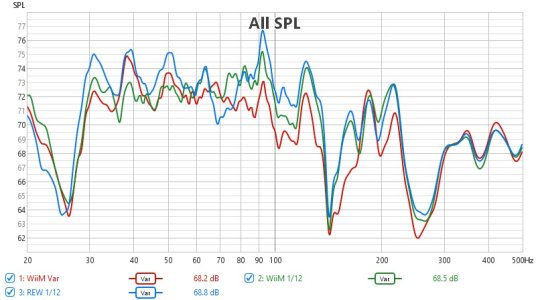
I tried out Variable smoothing with MMM individual channel and compared the results with WiiM 1/12 octave and REW 1/12 octave using REW MMM
Red = WiiM Variable
Green = WiiM 1/12 octave
Blue = REW 1/12 octave
It does look different.


VAR.jpg
 
I tried out Variable smoothing with MMM individual channel and compared the results with WiiM 1/12 octave and REW 1/12 octave using REW MMM
Red = WiiM Variable
Green = WiiM 1/12 octave
Blue = REW 1/12 octave
It does look different.


View attachment 33121
REW seems generally the least bad, with shallower dips at 36Hz, 44Hz, 110Hz, 150Hz, and 265Hz, but it has the most excess energy at 92Hz, and the worst dip at 68Hz. If anything, WiiM Variable is kind of the worst looking. That being said, I don't know what the target curve is in this picture, so it is overall difficult for me to judge, in reality.

-Ed
 
I tried out Variable smoothing with MMM individual channel and compared the results with WiiM 1/12 octave and REW 1/12 octave using REW MMM
Red = WiiM Variable
Green = WiiM 1/12 octave
Blue = REW 1/12 octave
It does look different.


View attachment 33121
Thanks for the test!
Perhaps worth pointing out that with this highly zoomed-in plot (only 17dB vertical scale) the differences look more significant then they really are. With the standard 50dB vertical scale and 20Hz to 20kHz horizontal scale the differences would visually decrease.

Apart from that, I agree with @EddNog difficult to comment without having much more details. I'll probably do a similar test in the next days and report my findings as well.
 
Hi. Would be great if when you press the search button the second time, keyboard comes up, instead of having to go to the bar to get the keyboard.
 
Thanks for the test!
Perhaps worth pointing out that with this highly zoomed-in plot (only 17dB vertical scale) the differences look more significant then they really are. With the standard 50dB vertical scale and 20Hz to 20kHz horizontal scale the differences would visually decrease.

Apart from that, I agree with @EddNog difficult to comment without having much more details. I'll probably do a similar test in the next days and report my findings as well.

I see it the same way: We are talking about only a few dB in a very small bandwidth


Also, I am wondering if 1/12 smoothing really makes so much sense? I mean having a perfect sweet-spot at some place is great. But what about the rest of the room? In my case I have ONE large room, including kitchen, eating table, fireplace, chaise-long and an aera, where I listen mainly to music. But it should sound everywhere fine. If I look at the very small correction in the bass and compare that with how big the bass differences are in the different places of the room, then I wonder if such detailed correction might have negative impact on other positions? Wouldn't 1/6 smoothing be sufficient/maybe even better to correct only the large-scale room modes?
 
Hi. Would be great if when you press the search button the second time, keyboard comes up, instead of having to go to the bar to get the keyboard.
I agree! Please vote for my request from three years ago.😂
 
Thanks for the test!
Perhaps worth pointing out that with this highly zoomed-in plot (only 17dB vertical scale) the differences look more significant then they really are. With the standard 50dB vertical scale and 20Hz to 20kHz horizontal scale the differences would visually decrease.

Apart from that, I agree with @EddNog difficult to comment without having much more details. I'll probably do a similar test in the next days and report my findings as well.
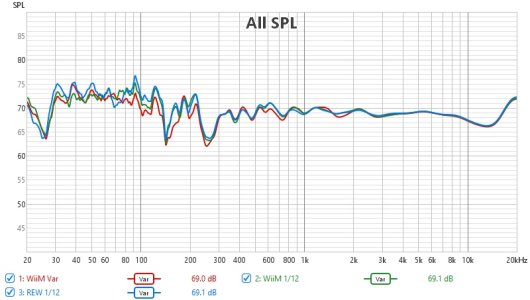
This is 50dB vertical scale and full frequency range. The individual channel target was flat 20-400Hz
var2.jpg
 
Also, I am wondering if 1/12 smoothing really makes so much sense? I mean having a perfect sweet-spot at some place is great. But what about the rest of the room? In my case I have ONE large room, including kitchen, eating table, fireplace, chaise-long and an aera, where I listen mainly to music. But it should sound everywhere fine. If I look at the very small correction in the bass and compare that with how big the bass differences are in the different places of the room, then I wonder if such detailed correction might have negative impact on other positions? Wouldn't 1/6 smoothing be sufficient/maybe even better to correct only the large-scale room modes?
You raise a very valid and insightful point. This is unfortunately an issue which EQ can't really solve, regardless of smoothing we select in RoomFit. :confused:

Different points in a typical room will have a different pattern or room mode and LBIR notches and peaks, while you can only configure PEQ to fix them in a very limited space (i.e. basically one seat). This means that any peak you knock down with PEQ on one side of the room will become a notch in a different spot of the room, and conversely any notch you try to boost in one spot will become a peak/resonance in a different spot of the room.
Side note: the above is exactly why we want to avoid boosting with EQ - peaks/resonances are very unpleasant, while dips/notches are much less so. This is why the "Non-Boost Mode" is such a great addition to RoomFit.​

So if we only have EQ (like RoomFit) at our disposal we can only optimize the response for a single listening position at any one time. This is just the sad reality which physics imposes on us, and us audio enthusiasts must live with. :cry:

But there are ways to achieve a more consistent bass response across a wider area of the room, it's just that this requires more than just EQ. I wrote about this previously in this post.
 
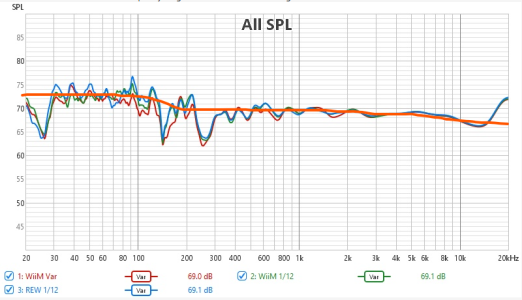
Could just be my eyes deceiving me, but while your target was flat 20-400Hz, that looks more like almost a Harman preference curve (which I personally think sounds better than flat, anyway):
View attachment 33124

-Ed
I think @slartibartfast is measuring L+R together, so the bass boost you see is a result of the different behaviour of bass and high frequencies when summing multiple sources.
Basically two source will sum as coherent sources in bass (+6db) and as incoherent sources (+3dB) above the bass. This is why when measuring both channels together we always see a +3dB boost in the bass (compared to single-channel measurement which would fit the flat curve in this case).
 
You raise a very valid and insightful point. This is unfortunately an issue which EQ can't really solve, regardless of smoothing we select in RoomFit. :confused:

Different points in a typical room will have a different pattern or room mode and LBIR notches and peaks, while you can only configure PEQ to fix them in a very limited space (i.e. basically one seat). This means that any peak you knock down with PEQ on one side of the room will become a notch in a different spot of the room, and conversely any notch you try to boost in one spot will become a peak/resonance in a different spot of the room.
Side note: the above is exactly why we want to avoid boosting with EQ - peaks/resonances are very unpleasant, while dips/notches are much less so. This is why the "Non-Boost Mode" is such a great addition to RoomFit.​

So if we only have EQ (like RoomFit) at our disposal we can only optimize the response for a single listening position at any one time. This is just the sad reality which physics imposes on us, and us audio enthusiasts must live with. :cry:

But there are ways to achieve a more consistent bass response across a wider area of the room, it's just that this requires more than just EQ. I wrote about this previously in this post.
100% this is bound to be a reality with how acoustics work in general. One thing you can try is having multiple correction profiles. I did this previously with DIRAC Live, where one profile focused on optimal sound at a tight sweet spot by taking all 9 sweeps in a tight cluster around the main listening position, and then a second profile where 16 sweeps were taken from all throughout the entire sofa and corner desk area. Bass was thinner in the sweet spot with the second profile, but was not boomy anywhere along the couch or desk, whereas with the sweet spot profile, bass was pretty much full rage in the corner where the desk is and very bass-head-party-time along the sofa too (which is behind the sweet spot listening position).

Ironically, I accidentally came upon a solution later on. By changing my crossover frequency down from 80Hz to 40Hz (my speakers reach down to an F3 of nearly 28Hz in-room), I actually dramatically smoothed out the bass response throughout the entire room, and now only use one single DIRAC profile all the time. Spreading the 40-80Hz band out across two to three sources instead of just the one subwoofer made a dramatic improvement in evenness of bass distribution.

-Ed
 
Because it was a flat target for individual channels the low frequencies gain 3dB when both channels are playing due to correlation.
I think @slartibartfast is measuring L+R together, so the bass boost you see is a result of the different behaviour of bass and high frequencies when summing multiple sources.
Basically two source will sum as coherent sources in bass (+6db) and as incoherent sources (+3dB) above the bass. This is why when measuring both channels together we always see a +3dB boost in the bass (compared to single-channel measurement which would fit the flat curve in this case).
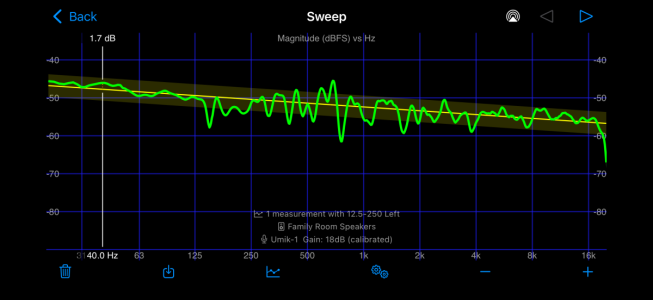
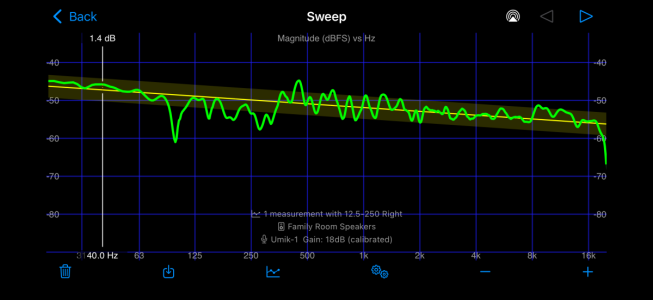
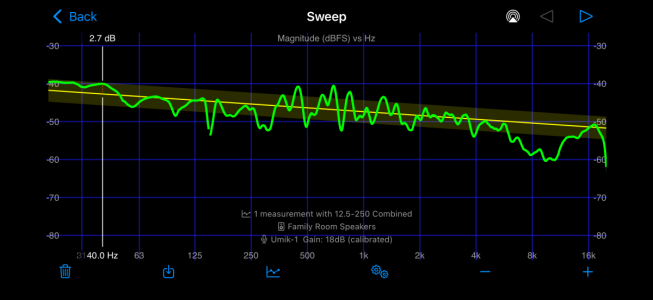
Thanks, guys. That explains what I see when I compare my own individual channel sweeps against my combined (ignore the filtering effect in the high frequencies in the combined sweep)
IMG_0835.png
IMG_0836.png
IMG_0834.png

I also move the mic slightly with each sweep, left sweep taken 3.5” left of center, right sweep taken 3.5” right of center, and combined taken from dead center.

I am waiting for LinkPlay to release the firmware update to perform subwoofer sync correctly before I bother doing any testing with the new smoothing methods or MMM.

-Ed
 
100% this is bound to be a reality with how acoustics work in general. One thing you can try is having multiple correction profiles. I did this previously with DIRAC Live, where one profile focused on optimal sound at a tight sweet spot by taking all 9 sweeps in a tight cluster around the main listening position, and then a second profile where 16 sweeps were taken from all throughout the entire sofa and corner desk area. Bass was thinner in the sweet spot with the second profile, but was not boomy anywhere along the couch or desk, whereas with the sweet spot profile, bass was pretty much full rage in the corner where the desk is and very bass-head-party-time along the sofa too (which is behind the sweet spot listening position).

Ironically, I accidentally came upon a solution later on. By changing my crossover frequency down from 80Hz to 40Hz (my speakers reach down to an F3 of nearly 28Hz in-room), I actually dramatically smoothed out the bass response throughout the entire room, and now only use one single DIRAC profile all the time. Spreading the 40-80Hz band out across two to three sources instead of just the one subwoofer made a dramatic improvement in evenness of bass distribution.

-Ed
Different correction profiles for each seat is a reasonable solution, yes, but has some limitations (e.g. doesn't work for multiple listeners at the same time, and you need to remember to manually switch profiles). In one of my systems I need to have different calibrations depending on whether I have the window closed or not because one of the room resonances moves significantly (and audibly).
As with many things in life, we have to decide on a compromise that fits us best.

Glad to hear you found a practical solution that works well for you!

IMG_0835.png

IMG_0836.png

IMG_0834.png


I also move the mic slightly with each sweep, left sweep taken 3.5” left of center, right sweep taken 3.5” right of center, and combined taken from dead center.
Yes, this is normal. I see the same behaviour in any system I ever measured, and it makes sense when you think about the physics and the wavelengths involved. Perhaps this link will be interesting as well.

My usual recommendation is to always calibrate individual channels to the desired target (because that will give consistent channel response in stereo as well as multichannel), and then use EQ to set the total amount of bass to one's preference.
 
I see it the same way: We are talking about only a few dB in a very small bandwidth


Also, I am wondering if 1/12 smoothing really makes so much sense? I mean having a perfect sweet-spot at some place is great. But what about the rest of the room? In my case I have ONE large room, including kitchen, eating table, fireplace, chaise-long and an aera, where I listen mainly to music. But it should sound everywhere fine. If I look at the very small correction in the bass and compare that with how big the bass differences are in the different places of the room, then I wonder if such detailed correction might have negative impact on other positions? Wouldn't 1/6 smoothing be sufficient/maybe even better to correct only the large-scale room modes?
There's a powerful tool in REW that allows you to observe the overall behavior of acoustic modes of your room, to understand their orders of magnitude, etc. It's quite enlightening and educational—a helpful tool for proper placement, etc. It should be approached seriously before expecting miracles from a "roomfit" system.
;-)
 
Back
Top