WiiM ultra can anyone tell me if you can select 16bit, 24bit, or 32bit bitrate when using usb out?

SBaudioquest

Member
Joined
Jan 6, 2026
Messages
8
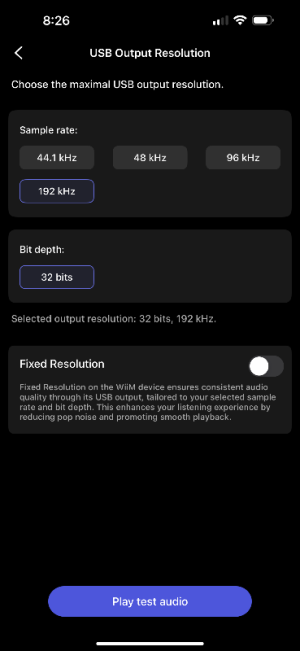
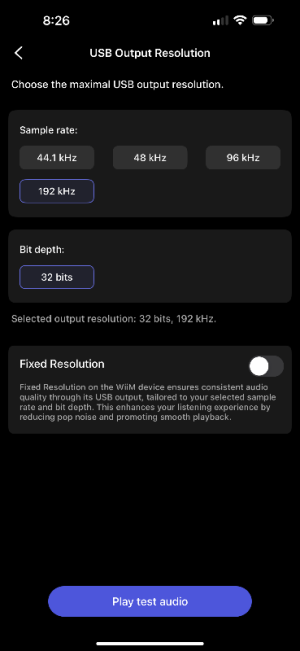
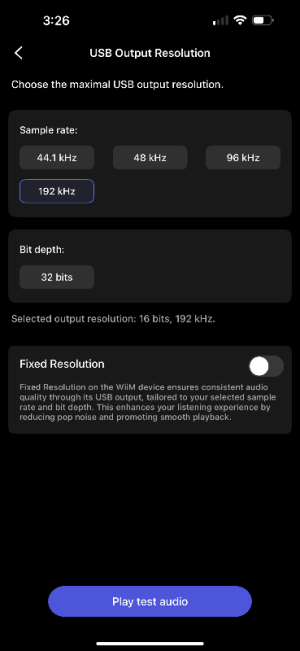
WiiM ultra can anyone tell me if you can select 16bit, 24bit, or 32bit bitrate when using usb out? I have been using usb out to my Berkeley Alpha USB version 2 and it has been working flawlessly for about 3 weeks. The Berkeley only handles bitrates up to max 24/192. If I look at the WiiM ultra usb out it recognizes it properly but only has the 32bit box and it is highlighted. I don’t have the option to select 16, or 24 bit. I am wondering if this is a software or hardware issue. Could anyone who is using USB out please check and see if you have the 3 selection boxes available.
If I unplug the usb cable and power cord and reconnect, music will play for anywhere from half a song to half an album, but if I change albums or skip ahead the song will stop playing and no audio.
At this point, the song progress bar moves for 2-6 seconds, halts, restarts from the previous 2-6 seconds, all the time no audio is coming out.
I feel if I could set the bitrate down to 24/192 everything would work again.
If I change to line out without shutting anything down, everything works normally.
Please let me know if you have selectable USB bitrates for 16, 24, and 32 from your usb out settings
I have filed a report with WiiM but haven’t heard anything other than it’s been assigned to technical support.
I have done a reboot, and then a factory reset, still can’t get any other selection other than 32 bit to show up under usb out.
Thanks in advance!
 
Ultra, as well as any other WiiM that I know, does not up sample the source, therefore you can set the max bit depth and sampling rate of USB but this is not meaning that only that bitrate will be used. If source is 24, it will exit at 24. The same for other specs of the input.

For Optical and Coaxial you can set a maximum or define that your setting is the one to be used - which will have Ultra do up sampling as/if needed - for USB I need to check if is the same as I'm currently connected via Optical; will check tomorrow and let you know.
 
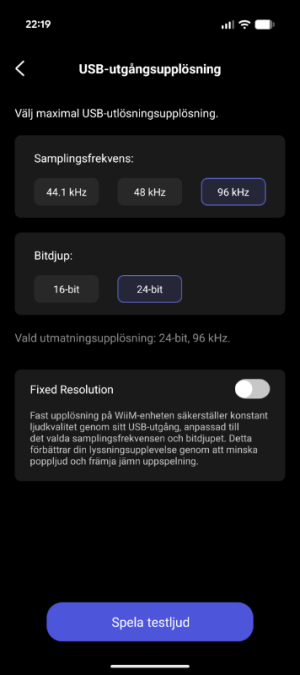
I have selectable 16-bit & 24-bit.

Have had DACs with only 32-bit as option. Do you have the option to connect your DAC to a Windows computer and see what samplerates/bitdepths are available there?

My current DAC connected to my WiiM Ultra has the capability of 384kHz/32-bit but the WiiM Ultra max resolution is detected as 96kHz/24-bit. In Windows it's correctly detected as max 384kHz/32-bit. Will create a new thread for that issue.
 

Attachments

  • usb_out_2.png
    usb_out_2.png
    59.1 KB · Views: 11
I have selectable 16-bit & 24-bit.

Have had DACs with only 32-bit as option. Do you have the option to connect your DAC to a Windows computer and see what samplerates/bitdepths are available there?

My current DAC connected to my WiiM Ultra has the capability of 384kHz/32-bit but the WiiM Ultra max resolution is detected as 96kHz/24-bit. In Windows it's correctly detected as max 384kHz/32-bit. Will create a new thread for that issue.
My Berkeley Alpha USB is capable of 24/192. The WiiM Ultra usb specs claim it is capable of up to 24/192 output. That would be ok and was working that way for 3 weeks, then poof, issues.
When I look at the Wiims usb selectable output it used to show 16, 24, and 32 bit. It only shows 32 bit now. See photo. I don’t have the option to lower the bitrate. Even if it’s not outputting 32 bit, there is a software glitch that is preventing it from playing anymore.
 

Attachments

  • IMG_9966.png
    IMG_9966.png
    41.3 KB · Views: 6
My Berkeley Alpha USB is capable of 24/192. The WiiM Ultra usb specs claim it is capable of up to 24/192 output. That would be ok and was working that way for 3 weeks, then poof, issues.
When I look at the Wiims usb selectable output it used to show 16, 24, and 32 bit. It only shows 32 bit now. See photo. I don’t have the option to lower the bitrate. Even if it’s not outputting 32 bit, there is a software glitch that is preventing it from playing anymore.
The USB options seem to be dependant on the connected USB device.
I.E. if there‘s nothing plugged in you won‘t even see USB out as an option.

What happens if you choose 96 or 48 kHz?
 
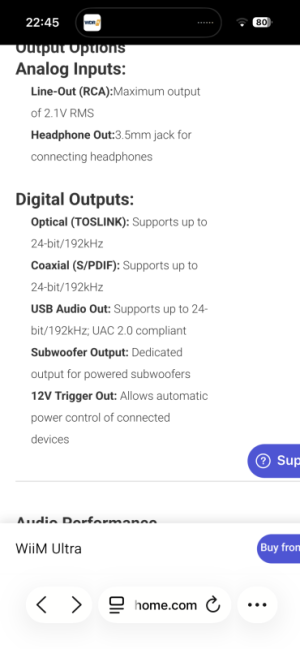
The specs for the Ultra‘s USB out.
192 / 24

View attachment 32169
I see the specs that states max output is 24/192 but the WiiM is glitching out that I’ve seen 16,24, and 32 bit selectable boxes but currently I have nothing lower than 32bit. I am at a loss and haven’t been getting far with support. I have hooked the Berkeley up in my main system and it functions normally. It worked for 3 weeks hooked up to the Ultra with no issues. It sounded wonderful. I’m hoping WiiM would send me another unit to replace this one. I may have to return it under warranty if I can’t somehow find an answer to this issue. I really don’t want to because I’m really pleased with the sound using an outboard dac and amp.
 

Attachments

  • IMG_9966.png
    IMG_9966.png
    41.3 KB · Views: 6
The USB options seem to be dependant on the connected USB device.
I.E. if there‘s nothing plugged in you won‘t even see USB out as an option.

What happens if you choose 96 or 48 kHz?
It stays stuck on 32bit depth. No other options appear.
 
My Berkeley Alpha USB is capable of 24/192. The WiiM Ultra usb specs claim it is capable of up to 24/192 output. That would be ok and was working that way for 3 weeks, then poof, issues.
When I look at the Wiims usb selectable output it used to show 16, 24, and 32 bit. It only shows 32 bit now. See photo. I don’t have the option to lower the bitrate. Even if it’s not outputting 32 bit, there is a software glitch that is preventing it from playing anymore.
If it has worked before it's presumably a WiiM software issue or less likely the DAC. I would test the DAC on a computer just to rule that out. Then wait for WiiM to respond to the issue (if you have the time), they have the ability to read the device logs which may reveal the issue.

Do you have another DAC to test if the WiiM is working correctly otherwise?
 
If it has worked before it's presumably a WiiM software issue or less likely the DAC. I would test the DAC on a computer just to rule that out. Then wait for WiiM to respond to the issue (if you have the time), they have the ability to read the device logs which may reveal the issue.

Do you have another DAC to test if the WiiM is working correctly otherwise?
If I go out of the Wiim to a Smsl P0100 or directly into the Hifiman via usb, both work, although not as nice sounding as when going through the Berkeley when it works.
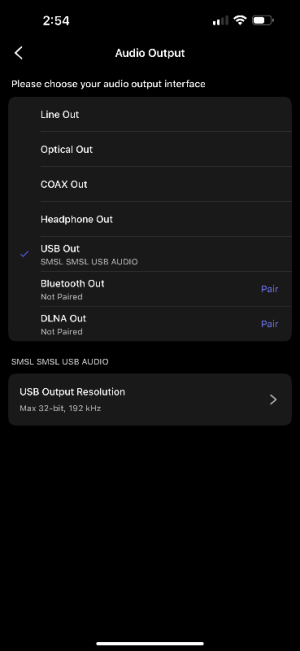
With the Smsl currently hooked up only 32/192 is available. I can change from 44.1 all the way to 192 but I can’t change off of 32 bit depth
 
If I go out of the Wiim to a Smsl P0100 or directly into the Hifiman via usb, both work, although not as nice sounding as when going through the Berkeley when it works.
With the Smsl currently hooked up only 32/192 is available. I can change from 44.1 all the way to 192 but I can’t change off of 32 bit depth
Where you able to change bitdepth to other than 32-bit on the SMSL before when the Berkeley DAC worked?
 
Where you able to change bitdepth to other than 32-bit on the SMSL before when the Berkeley DAC worked?
I remember there being 3 boxes for selecting bit depth. But not available now. If they are reading what the dac is capable of and only offering that setting, that is incorrect and inconsistent. The Berkeley should not have a 32 bit depths available option. And others have stated 16 and 24 were available for selection and another stated just 32.
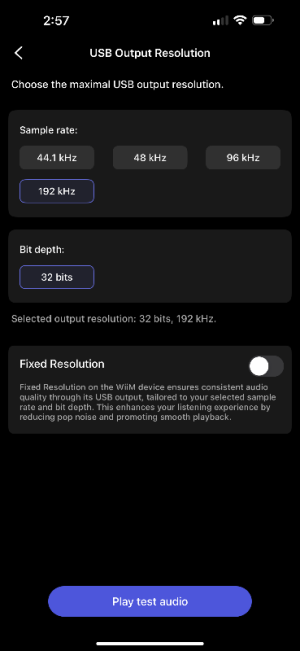
The attached pictures are with the Smsl attached. Note, no selection other than 32 bit depth.
 

Attachments

  • IMG_9974.png
    IMG_9974.png
    28.8 KB · Views: 3
  • IMG_9975.png
    IMG_9975.png
    41.2 KB · Views: 4
I remember there being 3 boxes for selecting bit depth. But not available now. If they are reading what the dac is capable of and only offering that setting, that is incorrect and inconsistent. The Berkeley should not have a 32 bit depths available option. And others have stated 16 and 24 were available for selection and another stated just 32.
The attached pictures are with the Smsl attached. Note, no selection other than 32 bit depth.
Strange, and this sudden change did not happen directly after a firmware update?
 
I’m not sure as I had the Smsl in for a while and went back to the Berkeley.
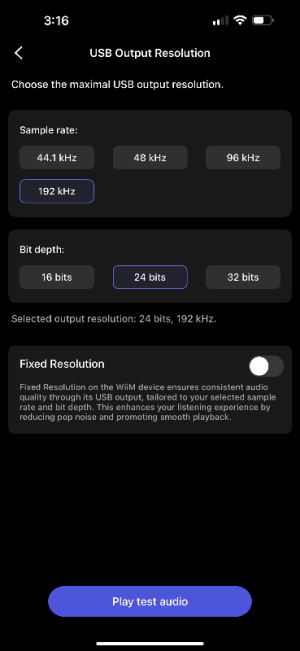
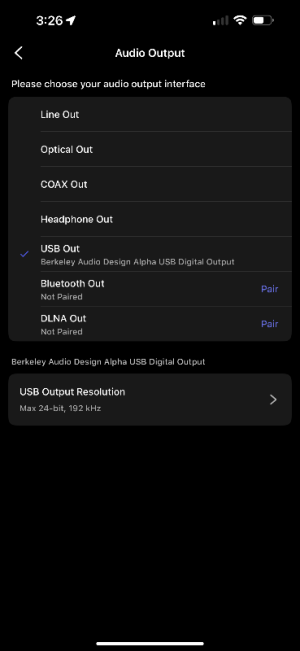
I just hooked the usb cable up to the Hifiman Ef600 and it gave me the 3 choices for bit depth so I selected 24bit, confirmed it worked. I just now swapped the Berkeley back in and it’s working. But it could be for anywhere from 2-6 songs or if I change a playlist it will suddenly stops between tracks. See the three screenshots Hifiman with the three boxes, then the Berkeley with the description showing 24/192 selected and then I click the box to change resolution and it says 16/192 output playing and the other boxes are not there. Definitely something glitchy going on. Does WiiM tech support look at the forum
posts?
Correction, after 3 songs, no sound, song tries to play for 9 seconds a shown on the progress bar and then reattempts to try and play the same part of the song. Does not play again unless I unplug power and cables and reconnect, and even then it’s not guaranteed it’ll work.
WiiM tech support, help!
 

Attachments

  • IMG_9976.png
    IMG_9976.png
    42.6 KB · Views: 3
  • IMG_9977.png
    IMG_9977.png
    31.3 KB · Views: 2
  • IMG_9978.png
    IMG_9978.png
    40.9 KB · Views: 2
Last edited:
I’m not sure as I had the Smsl in for a while and went back to the Berkeley.
I just hooked the usb cable up to the Hifiman Ef600 and it gave me the 3 choices for bit depth so I selected 24bit, confirmed it worked. I just now swapped the Berkeley back in and it’s working. But it could be for anywhere from 2-6 songs or if I change a playlist it will suddenly stops between tracks. See the three screenshots Hifiman with the three boxes, then the Berkeley with the description showing 24/192 selected and then I click the box to change resolution and it says 16/192 output playing and the other boxes are not there. Definitely something glitchy going on. Does WiiM tech support look at the forum
posts?
Correction, after 3 songs, no sound, song tries to play for 9 seconds a shown on the progress bar and then reattempts to try and play the same part of the song. Does not play again unless I unplug power and cables and reconnect, and even then it’s not guaranteed it’ll work.
WiiM tech support, help!
So now you can select bitdepths for the Berkeley again but get playback errors after a while? Have you tried different streaming services to rule out there's not a problem on that side? I'm unsure if tech support reads this forum but you can leave additional information for the ticket you created.
 
So now you can select bitdepths for the Berkeley again but get playback errors after a while? Have you tried different streaming services to rule out there's not a problem on that side? I'm unsure if tech support reads this forum but you can leave additional information for the ticket you created.
no I can’t select bit rate depths. Just the 32bit shows up but it’s not highlighted or selected. This is Qobuz I’m using. I have the same issue with Spotify. If I use line out, no issue. Just seems to be usb out. Swapped usb cables too.
 
Back
Top