WiiM Ultra Firmware v5.2.738432 Update - Dec 12, 2025

Please review the WiiM Ultra update release notes below. If you encounter any issues, feel free to reach out to us. This firmware update is being rolled out in stages, with devices updating sequentially over the next few days.

5.2.738432 (In Progress)

Release date:

Dec 12, 2025

General Improvements:
  1. Wi-Fi: Stronger connection stability; improved compatibility with Wi-Fi 7 routers.
  2. Sync Audio: More accurate calculations at low volume.
  3. Audio Spectrum: Better timing alignment with playback.
Music Services:
  1. Qobuz: Stabilized progress bar; fixed shuffle dropouts, playback-mode mismatch, and missing artist/track metadata.
  2. Soundtrack: Updated SDK; fixed disconnects when renaming the device during playback.
  3. SoundCloud: Fixed playback stops, genre-preset failures, and unexpected logouts.
  4. Plex: Added remote streaming over WAN.
  5. Amazon Music: Fixed position reset after back-to-back seeks.
  6. USB Library: Fixed disappearing album art.
  7. NAS: Fixed missing metadata.
  8. TIDAL Connect: Fixed playback interruptions after ~1 hour.
Playback Enhancements:
  1. Local files: Automatically skips unplayable tracks to continue playback.
  2. Seeking: Fixed next-track failures when seeking in the last 5 seconds.
  3. Stability: Reduced intermittent dropouts via synchronization optimizations.
  4. Resumption: Music now returns to the foreground after alarms or timers.
  5. Queue: Fixed crashes related to queue management and multiroom group naming.
  6. Radio: Resolved failures for certain station formats.
Bug Fixes:
  1. USB Out: Fixed a power issue that blocked standby while using USB output.
  2. EQ: Fixed a rare exception that caused no sound.
 
I looks like there is need for that because it seems you have a problem accepting that other people do or like somethings different than you, judging by your reply's to various others. Maybe I'm "triggered" by that because sometimes I have a tendency to do it also but always try to prevent it.
Not at all. I was merely checking that veskop understood that the device where the stations were stored would be the same device where they were set up and he pointed me to a thread that was not the same issue as he was having.

judging by your reply's to various others.
I guess you are talking about the automatic updates discussion that we had. I thought I was quite polite with you.
Perhaps you misunderstood me.
 
I told you allready , i checked on my iPad, list was empty after firmware update this morning. App on iPad was up-to-date.
The list of URL's are stored at the phone/tablet where you added them. So a firmware update should not be able to delete them. A WiiM Home App reinstall will however do that.
 
@WiiM Team

Could you please tell us what can we expect regarding the issue and the proposition given? I also cannot deactivate HDMI in TV. Even if I could, I don't like this solution, as I watch movies with my audio setup. It's just not used on daily basis

I have no idea why they are constantly leaving @hgo58 and others in the dark on this. It seems obvious that the Ultra should be able to turn on and off how it presents itself as an ARC endpoint. This is basic AVP/AVR functionality and they already proved they can do it with previous betas. That’s the craziest part. Why ever disable useful options?
 
I have no idea why they are constantly leaving @hgo58 and others in the dark on this. It seems obvious that the Ultra should be able to turn on and off how it presents itself as an ARC endpoint. This is basic AVP/AVR functionality and they already proved they can do it with previous betas. That’s the craziest part. Why ever disable useful options?
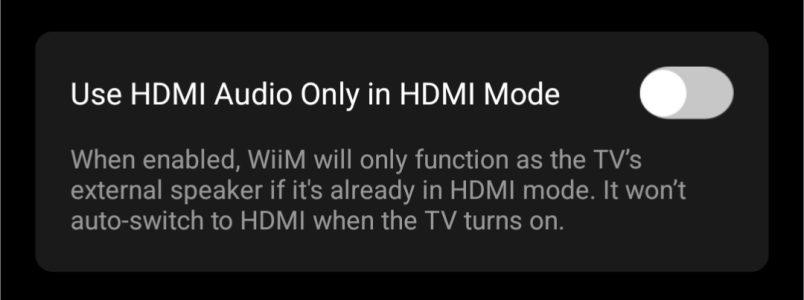
They even have the toggle in the WiiM Home App.

"Use HDMI Audio Only in HDMI Mode"

"HDMI audio" being HDMI ARC.
"HDMI Mode" meaning that the HDMI ARC is selected as input.
So: "Only enabled HDMI ARC discovery if selected as input"

It's just not working! And have not for more than a year.
 
Let me pick up two of the ‚issues‘ emphasize in this thread.

HDMI behaviour
and
Automatic updates

I appreciate the critisim. But you (the posters) should be aware of your status as very advanced users.
The average user wants exactly those features. He can‘t be bothers with manually initiated updates. Nor will he accept that his TV sound is not present, regardless of any setting he may have changed more or less undeliberately.
 
Are you sure you understand the problem?
Yes, I do. The HDMI thing may indeed be a bit annoying, if you are using it only on occasions. But the normal user will hardly even realise that Auto-Sensing set to OFF doesn‘t do anything.
 
Back
Top