WiiM Ultra Firmware v5.2.813259 - Apr 8, 2026

Please review the WiiM Ultra update release notes below. If you encounter any issues, feel free to reach out to us. This firmware update is being rolled out in stages, with devices updating sequentially over the next few days.

5.2.813259 (In Progress)

Release date:

Apr 8, 2026

Highlights:
  1. Sub & Main Speaker Sync: Automatically aligns subwoofer and main speakers for improved timing at the listening position.
  2. Per-Input Screen Control: Enable or disable the screen display for each input mode.
  3. Headphone EQ: Added independent EQ for headphone output optimization.
  4. Standby Source Mode: Automatically switch to a selected input when entering standby, enabling instant playback.
  5. Spotify Smart Play: Resume your latest listening session with a single tap.
  6. Surround Setup: Simplified setup with full backward compatibility. (requires upcoming app update).
Screen:
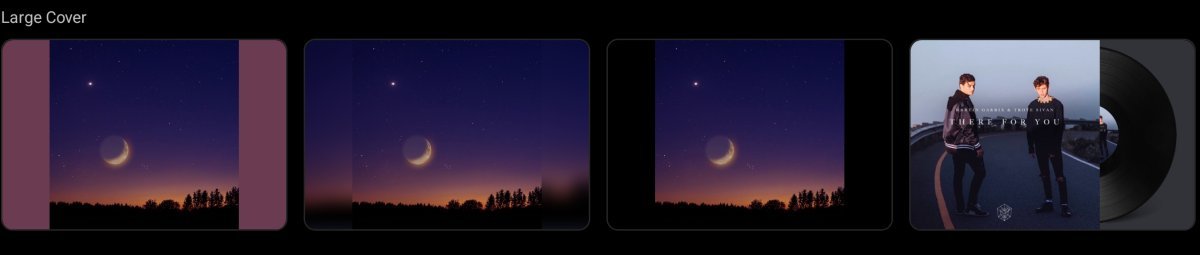
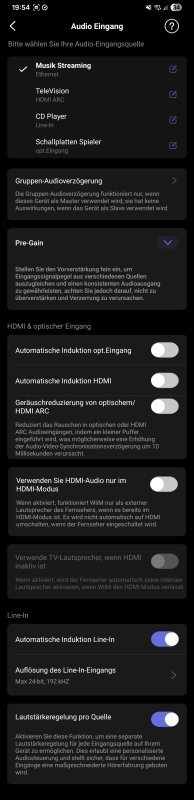
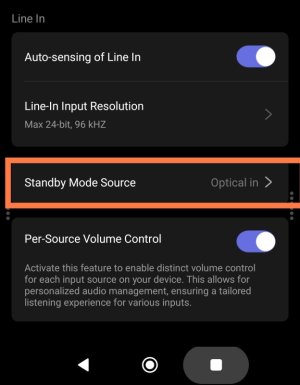
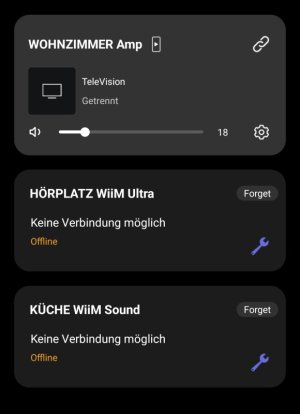
  1. Playback Screen: Added a vinyl-style playback screen for a more immersive experience.
  2. Localization: Added French language support.
Playback & Audio:
  1. Playback Latency: Reduced delay when starting playback.
  2. EQ: Improved responsiveness when adjusting and switching EQ settings.
  3. Line In: Fixed distortion during extended playback sessions.
  4. Bass Output: Fixed low bass levels for Apple TV (Dolby 5.1).
  5. Audio Sync: Improved sync accuracy at microsecond level for better group playback (requires upcoming app update).
Radio & Streaming Services:
  1. TIDAL Connect: Upgraded SDK to resolve unexpected playback interruptions.
  2. Soundtrack: Updated SDK for improved playback stability and performance.
  3. TuneIn: Fixed playback issues for certain stations and improved resume behavior after long pauses.
  4. Deezer: Fixed unexpected playback interruptions.
General Improvements:
  1. Wi-Fi: Improved network stability and enhanced compatibility with Wi-Fi 7 routers.
  2. HDMI ARC: Disabling automatic audio output now correctly keeps WiiM in standby and defaults to the TV speakers.
  3. HTTP Server: Improved concurrency and stability under high load.
  4. Audio Input: Fixed playback crash issues.
  5. Remote: Fixed occasional disconnection and unexpected max volume issues.
  6. Alarm: Fixed incorrect alarm and preset volume behavior.
  7. Roon: Fixed occasional crash issues.
  8. EQ: Enables EQ for Dolby 5.1 playback.
  9. Alarm: Fixes BBC and vTuner alarms defaulting to the chime.
  10. Spectrum Display: Improves dynamic visualization.
  11. Qobuz Connect: Fixed occasional playback stopping issues.
 
Last edited:
Why is the new vinyl visualization restricted to the phono input? My turntable has a built in phono stage so it's plugged in to the line input on my ultra...

But that means I can't use the new visualization?
 
With any type of setting, with WiiM in standby and the TV in standby, as soon as I turn on the TV, after a few seconds the speaker audio is muted because it automatically switches to HDMI ARC. While waiting for a solution, I unplug the HDMI cable. Every time I have to set the TV's audio to manual.
Could you tell us the model of your TV?

If the TV's audio output setting is set to "AUTO," changing it to "HDMI/ARC" might resolve the issue.
 
Why is the new vinyl visualization restricted to the phono input? My turntable has a built in phono stage so it's plugged in to the line input on my ultra...

But that means I can't use the new visualization?
It is not. It is actually no available for phono. Available for digital inputs where song Metadata and album art are readable (ethernet/Wifi/Usb)
 
Last edited:
Why is the new vinyl visualization restricted to the phono input? My turntable has a built in phono stage so it's plugged in to the line input on my ultra...

But that means I can't use the new visualization?
It seems obvious to me that, whether it’s via phono, line-in or Bluetooth, the WiiM can’t recognise which artist is playing. So what’s the screen supposed to display?

Regardless, it doesn’t matter much to me, as I’m sitting too far away and can’t see the screen properly anyway.

I’d prefer a display showing the album cover in full screen, without the streaming source or the home button, but with a progress bar.
It’s all a matter of taste...
 
With any type of setting, with WiiM in standby and the TV in standby, as soon as I turn on the TV, after a few seconds the speaker audio is muted because it automatically switches to HDMI ARC. While waiting for a solution, I unplug the HDMI cable. Every time I have to set the TV's audio to manual.
That is the old behaviour, before the latest fix to HDMI. Did you enabled the new HDMI options?

With the two new HDMI options enabled and the HDMI auto-sensing disabled, then the CEC discovery will be turned off unless you manually select the HDMI input. So the TV will only switch to ARC when you manually chose to.

Unfortunately this is not correctly documented in the WiiM solution documentation.
 
Last edited:
Actually liking the new animated vinyl record playback screen option. Maybe it would be an idea to have a variation on this where just basic track info is shown on the left part of the screen and the artwork is shown only in the vinyl record animation.
 
  • Like
Reactions: MGJ
There isn’t much new that I can use at the moment.
What I really like is that I now have the option to turn the screen off when a specific audio input is playing.
What’s strange is that when the screen is set to ‘off’ during a specific input, and the WiiM goes into standby after use, the selected and desired standby screen (‘clock’) isn’t displayed; instead, the screen remains off.
My standby setting is “Screen on during standby”.
 
Actually liking the new animated vinyl record playback screen option. Maybe it would be an idea to have a variation on this where just basic track info is shown on the left part of the screen and the artwork is shown only in the vinyl record animation.

This is on devices screen ? Coz I can’t find the option to enable it.
 
What’s strange is that when the screen is set to ‘off’ during a specific input, and the WiiM goes into standby after use, the selected and desired standby screen (‘clock’) isn’t displayed; instead, the screen remains off.
My standby setting is “Screen on during standby”.
Did you send the ticket?

This is just a workaround, but if you enable the "Optical in" display and change the "Standby Mode Source" in the audio input section to "Optical in," I believe the clock will remain visible even in standby mode.
 
Did you send the ticket?
Yes I did.
This is just a workaround, but if you enable the "Optical in" display and change the "Standby Mode Source" in the audio input section to "Optical in," I believe the clock will remain visible even in standby mode.
That sounds like a good idea... Unfortunately, I can't find the standby setting?
Which section is the setting in?
 
Did you send the ticket?
Yes, and the answer was:

"Please open the WiiM Home app and navigate to Device Settings (gear icon) > Display Settings > Screen Display. Check there to ensure that the “HDMI ARC” option is disabled.

If this option is disabled, this behaviour is normal. When the HDMI ARC option is switched off, the device displays a black screen in standby mode. If, on the other hand, this option is enabled, the wallpaper you have selected will be displayed in standby mode." 🙈

Clearly, some people aren’t in the right job... or simply don’t read the enquiry thoroughly, because it is precisely the screen turning off that is desired during operation. However, operation has nothing to do with standby....
🫩
 
Where is the option to delay or pause the firmware update?

Am I just not finding it, or has it been removed?

Updates have been a mess for a while now
 
beta firmware?
The latest firmware includes this.
That was probably my mistake...

I’ve got the wrong device open; I need to adjust the settings on my WAU, not the WU.
I assumed that if the screen-off function is available on both devices, the other options would be the same too.
Why do they have to make it so complicated...
1000098704.jpg
 
Back
Top