WiiM Ultra Firmware v5.2.813259 - Apr 8, 2026

Please review the WiiM Ultra update release notes below. If you encounter any issues, feel free to reach out to us. This firmware update is being rolled out in stages, with devices updating sequentially over the next few days.

5.2.813259 (In Progress)

Release date:

Apr 8, 2026

Highlights:
  1. Sub & Main Speaker Sync: Automatically aligns subwoofer and main speakers for improved timing at the listening position.
  2. Per-Input Screen Control: Enable or disable the screen display for each input mode.
  3. Headphone EQ: Added independent EQ for headphone output optimization.
  4. Standby Source Mode: Automatically switch to a selected input when entering standby, enabling instant playback.
  5. Spotify Smart Play: Resume your latest listening session with a single tap.
  6. Surround Setup: Simplified setup with full backward compatibility. (requires upcoming app update).
Screen:
  1. Playback Screen: Added a vinyl-style playback screen for a more immersive experience.
  2. Localization: Added French language support.
Playback & Audio:
  1. Playback Latency: Reduced delay when starting playback.
  2. EQ: Improved responsiveness when adjusting and switching EQ settings.
  3. Line In: Fixed distortion during extended playback sessions.
  4. Bass Output: Fixed low bass levels for Apple TV (Dolby 5.1).
  5. Audio Sync: Improved sync accuracy at microsecond level for better group playback (requires upcoming app update).
Radio & Streaming Services:
  1. TIDAL Connect: Upgraded SDK to resolve unexpected playback interruptions.
  2. Soundtrack: Updated SDK for improved playback stability and performance.
  3. TuneIn: Fixed playback issues for certain stations and improved resume behavior after long pauses.
  4. Deezer: Fixed unexpected playback interruptions.
General Improvements:
  1. Wi-Fi: Improved network stability and enhanced compatibility with Wi-Fi 7 routers.
  2. HDMI ARC: Disabling automatic audio output now correctly keeps WiiM in standby and defaults to the TV speakers.
  3. HTTP Server: Improved concurrency and stability under high load.
  4. Audio Input: Fixed playback crash issues.
  5. Remote: Fixed occasional disconnection and unexpected max volume issues.
  6. Alarm: Fixed incorrect alarm and preset volume behavior.
  7. Roon: Fixed occasional crash issues.
  8. EQ: Enables EQ for Dolby 5.1 playback.
  9. Alarm: Fixes BBC and vTuner alarms defaulting to the chime.
  10. Spectrum Display: Improves dynamic visualization.
  11. Qobuz Connect: Fixed occasional playback stopping issues.
 
Last edited:
That was probably my mistake...

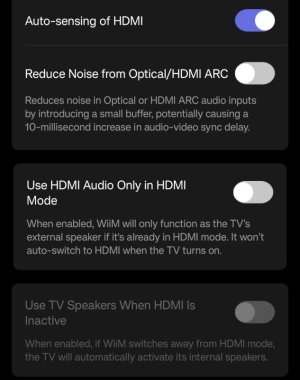
I’ve got the wrong device open; I need to adjust the settings on my WAU, not the WU.
I assumed that if the screen-off function is available on both devices, the other options would be the same too.
Why do they have to make it so complicated...
View attachment 36633
The latest firmware for Amp Ultra has been released, so this feature will be available soon. Maybe a few days later.... 🙂
 
HDMI ARC: Disabling automatic audio output now correctly keeps WiiM in standby and defaults to the TV speakers.

Unfortunately, this is still not working for me. Both options are enabled, but CEC is still active even if I switch to another input source. Also, the TV is still routing the sound to HDMI receiver even if Ultra is in stand-by mode.

What I notice as a different behavior compared to the previous firmware is that - Use TV Speakers when HDMI is inactive option temporary fixes the problem, but only until I switch from HDMI ARC to another input.

I had big hopes for this update, but seems I have to continue using my 15 EUR HDMI ARC extractor which is kind of shame (especially because I bought Ultra because of HDMI ARC).
 
Unfortunately, this is still not working for me. Both options are enabled, but CEC is still active even if I switch to another input source. Also, the TV is still routing the sound to HDMI receiver even if Ultra is in stand-by mode.

What I notice as a different behavior compared to the previous firmware is that - Use TV Speakers when HDMI is inactive option temporary fixes the problem, but only until I switch from HDMI ARC to another input.

I had big hopes for this update, but seems I have to continue using my 15 EUR HDMI ARC extractor which is kind of shame (especially because I bought Ultra because of HDMI ARC).
That's strange. You are describing exactly my problems before this update. This release (and the beta 5.2.809757) solved perfectly the issue for me. Might be something on your TV CEC settings?
 
Unfortunately, this is still not working for me. Both options are enabled, but CEC is still active even if I switch to another input source. Also, the TV is still routing the sound to HDMI receiver even if Ultra is in stand-by mode.

What I notice as a different behavior compared to the previous firmware is that - Use TV Speakers when HDMI is inactive option temporary fixes the problem, but only until I switch from HDMI ARC to another input.

I had big hopes for this update, but seems I have to continue using my 15 EUR HDMI ARC extractor which is kind of shame (especially because I bought Ultra because of HDMI ARC).
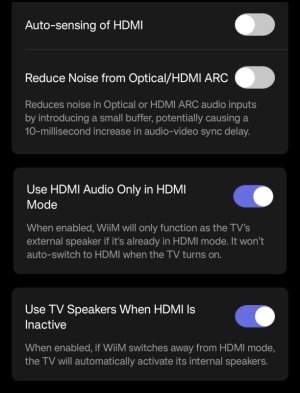
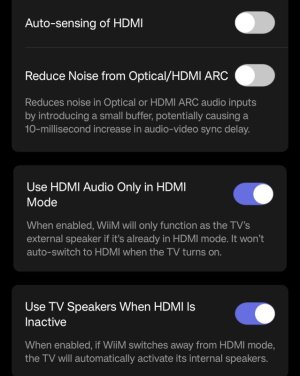
Are your settings for HDMI like this:
1000005888.jpg

This work for me.
From your observations it may be that the last option is not enabled?

Don't ask me why both settings are needed. I don't see any needs to even disable the last one.
 
Are your settings for HDMI like this:
View attachment 36640

This work for me.
From your observations it may be that the last option is not enabled?

Don't ask me why both settings are needed. I don't see any needs to even disable the last one.
Hi,
Yes, both options are enabled, but as you said it can be issue with my TV which is quite old (I have it for more than 10 years) even though I never had issues with the Sony soundbar. So for now I'll just give up and will try once I buy a newer TV :) .
 
Hi,
Yes, both options are enabled, but as you said it can be issue with my TV which is quite old (I have it for more than 10 years) even though I never had issues with the Sony soundbar. So for now I'll just give up and will try once I buy a newer TV :) .
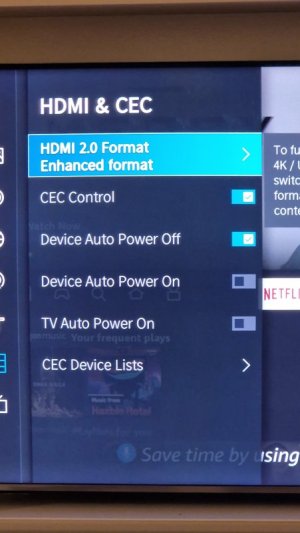
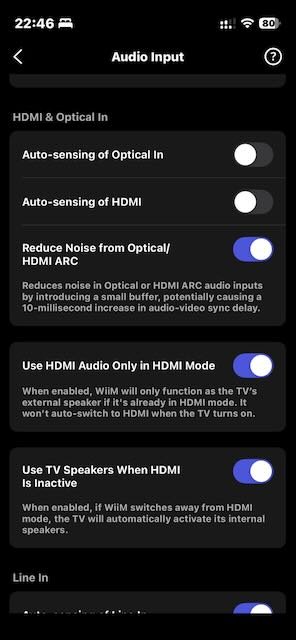
Aside of the 2 hdmi settings, is Auto-sensing HDMI input also disabled?
Have a look at your tv ce settings. You may need to deep dive into the configuration menus.
Mine has these for example. I had to play a bit with these also to get it working as I wanted. Disabled a few things ans enable just first to allow tv to send my ultra to stand by (and it only does when ultra is on hdmi input. If set to streaming or other input the tv can be on or off and it won't interact with tv at all).

1000137195.jpg
 
Hi,
Yes, auto sensing is disabled. Here is my settings:

IMG_4376.jpeg

From the TV side CEC is enabled, but I have nothing to control more (apart of audio stream format). My TV is Samsung UE43J5500 which was released 2015, so can be something with the compatibility or Samsung implementation.
 
Last edited:
Back
Top