Beta Test: Stereo Pair

Hi WiiM Community,

We’re looking for beta testers to try the new Stereo Pair experience. You can easily pair two WiiM Sound or WiiM Sound Lite devices into a stereo setup, and their volume will stay in sync. In the next version, they will also stay consistent in EQ, Pre-Gain, Dynamic Bass, and more.

How to join the beta​

  • Update the WiiM Home app to the latest version
  • Go to WiiM Sound / Sound Lite → Device Settings → Device Info → Join Beta Testing
  • Select Version 5.2.811351

Thanks!
WiiM Team
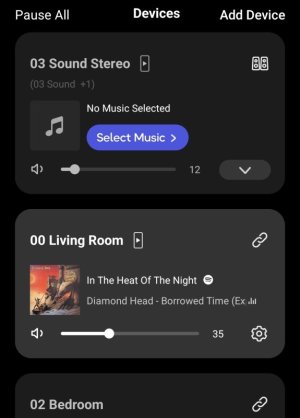
I noticed my WiiM Sound/Sound Lite jump to the top of the device list when paired, and stay there regardless of the name of the group.

Is this really intended, or is there some way I missed to influence the order?

Normally I have names starting with a number to customize the order, but this trick doesn't seem to work with the stereo pair:
1000082228.jpg
 
I noticed my WiiM Sound/Sound Lite jump to the top of the device list when paired, and stay there regardless of the name of the group.

Is this really intended, or is there some way I missed to influence the order?

Normally I have names starting with a number to customize the order, but this trick doesn't seem to work with the stereo pair:
View attachment 36200
Same here. No objection from my side.
 
Last edited:
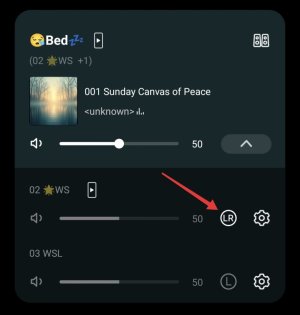
On second check it seems that the Remote of the Lead speaker is the one to use. The other speaker Remote may brake the Stereo Pair.

Also when first clicking the Lead Remote its LED flashes amber. A second click flashing white seems necessary to change volume or presets.
 
Hi everyone,

Thanks for all the feedback and discussions — we’ve carefully reviewed everything shared here.

We’ve consolidated your inputs internally and will discuss them with the team to evaluate improvements and define a plan for future updates. Really appreciate your support and please keep the feedback coming!
 
This happens for me with any group, whether ad-hoc, persistent, pair.
True.
For the stereo pair feature I personally find this objectionable however, as I tend to treat the permanently paired Sounds like a single device. So I dislike that it always sits at the top of the list and I can't do anything about it.
 
Hi everyone,

Thanks for all the feedback and discussions — we’ve carefully reviewed everything shared here.

We’ve consolidated your inputs internally and will discuss them with the team to evaluate improvements and define a plan for future updates. Really appreciate your support and please keep the feedback coming!
Then to save me opening a ticket, here's another one:

I can only rename the stereo pair once I've completed pairing by going back into the Stereo Pair menu.
It can't be renamed during / at the end of the pairing procces / screens.

And a bonus one:
The screens are only in portrait, so I have to rotate my tablet!
 
It’s been a while, but I’ve finally tested the stereo pair. First off, I should mention that I have a WS and a WSL in my bedroom, and I always play them in stereo pair mode. Once I set up the pairing, I want to keep it that always.

In this regard, the feature works perfectly so far.

There are absolutely no issues with volume synchronization. I confirmed that the volume stays in sync both when the alarm goes off and when switching inputs.

However, as other members have already mentioned, several issues arise when unpairing the stereo pair.

<Bug>
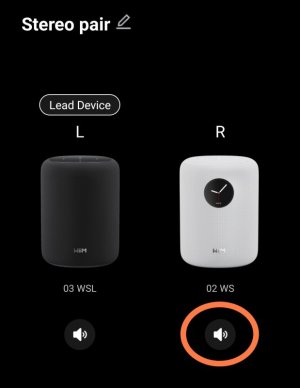
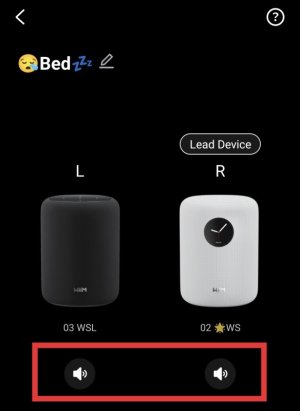
When I play a follower's test sound on a stereo pair screen, the pair is disconnected.
3169.jpg
Since this behaves the same way as a regular group, you might want to place a single speaker icon in the center and configure it to play the test sound in Stereo pair.


As I mentioned earlier, here are a few suggestions.

1. Treat the stereo pair as a single device so it can be added to other groups. I believe this would allow it to be incorporated into a wireless surround group.

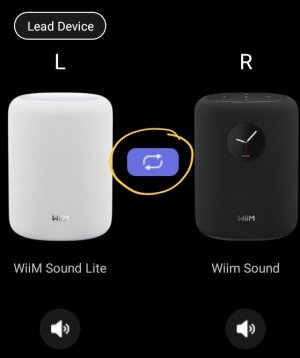
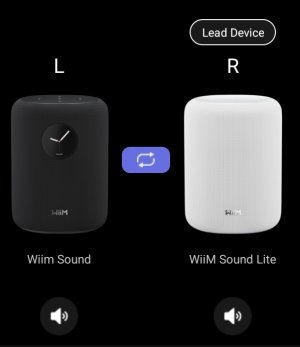
2. On the stereo pair screen, allow users to switch between L, R, and L/R for each speaker. It might also be convenient if the leader speaker could be changed.

3. Ideally, I’d like a mechanism where the pair isn’t disconnected when music is played from a follower speaker.

That’s about it for now.
Thank you .🤗
 
If technically feasible, I think it would be better to activation independent mute buttons for each speaker.

And, when one speaker is muted, the other speaker would automatically switch to the L/R channel.

If this is possible, we could play sound through only one speaker while keeping the pair keeped.


...Also, and this applies to the entire group, it would be great if the screens of muted devices within the group could be automatically turn off.
 
Back
Top