Plex Integration (In-App and as Plexamp Player)

jxrxme

Active member
Joined
Feb 29, 2024
Messages
195
I really love the WiiM Amp so far. Most music I listen with the Amp is using Plexamp + Chromecast to WiiM Amp.

A native Plex Integration would be highly appreciated. Integrated in the WiiM Home App and additionally as Plexamp compatible player in the network since listening to music with Plexamp is way more fun.

I would absolutely beta test this feature.
 
Upvote 15
As the holidays come back around I have to ask... if you buy a WIIM what kind of Plexamp functionality is available? Are we still locked into raspberry pi for a headless setup? So wanting to spend some money on an intuitive headless setup for my .flac files that has gapless playback and sweet fades for my music collection and playlists.
I’d say a Pi attached to a dac is the better option right now. Plex on the Wiim sort of works until it doesn’t. I find the search function rather erratic. Some albums can be found, some can’t. Sometimes missing albums show up when showing all albums by an artist, sometimes albums only show up in search but not when showing all albums. I want to ditch LMS because it’s kind of slow compared to Plex on my system but at least with an Ultra that’s not really an option. Ymmv though. Some people on here claim that Plex is working just fine.
 
I’d say a Pi attached to a dac is the better option right now. Plex on the Wiim sort of works until it doesn’t. I find the search function rather erratic. Some albums can be found, some can’t. Sometimes missing albums show up when showing all albums by an artist, sometimes albums only show up in search but not when showing all albums. I want to ditch LMS because it’s kind of slow compared to Plex on my system but at least with an Ultra that’s not really an option. Ymmv though. Some people on here claim that Plex is working just fine.
Works ok here use it exclusively my only source of music, I do have LMS running on another box but never use it...
 
I have replaced my Wiim with Raspberry PI 4/Ropieee/ (USB Out/SMSL Re-clocker/Chord mojo), sound quality is fantastic.

I wish I could use my WIIM instead
 
Willyspu
The integration is still pretty weak. However, you can cast from Plexamp to your WiiM.
Brother, I have the integration running withing the Wiim app, but I am not able to see the cast from Plex amp

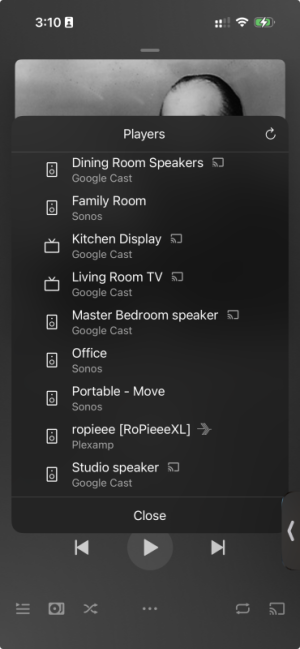
I have both Ropieee (ropieee) with Plexamp integration which I can see and a Wiim Pro (Dining Room Speakers) which I see as a chrome cast device but not as a Plexamp device.

Screenshot 2025-11-15 at 3.10.29 PM.png
 
Last edited:
Willyspu

Brother, I have the integration running withing the Wiim app, but I am not able to see the cast from Plex amp

I have both Ropieee (ropieee) with Plexamp integration which I can see and a Wiim Pro (Dining Room Speakers) which I see as a chrome cast device but not as a Plexamp device.

View attachment 29530
WiiM devices don’t present as Plexamp devices - support for that hasn’t yet been developed by WiiM
 
A year ago. Sounds like they're not keen on keeping it up to date for some reason 🤷‍♂️
A software roadmap -- Bold plans ahead—subject to change when someone says, ‘What if we just…’

Our community takes the roadmaps too literally and it feels like a hard commitment rather than guidance. We've all seen the posts ;)
 
Maybe the major Plexamp 5.0 update brings something new to the table when it comes to playback on dedicated music streamers... one can hope 🤞
 
A software roadmap -- Bold plans ahead—subject to change when someone says, ‘What if we just…’

Our community takes the roadmaps too literally and it feels like a hard commitment rather than guidance. We've all seen the posts ;)
I totally get that roadmaps change and nothing is guaranteed but the lack of updates on it is pretty dissapointing
 
I've been toying around with Home Assistant recently and I have now added Music Assistant to the ecosystem. Having done this I have now been able to make all my WiiM devices Plexamp endpoints using the Plex connect plugin. Each WiiM has to be setup individually but it works perfectly... almost. All the WiiM devices now show up in the Plexamp app as players! The only caveat that I have found is that the display in the WiiM home app only shows text, to see graphics you have to use either the Plexamp app or the Music Assistant web display. Result!
 
That sounds great but could you clarify a bit?
Home Assistant - Google Home Assistant?
Music Assistant -Google Home?

Could you provide a little more detail on how you did that?
Can you send music to more than one WiiM at a time?
I really like PLEX amp but I can only send music to one WiiM at a time with Plex Amp and it looks like it is using Google Cast.

Thanks!
 
That sounds great but could you clarify a bit?
Home Assistant - Google Home Assistant?
Music Assistant -Google Home?
Neither..
 
That sounds great but could you clarify a bit?
Home Assistant - Google Home Assistant?
Music Assistant -Google Home?

Could you provide a little more detail on how you did that?
Can you send music to more than one WiiM at a time?
I really like PLEX amp but I can only send music to one WiiM at a time with Plex Amp.

Thanks!
In this context, Home Assistant refers to the open source home automation system, with Music Assistant being an optional addition to that. They’re unrelated to Google Home

 
Sounds great! But is there no transcoding happening?

* Alright, I just learned I should be able to run just "music assistant" in its own docker container in my NAS. This is going be fun 😊
 
I'd love to hear how Home Assistant / Music Assistant allows for this.

Running Home Assistant in a VM or docker container is something I was already considering for other reasons. If it lets me cast directly from Plexamp (with multiroom), that would be a huge plus.
 
Whooo got it running! It's not without its limitations though, but very promising!

Firstly I installed Home Assistant in the Virtual Machine Manager, following this tutorial:

The tutorial doesn't touch on the fact that it might be handy to change the IP address to a static one after installation. You can do so in the settings of HA.

Next: install the Music Assistant add-on

In Music Assistant, you need to install additional plugins (referred to as "providers" in the settings) to make it discover the WiiM devices and other streamers/speakers on your network + to integrate with Plex(amp)
- UPnP/DLNA Player provider (to make the WiiM Device accessible to Music Assistant)
- Plex Media Server Library (required to be able to install the Plex Connect Plugin)
- Plex Connect Plugin -> configure the UPnP device to be detected by Plexamp! :)

It works with the limitation mentioned by @Stessull that there's no artwork shown. Volume control is synced though - but a bit jittery, laggy.

Alternatively, I tried the Squeezelite (slimproto players) provider and enabled Squeezelite in my WiiM Ultra's settings. The WiiM was picked up as a LMS target very quickly by Music Assistant and I set it as the target device for the Plex Connect Plugin.

Now I got playback with artwork! However, the Plexamp volume slider no longer controls the hardware volume of the WiiM. Every player in Music Assistant has some specific settings so maybe some setting can be changed to make it perfect.

Also not one of the solutions will correctly show playback progress on the display or in the WiiM Home app. The audio seems to be handled as a continuous stream.

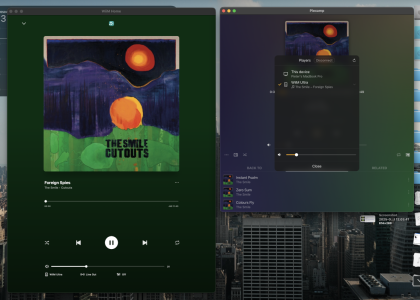
Here it is working with Squeezelite configured:

 

Attachments

  • Screenshot 2026-01-13 at 01.44.20.png
    Screenshot 2026-01-13 at 01.44.20.png
    670.9 KB · Views: 6
Whooo got it running! It's not without its limitations though, but very promising!

Firstly I installed Home Assistant in the Virtual Machine Manager, following this tutorial:

The tutorial doesn't touch on the fact that it might be handy to change the IP address to a static one after installation. You can do so in the settings of HA.

Next: install the Music Assistant add-on

In Music Assistant, you need to install additional plugins (referred to as "providers" in the settings) to make it discover the WiiM devices and other streamers/speakers on your network + to integrate with Plex(amp)
- UPnP/DLNA Player provider (to make the WiiM Device accessible to Music Assistant)
- Plex Media Server Library (required to be able to install the Plex Connect Plugin)
- Plex Connect Plugin -> configure the UPnP device to be detected by Plexamp! :)

It works with the limitation mentioned by @Stessull that there's no artwork shown. Volume control is synced though - but a bit jittery, laggy.

Alternatively, I tried the Squeezelite (slimproto players) provider and enabled Squeezelite in my WiiM Ultra's settings. The WiiM was picked up as a LMS target very quickly by Music Assistant and I set it as the target device for the Plex Connect Plugin.

Now I got playback with artwork! However, the Plexamp volume slider no longer controls the hardware volume of the WiiM. Every player in Music Assistant has some specific settings so maybe some setting can be changed to make it perfect.

Also not one of the solutions will correctly show playback progress on the display or in the WiiM Home app. The audio seems to be handled as a continuous stream.

Here it is working with Squeezelite configured:
Very well explained! I will have to try the Squeezelite implementation myself. It does make me wonder though, if the contributers to Music Assistant can come up with this solution why have WiiM and /or Plex Labs not been able to do this?
 
Back
Top