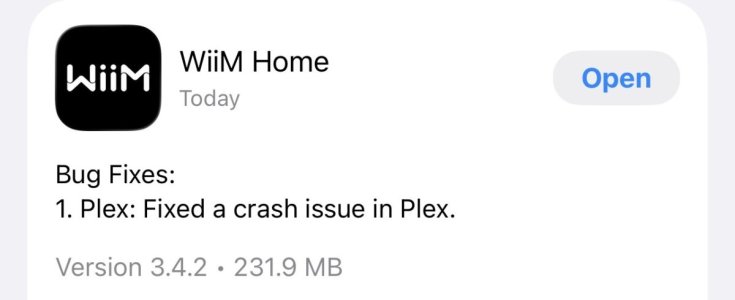
WiiM Home App v3.4.0 Update – Nov 21, 2025

Please review the app update release notes below. If you encounter any issues, feel free to reach out to us.

App Version:
3.4.0

What’s New:

SMB & Local Playback


1. [Android] Supports using the current folder’s cover as song artwork
2. [iOS] Support for multi-level SMB folders and file paths containing spaces or Chinese characters

Music Services

1. Plex: Updated to new API for better search; supports Plex Server access over WAN
2. YouTube: New sorting options, A–Z index for Libraries, and accurate remaining time for podcast episodes
3. [iOS]Unified “See All” styling and consistent search pages across all services
4. [iOS]Multi-line title support for Hotmix, Pandora, Plex, Deezer, Bookmarks, vTuner, YouTube, and Qobuz

Setup & Device Experience

1. OOBE: Alerts for Wi-Fi passwords with spaces/line breaks, weak-signal indicator after setup, and a visual guide for locating router passwords
2. Trigger Out: Shows trigger status and supports one-time trigger on/off
3. Group Volume: Muted devices no longer affect group volume adjustments

Display & Personalization

1. WiiM Sound: Wallpaper uploads + new VU-meter playback screens
2. WiiM Ultra / Amp Ultra: New audio-spectrum screens and a new clock-face wallpaper option (requires upcoming firmware)

Audio Controls

1. WiiM Mini: Custom volume step configuration (requires upcoming firmware)
2. [Android] Volume: Fixes looping volume up/down when connected via Bluetooth.

Bug Fixes:

1. Improved Chinese localization across the app
2. EQ status now refreshes correctly on iPad
3. General stability improvements and UI refinements
 
Audio Controls

1. WiiM Mini: Custom volume step configuration (requires upcoming firmware)

@WiiM Team: Are there good reasons to enable this only for the Mini?
By only the mini, what do you mean? All my devices with a volume knob (except vibelink, obviously) have this, as do all their remotes.
I've not got a remote paired with a mini, I was assuming it meant remote volume steps with a mini.
My remote paired to a pro has volume step control.
So I tiink it's more that it's finally come to the mini, not only.
 
By only the mini, what do you mean? All my devices with a volume knob (except vibelink, obviously) have this, as do all their remotes.
I've not got a remote paired with a mini, I was assuming it meant remote volume steps with a mini.
My remote paired to a pro has volume step control.
So I tiink it's more that it's finally come to the mini, not only.
I was talking about this statement:
"Custom volume step configuration (requires upcoming firmware)"

Maybe I completely misunderstood this....
I do understand this as if WiiM implemented a functionality in the App that allows to customize the stepsize of the volume control, i.e. customize the function attenuation[dB] = f(volume[%]).

Are you telling me that the WiiM remote control has a capability to modify the stepsize of the volume control? The hint that this requires an upcoming firmware (on the WiiM I guess) points towards the translation of [%] -> [dB] in the digital path of the WiiM.
 
I was talking about this statement:
"Custom volume step configuration (requires upcoming firmware)"

Maybe I completely misunderstood this....
I do understand this as if WiiM implemented a functionality in the App that allows to customize the stepsize of the volume control, i.e. customize the function attenuation[dB] = f(volume[%]).

Are you telling me that the WiiM remote control has a capability to modify the stepsize of the volume control? The hint that this requires an upcoming firmware (on the WiiM I guess) points towards the translation of [%] -> [dB] in the digital path of the WiiM.
Isn't it just introducing an option for the volume step size? Eg 1, 2 or 3. This is already available in other WiiM units.
 
That sounds like a good explanation, thanks!
"Volume step configuration" did sound more complex to me than just taking 2 or 3 steps at a time 😇
 
I was talking about this statement:
"Custom volume step configuration (requires upcoming firmware)"

Maybe I completely misunderstood this....
I do understand this as if WiiM implemented a functionality in the App that allows to customize the stepsize of the volume control, i.e. customize the function attenuation[dB] = f(volume[%]).

Are you telling me that the WiiM remote control has a capability to modify the stepsize of the volume control? The hint that this requires an upcoming firmware (on the WiiM I guess) points towards the translation of [%] -> [dB] in the digital path of the WiiM.
I tried pairing the Mini with the remote, and the volume adjustment step was already implemented. However, it do not affect the device's volume buttons, so a function to adjust that may be added. But it could be wrong.
 
Audio Controls

1. WiiM Mini: Custom volume step configuration (requires upcoming firmware)

@WiiM Team: Are there good reasons to enable this only for the Mini?
I think the Ultra already got that.
Plex search is much better than it used to be. Yet for some reason it only finds a selection of albums with the search term in the title. However finding artists seems to work now and from what I can tell so far, all albums by an artist are listed now instead of the random selection I used to get. We‘re finally getting somewhere.
I was being too optimistic. Further exploration has shown the search function to still be quite erratic.
 
I tried pairing the Mini with the remote, and the volume adjustment step was already implemented
I feel like I'm missing the point 🤔...
1) Do you mean "Step size [dB] for the individual 1% step in the volume adjustment 0-100%" or do you mean with "step size" the number of 1% steps taken for each tap on the remote volume buttons?
2) I have searched through the menu of the Android WiiM App (App as well as unit) and I did not find a menu to adjust either of the above.
I'm owning WiiM Pro (Plus) in case that makes a difference.
I think the Ultra already got that.
Would make sense to have a "real" volume control as the Ultra is advertised as "Preamp".
However many users have the WiiM Pro (Plus) connected directly to active speakers, so actually the same applies. The adjustment range of the current implementation is just not well suited as "only volume control"; steps are very fine close to 100% and the maximum attenuation is 50dB (side from 0%=mute).
I'm referring to this curve: Post in thread 'Volume scaling' https://forum.wiimhome.com/threads/volume-scaling.6771/post-151443

Can you post a screenshot of the menu you are referring to?
 
I feel like I'm missing the point 🤔...
1) Do you mean "Step size [dB] for the individual 1% step in the volume adjustment 0-100%"
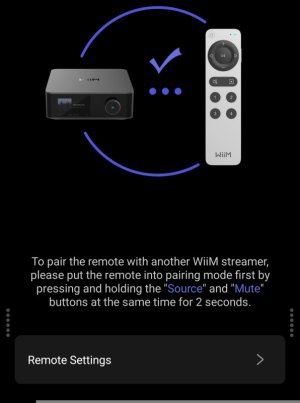
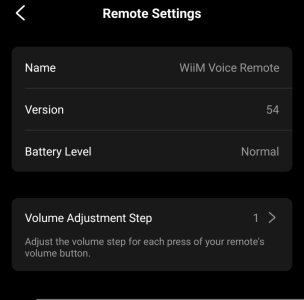
No. "Volume Adjustment Step" refers to the volume step that changes when the volume button on the remote is pressed once. It can be adjusted in five steps between 1~5%.


2) I have searched through the menu of the Android WiiM App (App as well as unit) and I did not find a menu to adjust either of the above.
I'm owning WiiM Pro (Plus) in case that makes a difference.
When you pair the remote, the settings screen will appear in the remote section.

1498.jpg

1491.jpg
 
I'm one of the people who are too lazy to read thru manuals, instructions etc. After many years as an IT technician, reading manuals, software changes, new server software, networking changes etc, etc, I decided when I retired 4 years ago, no more of it.
That's the good thing about the Wiim Forum, if I can't work something out myself, a quick post on here and one of you guys will answer my question faster than I can find the answer by trawling thru loads of instructions.
The depth of knowledge on here is second to non, so thanks all for giving up your time helping me out. 👍

I'll bet you spend more time reading this forum that you would have spent reading the manual... :)
 
I'll bet you spend more time reading this forum that you would have spent reading the manual... :)
Don't we all?? Or most of us?? Or is it just me and Cliff?? (does that make me Norm??)

As is all too normal for modern products, the User Manual is somewhat vague on usage details whilst the online forum is overly rife with every possible permutation and the real (and perceived) answers and resolutions muddled with so many asides and distractions. No wonder "AI" is making inroads in Product Support...
 
Don't we all?? Or most of us?? Or is it just me and Cliff?? (does that make me Norm??)
...
No wonder "AI" is making inroads in Product Support...
Indeed 😇.
However, I can understand that some very helpful people in this forum feel "abused" when they answer a question that can be looked up in the manual within a few minutes.
In the end it's their choice to do so....

AI: I often use AI for questions that I could find the answer to by looking up some ten websites, but AI is so much faster at reading websites. It processes information so quickly that I'm not sure I'd end up using the same amount of energy.
I'm afraid a plain "Google" search will be history in very few years - with all the associated issues that AI may bring.
 
Indeed 😇.
However, I can understand that some very helpful people in this forum feel "abused" when they answer a question that can be looked up in the manual within a few minutes.
In the end it's their choice to do so....

AI: I often use AI for questions that I could find the answer to by looking up some ten websites, but AI is so much faster at reading websites. It processes information so quickly that I'm not sure I'd end up using the same amount of energy.
I'm afraid a plain "Google" search will be history in very few years - with all the associated issues that AI may bring.
After using AI you need to check the answer by Googling anyway 🤣
 
Last edited:
Of course, AI does not exempt one from using common sense. Often, one must first clearly and explicitly disagree with the AI when it says something nonsensical when "shooting from the hip". This is often followed by a genuinely good response. It's human—"shooting from the hip" saves energy and often gets the job done.
 
Back
Top