Wiim Sound Lite 4-speaker setup for Retail Store?

wts3849

New Member
Joined
Feb 1, 2026
Messages
10
I apologize for my ignorance in advance as I am totally new to smart sound system.
I am thinking of buying 4 Sound Lite speakers for my 800 sq. ft. retail store. I am going to be streaming songs from my Windows laptop over Wifi.

My questions are:
1. Do I need any of the Wiim Amps to connect between the laptop and Sound Lite speakers? Or just Wiim app and Google Home should do it?
2. Is it possible to stream from Laptop? I can't seem to find Google Home app for Windows.
3. Is it possible to setup multiple stereo pairs? Like 2 sets of 2 speakers in stereo. Or maybe a 4-speaker surround setup without center and sub? I am asking because I saw many people saying linked multiple speakers won't sound as good as the stereo set.
4. Are there better options/recommendations for a retail setup? Wiim Sound Lite seems perfect for me because I won't have to run long speaker cables and I never liked bluetooth connections for streaming music.

Any comments will be greatly appreciated.
 
Last edited:
Welcome.

800 sq ft (75m2 ish)
I'd have thought each Sound Lite would be a reasonable distance from any other, so not sure how well stereo pairs would work.

1. You ought to be able to group all the wiims in the wiim app and then send the music to the group leader.
I don't see why you'd need Google involved.
Best to use android or ios for the wiim app rather than the windows (beta) wiim app.

2. Streaming from windows laptop - streaming what? Local music files (if so, what software to play them), radio, streaming services?
At the worst you could have the laptop audio out going to the group leader aux in, but all sounds (noises) from the laptop would play.

3. Multiple stereo pairs, yes, but see first comment.
You simply choose which wiim should play which channel(s). Choice of Left, Right, Left and Right.

4. Maybe!!
 
Last edited:
I apologize for my ignorance in advance as I am totally new to smart sound system.
I am thinking of buying 4 Sound Lite speakers for my 800 sq. ft. retail store. I am going to be streaming songs from my Windows laptop over Wifi.

My questions are:
1. Do I need any of the Wiim Amps to connect between the laptop and Sound Lite speakers? Or just Wiim app and Google Home should do it?
2. Is it possible to stream from Laptop? I can't seem to find Google Home app for Windows.
3. Is it possible to setup multiple stereo pairs? Like 2 sets of 2 speakers in stereo. Or maybe a 4-speaker surround setup without center and sub? I am asking because I saw many people saying linked multiple speakers won't sound as good as the stereo set.
4. Are there better options/recommendations for a retail setup? Wiim Sound Lite seems perfect for me because I won't have to run long speaker cables and I never liked bluetooth connections for streaming music.

Any comments will be greatly appreciated.

Hi,

You don't need a WiiM Amp.

For using it as background music in a store, I recommend creating a group with four WiiM Sound Lite units and playing in all-stereo mode. Mono playback might be ideal, but to my knowledge, WiiM's multi-room group feature does not support mono playback.

You can't achieve surround sound playback with four WiiM Sound units. If your store has a TV and you want wireless surround sound playback, you will need either a WiiM Amp Pro, Amp Ultra, or Ultra. In this case, you also can't wirelessly use WiiM Sound units as front speakers. Alternatively, you will need passive speakers (or active speakers).

At my home, grouping five WiiM devices (including WiiM Sound and Lite) into one group for playback works well. If you encounter issues, I recommend connecting via Ethernet from your router or range extender.

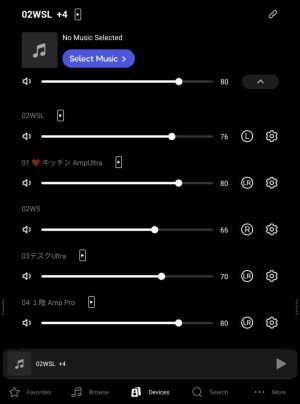
This shows five WiiM devices grouped together in the WiiM Home app. Tapping the channel icon on the right side of each device lets you switch between L, R, or LR channels.

937.jpg
 
2. Is it possible to stream from Laptop? I can't seem to find Google Home app for Windows.


Any comments will be greatly appreciated.
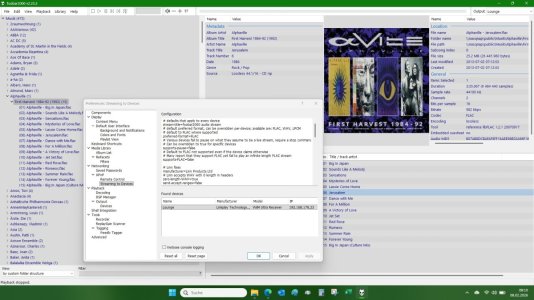
If you want to stream from your laptop I recommend foobar2000. It has a UPnP casting feature as of late. You can choose the group leader Sound Lite as the output device in foobar. It works perfectly.

You will still need the WiiM Home App in order to set up and manage your speakers. But for daily use/playback foobar2000 will do the job.

Foobar2000.jpg
 
Last edited:
This shows five WiiM devices grouped together in the WiiM Home app. Tapping the channel icon on the right side of each device lets you switch between L, R, or LR channels.
Doesn't 'LR' essentially mean mono? In the sense that this speaker will play both channels. I guess it will play in stereo regarding its own speaker system, but in the context of the group I consider this to be mono operation.
 
Doesn't 'LR' essentially mean mono? In the sense that this speaker will play both channels. I guess it will play in stereo regarding its own speaker system, but in the context of the group I consider this to be mono operation.
With regular speakers, that's how it works, but the WiiM Sound has two tweeters, with the left and right tweeters each reproducing the L/R channels.
 
With regular speakers, that's how it works, but the WiiM Sound has two tweeters, with the left and right tweeters each reproducing the L/R channels.
One S
If you want to stream from your laptop I recommend foobar2000. It has a UPnP casting feature as of late. You can choose the group leader Sound Lite as the output device in foobar. It works perfectly.

You will still need the WiiM Home App in order to set up and manage your speakers. But for daily use/playback foobar2000 will do the job.

View attachment 33572
Thanks for the input. What is the difference between using Foobar 2000 and using Windows Media Player over DLNA? Foobar doesn't require a DLNA server?
 
With regular speakers, that's how it works, but the WiiM Sound has two tweeters, with the left and right tweeters each reproducing the L/R channels.
And can you clearly notice the stereo separation from one Wiim Sound as you hear from two independent speakers?
 
Hi,

You don't need a WiiM Amp.

For using it as background music in a store, I recommend creating a group with four WiiM Sound Lite units and playing in all-stereo mode. Mono playback might be ideal, but to my knowledge, WiiM's multi-room group feature does not support mono playback.

You can't achieve surround sound playback with four WiiM Sound units. If your store has a TV and you want wireless surround sound playback, you will need either a WiiM Amp Pro, Amp Ultra, or Ultra. In this case, you also can't wirelessly use WiiM Sound units as front speakers. Alternatively, you will need passive speakers (or active speakers).

At my home, grouping five WiiM devices (including WiiM Sound and Lite) into one group for playback works well. If you encounter issues, I recommend connecting via Ethernet from your router or range extender.

This shows five WiiM devices grouped together in the WiiM Home app. Tapping the channel icon on the right side of each device lets you switch between L, R, or LR channels.

View attachment 33567
Ah... Thank you so much for your clarification!
 
Welcome.

800 sq ft (75m2 ish)
I'd have thought each Sound Lite would be a reasonable distance from any other, so not sure how well stereo pairs would work.

1. You ought to be able to group all the wiims in the wiim app and then send the music to the group leader.
I don't see why you'd need Google involved.
Best to use android or ios for the wiim app rather than the windows (beta) wiim app.

2. Streaming from windows laptop - streaming what? Local music files (if so, what software to play them), radio, streaming services?
At the worst you could have the laptop audio out going to the group leader aux in, but all sounds (noises) from the laptop would play.

3. Multiple stereo pairs, yes, but see first comment.
You simply choose which wiim should play which channel(s). Choice of Left, Right, Left and Right.

4. Maybe!!
Thank you so much for your reply. I will be streaming the songs that I have copyrights for from the Google Chrome browser. Yes, I am sure it is not integrated with Wiim Home app. In this case, would I need a Google Chromecast for the group leader? Up until yesterday, I was thinking I would need 4 Google Chromecasts for each of the Wiim Sound Lite speaker... How can I stream the music I play on Google Chrome through 4 Wiim Sound Lite speakers?
 
And can you clearly notice the stereo separation from one Wiim Sound as you hear from two independent speakers?
I think that depends on how close you are to the Sound.
Two independent speakers woild normally have a reasonable gap between them. A single speaker like the Sound could never give that level of separation.
 
And can you clearly notice the stereo separation from one Wiim Sound as you hear from two independent speakers?
At close range, it's clearly noticeable.
Since your store is spacious, probably won't be a problem. On the contrary, you might even experience a (in a good way) unique sense of sound dispersion.
 
How can I stream the music I play on Google Chrome through 4 Wiim Sound Lite speakers?
I'm not sure I understand exactly what / how you play music, given the comments about media player earlier.
However, the Sounds support chromecast so I would expect you could set up a google home group of the Sounds and cast to that group.
It's been a while since I used multiple wiims that way.
 
Thanks for the input. What is the difference between using Foobar 2000 and using Windows Media Player over DLNA? Foobar doesn't require a DLNA server?
If the Windows Media Player works for you there no need to switch to foobar. Both use the DLNA protocol to cast to renderers.
 
I'm not sure I understand exactly what / how you play music, given the comments about media player earlier.
However, the Sounds support chromecast so I would expect you could set up a google home group of the Sounds and cast to that group.
It's been a while since I used multiple wiims that way.
My apologies. I will be playing songs from Suno AI on Google Chrome browser. I didn't mean to disguise what I am doing. I couldn't find any commercial music streaming services that offer broad types of music like Spotify does. So I decided to make my own songs under my own commercial copyrights to stream.
So, then Chromecast is the only way to stream from Google Chrome browser? I will only need one unit of Chromecast for the group leader, right? And I need the Google Home app as well... Any implications on this type of setup? I really appreciate your advice.
Another option I have is export all the compositions into MP3 and run on media player as you mentioned. But this will make things more complicated.
 
Last edited:
@wts3849
having said the above I have just tried to play from WMP on my laptop to my WiiM. It established a DLNA connection but the music didn't play. The DLNA implementation of WMP is pretty poor. So be warned. If it works at your end, good. But I wouldn't bet on it.
 
@wts3849
having said the above I have just tried to play from WMP on my laptop to my WiiM. It established a DLNA connection but the music didn't play. The DLNA implementation of WMP is pretty poor. So be warned. If it works at your end, good. But I wouldn't bet on it.
Understood. Thank you very much!
 
My apologies. I will be playing songs from Suno AI on Google Chrome browser. I didn't mean to disguise what I am doing. I couldn't find any commercial music streaming services that offer broad types of music like Spotify does. So I decided to make my own songs under my own commercial copyrights to stream.
So, then Chromecast is the only way to stream from Google Chrome browser? I will only need one unit of Chromecast for the group leader, right? And I need the Google Home app as well... Any implications on this type of setup? I appreciate your advice.
Another option I have is export all the compositions into MP3 and run on media player as you mentioned. But this will make things more complicated.
Have you considered streaming services for store, like "soundtrack your brand"?

I use SUNO too, but I download my own songs to my phone and play them directly through the WiiM app.
 
Have you considered streaming services for store, like "soundtrack your brand"?

I use SUNO too, but I download my own songs to my phone and play them directly through the WiiM app.
I tried Soundtrack. That's where I actually found out about Wiim. But they don't even offer many songs. They seemed to be affiliated with Spotify and I thought they would offer exactly same library as Spotify does, but I was totally disappointed with what they offer. It was like a joke.
I cannot use my phone because I need to keep it open for the credit card tap transactions. I can only play from my laptop.
I tried exporting songs, but later on, I couldn't keep track of which ones I already exported and not. I hope I could just shuffle from Suno library as I add new songs everyday.
 
I tried Soundtrack. That's where I actually found out about Wiim. But they don't even offer many songs. They seemed to be affiliated with Spotify and I thought they would offer exactly same library as Spotify does, but I was totally disappointed with what they offer. It was like a joke.
I cannot use my phone because I need to keep it open for the credit card tap transactions. I can only play from my laptop.
I tried exporting songs, but later on, I couldn't keep track of which ones I already exported and not. I hope I could just shuffle from Suno library as I add new songs everyday.
Thanks for the detailed info.

To summarize, if you create a group for WiiM devices in the Google Home app, you can cast SUNO to that group using the Chrome browser on your PC. I've confirmed this works with four WiiM devices. I haven't tested extended playback, but so far, no issues have occurred. Playback works normally.

However, it seems the SUNO web version doesn't support repeating all songs in the library. Pressing the repeat button only repeats one song. Therefore, for extended use in a store, you'll likely need to populate the library or playlist with a large number of tracks. But shuffle playback worked.

Here are the setup steps:

  1. Enable Google Cast on all four WiiM Sound devices.
  2. Create a speaker group in the Google Home app on your smartphone and add the four WiiM Sound units to it.
  3. Open Chrome on your PC and cast to the group.
  4. Play music on SUNO.

No Chromecast device or additional devices are required. Once the Google speaker group is created, your smartphone is no longer needed.
 
Back
Top