


WiiM released recently the WiiM Sound Lite, a variant of the original WiiM Sound introduced last Summer, minus a display; it also misses in the package a remote control which can be purchased separately. The speaker is sold in the US at Amazon at a current price of $229.
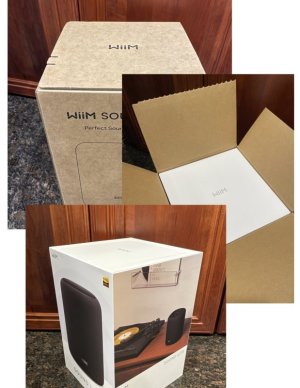
My speaker arrived very well packed, indeed triple-packed, assurance that the speaker is well protected during shipping.
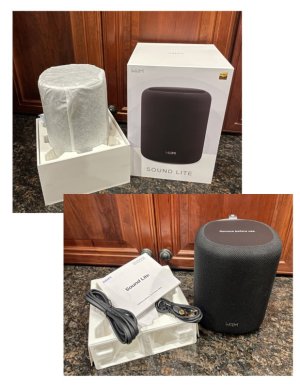
A country-specific power corded and an RCA interconnect cable were included, along with a paper manual.
Setup is straightforward via the WiiM Home App (WHA) making sure that the app is allowed to use localization and the device has bluetooth active. Just attach the power cord to the Sound Lite, open the WHA and wait for the newly detected device notification and proceed to install the Sound Lite.
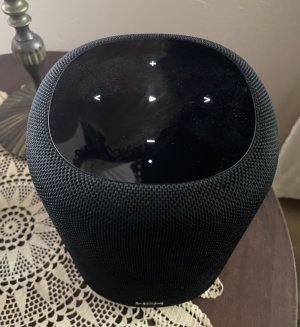
The speaker's top has a proximity sensor and once activated by sensing a hand it will illuminate convenient control settings (+ - volume controls, <- and -> channel preset controls and a center > pause/play control). A small pilot light is also present below the - control and it can be set always on or off by a setting in the WHA.
How does it sound? I found that Sound Lite can sound very well indeed, but only after a significant break-in period. When I first turned the unit on and played known streams, the sound was dry and somewhat harsh. I know that electronic devices (analog in particular) can have long break-in periods. Components need to adapt and capacitors, in particular, need time to 'form' their dielectrics. The theory behind this is that electronic circuits are tuned/voiced on the design bench after many hours of operation, thus a newly built circuit needs the same aging time to settle in the designed parameters. This is clearly the case with this speaker. It took several days, leaving the speaker constantly on for its sound presentation to rebalance. After one week the speaker sounded quite good. Also my preference is always to leave these devices on 24/7 - their power consumption is quite modest.
Sound presentation also depends very much on how the speaker is located and how close or how far it is from hard acoustically reflecting surfaces (walls). In my case I set the Sound Lite as an accent sound source in a nook of the house. It sits on a small table, about 35cm from the back wall. This position creates a dip in the low frequency range that can easily be corrected with a slight boost in that area:
Assuming the speaker is some distance from side walls, measure the distance from the center of the speaker to the rear wall - call it L. Calculate the attenuated frequency f:
f = 340/(2L)
where L is in meters, and f in Hz.
(Unit conversion: 3.3ft is about 1m. 12 in about 0.3m.)
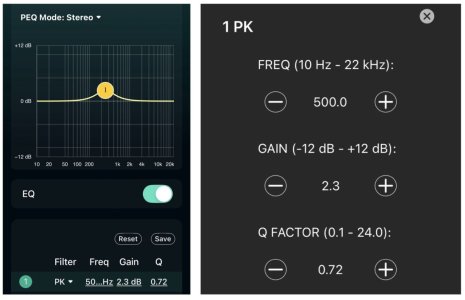
Using the WHA parametric EQ, apply a PK boost at the frequency f, start with a gain of +2dB and a Q of .4 to .8. Adjust that in small increments while listening. It should produce a pleasantly balanced sound.
Here is the PEQ correction in my setup:
The WiiM Sound Lite is a great modern-day table top radio - a digital one playing streams from established radio stations, streaming services and even local signals (analog or digital). It can also form a stereo pair, one unit playing the left channel and the other the right channel.
Highly recommended!
___________
Addendum:
And of course the full portfolio of WiiM’s WHA digital signal processing - graphical and parametric EQ, RoomFit and Dynamic Bass - are tools the Sound Lite can use. I recommend low values of Dynamic Bass (1 or 2 dB) if a balanced tonality is sought.
My speaker arrived very well packed, indeed triple-packed, assurance that the speaker is well protected during shipping.
A country-specific power corded and an RCA interconnect cable were included, along with a paper manual.
Setup is straightforward via the WiiM Home App (WHA) making sure that the app is allowed to use localization and the device has bluetooth active. Just attach the power cord to the Sound Lite, open the WHA and wait for the newly detected device notification and proceed to install the Sound Lite.
The speaker's top has a proximity sensor and once activated by sensing a hand it will illuminate convenient control settings (+ - volume controls, <- and -> channel preset controls and a center > pause/play control). A small pilot light is also present below the - control and it can be set always on or off by a setting in the WHA.
How does it sound? I found that Sound Lite can sound very well indeed, but only after a significant break-in period. When I first turned the unit on and played known streams, the sound was dry and somewhat harsh. I know that electronic devices (analog in particular) can have long break-in periods. Components need to adapt and capacitors, in particular, need time to 'form' their dielectrics. The theory behind this is that electronic circuits are tuned/voiced on the design bench after many hours of operation, thus a newly built circuit needs the same aging time to settle in the designed parameters. This is clearly the case with this speaker. It took several days, leaving the speaker constantly on for its sound presentation to rebalance. After one week the speaker sounded quite good. Also my preference is always to leave these devices on 24/7 - their power consumption is quite modest.
Sound presentation also depends very much on how the speaker is located and how close or how far it is from hard acoustically reflecting surfaces (walls). In my case I set the Sound Lite as an accent sound source in a nook of the house. It sits on a small table, about 35cm from the back wall. This position creates a dip in the low frequency range that can easily be corrected with a slight boost in that area:
Assuming the speaker is some distance from side walls, measure the distance from the center of the speaker to the rear wall - call it L. Calculate the attenuated frequency f:
f = 340/(2L)
where L is in meters, and f in Hz.
(Unit conversion: 3.3ft is about 1m. 12 in about 0.3m.)
Using the WHA parametric EQ, apply a PK boost at the frequency f, start with a gain of +2dB and a Q of .4 to .8. Adjust that in small increments while listening. It should produce a pleasantly balanced sound.
Here is the PEQ correction in my setup:
The WiiM Sound Lite is a great modern-day table top radio - a digital one playing streams from established radio stations, streaming services and even local signals (analog or digital). It can also form a stereo pair, one unit playing the left channel and the other the right channel.
Highly recommended!
___________
Addendum:
And of course the full portfolio of WiiM’s WHA digital signal processing - graphical and parametric EQ, RoomFit and Dynamic Bass - are tools the Sound Lite can use. I recommend low values of Dynamic Bass (1 or 2 dB) if a balanced tonality is sought.
Last edited:


