Wiim spatial correction measurement diagram explanation needed

Alright, everyone!

I just used my Denon AVR-X2400H with Audyssey to calibrate my Elac Debut Reference DBR62 and Teufel Ultima 40 speakers, and here are the results.

After the calibration, the Denon sounds significantly better with both speakers (Elac Debut Reference DBR62 and Teufel Ultima 40) than with Wiim and its useless RoomFit function!

Now I'm even considering returning my Wiim receiver, because the Wiim calibration is completely pointless! It simply doesn't improve the sound. Denon's measurement technology Audyssey is significantly better for me! So far! Who would have thought it?!

Here are the results.


... Teufel Ultima 40 with AVR-X2400H


Elac Debut Reference DBR62 with Denon AVR-2400H


Alright, everyone!

I just used my Denon AVR-X2400H with Audyssey to calibrate my Elac Debut Reference DBR62 and Teufel Ultima 40 speakers, and here are the results.

After the calibration, the Denon sounds significantly better with both speakers (Elac Debut Reference DBR62 and Teufel Ultima 40) than with Wiim and its useless RoomFit function!

Now I'm even considering returning my Wiim receiver, because the Wiim calibration is completely pointless! It simply doesn't improve the sound. Denon's measurement technology Audyssey is significantly better for me! So far! Who would have thought it?!

Here are the results.


... Teufel Ultima 40 with AVR-X2400H


Elac Debut Reference DBR62 with Denon AVR-2400H


It isn't RoomFit that is useless it is your phone microphone. Audyssey isn't using your phone microphone so you aren't comparing like with like.
 
Alright, everyone!

I just used my Denon AVR-X2400H with Audyssey to calibrate my Elac Debut Reference DBR62 and Teufel Ultima 40 speakers, and here are the results.

After the calibration, the Denon sounds significantly better with both speakers (Elac Debut Reference DBR62 and Teufel Ultima 40) than with Wiim and its useless RoomFit function!

Now I'm even considering returning my Wiim receiver, because the Wiim calibration is completely pointless! It simply doesn't improve the sound. Denon's measurement technology Audyssey is significantly better for me! So far! Who would have thought it?!

Here are the results.


... Teufel Ultima 40 with AVR-X2400H


Elac Debut Reference DBR62 with Denon AVR-2400H


It is great you found a configuration that you like and I'm happy for you, but what I honestly don't understand is why do you keep asking questions here and then ignore the answers and explanations that the members provide?

On the topic of RoomFit: it is actually quite powerful - but because of this it also requires a bit of time to learn how to set it up for best results. It is definitely not plug-and-play, but it is also very far from useless.

As I said before - if everything is setup correctly, you should be able to get similar results with both your Denon AVR and the WiiM Amp Ultra.

This is why I suggested previously not to replace anything until you try to get the most out of what you already had.
The "boomy bass" issue you had can be solved by EQ, and this is exactly what Audyssey did, but it could have also been done with RoomFit if you took the time to learn how to use it for best results. This is what I wrote to you on Monday:
To be clear: replacing speakers, or changing their position in the room, or applying EQ would each have a much more dramatic influence on sound quality than replacing your AVR with a different amp.

Again, my advice would be to first apply room correction EQ to your current speakers and see if you're happy with the result. This should solve your boomy bass issue. I wouldn't advise to buy new speakers until you try to get the best possible sound ouf of your current speakers.

As @Mr Ee said, any speakers that you put in the same position will likely get the same bass reinforcement - this is due to physics of sound propagation and interference; it is not related to a specific loudspeaker model.

Actually, boomy bass is much less of a problem than bass deficiency/suck-out, and EQ (like RoomFit or Audyssey) solves boomy bass very effectively.


RoomFit and Audyssey are both types of room correction EQ; Audyssey is bundled with Denon/Marantz AVRs, while RoomFit comes with WiiM devices.

The main difference is that Audyssey doesn't offer a lot of configuration options out-of-the-box (i.e. as far as I know you need to buy an extra app to configure it), while RoomFit is quite configurable. With RoomFit you can even calculate your correction filters with a 3rd party app of cyour choice (like REW or Housecurve) and enter them manually.

Another issue with Denon Audyssey MultEQ XT is that it has relatively low number of FIR taps for the speakers, so low-frequency correction resolution is relatively poor.
WiiM RoomFit on the other hand uses IIR filters and allows very high resolution correction at low-frequencies.

As such, there's much more you can do to optimize the correction filters when using RoomFit compared to Audyssey.

That being said, in some cases it might still be possible to get similar sounding results with both Audyssey and RoomFit. If that is true in your case, then I wouldn't expect too much difference in resulting sound quality. In other cases the audible difference could be more dramatic. There's no way to predict which one applies to your specific scenario - but luckily you can try out both and see which you prefer. :)

The point is, there was absolutely no need to replace your AVR (or your speakers) to solve your "boomy bass" issue.
 
Not sure what you mean! Roomfit works perfectly!
Just use the tips we gave you! 💡😉
Limit the correction frequency e.g to 30-500Hz, as the rest will not need correction.
Limit the correction frequency to, for example, 30–500 Hz, since the rest doesn't require correction.

How should I proceed then? How can I limit the range to 30–500 Hz? Which menu item do I need to select? Can I still use RoomFit for measuring and correcting speakers afterward?
 
As I said before - if everything is setup correctly, you should be able to get similar results with both your Denon AVR and the WiiM Amp Ultra.
Well, I'm curious, can I achieve the same result with Wiim too, but...
I'd like to keep my Wiim Amp Ultra, but I'm wondering how to limit the correction frequency to, say, 30–500 Hz, since the rest doesn't need correction.

How should I proceed? How can I limit the range to 30–500 Hz? Which menu item do I need to use? Can I still use RoomFit to measure and correct speakers afterward?
 
Well, I'm curious, can I achieve the same result with Wiim too, but...
I'd like to keep my Wiim Amp Ultra, but I'm wondering how to limit the correction frequency to, say, 30–500 Hz, since the rest doesn't need correction.

How should I proceed? How can I limit the range to 30–500 Hz? Which menu item do I need to use? Can I still use RoomFit to measure and correct speakers afterward?
Did you read the solution descriptions I posted? They explain everything.

Post in thread 'Wiim spatial correction measurement diagram explanation needed' https://forum.wiimhome.com/threads/...t-diagram-explanation-needed.8779/post-161518

Post in thread 'Wiim spatial correction measurement diagram explanation needed' https://forum.wiimhome.com/threads/...t-diagram-explanation-needed.8779/post-161665
 
Well, I'm curious, can I achieve the same result with Wiim too, but...
I'd like to keep my Wiim Amp Ultra, but I'm wondering how to limit the correction frequency to, say, 30–500 Hz, since the rest doesn't need correction.

How should I proceed? How can I limit the range to 30–500 Hz? Which menu item do I need to use? Can I still use RoomFit to measure and correct speakers afterward?
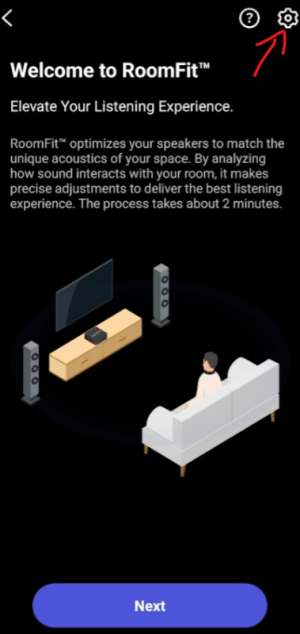
All the RoomFit settings are accessed by clicking the cog in the top right corner of the RoomFit page. You still need a decent microphone though since we don't know how your phone microphone acts at bass frequencies. You have consistently ignored the microphone issue.
 
Last edited:
Well, I'm curious, can I achieve the same result with Wiim too, but...
I'd like to keep my Wiim Amp Ultra, but I'm wondering how to limit the correction frequency to, say, 30–500 Hz, since the rest doesn't need correction.

How should I proceed? How can I limit the range to 30–500 Hz? Which menu item do I need to use? Can I still use RoomFit to measure and correct speakers afterward?

When running RoomFit you need to keep your microphone at your listening position (where your head is when you listen to music), and pointed between your speakers.

Please remember that the microphone in your phone is not calibrated. This may affect the amount of bass you get at the end. This we can try to take care of in step 4) below with additional EQ.

1) Start RoomFit and use the gear icon:
1765637154915.png

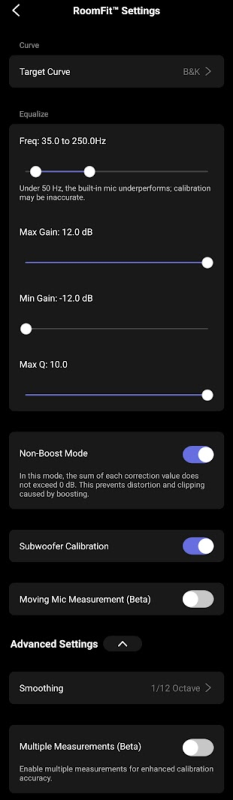
2) Use the following settings as a starting point:
1765637806898.png

3) Use "Individual Channel RoomFit" when the option is given.

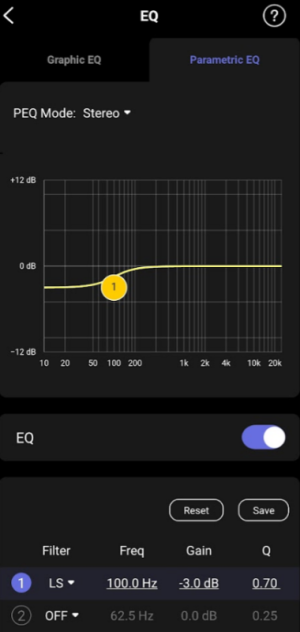
4) If after this you still feel the bass is too strong, go to the EQ menu and configure a single (PEQ Mode: Stereo) PEQ low-shelf (LS) filter with the following settings:
  • Filter=LS
  • Freq=100Hz
  • Gain=according to your preference.
  • Q=0.70
E.g. this one reduces bass level by 3dB (but you can use other gain values if you need more or less bass reduction or boost):
1765638060086.png
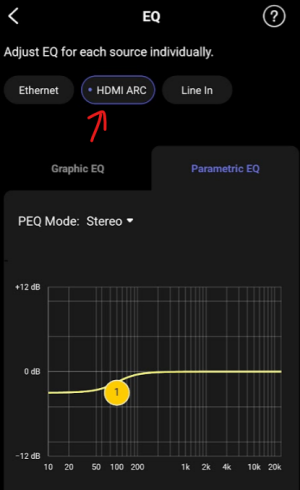
Note that this EQ will only apply for your current input - but you can configure the same for all inputs you use.
1765638366988.png
 
When running RoomFit you need to keep your microphone at your listening position (where your head is when you listen to music), and pointed between your speakers.

Please remember that the microphone in your phone is not calibrated. This may affect the amount of bass you get at the end. This we can try to take care of in step 4) below with additional EQ.

1) Start RoomFit and use the gear icon:
View attachment 30919

2) Use the following settings as a starting point:
View attachment 30921

3) Use "Individual Channel RoomFit" when the option is given.

4) If after this you still feel the bass is too strong, go to the EQ menu and configure a single (PEQ Mode: Stereo) PEQ low-shelf (LS) filter with the following settings:
  • Filter=LS
  • Freq=100Hz
  • Gain=according to your preference.
  • Q=0.70
E.g. this one reduces bass level by 3dB (but you can use other gain values if you need more or less bass reduction or boost):
View attachment 30922
Note that this EQ will only apply for your current input - but you can configure the same for all inputs you use.
View attachment 30923

Ohh wow - what a service for the asking guy!! Hope he‘s appreciating it! 👏🏻👏🏻😃
 
Regarding the microphone issue - my experience with the iphone 16 mic wasn’t bad! 👍🏻
I think iPhone mics tend to work better with RoomFit since there are fewer variations between them. Don't WiiM even include a kind of calibration for iPhones?
 
Regarding the microphone issue - my experience with the iphone 16 mic wasn’t bad! 👍🏻
I think iPhone mics tend to work better with RoomFit since there are fewer variations between them. Don't WiiM even include a kind of calibration for iPhones?
Yes, WiiM Home app v3.2.8 introduced a default calibration for iPhone mics (link to release notes):
7. [iOS] Microphone Calibration File: Added calibration files for iPhone and iPad for a more accurate Room Correction process.
Older model calibration was improved in v3.3.2 (link):
5. [iOS] RoomFit: Improved mic calibration for iPhone 13 and earlier, enabling more accurate bass tuning

Hopefully in time similar 'default' calibration will come for at least some Android models.
 
This is one of the reasons why it is a good idea to get a calibrated measurement microphone like miniDSP UMIK-1 or Dayton iMM-6c.
First of all, thank you all for the excellent and expert answers. Thank you very much!

Do I need to calibrate the microphone before using it? Or can I just plug it in and test it? Why do I need to calibrate it at all? Why isn't it calibrated at the factory?

Are there alternative, cheaper microphones that are just as good? Which one is better than the microphone that came with my phone?
 
Last edited:
First of all, thank you all for the excellent and expert answers. Thank you very much!

Do I need to calibrate the microphone before using it? Or can I just plug it in and test it? Why do I need to calibrate it at all? Why isn't it calibrated at the factory?

Are there alternative, cheaper microphones that are just as good? Which one is better than the microphone that came with my phone?
Wasn’t this responded to yesterday? The mics are calibrated at the factory and come with a calibration file that the WiiM home app will import. The Dayton IMM-6c is a good external mic
 
First of all, thank you all for the excellent and expert answers. Thank you very much!

Do I need to calibrate the microphone before using it? Or can I just plug it in and test it? Why do I need to calibrate it at all? Why isn't it calibrated at the factory?

Are there alternative, cheaper microphones that are just as good? Which one is better than the microphone that came with my phone?

As explained here, the serial number is printed on the back of the IMM-6C package. Enter this serial number on Dayton's calibration file download site to download the calibration file.

Then, upload the calibration file to the WiiM app following the procedure described here.
 
Back
Top