Wiim Ultra with external DAC: what output?

As part of your personal experience you mentioned that coaxial output wasn't even an option and you gave pseudo-technical explanations for why it couldn't be any different.

Expect others to express contradicting experience and plain facts.

Having said that, you absolutely should go with the option that sounds best to you in your environment, of course.

No, that is not correct. The asynchronous package transfer on USB is unrelated to the audio clock in the PCM signal. The receiver must supply its own audio clock when using USB but this has nothing to do with the package transfer itself.

With USB it's always the receiver (DAC) that provides the clock and therefore defined how much jitter there is in the signal.

The SPDIF interface (Coax and Optical) includes the senders clock and this may be used by the receiver or the receiver can re-clock the signal and use its own clock. This depends on the DAC used. Typically a low cost DAC just uses the received clock, while a high-end DAC uses its own dedicated clock (that is hopefully better than the senders).

Most of this is however just theoretically, as all modern equipment has a internal clock that provides a jitter well below what is possible to hear.

What cable you use have no influence on the signal in any way, unless it is faulty or a very bad quality. I myself use a $2 optical cable with no issues at all (the external equipment do re-clocking, so any jitter due to optical smear can be ignored).
This is what I said, using USB has control to the receiver!
 
Last edited by a moderator:
As part of your personal experience you mentioned that coaxial output wasn't even an option and you gave pseudo-technical explanations for why it couldn't be any different.

Expect others to express contradicting experience and plain facts.

Having said that, you absolutely should go with the option that sounds best to you in your environment, of course.
Wow, what a tough crowd! I stick by what I said - those were my findings. I have tried all sorts from the Audioquest Jitterbug (sent back) to making room corrections using a cheap but effective Dayton Mic and the HouseCurve app which enabled me to find that my wall mounted speakers (B&W 707s3) measured better facing straight then toe'd in and were best semi-ported. I had the SMSL PO100 Pro which I experimented with and sold as prefer straight native USB or COAX, but everyone's mileage I can appreciate will vary. I have purchased and sold a fair amount of cables and in fact in my system going XLR was one of the biggest upgrades I made (I use the Van Den Hul D102 MKIII Hybrids) re notable differences, also upgrading power supply (Audiolab DC Blocks) too. I am not here to sell snake oil but as you can gather I have done a heap of experiments and thought a forum like this would be a place where I could impart what I found though my personal expense, time & sweat equity for FREE! Oh, I forgot to add, I use an iFi Lan iSilencer too, oh damn I don't have any affiliate links... Guess I can't be a snake oil salesman after all! Take care, can't say this has been fun!
 
Last edited:
This is what I said, using USB has control to the receiver!
Correct but audio quality is not related to the standard USB asynchronous package transfer, as you wrote. A DAC that re-clock the SPDIF signal will have exactly the same jitter level as with the USB interface.

About selling snake-oil, it is not because we claim you are actually selling anything. Just that the claim of being able to hear the difference of cables, power supplies, etc. is discussed over and over again in this forum, as it is in many audio forums and it always turn into believes rather than facts.
 
Correct but audio quality is not related to the standard USB asynchronous package transfer, as you wrote. A DAC that re-clock the SPDIF signal will have exactly the same jitter level as with the USB interface.

About selling snake-oil, it is not because we claim you are actually selling anything. Just that the claim of being able to hear the difference of cables, power supplies, etc. is discussed over and over again in this forum, as it is in many audio forums and it always turn into believes rather than facts.
This really is becoming tiresome!!! I keep repeating USB enables the DAC to be able to request and control the timing, if you have a better DAC than whats in the Wiim then thats the best way to go!

Also, on the Wiim if you choose to go USB you get 32bit audio vs the 24bit available on COAX this is a FACT, now I don't care what you could say about human hearing range it's simply more bandwidth!!!!!

So USB is better than COAX all things being equal! Take care!

p.s I wish I never wasted my breathe re cable talk but I can for sure hear the difference and I 100% a/b/c tested with my own money!!!!
 
This really is becoming tiresome!!! I keep repeating USB enables the DAC to be able to request and control the timing, if you have a better DAC than whats in the Wiim then thats the best way to go!
Ok. Up to you but you are misunderstanding how USB works.

The USB transfer mode (asynchronous, adaptive, or synchronous) only describes who controls the timing of data transfer—not the stability of the audio clock.

Some sources (and marketing materials) incorrectly suggest that "asynchronous USB" reduces jitter. In reality, it’s the interface’s clock design and the use of isochronous USB transfer (with proper buffering and time-stamping) that matters.

Also, on the Wiim if you choose to go USB you get 32bit audio vs the 24bit available on COAX this is a FACT, now I don't care what you could say about human hearing range it's simply more bandwidth!!!!!
The WiiM devices only support up to 24 bits, so even when the DAC support 32 bits on the USB interface, it will still be 24 bit dynamic range.
 
when I was younger I also used to dig my heels.

Then my heels started to hurt. I started yelling less and listening more, I find it much more relaxing as well as rewarding.

On your statement re USB at 32bit audio are you sure? I'm not an expert at all, but WiiM's documentation explicitly states "up to 24-bit/192 kHz" for digital outputs including USB, coax, and optical...
 
Ok. Up to you but you are misunderstanding how USB works.

The USB transfer mode (asynchronous, adaptive, or synchronous) only describes who controls the timing of data transfer—not the stability of the audio clock.

Some sources (and marketing materials) incorrectly suggest that "asynchronous USB" reduces jitter. In reality, it’s the interface’s clock design and the use of isochronous USB transfer (with proper buffering and time-stamping) that matters.


when I was younger I also used to dig my heels.

Then my heels started to hurt. I started yelling less and listening more, I find it much more relaxing as well as rewarding.

On your statement re USB at 32bit audio are you sure? I'm not an expert at all, but WiiM's documentation explicitly states "up to 24-bit/192 kHz" for digital outputs including USB, coax, and optical...

when I was younger I also used to dig my heels.

Then my heels started to hurt. I started yelling less and listening more, I find it much more relaxing as well as rewarding.

On your statement re USB at 32bit audio are you sure? I'm not an expert at all, but WiiM's documentation explicitly states "up to 24-bit/192 kHz" for digital outputs including USB, coax, and optical...
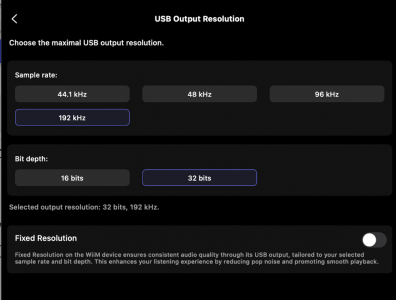
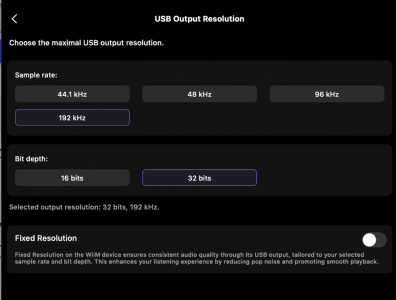
Pat, if you choose to wear high heels on the weekend it's Saturday and thats entirely up to you! Each to their own! See screenshot! Take care!
 

Attachments

  • Screenshot 2026-01-10 at 19.50.03.png
    Screenshot 2026-01-10 at 19.50.03.png
    281.3 KB · Views: 26
Ok. Up to you but you are misunderstanding how USB works.

The USB transfer mode (asynchronous, adaptive, or synchronous) only describes who controls the timing of data transfer—not the stability of the audio clock.

Some sources (and marketing materials) incorrectly suggest that "asynchronous USB" reduces jitter. In reality, it’s the interface’s clock design and the use of isochronous USB transfer (with proper buffering and time-stamping) that matters.


The WiiM devices only support up to 24 bits, so even when the DAC support 32 bits on the USB interface, it will still be 24 bit dynamic range.
I have been saying just this 'The USB transfer mode (asynchronous, adaptive, or synchronous) only describes who controls the timing of data transfer' - where have I mentioned the word 'Jitter'??????? I bought an Audioquest 'Jitterbug' adapter if you are confusing it with that, I also said I returned it!
 
Last edited by a moderator:
I have been saying just this 'The USB transfer mode (asynchronous, adaptive, or synchronous) only describes who controls the timing of data transfer' - where have I mentioned the word 'Jitter'??????? I bought an Audioquest 'Jitterbug' adapter if you are confusing it with that, I also said I returned it!
Ok. Maybe I just misread your comment "USB hand the control of the clocking to the external DAC via asynchronous, this means that DAC can control the timing of packets." Thinking that you mean that the "asynchronous" have anything to do with the audio clock.
 
Ok. Maybe I just misread your comment "USB hand the control of the clocking to the external DAC via asynchronous, this means that DAC can control the timing of packets." Thinking that you mean that the "asynchronous" have anything to do with the audio clock.
To clear things up, I am saying that:-

In USB asynchronous mode - using your own DAC (not Wiim)
  • The DAC has its own master clock
  • The DAC tells the WiiM "send me data NOW" based on its clock
  • This means the DAC's clock controls BOTH packet timing AND the actual audio sample timing
 
This means the DAC's clock controls BOTH packet timing AND the actual audio sample timing
Hopefully not. It must be two very different clocks that are not associated at all. One for USB data transfer handling and one for the audio sampling frequency.
 
Sorry to dig this one up, but I’m about to use a WiiM Ultra feeding digital into a pair of quality active speakers (they have their own DAC).
The speakers accept coax or AES/EBU. After reading through most of the comments here about USB vs coax on the Ultra, it seems many people prefer the sound quality of the USB output.
In that case, I was thinking of running USB out of the Ultra into a DDC (like Matrix X-SPDIF 3) and then AES/EBU into the speakers.
Does that make sense, or would you just go straight coax out of the Ultra into the speakers and call it a day?

USB yes, if your DAC had a filtered USB port and better clocks. Given that it doesn't have a USB port I would use coax with a proper 75 Ohm coax cable.
 
Hopefully not. It must be two very different clocks that are not associated at all. One for USB data transfer handling and one for the audio sampling frequency.Okay
In simple terms, using USB allows your external DAC full control of the data retrieval timing - would that be a good way of phrasing this? Whilst using COAX relies on the Wiim to send the data and the external DAC is in retrieve mode, or would there be a better way of phrasing this? I have thought this all along, I may have conveyed this wrong?

Sorry about bringing the audio sample part into this, I may have incorrectly confused this with what I did with my Audirvana options which was sometime ago now, I have now set/forgot it, so not great with the memory recall on that one! Lets put this aside so not to confuse this issue, my bad!
 
Last edited:
In simple terms, using USB allows your external DAC full control of the data retrieval timing - would that be a good way of phrasing this? Whilst using COAX relies on the Wiim to send the data and the external DAC is in retrieve mode, or would there be a better way of phrasing this? I have thought this all along, I may have conveyed this wrong?

Sorry about bringing the audio sample part into this, I may have incorrectly confused this with what I did with my Audirvana options which was sometime ago now, I have now set/forgot it, so not great with the memory recall on that one! Lets put this aside so not to confuse this issue, my bad!
Ok. Maybe I just misread your comment "USB hand the control of the clocking to the external DAC via asynchronous, this means that DAC can control the timing of packets." Thinking that you mean that the "asynchronous" have anything to do with the audio clock.
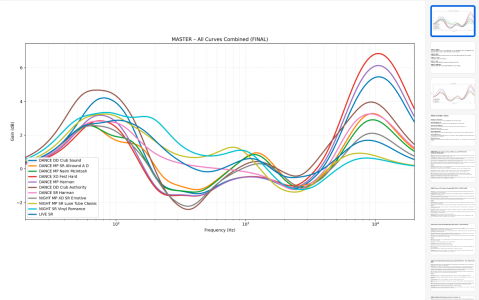
Btw, I produced some very cool PEQs for my Wiim and after a pretty in-depth room correction exercise using a mic & the house curve app which corrected the room both physically re speaker placement etc and digitally. The results are pretty amazing, here is a screenshot of the Master Reference graph of my PEQ project, which I made for my Wiim Ultra (I also own a Wiim Pro Plus - which I improved it sound with an iFi 5v Linear Power Supply but appreciate people on this forum who haven't tried it will call it snake oil because thats what they do around these parts!). I could tell you all about my findings of the Wiim's room correction. But, I realise you guys are such experts that you think cables don't make a difference and would hound me out of here! Shame as sometimes people who don't post as much on forums and don't have 'major contributor' titles under their names do actually have something to offer and most certainly if they say things like USB offers 32bit vs COAX 24bit then in fact it could be because they have been into the Wiim menus and seen/used it for themselves. Because as it turns out I was correct about both USB allowing the external dac full control of data retrieval vs Coax (24bit) allowing just receipt and it being able to go up to 32bit. I really have alot to offer but having had this experience with all of you, I won't my waste my time or energy which is a shame as I would've loved to help fellow audio enthusiasts level up their listening experience because I have very definitely upped mine for relatively nothing cost wise re corrections and PEQs without the need for pre-gain using both room correction and the PEQs in tandem. So let this be a lesson to you when other people come on to share information, that they maybe more experienced than you think, have tried out things you likely haven't and have listened to differences with their own ears! Take care all and hope you have learn a lesson from this!!!
 

Attachments

  • Screenshot 2026-01-11 at 09.43.07.png
    Screenshot 2026-01-11 at 09.43.07.png
    375.8 KB · Views: 15
Last edited:
Btw, I produced some very cool PEQs for my Wiim and after a pretty in-depth room correction exercise using a mic & the house curve app which corrected the room both physically re speaker placement etc and digitally. The results are pretty amazing, here is a screenshot of the Master Reference graph of my PEQ project, which I made for my Wiim Ultra (I also own a Wiim Pro Plus - which I improved it sound with an iFi 5v Linear Power Supply but appreciate people on this forum who haven't tried it will call it snake oil because thats what they do around these parts!). I could tell you all about my findings of the Wiim's room correction. But, I realise you guys are such experts that you think cables don't make a difference and would hound me out of here! Shame as sometimes people who don't post as much on forums and don't have 'major contributor' titles under their names do actually have something to offer and most certainly if they say things like USB offers 32bit vs COAX 24bit then in fact it could be because they have been into the Wiim menus and seen/used it for themselves. Because as it turns out I was correct about both USB allowing the external dac full control of data retrieval vs Coax (24bit) allowing just receipt and it being able to go up to 32bit. I really have alot to offer but having had this experience with all of you, I won't my waste my time or energy which is a shame as I would've loved to help fellow audio enthusiasts level up their listening experience because I have very definitely upped mine for relatively nothing cost wise re corrections and PEQs without the need for pre-gain using both room correction and the PEQs in tandem. So let this be a lesson to you when other people come on to share information, that they maybe more experienced than you think, have tried out things you likely haven't and have listened to differences with their own ears! Take care all and hope you have learn a lesson from this!!!
Sorry, you are still completely misunderstanding how USB audio works. The data package retrieval of USB is not related to the PCM audio clock, as included in the SPDIF bit stream. In the USB case it is always the receiver that provides the PCM clock. With SPDIF it's either the sender clock or the receiver clock that is used for the PCM.
 
Sorry, you are still completely misunderstanding how USB audio works. The data package retrieval of USB is not related to the PCM audio clock, as included in the SPDIF bit stream. In the USB case it is always the receiver that provides the PCM clock. With SPDIF it's either the sender clock or the receiver clock that is used for the PCM.
I never mentioned the word clock once, you are fixated on this, I said 'USB allowing the external dac full control of data retrieval vs Coax (24bit) allowing just receipt and it being able to go up to 32bit.' - what is incorrect about this statement?????

Also, you were wrong here 'The WiiM devices only support up to 24 bits, so even when the DAC support 32 bits on the USB interface, it will still be 24 bit dynamic range.' - see attached screenshot, clears says 32bit output!!! I have done this myself via Audirvana (on my server) via Wiim!!! I am fast getting the impression that people who reply to posts on here don't actually try out the things they comment on for themselves!!
 

Attachments

  • Screenshot 2026-01-10 at 19.50.03.png
    Screenshot 2026-01-10 at 19.50.03.png
    281.3 KB · Views: 6
Last edited:
I guess I just don't know how to phrase a helpful experience. Can your forgive me major contributor Aquaman?
I figured it out, they call him this Aquaman, because he listens to his Wiim & cables underwater. Therefore, he can't hear the differences between cables! Phew!
 
Last edited:
Back
Top