Newbie trying speaker placement and roomfit - looking for guidance

satheesht

New Member
Joined
Dec 29, 2025
Messages
11
Location
Bengaluru, India
Hello All,

A month ago, I bought Wiim Amp ultra along with bookshelf speakers (polk R200) and an 8 inch sub (pioneer S-52W, it's an 8 inch down firing ported budget sub). It's setup in my small living room and is for music. This is the first amp+speaker+sub setup i have. So though iam close to 50, Iam a newbie. But i have read through a lot of information in this forum and has tried my best to get to my current speaker and sub placement. But I am not able to judge whether the sub placement can be made any better. I want to eliminate the nulls by moving my sub as moving speakers are difficult due to room constraints. After days of trial and error, here is my situation from roomfit. (Apologies if the screenshots are insufficient to provide any comments, can rerun roomfit and share more details in the weekend if needed)

Speakers are placed almost 6 ft(1.8m) apart and listening position is almost at similar distance (7ft) from the speakers . Speakers are in the corner close to the walls, 10 inches gap between the back wall and the port and 18 inches from the side walls. Sub is placed on the floor in front of the speaker stand of the right speaker as i felt it reduces the chance of they interfering with each other.

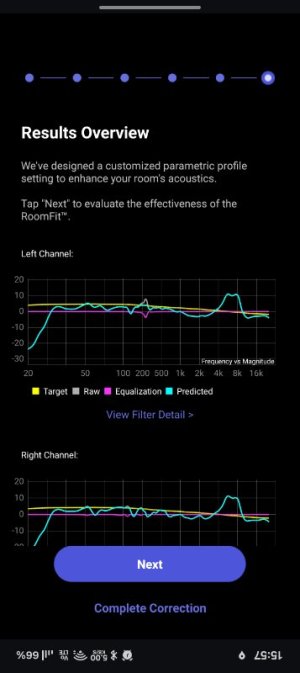
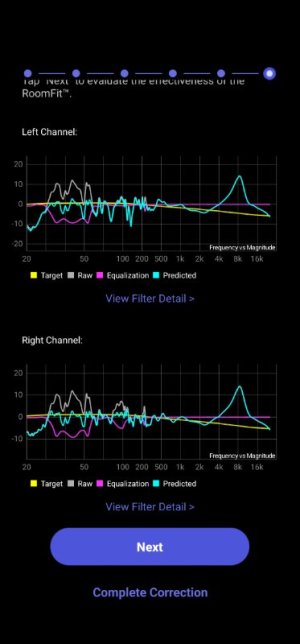
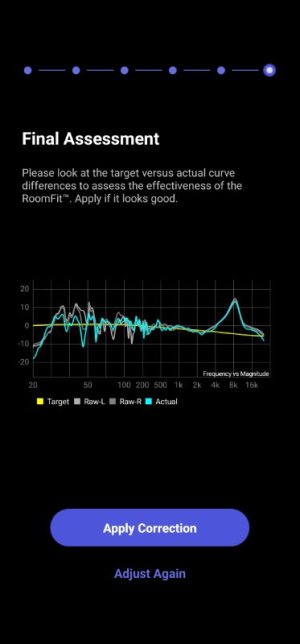
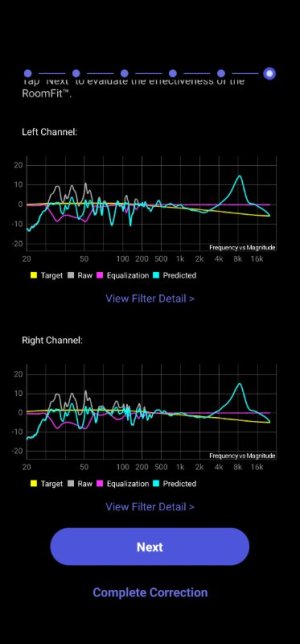
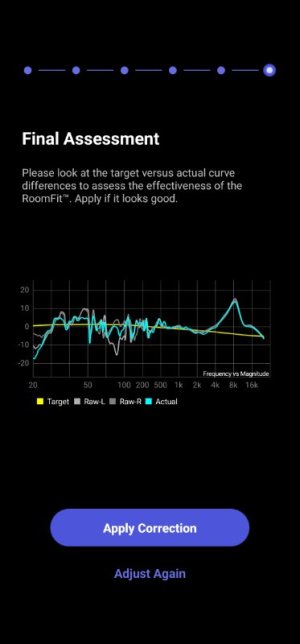
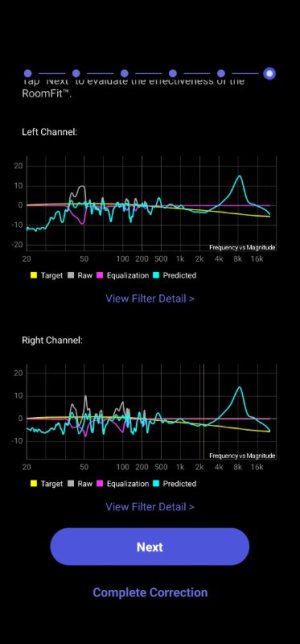
Roomfit in sweep mode gave the output as attached which shows dips at around 60Hz and between 150-180hz.
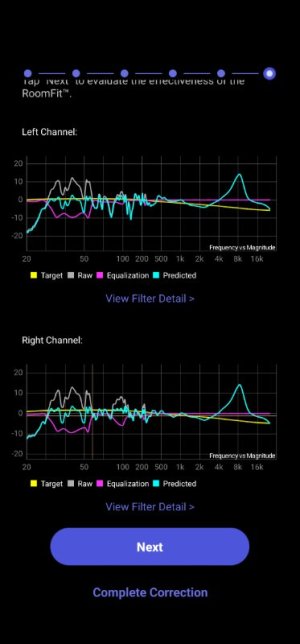
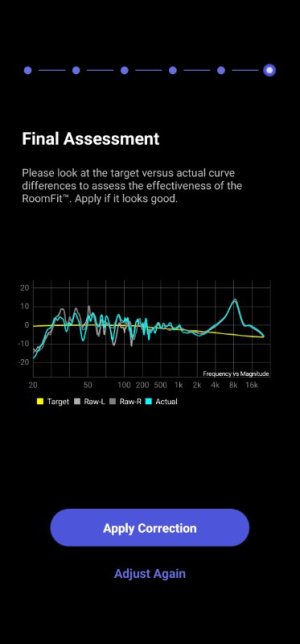
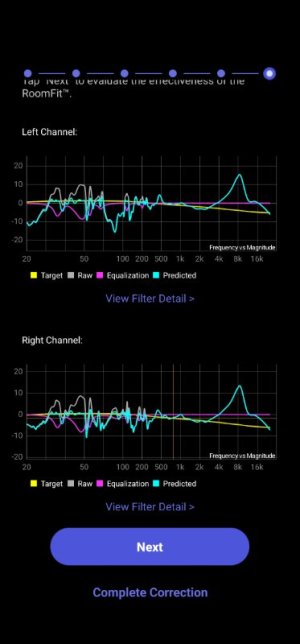
However roomfit in moving mic calibration mode gives better result - also attached (file name has MMC)

Physical controls on the sub are as below
Volume at 50%, crossover bypass is on and phase is 0.
On the wiim configuration for sub, crossover is set to 70Hz, phase is 0 and delay for main speaker is set to 8ms which was done by wiim auto sync and I tried to tweak it but 8ms delay and phase setting sounded correct. I have set input gain to -2.5 and used peq values above 400Hz based on spinorama values for the speaker. But I assume EQ is not applied during roomfit.
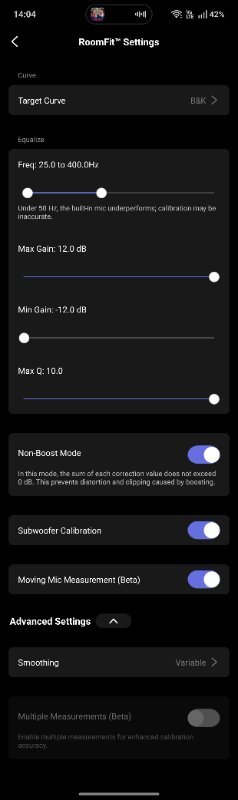
As for roomfit settings, I have disabled the boost mode (i.e enabled the setting), range is set 20hz to 400hz and smoothing at 1/6 and other settings are at default. I use the phones mic, so please ignore the spikes close to 8khz.

Iam happy with the sound but that may be because i feel i have spent enough time and feel i cannot do much better with speaker placement as it's a small room. But the roomfit showing the nulls in the sweep mode is bothering me and hence wondering if i should keep trying to find better placement for sub as for some tracks I think I hear the presence of the sub. Hence looking for guidance.

(Also want to say thank you to a lot of experts on this forum whose posts have helped me immensely to learn a lot that I didn't know a month before joining this forum)

Thank you.
 

Attachments

  • Speaker behind sub right.jpg
    Speaker behind sub right.jpg
    42.2 KB · Views: 41
  • MMC_Screenshot_2026-01-18-15-57-57-71.jpg
    MMC_Screenshot_2026-01-18-15-57-57-71.jpg
    37.2 KB · Views: 42
This all looks pretty fine to me, I think you did a great job!

Roomfit in sweep mode gave the output as attached which shows dips at around 60Hz and between 150-180hz.
However roomfit in moving mic calibration mode gives better result - also attached (file name has MMC)
A smoother result isn't necessarily more accurate. :) You could try repeating the MMM RoomFit run with 1/12 octave smoothing and see if it makes a difference.
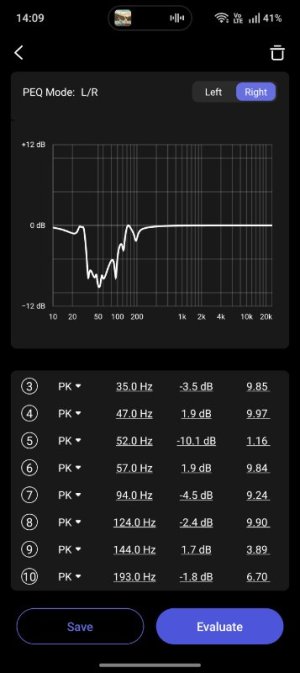
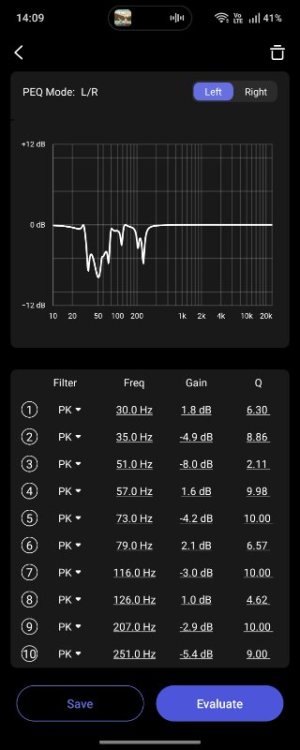
I have set input gain to -2.5 and used peq values above 400Hz based on spinorama values for the speaker. But I assume EQ is not applied during roomfit.
Yes, I wish there was a toggle switch do enable or disable EQ during RoomFit runs.

But the roomfit showing the nulls in the sweep mode is bothering me and hence wondering if i should keep trying to find better placement for sub as for some tracks I think I hear the presence of the sub. Hence looking for guidance.
I'm not in your room and I don't have your ears, but I'd be surprised if the sub can really be localised with this setup.

If you could place the subwoofer closer to the front wall, you should give it a try. Personally, I would probably try to increase the subwoofer volume in the WiiM Home App by 2 or 3 dB (and re-run RoomFit, of course). It's easy to try and easy to reverse if you don't like the result.

My summary is identical to my introduction: Good job!
 
Last edited:
Thank you for taking the time to read the post and giving feedback.

A smoother result isn't necessarily more accurate. :) You could try repeating the MMM RoomFit run with 1/12 octave smoothing and see if it makes a difference.
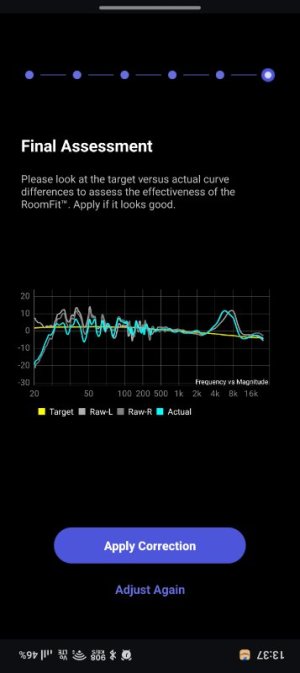
Yes, will try with 1/12 octave in the next runs.

I'm not in your room and I don't have your ears, but I'd be surprised if the sub can really be localised with this setup
I felt it only in some parts of some tracks (mostly old ones) where guitars for example are played only in right speakers and when drums come on they also seem skewed from right where sub is. But it's not at a level that bothers me and doesn't feel for 99% of the time and overall imaging is fine. It may be that iam used to the stereo imaging in headphones for a long time now where one side speaker is strictly heard in one ear and it comes as a reference sound image. (May be a downside of running too many tests is that my brain is now briefly wired to look for inaccuracies and differences instead of listening to the music).

If you could place the subwoofer closer to the front wall, you should give it a try. Personally, I would probably try to increase the subwoofer volume in the WiiM Home App by 2 or 3 dB (and re-run RoomFit, of course). It's easy to try and easy to reverse if you don't like the result.
Thanks for this input. I will give these a try. I have constraints on keeping sub in the middle part of the wall due to immovable wall mounted units installed there. But it's worth a try within the constraints. Will try and update here in a few days.

Once again thank you for your time and the valuable comments.
 
Last edited:
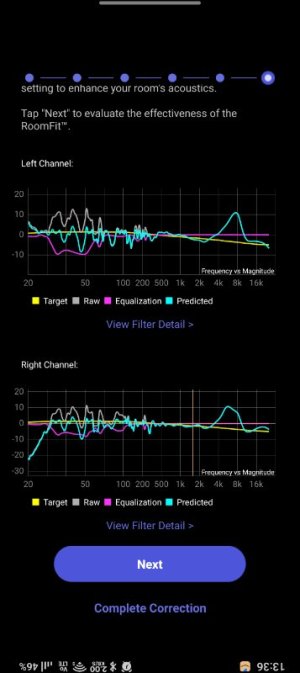
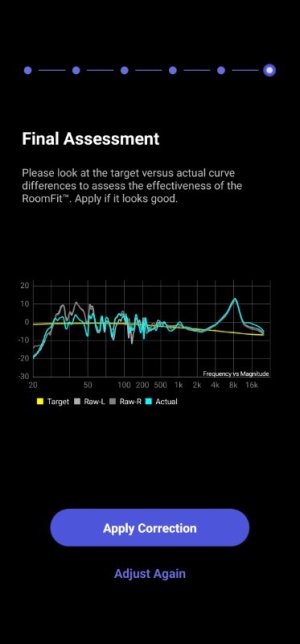
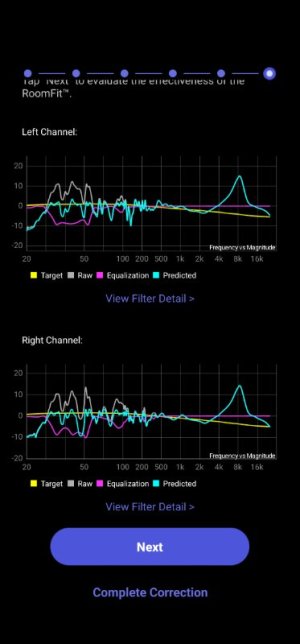
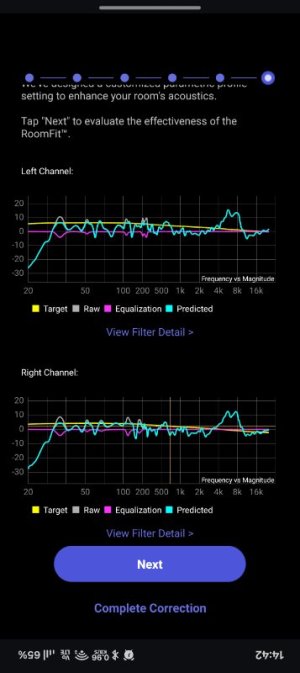
I re-ran roomfit but with some changes
1. I moved the sub into the corner as its downfiring, corner placement seem to have less negative impact. Both port and driver are downfiring in the sub (pioneer S-52W)
2. I switched to the new variable smoothing option
3. Because sub moved to the corner, both speakers are now pulled forward a little bit into the room .
4. I kept the sub volume -3db earlier, it's now set to 0db

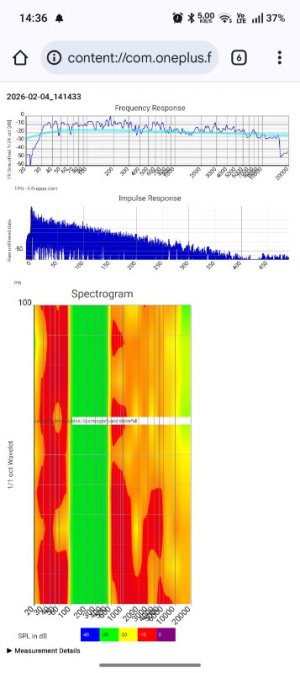
Screenshots of the roomfit i captured are attached. I am overall ok with the result - i have shared the frequency sweep and others captured using a room correction android app after applying the roomfit.(I don't have REW)

I plan to adjust the cuts in the sub frequencies either manually or switching to a different target curve like harman to see if it can bring up bass a little bit as it's now feels significantly mellowed down. It may be also a limitation of the phone mic.

Thank you.
 

Attachments

  • Screenshot_2026-02-04-14-05-03-98.jpg
    Screenshot_2026-02-04-14-05-03-98.jpg
    21.6 KB · Views: 19
  • Screenshot_2026-02-04-13-36-00-63_5592fe85c89b9c7526dd9939eef9599a.jpg
    Screenshot_2026-02-04-13-36-00-63_5592fe85c89b9c7526dd9939eef9599a.jpg
    41 KB · Views: 16
  • Screenshot_2026-02-04-13-37-20-89_5592fe85c89b9c7526dd9939eef9599a.jpg
    Screenshot_2026-02-04-13-37-20-89_5592fe85c89b9c7526dd9939eef9599a.jpg
    28.8 KB · Views: 16
  • Screenshot_2026-02-04-14-09-10-58.jpg
    Screenshot_2026-02-04-14-09-10-58.jpg
    38.2 KB · Views: 13
  • Screenshot_2026-02-04-14-09-30-68.jpg
    Screenshot_2026-02-04-14-09-30-68.jpg
    37.5 KB · Views: 13
  • Screenshot_2026-02-04-14-36-24-92_40deb401b9ffe8e1df2f1cc5ba480b12.jpg
    Screenshot_2026-02-04-14-36-24-92_40deb401b9ffe8e1df2f1cc5ba480b12.jpg
    49.3 KB · Views: 20
Last edited:
I re-ran roomfit but with some changes
1. I moved the sub into the corner as its downfiring, corner placement seem to have less negative impact. Both port and driver are downfiring in the sub (pioneer S-52W)
2. I switched to the new variable smoothing option
3. Because sub moved to the corner, both speakers are now pulled forward a little bit into the room .
4. I kept the sub volume -3db earlier, it's now set to 0db

Screenshots of the roomfit i captured are attached. I am overall ok with the result - i have shared the frequency sweep and others captured using a room correction android app after applying the roomfit.(I don't have REW)
That looks pretty good, except perhaps the -10dB notch at about 48Hz.
What are your room dimensions, and how far is your listening position from the back and side walls?
Does this notch move if you measure e.g. 2ft in front of your main listening positions?
I plan to adjust the cuts in the sub frequencies either manually or switching to a different target curve like harman to see if it can bring up bass a little bit as it's now feels significantly mellowed down. It may be also a limitation of the phone mic.
My advice would be to keep the B&K curve in RoomFit, and then adjust the amount of bass according to your preference using EQ (instructions here).
Note that as long as you don't use close to 100% volume in WiiM Home App there's no danger of digital clipping when adding a little boost with PEQ shelving filters. In case you use the "fixed volume" option in WiiM Home App then you should use the "volume limit" function to compensate for any boost you add with PEQ.
 
What are your room dimensions, and how far is your listening position from the back and side walls?
Room is small - approx 12ft x 9ft (3.6m x 2.7m). Listening position is almost 4 ft from the side walls, 6-7ft from the speakers and there is an open area behind the listening position into a staircase area which then goes further into the dining area. I think for the speaker size and the volume i use, reflections from behind the listener area should be minimal. I suspect one contributor could be the furniture on the wall behind the speaker creating some reflections.

Does this notch move if you measure e.g. 2ft in front of your main listening positions?

I haven't done a measurement from another listening position, will do and update here. Its actually a very good point, I had done a few measurements with different speaker and sub positions though unfortunately I didn't grab screenshots for all or made notes. I think notches around 45-55 range was there in all measurements with slight variations.


My advice would be to keep the B&K curve in RoomFit, and then adjust the amount of bass according to your preference using EQ (instructions here).
Sure, thank you for the link.


Note that as long as you don't use close to 100% volume in WiiM Home App there's no danger of digital clipping when adding a little boost with PEQ shelving filters.
My listening volumes are never more than 40 on WiiM and usually in the 25-35 range. Will use boost wherever necessary, thank you for this input.


In case you use the "fixed volume" option in WiiM Home App then you should use the "volume limit" function to compensate for any boost you add with PEQ
I don't think I have set these, unless they are set by default. I will check and confirm.

It might take me some time to find a quiet window for further tests, so please bear with me if I come back after a few days of silence with new data.

Thank you for your time. A lot of expert advice in a lot of other threads that i read through were inputs from you and other experts which were very helpful. I am glad I learned many new aspects of sound through these. It's all very interesting and fun learning about these !
 
Room is small - approx 12ft x 9ft (3.6m x 2.7m). Listening position is almost 4 ft from the side walls, 6-7ft from the speakers and there is an open area behind the listening position into a staircase area which then goes further into the dining area. I think for the speaker size and the volume i use, reflections from behind the listener area should be minimal. I suspect one contributor could be the furniture on the wall behind the speaker creating some reflections.
I haven't done a measurement from another listening position, will do and update here. Its actually a very good point, I had done a few measurements with different speaker and sub positions though unfortunately I didn't grab screenshots for all or made notes. I think notches around 45-55 range was there in all measurements with slight variations.
The ~48Hz notch doesn't seem to correlate with the size of your room and the speaker locations, so I suspect it has to do with the listening location. Let's see if the frequency changes once you measure from a different spot.
My listening volumes are never more than 40 on WiiM and usually in the 25-35 range. Will use boost wherever necessary, thank you for this input.
In that case there's absolutely nothing to worry about!
I don't think I have set these, unless they are set by default. I will check and confirm.
They are not set by default, and I'd recommend to keep the "Fixed Volume Output" disabled. This option locks the volume control and keeps it at 100%. Some people use this in case where they have another volume control downstream. Be careful not to enable this by accident, as it might be frighteningly loud in your system.
It might take me some time to find a quiet window for further tests, so please bear with me if I come back after a few days of silence with new data.
No problem at all!
Thank you for your time. A lot of expert advice in a lot of other threads that i read through were inputs from you and other experts which were very helpful. I am glad I learned many new aspects of sound through these. It's all very interesting and fun learning about these !
Thanks for the kind words, I'm glad you found some of it interesting!
 
The ~48Hz notch doesn't seem to correlate with the size of your room and the speaker locations, so I suspect it has to do with the listening location. Let's see if the frequency changes once you measure from a different spot

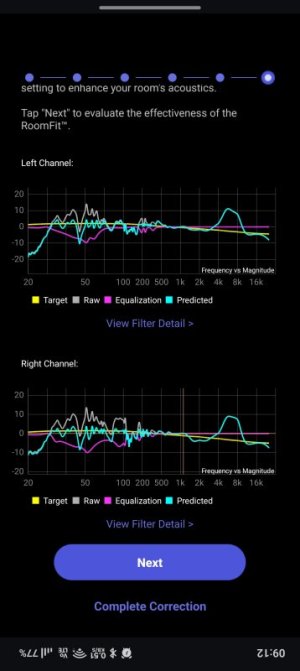
I measured once again with same settings with listener location moved 2 feet closer to the speaker side. The frequency of the dip seems same - please see the image. So looks like it's SBIR?
My sub crossover is 70hz and sub is in the corner behind the right speaker.

1000140882.jpg

Iam also making some other adjustments to what's around the speaker to conceal some wiring and moving one furniture out of the room. Hopefully will be done in the weekend and will do more measurements with a plan below.
Let me know if testing with a plan like below makes sense.

1. Take measurements with the usual and one more listening positions (already done but can repeat once the wiring and furniture movements are done) with the current placement (sub in the right corner and speaker in front of the sub)
2. Take measurements with sub off and subwoofer calibration off to see what changes.
3. Take another one by pushing speakers closer to the wall and pulling the subwoofer in front of the speaker but closer to the side wall
4. Keep the setup the same as #3 above but sub moved away a little bit from the side wall
5. Move sub to the other side - in front of the left speaker and further from the speakers and back wall as i have a power socket there giving more flexible sub placement.

#1 will help to confirm whether it's SBIR, #2 to confirm whether the sub is the cause and then #3 and #4 are to validate which feasible speaker and sub positions I can have in the room to pick from the better. #5 is just to test and validate, but I can only go with either current position, #3 and #4.

Let me know your comments which ones makes sense and anything else is worth checking.

My advice would be to keep the B&K curve in RoomFit, and then adjust the amount of bass according to your preference using EQ (instructions here).
I added to the EQ an LS with a gain of +2 following the instructions and it sounds good in the regular volumes I use. Now I can add multiple EQ with variations that i can choose from or add to a preset to choose based on what's played and the listening volume until the WiiM feature is released. Thank you, this is helpful.
 
Last edited:
I measured once again with same settings with listener location moved 2 feet closer to the speaker side. The frequency of the dip seems same - please see the image. So looks like it's SBIR?
My sub crossover is 70hz and sub is in the corner behind the right speaker.
It seems to be SBIR after all, yes. Given that the dip is in the subwoofer passband (<70Hz) it should be related to the subwoofer position in the room.
1. Take measurements with the usual and one more listening positions (already done but can repeat once the wiring and furniture movements are done) with the current placement (sub in the right corner and speaker in front of the sub)
2. Take measurements with sub off and subwoofer calibration off to see what changes.
3. Take another one by pushing speakers closer to the wall and pulling the subwoofer in front of the speaker but closer to the side wall
4. Keep the setup the same as #3 above but sub moved away a little bit from the side wall
5. Move sub to the other side - in front of the left speaker and further from the speakers and back wall as i have a power socket there giving more flexible sub placement.

#1 will help to confirm whether it's SBIR, #2 to confirm whether the sub is the cause and then #3 and #4 are to validate which feasible speaker and sub positions I can have in the room to pick from the better. #5 is just to test and validate, but I can only go with either current position, #3 and #4.

Let me know your comments which ones makes sense and anything else is worth checking.
At the moment I'd focus only on trying out a few different subwoofer positions. Try to move the sub to a few different places along the wall and see if you can avoid the dip at any of them. I see no need to move the speakers, at least not for now. The response above 70Hz is pretty OK.
I added to the EQ an LS with a gain of +2 following the instructions and it sounds good in the regular volumes I use. Now I can add multiple EQ with variations that i can choose from or add to a preset to choose based on what's played and the listening volume until the WiiM feature is released. Thank you, this is helpful.
No problem, glad you found it helpful! Presets are indeed a good way to do on-the-fly adjustments of bass level.
 
It seems to be SBIR after all, yes. Given that the dip is in the subwoofer passband (<70Hz) it should be related to the subwoofer position in the room.
At the moment I'd focus only on trying out a few different subwoofer positions. Try to move the sub to a few different places along the wall and see if you can avoid the dip at any of them. I see no need to move the speakers, at least not for now. The response above 70Hz is pretty OK.

So I spent some time and I tried placing the sub in multiple locations but the results don't change much, the dip moves around little bit here and there but is always there in 30 to 50 hz range. So I paused roomfit attempts and started listening to sine wave tones from 30hz to 55hz and first confirmed that there is some sort of room resonance (I don't know how else to put it, may not be the right term) because it's cement plastered and smoothened & painted room walls along with vitrified tiles flooring (porcelain like flooring) used in this part of the world which reflects the sound a lot. I was also suspecting if my budget sub has flaws or it's characteristics of using the floor may be the culprit so i disabled sub out and tried playing the sine wave tones with speakers and it was the same. Though I can't pick out a dip per se, but I can see the volume levels fluctuate as I keep playing from around 35hz till 55hz or so generally everywhere in the room. Largely the same pattern whether i use the sub or not. I have not listened to sounds this carefully at this frequency in any rooms before and is relying on headphones, so I may be totally off as i dont have a correct baseline reference which I can get only if listen in an acoustically treated room.

I think my next step would be to keep the sub and speakers at designated places (visually and not based on sound as there doesn't seem to be much change to audio adjustment that is needed anyway within the choices i have) and see the best I can get through roomfit and EQ adjustments.

At some point I will try to validate with REW.

Thank you.
 
Last edited:
So I spent some time and I tried placing the sub in multiple locations but the results don't change much, the dip moves around little bit here and there but is always there in 30 to 50 hz range.
So that confirms the assumption that the dip is related with subwoofer placement. Good job!
The room is pretty small, so it's not that surprising that it is difficult to find a location without any dip.
Still, a dip at 30Hz would probably be less audible than a dip at 50Hz. This is because there's usually much less energy in recordings at 30Hz than at 50Hz. So it might be worth placing the sub accordingly.
Additionally, from RoomFit we see that your sub's response is limited at 30Hz at the low end, and your crossover is at 70Hz which sets the upper bound of your sub's passband. If you can place the sub in a way where the dip moves either below 30Hz or above 70Hz you are effectively eliminating it. And if you get the dip close to 70Hz (but not over) you can try to reduce the crossover frequency to remove it.
So I paused roomfit attempts and started listening to sine wave tones from 30hz to 55hz and first confirmed that there is some sort of room resonance (I don't know how else to put it, may not be the right term) because it's cement plastered and smoothened & painted room walls used in this part of the world which reflects the sound. I was thinking my budget sub flaws or it's characteristics of using the floor may be the culprit so i disabled sub out and tried playing the sine wave tones with speakers. Though I can't pick out a dip per se, but I can see the volume levels fluctuate as I keep playing from around 35hz till 55hz or so generally everywhere in the room. Largely the same pattern whether i don't use sub or not. I have not listened to sounds this carefully at this frequency in any rooms before and is relying on headphones, so I may be totally off as i dont have a correct baseline reference which I can get only if listen in an acoustically treated room.
Was this listening done with RoomFit enabled or disabled?
It is typical to have wild volume fluctuations at different frequencies in the bass when room correction (RoomFit) is disabled.
Optimal placement of subs and speaker + room correction EQ (like RoomFit) are intended to fix exactly that and make any bass frequency better aligned in level.

Note that traditional physical room treatment is not that effective at frequencies below 50Hz. Room correction EQ luckily is!
 
considering the materials you describe as currently used, a thick ( and big) rug would be more than welcome for a better overall result.... ;-)
That's for sure. It even makes a difference with less hard and reflective materials like wooden floors. But it won't help with a dip at or below 50 Hz.
 
That's for sure. It even makes a difference with less hard and reflective materials like wooden floors. But it won't help with a dip at or below 50 Hz.
I'm speaking generally, not about the impact around 50Hz (although that still needs to be verified)... but about listening, let's say "subjective"... the end result... not necessarily obsessed with verified observation...
(and especially above 500 -1kHz)
;-)
 
We didn't wait for the measures, the PEQs, etc. to ensure this...(such as the impact of glass surfaces, etc.)
"B-a.ba"
;-)
(That reminds me of that well-known, sometimes used effect in pop/rock music, etc., of recording in an empty swimming pool...yes, really... ;-) )
 
Last edited:
I'm speaking generally, not about the impact around 50Hz (although that still needs to be verified)... but about listening, let's say "subjective"... the end result... not necessarily obsessed with verified observation...
(and especially above 500 -1kHz)
;-)
Excessively reflective/bare rooms can indeed be quite unpleasant, and things like thick rugs (as you already suggested), bookshelves filled with books, heavy curtains, upholstery and/or various other soft furnishings can really improve the situation a lot at higher frequencies. So much so that specialized acoustic treatment may not be required in many cases, luckily. :)

But at low frequencies optimal placement and room correction EQ are key.
 
But at low frequencies optimal placement and room correction EQ are key.
Of course..
(Modes are one thing... but what about their precise energy depending on the very reflective surfaces in the marked cases, even at low frequencies? ...
In any case, barring deliberate intent... he really wants to make this effort with the carpet, etc.)
 
So that confirms the assumption that the dip is related with subwoofer placement. Good job!
The room is pretty small, so it's not that surprising that it is difficult to find a location without any dip.
Still, a dip at 30Hz would probably be less audible than a dip at 50Hz. This is because there's usually much less energy in recordings at 30Hz than at 50Hz. So it might be worth placing the sub accordingly.
Understood. I think in addition to the room being small, i have to keep the sub in one corner which is also a major constraint. I will try to move it within the constraints to see where the dip move close to 30 as you suggested.

Additionally, from RoomFit we see that your sub's response is limited at 30Hz at the low end, and your crossover is at 70Hz which sets the upper bound of your sub's passband. If you can place the sub in a way where the dip moves either below 30Hz or above 70Hz you are effectively eliminating it. And if you get the dip close to 70Hz (but not over) you can try to reduce the crossover frequency to remove it.
In my tries with roomfit I could see the dips moving lower towards 35-40 but never closer to 60, it was more like 55, I think some measurements also has an additional dip after 100. So might have to pick the least impact one based on my test.

Was this listening done with RoomFit enabled or disabled?
It is typical to have wild volume fluctuations at different frequencies in the bass when room correction (RoomFit) is disabled.
Optimal placement of subs and speaker + room correction EQ (like RoomFit) are intended to fix exactly that and make any bass frequency better aligned in level.
Ah. You're right, tone playback was done with EQ and roomfit disabled as what I hoped to find was whether there is any difference based on location in the room, speaker or sub used etc. Only difference when compared to roomfit was I was moving around in the room with RTA analyser on my phone mostly to spot db level variation. But i realize based on what you said now that volume fluctuations are expected.
Anyway one positive outcome of that exercise is that I don't suspect the sub messing up things that much now - it did atleast sound better than speakers in 30hz+ frequencies 😀

Note that traditional physical room treatment is not that effective at frequencies below 50Hz. Room correction EQ luckily is!

Thank you. Didn't know this at all, will focus on EQ and RC.
I plan to run roomfit again from my spouse's phone as I read it has better microphones. I will keep this thread posted once I have updates.

Thank you for all your inputs and thank you @harkpabst and @canard for your inputs as well. Appreciate all of your time and your inputs. 🙏
 
Back
Top