WiiM Ultra Firmware v5.2.813259 - Apr 8, 2026

Please review the WiiM Ultra update release notes below. If you encounter any issues, feel free to reach out to us. This firmware update is being rolled out in stages, with devices updating sequentially over the next few days.

5.2.813259 (In Progress)

Release date:

Apr 8, 2026

Highlights:
  1. Sub & Main Speaker Sync: Automatically aligns subwoofer and main speakers for improved timing at the listening position.
  2. Per-Input Screen Control: Enable or disable the screen display for each input mode.
  3. Headphone EQ: Added independent EQ for headphone output optimization.
  4. Standby Source Mode: Automatically switch to a selected input when entering standby, enabling instant playback.
  5. Spotify Smart Play: Resume your latest listening session with a single tap.
  6. Surround Setup: Simplified setup with full backward compatibility. (requires upcoming app update).
Screen:
  1. Playback Screen: Added a vinyl-style playback screen for a more immersive experience.
  2. Localization: Added French language support.
Playback & Audio:
  1. Playback Latency: Reduced delay when starting playback.
  2. EQ: Improved responsiveness when adjusting and switching EQ settings.
  3. Line In: Fixed distortion during extended playback sessions.
  4. Bass Output: Fixed low bass levels for Apple TV (Dolby 5.1).
  5. Audio Sync: Improved sync accuracy at microsecond level for better group playback (requires upcoming app update).
Radio & Streaming Services:
  1. TIDAL Connect: Upgraded SDK to resolve unexpected playback interruptions.
  2. Soundtrack: Updated SDK for improved playback stability and performance.
  3. TuneIn: Fixed playback issues for certain stations and improved resume behavior after long pauses.
  4. Deezer: Fixed unexpected playback interruptions.
General Improvements:
  1. Wi-Fi: Improved network stability and enhanced compatibility with Wi-Fi 7 routers.
  2. HDMI ARC: Disabling automatic audio output now correctly keeps WiiM in standby and defaults to the TV speakers.
  3. HTTP Server: Improved concurrency and stability under high load.
  4. Audio Input: Fixed playback crash issues.
  5. Remote: Fixed occasional disconnection and unexpected max volume issues.
  6. Alarm: Fixed incorrect alarm and preset volume behavior.
  7. Roon: Fixed occasional crash issues.
  8. EQ: Enables EQ for Dolby 5.1 playback.
  9. Alarm: Fixes BBC and vTuner alarms defaulting to the chime.
  10. Spectrum Display: Improves dynamic visualization.
  11. Qobuz Connect: Fixed occasional playback stopping issues.
 
Last edited:
Honestly I’ll go even further - regular users like me need only auto sensing only when WiiM is in standby. If it is ON WiiM will wakes up once HDMI signal is detected. If HDMI ARC is not chosen I see no reason why the TV should route the signal to WiiM. Also, if I listen to music and my kid powers on the TV I definitely don’t want WiiM to switch to HDMI even if auto sense is enabled ( so auto sense works only when WiiM is in standby mode). Of course this is my personal opinion and many people can find having different options useful!
The issue here is that HDMI auto-sensing can only work if the TV has already directed its audio to the ARC output and that mean you don't have the TV using its internal speakers. Only when the TV can't "see" the WiiM (via CEC discovery) the TV will play on internal speakers else it will switch.
 
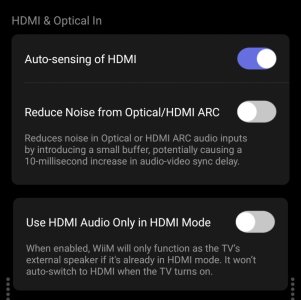
"Auto switch HDMI ARC"
I’m not sure where that toggle is, but since I mainly use my Amp Pro for watching TV, this is how it’s set up.
3281.jpg


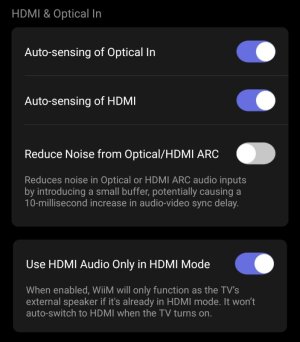
I mainly use the Amp Ultra for music, but since I use the WiiM TV app on my TV, this is how it’s set up. If I switch from the WiiM TV app to the YouTube app while music is playing, the WiiM automatically switches to HDMI.
3283.jpg
 
I’m not sure where that toggle is, but since I mainly use my Amp Pro for watching TV, this is how it’s set up.
View attachment 36698


I mainly use the Amp Ultra for music, but since I use the WiiM TV app on my TV, this is how it’s set up. If I switch from the WiiM TV app to the YouTube app while music is playing, the WiiM automatically switches to HDMI.
View attachment 36699
"Auto switch HDMI ARC" ON/OFF is not an existing option, it's use cases.

Except you don't show the latest added HDMI option, your use cases are the same as I descibe, as far as I can see. The auto-sensing has no functionality when "Use HDMI Audio Only in HDMI Mode" is enabled anyway.
 
Last edited:
Honestly I’ll go even further - regular users like me need only auto sensing only when WiiM is in standby. If it is ON WiiM will wakes up once HDMI signal is detected. If HDMI ARC is not chosen I see no reason why the TV should route the signal to WiiM. Also, if I listen to music and my kid powers on the TV I definitely don’t want WiiM to switch to HDMI even if auto sense is enabled ( so auto sense works only when WiiM is in standby mode). Of course this is my personal opinion and many people can find having different options useful!
I do not understand who would disable ever 'Use TV speakers when HDMI is inactive'...I mean...that was a pain in the ass until i got this setting. Who would like its tv forcerly muted ??
 
Last edited:
I imagine there are people who want to watch silent TV while listening to streaming music at the same time. Don’t you think you’d have to turn it off to do that?
I don't know.
 
I imagine there are people who want to watch silent TV while listening to streaming music at the same time. Don’t you think you’d have to turn it off to do that?
I don't know.
There's a mute button on every TV in the World!. Plus the problem is the TV cannot be 'unmuted' . It is forced to stream audio towards hdmi, the ultra is hijacking the sound as soon as it is ON even when the input is not HDMI!. Who would like that behavior?
 
I imagine there are people who want to watch silent TV while listening to streaming music at the same time. Don’t you think you’d have to turn it off to do that?
I don't know.
Try to disable "Use TV speakers when HDMI is inactive" and you will see how strange the HDMI input behaves.
 
I don't have time to try it right now, but you guys need to turn that toggle on, right? I mean, isn't that toggle there because it doesn't work properly when it's off? 🤪
 
I don't have time to try it right now, but you guys need to turn that toggle on, right? I mean, isn't that toggle there because it doesn't work properly when it's off? 🤪
The thing is that I cannot find any use cases for it being off. So why is it introduced?

Anyway the two use cases I described in #119 is all I need and they work with the settings shown.
 
The thing is that I cannot find any use cases for it being off. So why is it introduced?
I seem to recall that it was because "Use HDMI Audio Only in HDMI Mode" didn't work properly for you guys...

Doesn't that mean you couldn't resolve the issue without an additional toggle?🤔

Well, I might give it a try tomorrow. I’ve done it before, but forgotten how...
 
I seem to recall that it was because "Use HDMI Audio Only in HDMI Mode" didn't work properly for you guys...

Doesn't that mean you couldn't resolve the issue without an additional toggle?🤔

Well, I might give it a try tomorrow. I’ve done it before, but forgotten how...
Actually the "Use HDMI Audio Only in HDMI Mode" did almost work about one and a half year ago (when I got the WiiM), it was just called something different. Then it was changed due to some Forum requests and it has never worked since, until now. The current implementation is better than originally but just not logical (at least to me).
 
I do not understand who would disable ever 'Use TV speakers when HDMI is inactive'...I mean...that was a pain in the ass until i got this setting. Who would like its tv forcerly muted ??
I want that setting off!

HDMI from an Apple TV 4K is my primary everyday input. I only use that AVT4K while listening to music through the WiiM Ultra and its speaker group. When I occassionally play a file or stream using the Ultra rather than the ATV4K/AirPlay/Apple ecosystem, the WiiM switches to Ethernet mode - at this point, I most definitely DO NOT want my TV to give up on its HDMI ARC connection and setting. When next I initiate a new selection on the ATV4K, I don't want to hear anything from my damn LG monitor, I want the WiiM Ultra to perform its "Auto-sensing of HDMI" like I told it to, SWITCH to the HDMI input without bothering me, and play the music.

OTOH, I have no idea why there's a "Use HDMI Audio Only in HDMI Mode" in the first place if the "Auto-sensing of HDMI" toggle actually works. With all the confusion, discussion, appeasement and revision this UI has become a bit odd.
 
OTOH, I have no idea why there's a "Use HDMI Audio Only in HDMI Mode" in the first place if the "Auto-sensing of HDMI" toggle actually works. With all the confusion, discussion, appeasement and revision this UI has become a bit odd.
What happens if someone wants to listen to music while the TV is on with or without subtitles?
 
I want that setting off!

HDMI from an Apple TV 4K is my primary everyday input. I only use that AVT4K while listening to music through the WiiM Ultra and its speaker group. When I occassionally play a file or stream using the Ultra rather than the ATV4K/AirPlay/Apple ecosystem, the WiiM switches to Ethernet mode - at this point, I most definitely DO NOT want my TV to give up on its HDMI ARC connection and setting. When next I initiate a new selection on the ATV4K, I don't want to hear anything from my damn LG monitor, I want the WiiM Ultra to perform its "Auto-sensing of HDMI" like I told it to, SWITCH to the HDMI input without bothering me, and play the music.

OTOH, I have no idea why there's a "Use HDMI Audio Only in HDMI Mode" in the first place if the "Auto-sensing of HDMI" toggle actually works. With all the confusion, discussion, appeasement and revision this UI has become a bit odd.
So I figured I should at least try turning on the "Use HDMI Audio Only in HDMI Mode" switch to see what it does. I'm still confused.

With it on, I paused the stream playing from the ATV4K and used the WiiM Ultra screen to start streaming a Pandora station. Worked fine - I'm listening to Pandora via the WiiM Ultra. I resume the ATV4K/HDMI ARC stream... it's ignored. I pause the Ultra's playback and pause/resume the ATV4K stream, and the Ultra switched back to HDMI and resumed playing the ARC stream. OK. The function DID behave as advertised and keep playing a WiiM-sourced stream when turning ON the ATV4K, but again, wouldn't turning OFF the "Auto-sensing of HDMI" have gotten the same result?

Anyway, I gather I'm scratching at a dead horse here.
 
What happens if someone wants to listen to music while the TV is on with or without subtitles?
Yeah I get it, but I've been doing that frequently. I mute the TV, switch to a WiiM sourced stream, and watch a secutity cam on the TV screen or load the WiiM ATV app and see the lyrics of the pandora stream I'm playing on the WiiM (something Pandora can't be bothered with). I've never messed with that switch because the implication of "Use HDMI Audio Only in HDMI Mode" is that no other source of audio can be used? I can't play HDMI audio simultaneously with audio from other sources? :-). I also ignored this option because my only other input to the WiiM is the network that I occassionally use.
 
When next I initiate a new selection on the ATV4K, I don't want to hear anything from my damn LG monitor, I want the WiiM Ultra to perform its "Auto-sensing of HDMI" like I told it to, SWITCH to the HDMI input without bothering me, and play the music.
That's fine. Auto sensing on and the others off do this job for you right?
Is that is your config?

The discussion here is for people that want to use their ultra as sound output only when ultra is told to do so, not each time tv is on.
We naturally disable auto sensing and switch on the second control "Use HDMI Audio Only in HDMI Mode " . This is redundant in my opinion, auto sensing off should be enough to not to tell tv to throw audio through hdmi when it detects ultra is on.. But it is not!
Then ok, we use this "Use HDMI Audio Only in HDMI Mode" setting but it does not work alone as one may think : With this setting On ultra no longer plays sounds from Ultra unless hdmi input is selected, good. But the problem is that the TV remains sending sound through hdmi and not through its own speakers. Audio stays kidnapped by ultra.
So here it comes the third setting 'Use TV speakers when HDMI is inactive' solves that..but the question is who would like to have "Use HDMI Audio Only in HDMI Mode" ON and "Use TV speakers when HDMI is inactive" OFF?
Isn't all these too redundant and confusing. Now i think all users cases are covered but as @hgo58 said, it may be possible to achieve the same with less and clearer settings?
 
Back
Top