

You are using an out of date browser. It may not display this or other websites correctly.
You should upgrade or use an alternative browser.
You should upgrade or use an alternative browser.
Newbie trying speaker placement and roomfit - looking for guidance
- Thread starter satheesht
- Start date

satheesht
New Member
Iam good with the first 3 except that room correction cuts the 50hz range and i have to add some of it back through a broad EQ as @dominikz kindly shared. The placement exercise was trying to see if the 50hz dip can be moved lower based on sub placement so that impact is reduced. Based on the results it doesn't appear that there is a placement that has avoided the dip or moved it towards 30hz.Well, the graphs are one thing, but how does it sound?? What do you prefer!
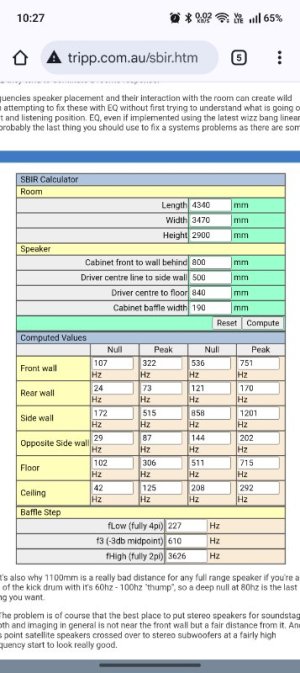
I got these values when I measured the room. With objects in the room, actuals will be different i imagine.If it helps when experimenting, you can predict where the dips will be for various distances from the center of the subwoofer driver to walls/ceiling/floor (and considering your room dimensions) using this online calculator.

dominikz
Senior Contributor
- Joined
- Dec 31, 2024
- Messages
- 1,034
Thanks for sharing the comprehensive test results, that's helpful!I did some placement attempts in the evening. Unfortunately very little change to the dips around 50hz, including one were only speakers were used.
Sub behind left speaker, sub in the corner close to the walls
View attachment 33522
Sub behind left speaker, sub away from the side wall
View attachment 33528
View attachment 33529
Sub behind left speaker, sub closer to the side wall
View attachment 33530
View attachment 33531
Sub in front of left speaker, sub closer to the side wall
View attachment 33532
View attachment 33533
Sub in front of right speaker at 2 feet away, sub closer to the side wall and closer to the listener compared to all other positions
View attachment 33534
View attachment 33535
Sub out disabled, only with speakers
View attachment 33536
I am uploading them here now, yet to look at it in detail as it's a bit late evening for me now. A quick look I had though makes me wonder if i misread it in the morning or environment was noisy or whether speakers are causing the 50hz dip too and introducing sub may be just moving it around. For some I missed grabbing the assesment screen. But I can get the RC PEQ for those tomorrow if needed.
Unfortunately no iphones at home. I tried all the above with wife's samsung S23 ultra which is the best i have access to. But i read it's better than my Oneplus 11r i used for previous measurements.
The other inputs you shared i will have a look tomorrow.
Thank you.
IMHO the first two positions for the sub look to be the best compromise. If you exhausted all of you placement options I'd choose one of those two.
Perhaps worth to comment that the last position (where the sub is closer to the listening position) is interesting, because we see that the 50Hz dip becomes much narrower - though unfortunately the left channel response above the crossover is degraded in that case.
By the way, did you try adjusting the speaker/subwoofer delay value? The intention is again to see if any of the dips around the crossover can be improved.
There are at least 3 ways to find the optimal delay value, see this post for a description. Perhaps easiest is to temporarily put the WiiM device at your listening position (which requires long cables) and run the automatic speaker/sub function using its own built-in microphone. The auto sync feature will hopefully be improved soon to be able to use the mobile phone microphone from the listening position instead, so that moving the WiiM device won't be required anymore.
Hm, so it seems the room is a bit bigger (4.3m x 3.5m) after all? Previously you said it is 3.6m x 2.7m.I got these values when I measured the room. With objects in the room, actuals will be different i imagine.
View attachment 33568
Also, are you sure the distances to boundaries are correct? Note that you should input distance from center of subwoofer driver to the boundary. E.g. you set 840mm (0.84m) for "Driver centre to floor", but Pioneer S-52W has the driver at the bottom, which means is can't be more than 50-100mm from the floor.
Related to that, note that this calculator assumes the usual front-firing design, which is why one of the parameter names is "Cabinet front to wall behind". You have a downward-firing sub, so instead from front of the cabinet you need to measure from center of cabinet (i.e. center of driver) to wall behind.
dominikz
Senior Contributor
- Joined
- Dec 31, 2024
- Messages
- 1,034
@satheesht By the way, have you tried setting the subwoofer crossover to a higher or lower frequency? I'd advise to try with 50Hz and with 90Hz (in one of the first two sub positions) to see if moving the crossover frequency might help with the dip.
Note that if you change the crossover you will also need to adjust the delay values for optimal results. For initial tests you can keep delays at 0ms, until you find the best baseline.
Note that if you change the crossover you will also need to adjust the delay values for optimal results. For initial tests you can keep delays at 0ms, until you find the best baseline.
Ps: I don“t want to capture this great thread! Just a side question as it fits to the loudspeaker delay info: what can I do in respect to delaying the loudspeakers if my subs are attached via pre-out at the Amp? (I use a WiiM Pro+)
dominikz
Senior Contributor
- Joined
- Dec 31, 2024
- Messages
- 1,034
Unfortunately I don't think there's much you can do unless if your amp offers configurable delay per output.Ps: I don“t want to capture this great thread! Just a side question as it fits to the loudspeaker delay info: what can I do in respect to delaying the loudspeakers if my subs are attached via pre-out at the Amp? (I use a WiiM Pro+)
However, if your subs are fully analogue (i.e. no built-in DSP), you can probably get away without adding delay if the distance from your listening position to the sub is the same as the distance from your listening position to each speaker.
Other solutions would require buying something new (e.g. replacing the WiiM Pro Plus and possibly your amp, or extending it with e.g. a miniDSP).
It‘s 2 active subs…Unfortunately I don't think there's much you can do unless if your amp offers configurable delay per output.
However, if your subs are fully analogue (i.e. no built-in DSP), you can probably get away without adding delay if the distance from your listening position to the sub is the same as the distance from your listening position to each speaker.
Other solutions would require buying something new (e.g. replacing the WiiM Pro Plus and possibly your amp, or extending it with e.g. a miniDSP).
I guessed your answer…


The WiiM Pro+ and the Amp will stay.
I like the sound as it is now, I just wanted to check if there is an easy way to even improve the timing…

satheesht
New Member
Iam afraid there are no other placement choices available due to limited length of the cables and power socket to connect the sub.IMHO the first two positions for the sub look to be the best compromise. If you exhausted all of you placement options I'd choose one of those two.
That spot is close to middle of the room but I think it's causing impact to the sound from the other speaker negatively and not the best spot even in my brief listening. May be the delay needs to be adjusted.Perhaps worth to comment that the last position (where the sub is closer to the listening position) is interesting, because we see that the 50Hz dip becomes much narrower - though unfortunately the left channel response above the crossover is degraded in that case.
I never faced any issues with automatic delay feature from WiiM. It calculated 8ms which was correct to my ears. I had also verified with another Android app named "Hi-fi Apps Subwoofer Optimizer" which has a nice hihat+bass a/b test which can be used to validate from listening position. (I had used it in my car earlier and it was simple enough and intuitive to follow).By the way, did you try adjusting the speaker/subwoofer delay value? The intention is again to see if any of the dips around the crossover can be improved.
There are at least 3 ways to find the optimal delay value, see this post for a description. Perhaps easiest is to temporarily put the WiiM device at your listening position (which requires long cables) and run the automatic speaker/sub function using its own built-in microphone. The auto sync feature will hopefully be improved soon to be able to use the mobile phone microphone from the listening position instead, so that moving the WiiM device won't be required anymore.
I will also follow option 3 in the post you linked for further tests.
Sorry I had the dimensions (12ftx9ft) in my mind somehow from the time i moved in 13 years ago. I measured it using a measuring tape and realized i was off by a decent margin. Sorry for that confusion. The values in the SBIR screenshot for the room dimensions are the correct one, just that behind the listening side is open without walls.Hm, so it seems the room is a bit bigger (4.3m x 3.5m) after all? Previously you said it is 3.6m x 2.7m.
Also, are you sure the distances to boundaries are correct? Note that you should input distance from center of subwoofer driver to the boundary. E.g. you set 840mm (0.84m) for "Driver centre to floor", but Pioneer S-52W has the driver at the bottom, which means is can't be more than 50-100mm from the floor.
Regarding the speaker dimensions I was a bit stupid, i used the main speaker dimension, will correct it.
Related to that, note that this calculator assumes the usual front-firing design, which is why one of the parameter names is "Cabinet front to wall behind". You have a downward-firing sub, so instead from front of the cabinet you need to measure from center of cabinet (i.e. center of driver) to wall behind.
Thanks for explaining this, will use this.
@satheesht By the way, have you tried setting the subwoofer crossover to a higher or lower frequency? I'd advise to try with 50Hz and with 90Hz (in one of the first two sub positions) to see if moving the crossover frequency might help with the dip.
I had tried 100, 90 and 80 in the past. Never tried 50 as speaker spec is 45+ and reviews gave 50+ as the low end for the speaker and WiiM app suggested +15 headroom. But will try these in next runs.
I couldn't run any tests on Sunday as i got busy. I probably will take a few more days for the next as usually weekday evenings gets busy with meetings and noise levels are low only in the evenings, so may go up to next weekend before I can do another test.
Thank you again for the time and the instructions. I think if you created a RoomFit page just by linking your previous forum responses, it would form a great guide for how to use the tool with real-world scenarios and the principles behind it. You know better than I do what works for most people, but from the perspective of someone trying this for the first time, your posts have been very instructive.
dominikz
Senior Contributor
- Joined
- Dec 31, 2024
- Messages
- 1,034
Even there the response is not ideal, so if you say it doesn't sound right to you (and isn't convenient physically) I see no need to consider it.That spot is close to middle of the room but I think it's causing impact to the sound from the other speaker negatively and not the best spot even in my brief listening. May be the delay needs to be adjusted.
Hm, 8ms delay sounds like too much to me, given the layout you described and the sub model.I never faced any issues with automatic delay feature from WiiM. It calculated 8ms which was correct to my ears. I had also verified with another Android app named "Hi-fi Apps Subwoofer Optimizer" which has a nice hihat+bass a/b test which can be used to validate from listening position. (I had used it in my car earlier and it was simple enough and intuitive to follow).
I will also follow option 3 in the post you linked for further tests.
First let me address the sub - subwoofers that have no on-board DSP shouldn't introduce any extra processing latency - i.e. the total delay mismatch should be fully explained by the acoustical time-of-flight difference of sound from the speakers vs the sub. The Pioneer S-52W doesn't seem like it would have DSP.
Regarding the time-of flight difference, remember that sound travels about 0.343m distance for every 1ms.
If the distance from the listening position to each speaker is e.g. 2m, sound from the speaker will travel 2/0.343=5.8ms until it reaches the listener.
Now if the distance from the listening position to a subwoofer is e.g. 2.5m, sound from the sub will travel 2.5/0.343=7.3ms until it reaches the listener.
This means that in this example the time-of-flight difference between the sound from the speakers and the sub to the listener is only 1.5ms.
So to compensate, in this example we'd add an extra 1ms or 2ms of delay to the loudspeakers.
A simplified rule of thumb is to add 1ms of delay to the speakers for every 1ft/(actually 34cm) that the sub is further away from the listener than the speakers.
If you try option 3 from the post I linked, note that member was using a DSP-capable SVS sub, which is specified to introduce about 6ms of baseline latency due to internal DSP processing. This most likely doesn't apply to your sub, and for now I'd assume 0ms baseline latency in your case.
One more thing, have you tried inverting the sub polarity/phase and then re-running the automatic speaker/sub sync function?
Which polarity option gives the lower delay estimate?
How are the knobs and switches on your sub configured? (My advice would be to keep the sub crossover knob to maximum value and phase switch to 0°, and then control everything from the WiiM Home App Sub out menu).
No problem, take your time - there's no rush.I had tried 100, 90 and 80 in the past. Never tried 50 as speaker spec is 45+ and reviews gave 50+ as the low end for the speaker and WiiM app suggested +15 headroom. But will try these in next runs.
I couldn't run any tests on Sunday as i got busy. I probably will take a few more days for the next as usually weekday evenings gets busy with meetings and noise levels are low only in the evenings, so may go up to next weekend before I can do another test.
Thanks for the kind words, I'm really glad to hear you find some of my posts helpful!Thank you again for the time and the instructions. I think if you created a RoomFit page just by linking your previous forum responses, it would form a great guide for how to use the tool with real-world scenarios and the principles behind it. You know better than I do what works for most people, but from the perspective of someone trying this for the first time, your posts have been very instructive.
For some time now I've been thinking about preparing some kind of guide for all of this, but I haven't had the time to realize it yet. Also, some of the functions in RoomFit and related features are still under development, and I'd like to avoid writing a guide that becomes semi-obsolete in a few months.

Last edited:

One thing to keep in mind is that the "distance to a subwoofer" is often not that easy to determine. In particular with placement close to the front wall the acoustical center is certainly not the front of the sub, but somewhere between the sub and the wall.If the distance from the listening position to each speaker is e.g. 2m, sound from the speaker will travel 2/0.343=5.8ms until it reaches the listener.
Now if the distance from the listening position to a subwoofer is e.g. 2.5m, sound from the sub will travel 2.5/0.343=7.3ms until it reaches the listener.
This means that in this example the time-of-flight difference between the sound from the speakers and the sub to the listener is only 1.5ms.
So to compensate, in this example we'd add an extra 1ms or 2ms of delay to the loudspeakers.
Admittedly, that doesn't sum up to a total of 8 ms.
Last edited:
satheesht
New Member
First let me address the sub - subwoofers that have no on-board DSP shouldn't introduce any extra processing latency - i.e. the total delay mismatch should be fully explained by the acoustical time-of-flight difference of sound from the speakers vs the sub. The Pioneer S-52W doesn't seem like it would have DSP.
A simplified rule of thumb is to add 1ms of delay to the speakers for every 1ft/(actually 34cm) that the sub is further away from the listener than the speakers.
One thing to keep in mind is that the "distance to a subwoofer" is often not that easy to determine. In particular with placement close to the front wall the acoustical center is certainly not the front of the sub, but somewhere between the sun and the wall.
Admittedly, that doesn't sum up to a total of 8 ms
The sub and speakers are pretty close in my case, physical distance doesn't justify more than 1ms difference. But wiim always measured 8ms as i repeated it. I had read about this, but It sounded alright to me and the app test also did well. So I left it as-is and attributed it to the delay in the electronics of sub crossover and phase correction circuit. But if it's more complex than physical distance then there may be a configuration issue.
If it's configured wrong, would I not hear it? Any other tests I can do? Will it help if i upload a recording (as long as Phone recordings are good enough)?
How are the knobs and switches on your sub configured? (My advice would be to keep the sub crossover knob to maximum value and phase switch to 0°, and then control everything from the WiiM Home App Sub out menu).
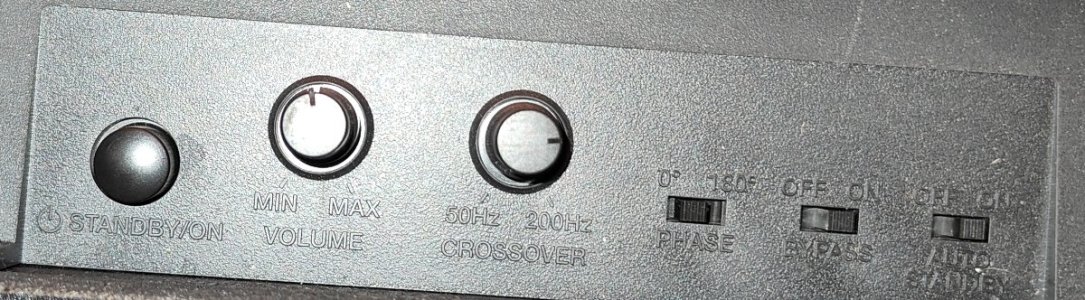
I have the picture of the physical configuration - same as the tests.
From the left
Power switch - was on during all the tests except the speaker only test
Volume control dial - kept around 50% just as a safe upper limit, I don't change the physical control but use WiiM for it.
Crossover dial 50-200, its dialed till 75%, so may be 120+, but the bypass switch setting as on would cause this to be ignored anyway as per the manual
Phase switch - 0 or 180. It's set at 0.
Bypass switch - on or off. Set as on,
Standby switch - on.
I will also attach a page of the manual just in case it shows/says something i may have not understood well enough.
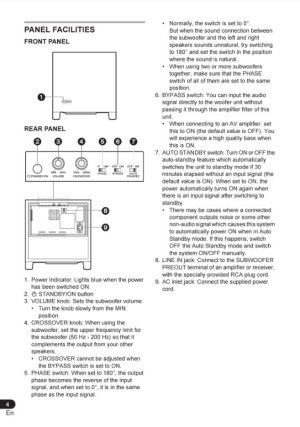
Nevertheless, I'll spend some time to try other delay values and follow steps based on the links shared.
Thank you all.
Last edited:
dominikz
Senior Contributor
- Joined
- Dec 31, 2024
- Messages
- 1,034
True, and thanks for pointing that out.One thing to keep in mind is that the "distance to a subwoofer" is often not that easy to determine. In particular with placement close to the front wall the acoustical center is certainly not the front of the sub, but somewhere between the sun and the wall.
If we need to be precise, then we need to somehow formally estimate the optimal delay (e.g. with REW, or with the soon-to-be-improved auto sync function in WHA).
However the 1ms per 1ft (actually 34cm) heuristic can still be useful to find a ballpark value for acoustic delay difference, and is probably much simpler to internalize for most people.
It is possible that your sub has a digital circuit introducing some fixed delay.The sub and speakers are pretty close in my case, physical distance doesn't justify more than 1ms difference. But wiim always measured 8ms as i repeated it. I had read about this, but It sounded alright to me and the app test also did well. So I left it as-is and attributed it to the delay in the electronics of sub crossover and phase correction circuit. But if it's more complex than physical distance then there may be a configuration issue.
But there might be other causes - including incorrect estimation by the WHA automatic Subwoofer & Speaker Sync function.
If your sub is out of phase with your speakers that could also cause incorrect delay estimation.
It depends, a few ms error in delay might not always be audible as a timing issue per se.If it's configured wrong, would I not hear it?
But it might cause new dips in the frequency response which in turn might be audible.
I think it is easiest if you just re-run RoomFit with delays set to 0ms and see if any of the dips improve. Personally I'd run RoomFit with sub phase set to 0° and all delays to 0ms, and then another attempt with sub phase set to 180° and all delays to 0ms.Any other tests I can do? Will it help if i upload a recording (as long as Phone recordings are good enough)?
From that you should see which phase setting is correct for your current placement (it is the one with less/smaller dips).
Then you can work on trying to estimate the optimal delay.
One way to do this is to increase the loudspeaker delay in WHA 1ms at a time, and re-run RoomFit after every change. Keep the smallest delay value with the least dips in the RoomFit individual channel responses.
Thanks, that makes it quite clear - I'd say you sub controls are set correctly.
I have the picture of the physical configuration - same as the tests.
From the left
Power switch - was on during all the tests except the speaker only test
Volume control dial - kept around 50% just as a safe upper limit, I don't change the physical control but use WiiM for it.
Crossover dial 50-200, its dialed till 75%, so may be 120+, but the bypass switch setting as on would cause this to be ignored anyway as per the manual
Phase switch - 0 or 180. It's set at 0.
Bypass switch - on or off. Set as on,
Standby switch - on.
I will also attach a page of the manual just in case it shows/says something i may have not understood well enough.
Nevertheless, I'll spend some time to try other delay values and follow steps based on the links shared.
Thank you all.
Last edited:
satheesht
New Member
I think it is easiest if you just re-run RoomFit with delays set to 0ms and see if any of the dips improve. Personally I'd run RoomFit with sub phase set to 0° and all delays to 0ms, and then another attempt with sub phase set to 180° and all delays to 0ms.
From that you should see which phase setting is correct for your current placement (it is the one with less/smaller dips).
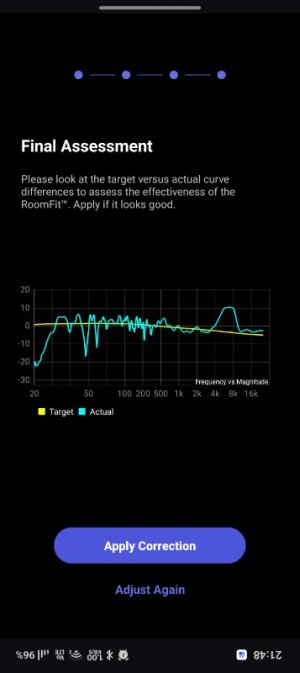
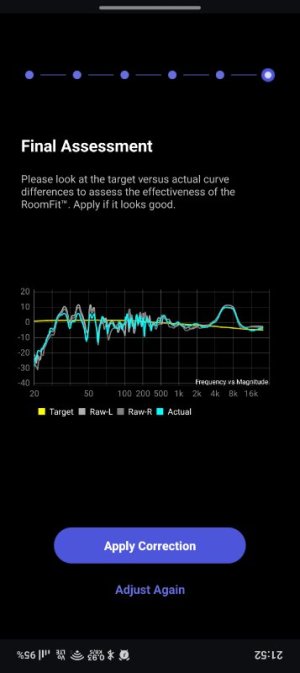
I tried this. Since there wasn't much time available, I couldn't use moving mic measurement (which needed 3+ mins per run), instead i used sweep. Hope that's not a problem for comparison.
For all tests, crossover was set at 70hz like the earlier runs and also no changes to speaker and sub placement, same as the first position. Screenshots captured from each run as below
Delay 8ms, phase 0
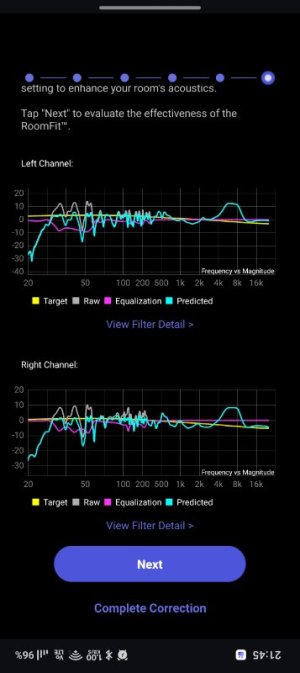
Delay 0ms, phase 0
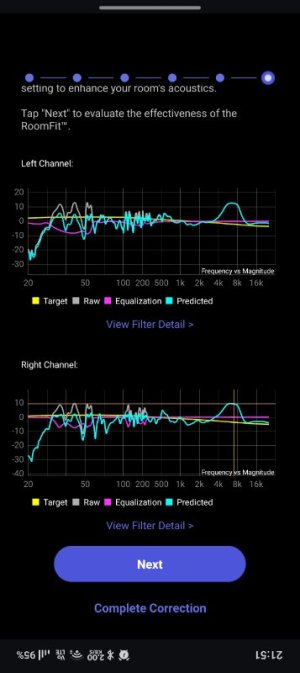
Delay 0ms, phase 180
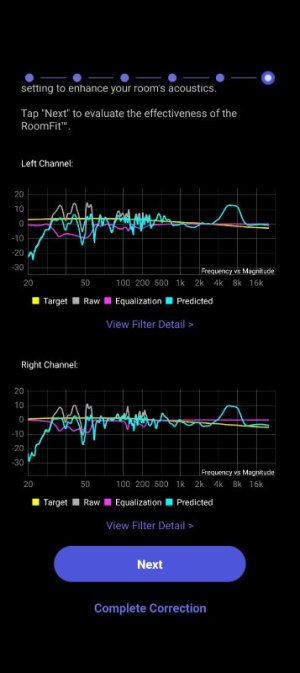
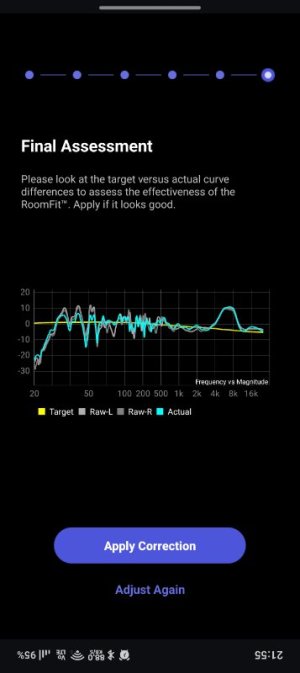
Delay 3ms, phase 0
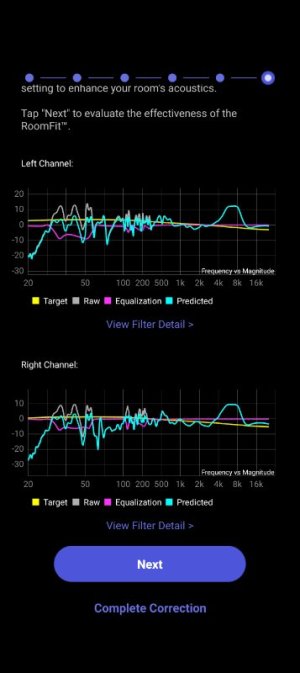
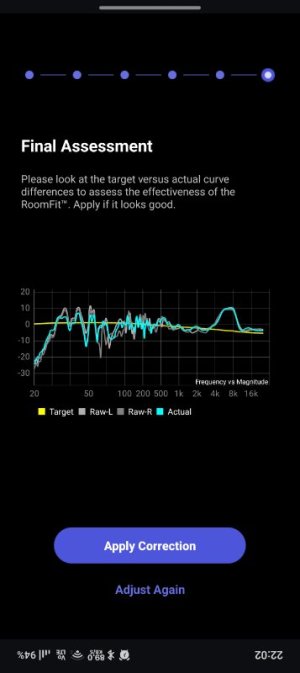
I feel the 8ms appears alright in the graph when compared to others
Then you can work on trying to estimate the optimal delay.
One way to do this is to increase the loudspeaker delay in WHA 1ms at a time, and re-run RoomFit after every change. Keep the smallest delay value with the least dips in the RoomFit individual channel responses.
I will try this whenever I get time.
Thanks.
dominikz
Senior Contributor
- Joined
- Dec 31, 2024
- Messages
- 1,034
Nice work @satheesht!
It is not a problem at all. While you're still looking for optimal settings it is definitely more efficient to use the single sweep, and you don't really lose any accuracy at low frequencies (have a look at this comparison).I tried this. Since there wasn't much time available, I couldn't use moving mic measurement (which needed 3+ mins per run), instead i used sweep. Hope that's not a problem for comparison.
There's a few comments I can make:Delay 8ms, phase 0


Delay 0ms, phase 0


Delay 0ms, phase 180


Delay 3ms, phase 0


I feel the 8ms appears alright in the graph when compared to others
- The 3ms delay / 0° phase attempt looks the worst out of all of these, so that one is definitely out.
- The 0ms delay / 180° phase and 8ms delay / 0° phase attempts actually look surprisingly similar to each other:
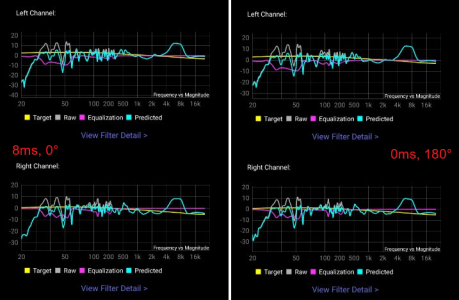
- In the 0ms delay / 0° phase attempt there is a ~70Hz dip in the right channel, but in the 0ms delay / 180° phase attempts a similar dip is visible in the left channel instead:
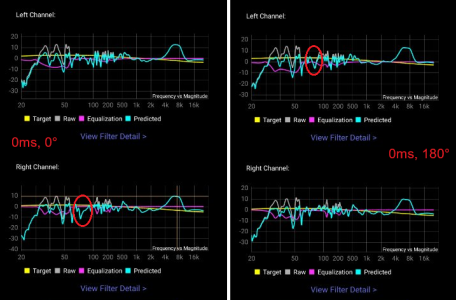
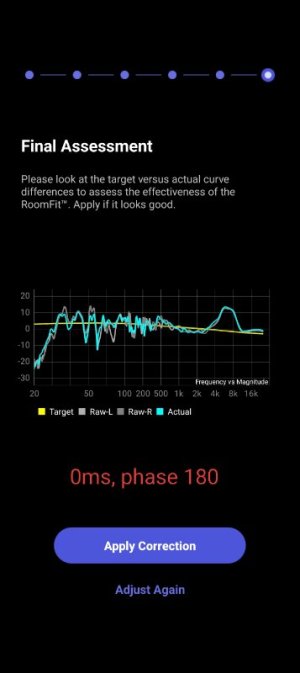
This would normally make me assume one of the channels is wired out of phase - but I don't see evidence of channels cancelling out in the Final Assessment screen (where L+R are measured together) so I guess it has to be caused something else.
satheesht
New Member
Next I'd suggest to try iterating through a few delay values (in 1ms increments) and re-run RoomFit every time to see if you can get some more energy around the crossover region.
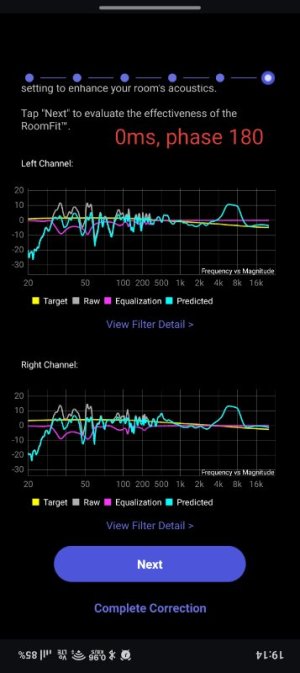
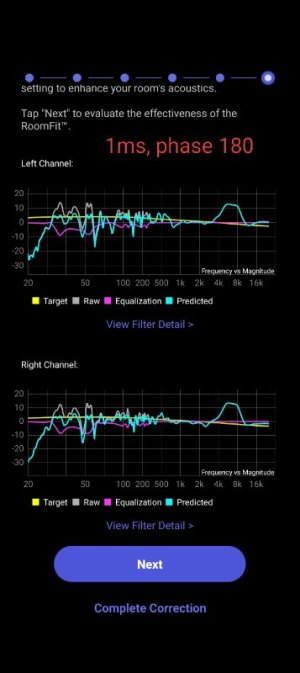
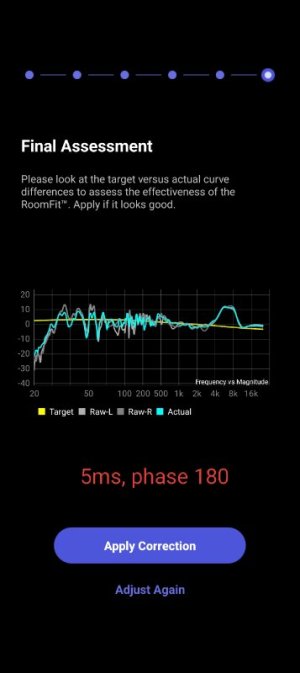
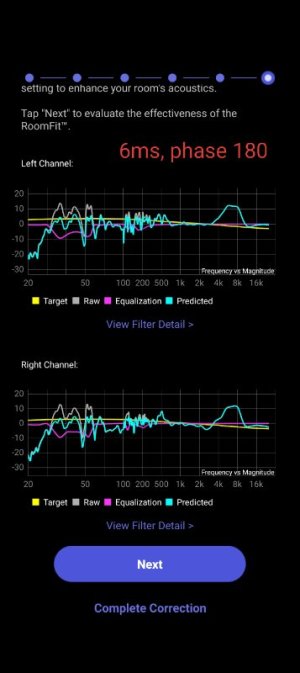
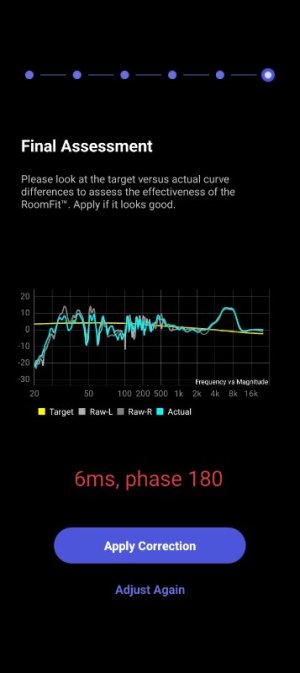
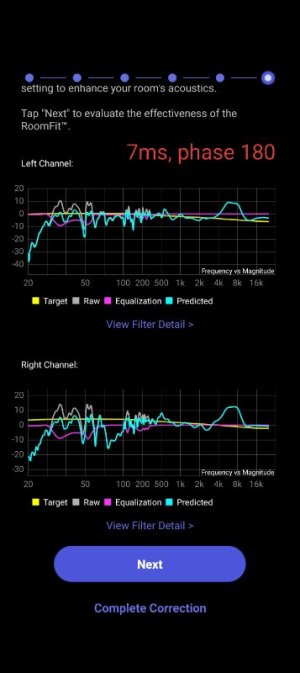
Please find the runs with phase 180 from delay of 0ms till 8ms attached. Thank you.
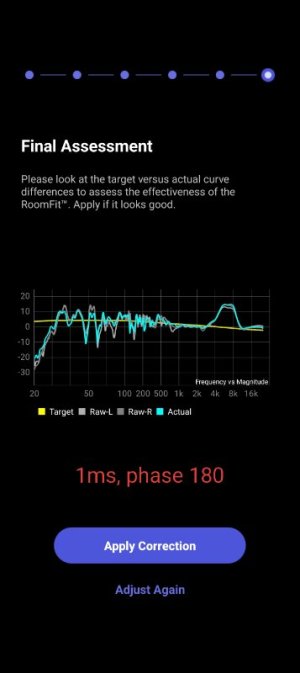
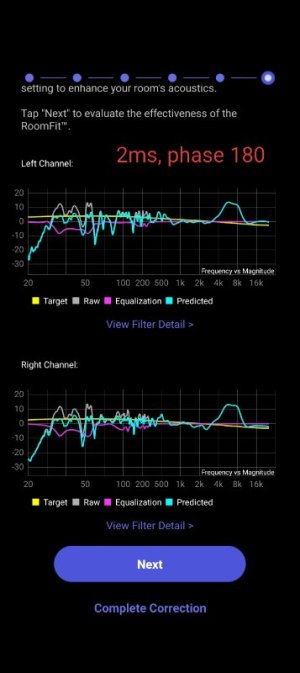
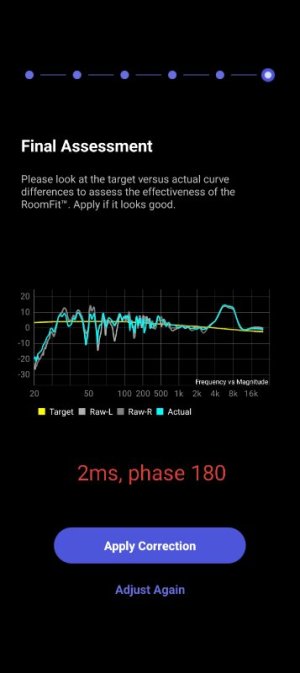
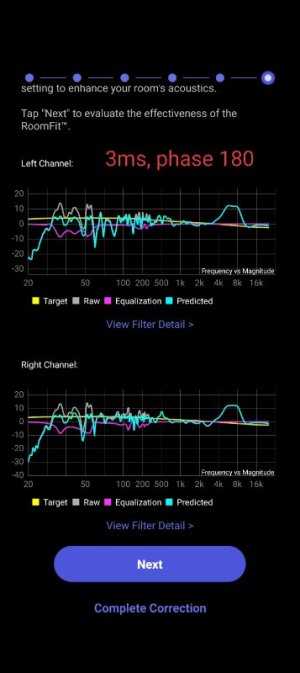
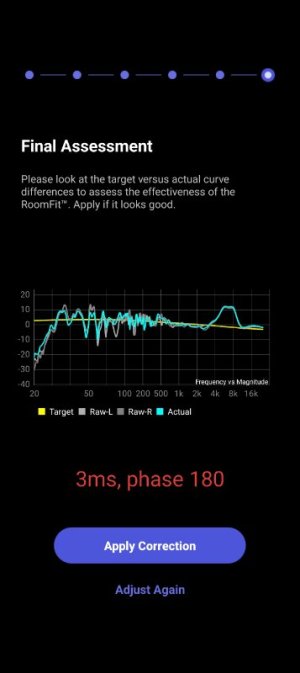
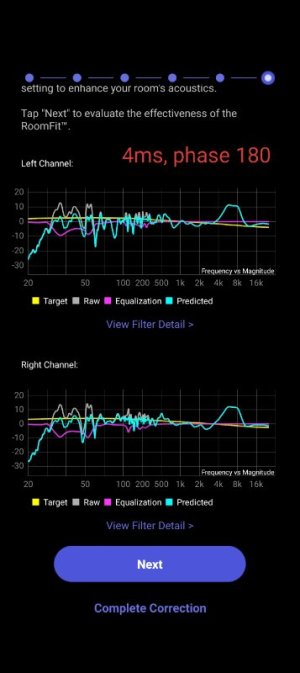
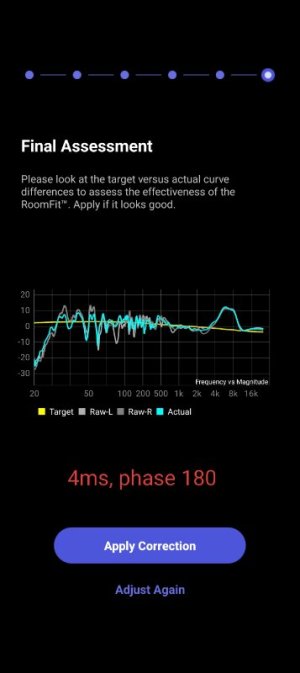
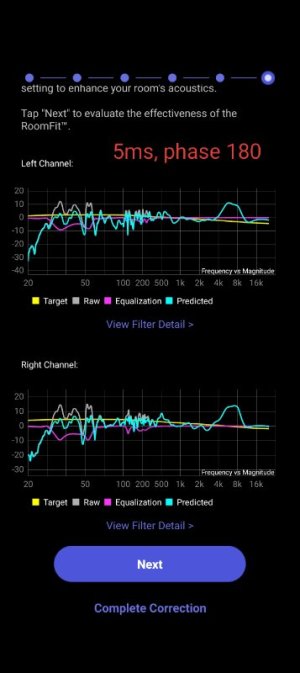
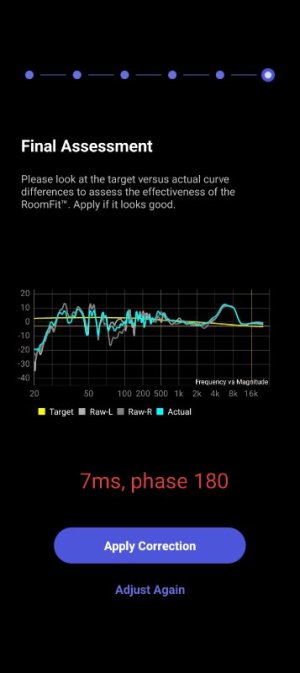
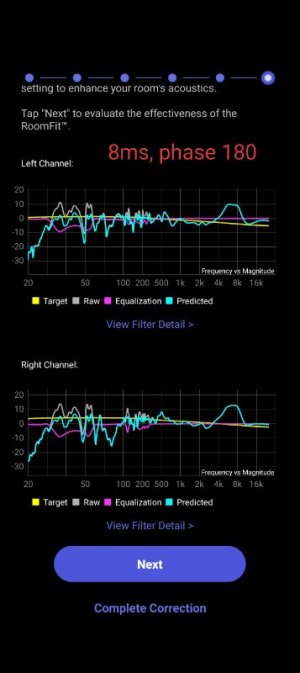
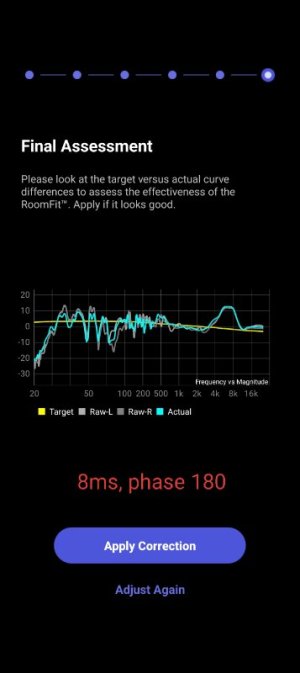
dominikz
Senior Contributor
- Joined
- Dec 31, 2024
- Messages
- 1,034
Wow, that's a lot of work!Please find the runs with phase 180 from delay of 0ms till 8ms attached. Thank you.
View attachment 33735View attachment 33736View attachment 33737View attachment 33738View attachment 33739View attachment 33740View attachment 33741View attachment 33742View attachment 33743View attachment 33744View attachment 33745View attachment 33746View attachment 33747View attachment 33748View attachment 33749View attachment 33750View attachment 33751View attachment 33752

Unfortunately none of the values seem to significantly improve the left channel response around 70Hz.
 So I'd personally just leave the delay at 0ms for now.
By the way, have you perhaps tried running the automatic speaker sub function with phase switch set to 180°? If so, I'm curious which value does it suggest?
Next thing that I'd try is the crossover at 50Hz. Given that your speakers play down to almost 40Hz in-room (and don't suffer from as many dips as your sub) perhaps this will help fill the dip around 50Hz.
Another thing you can try is to enable the "Main Speakers Output Bass" option in the Sub Out menu. Enabling that will cause both your speakers to play full-range (down to about 40Hz in your case). This will create an overlap region where you have three bass sources (i.e. both speakers and sub), which *might* help with some of the dips.
slartibartfast
Major Contributor
- Joined
- Apr 18, 2024
- Messages
- 6,195
His crossover is 70Hz so half a period at 70Hz is around 7ms. I was using 6ms delay with my crossover setting of 80Hz and found a phase of 180 was very similar. I don't think I could hear the difference but since the sub and speaker were at equal distance from the listening position I felt a phase of 180 felt more correctVery interesting!
The 0ms delay / 180° phase and 8ms delay / 0° phase attempts actually look surprisingly similar to each other:
I wonder: Do you hear a difference in the bass due to the 8ms?
satheesht
New Member
By the way, have you perhaps tried running the automatic speaker sub function with phase switch set to 180°? If so, I'm curious which value does it suggest?
I ran it and it gave 3ms, phase is 180, crossover 70
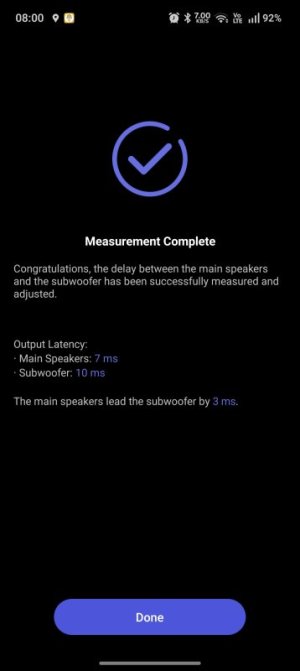
Next thing that I'd try is the crossover at 50Hz. Given that your speakers play down to almost 40Hz in-room (and don't suffer from as many dips as your sub) perhaps this will help fill the dip around 50Hz.
I will try these next. Let me know if the right sequence of steps to do roomfit after crossover changes are as below:
1. Change crossover value
2. Keep the phase as same (180)
3. Run sub sync (auto) to set the delay
4. Run roomfit
Last edited:
satheesht
New Member
I ran it and it gave 3ms, phase is 180, crossover 70
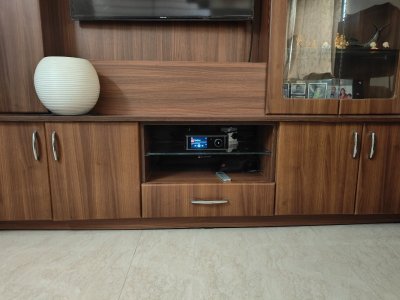
I also wonder if the speaker latency of 7ms is correct. My device is placed like below and speakers are on either side of the wooden unit so anything above 3ms should be processing latency?
Last edited:
Similar threads
- Replies
- 42
- Views
- 2K
- Replies
- 47
- Views
- 6K
- Replies
- 20
- Views
- 1K
